Workflow: Initial Tenant Setup Review
[Created: 24/09/2000 - Updated: 10/03/2022 ]
Description: Review of system level setup of a new Tenant
Help: This workflow reviews the system setup of a new tenant as performed by the automatic Initial Tenant Setup.You may want to check also the following Workflows:- Accounting Setup- Business Partner Setup- Product Setup- Price list Setup- Warehouse Setup- Tax Setup
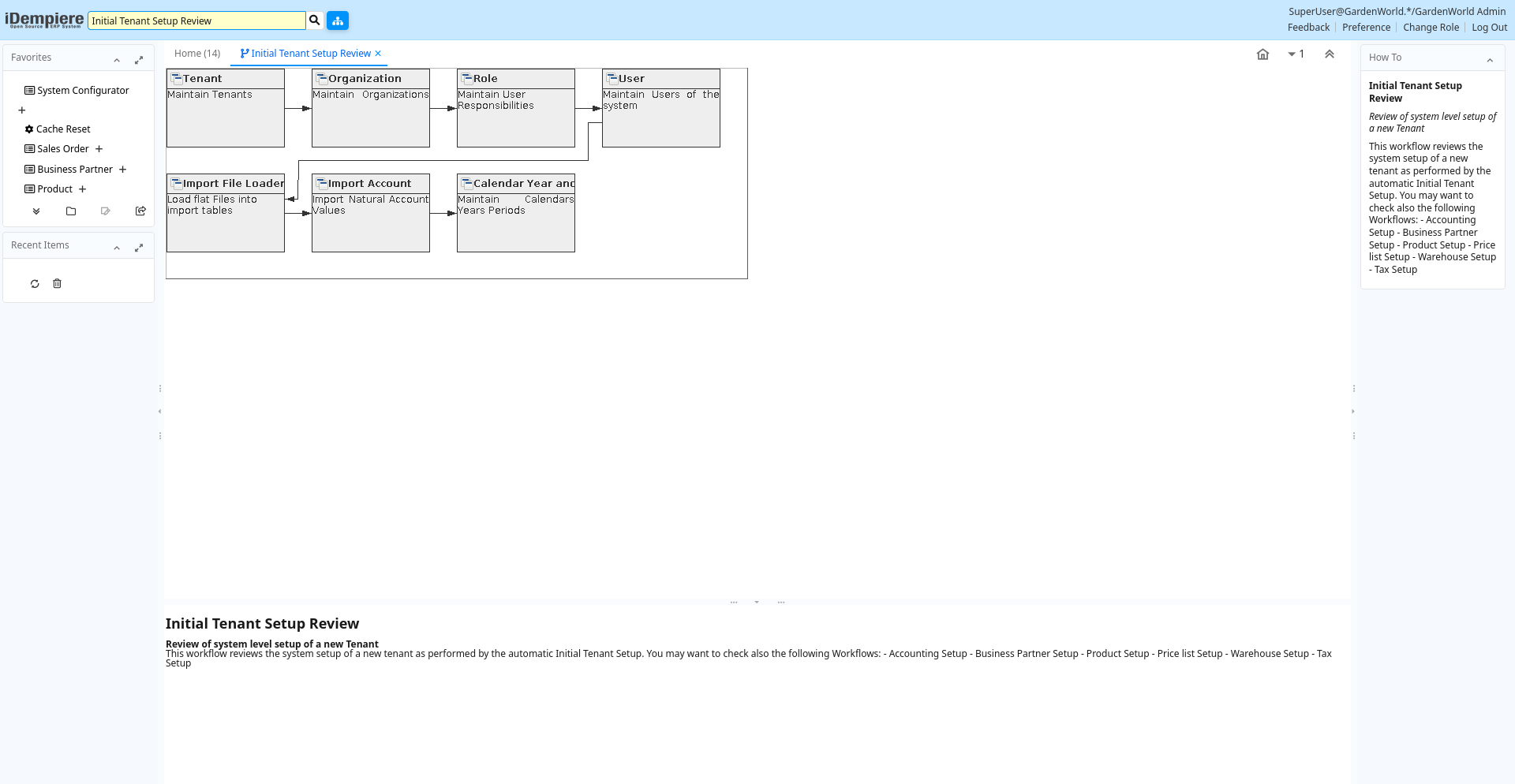
Table: Fields
| Name | Description | Help | Type | Zoom |
|---|---|---|---|---|
| Tenant | Maintain Tenants | The Tenant is the highest level of an independent business entity. Each Tenant will have one or more Organizations reporting to it. Each Tenant defines the accounting parameters (Accounting Schema, Tree definition, Non Monetary UOM's). To create new Tenants, run the Initial Tenant Setup with the System Administrator Role.Do not create a new tenant in this window, but use "Initial Tenant Setup" to set up the required security and access rules. If you create a new tenant here, you will not be able to view it and also the required tenant infrastructure would not have been set up. | User Window | Tenant |
| Organization | Maintain Organizations | The Organization Window allows you to define and maintain Organizational entities. An Organization is often a legal entity or sub-unit for which documents and transactions are processed | User Window | Organization |
| Role | Maintain User Responsibilities | The Role Window allows you to define the different roles that users of this system will have. Roles control access to windows, tasks, reports, etc. For a tenant an Administrator and User role are predefined. You may add additional roles to control access for specific functionality or data.You can add users to the role.Note that access information is cached and requires re-login or reset of cache. | User Window | Role |
| User | Maintain Users of the system | The User Window allows you to maintain User of the system. Users can log into the system and have access to functionality via one or more roles. A user can also be a business partner contact. | User Window | User |
| Import File Loader | Load flat Files into import tables | The Import File Loader parses the content of a flat file and loads it into import tables. Comments start with a '[' and end with a ']' and are ignored; example: [Some Heading]. | User Form | Import File Loader |
| Import Account | Import Natural Account Values | The Import Natural Account Window is an interim table which is used when importing external data into the system. Selecting the 'Process' button will either add or modify the appropriate records. | User Window | Import Account |
| Calendar Year and Period | Maintain Calendars Years Periods | The Calendar Year and Periods defines the calendars that will be used for period control and reporting. You can also define non-standard calendars (e.g. business year from July to June). | User Window | Calendar Year and Period |