Window: Accounting Schema
[Created: 11/06/1999 - Updated: 02/01/2000 ]
Description: Maintain Accounting Schema - For changes to become effective you must re-login
Help: The Accounting Schema Window defines an accounting method and the elements that will comprise an account structure. Create and activate elements for detailed accounting for Business Partners, Products, Locations, etc.Review and change the GL and Default accounts. The actual accounts used in transactions depend on the executing organization; Most of the information is derived from the context.
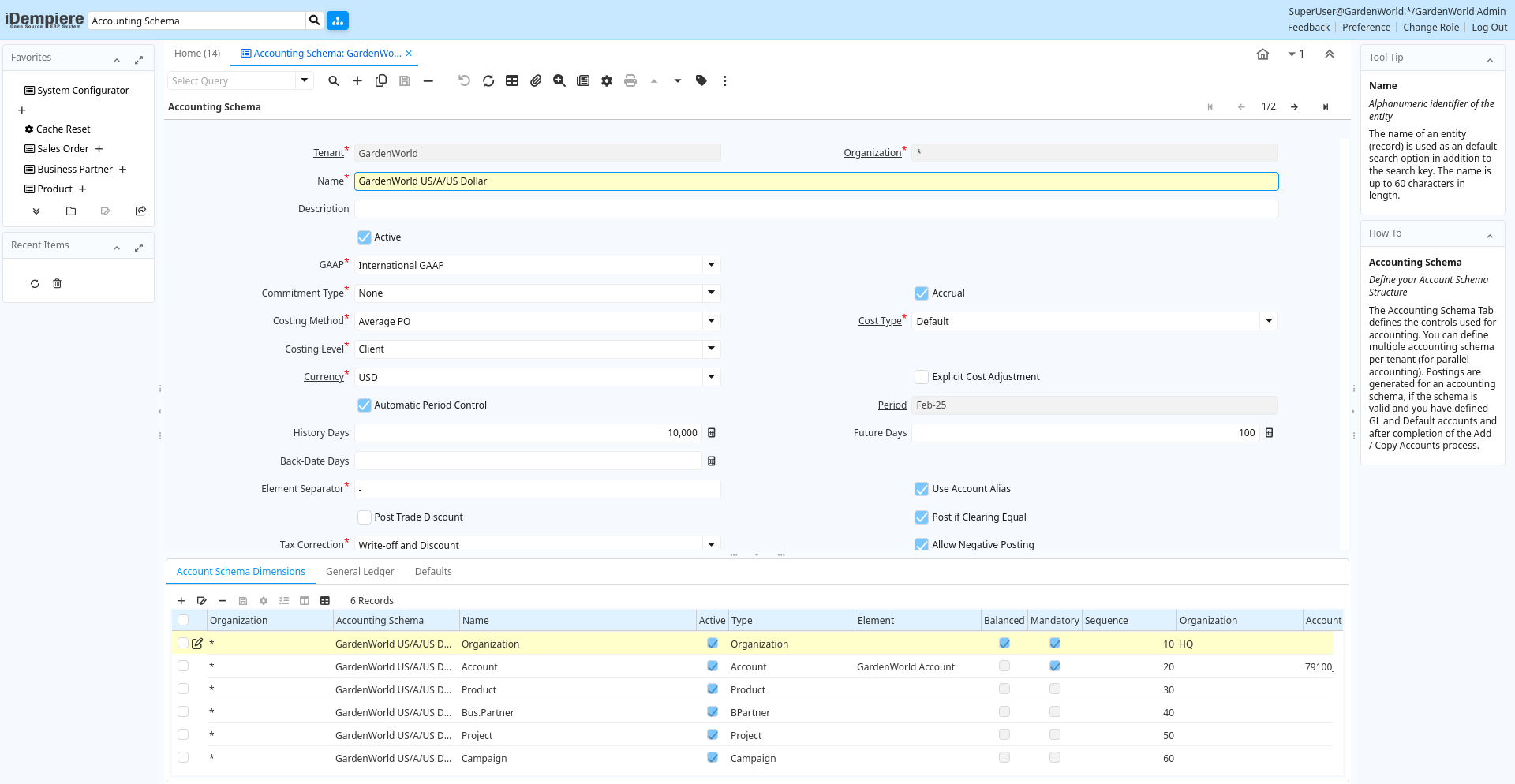
Tab: Accounting Schema
[Created: 23/09/1999 - Updated: 10/03/2022 ]
Description: Define your Account Schema Structure
Help: The Accounting Schema Tab defines the controls used for accounting. You can define multiple accounting schema per tenant (for parallel accounting). Postings are generated for an accounting schema, if the schema is valid and you have defined GL and Default accounts and after completion of the Add / Copy Accounts process.
Tab Level: 0
Table 10: Accounting Schema - Fields
Table: Report Parameters
| Name | Description | Help | Technical Info |
|---|---|---|---|
| Tenant | Tenant for this installation. | A Tenant is a company or a legal entity. You cannot share data between Tenants. | c_acctschema.AD_Client_ID numeric(10) Table Direct |
| Organization | Organizational entity within tenant | An organization is a unit of your tenant or legal entity - examples are store, department. You can share data between organizations. | c_acctschema.AD_Org_ID numeric(10) Table Direct |
| Name | Alphanumeric identifier of the entity | The name of an entity (record) is used as an default search option in addition to the search key. The name is up to 60 characters in length. | c_acctschema.Name character varying(60) String |
| Description | Optional short description of the record | A description is limited to 255 characters. | c_acctschema.Description character varying(255) String |
| Active | The record is active in the system | There are two methods of making records unavailable in the system: One is to delete the record, the other is to de-activate the record. A de-activated record is not available for selection, but available for reports.There are two reasons for de-activating and not deleting records:(1) The system requires the record for audit purposes.(2) The record is referenced by other records. E.g., you cannot delete a Business Partner, if there are invoices for this partner record existing. You de-activate the Business Partner and prevent that this record is used for future entries. | c_acctschema.IsActive character(1) Yes-No |
| GAAP | Generally Accepted Accounting Principles | The GAAP identifies the account principles that this accounting schema will adhere to. | c_acctschema.GAAP character(2) List |
| Commitment Type | Create Commitment and/or Reservations for Budget Control | The Posting Type Commitments is created when posting Purchase Orders; The Posting Type Reservation is created when posting Requisitions. This is used for budgetary control. | c_acctschema.CommitmentType character(1) List |
| Accrual | Indicates if Accrual or Cash Based accounting will be used | The Accrual checkbox indicates if this accounting schema will use accrual based account or cash based accounting. The Accrual method recognizes revenue when the product or service is delivered. Cash based method recognizes income when then payment is received. | c_acctschema.IsAccrual character(1) Yes-No |
| Costing Method | Indicates how Costs will be calculated | The Costing Method indicates how costs will be calculated (Standard, Average, Lifo, FiFo). The default costing method is defined on accounting schema level and can be optionally overwritten in the product category. The costing method cannot conflict with the Material Movement Policy (defined on Product Category). | c_acctschema.CostingMethod character(1) List |
| Cost Type | Type of Cost (e.g. Current, Plan, Future) | You can define multiple cost types. A cost type selected in an Accounting Schema is used for accounting. | c_acctschema.M_CostType_ID numeric(10) Table Direct |
| Costing Level | The lowest level to accumulate Costing Information | If you want to maintain different costs per organization (warehouse) or per Batch/Lot, you need to make sure that you define the costs for each of the organizations or batch/lot. The Costing Level is defined per Accounting Schema and can be overwritten by Product Category and Accounting Schema. | c_acctschema.CostingLevel character(1) List |
| Currency | The Currency for this record | Indicates the Currency to be used when processing or reporting on this record | c_acctschema.C_Currency_ID numeric(10) Table Direct |
| Explicit Cost Adjustment | Post the cost adjustment explicitly | If selected, landed costs are posted to the account in the line and then this posting is reversed by the postings to the cost adjustment accounts. If not selected, it is directly posted to the cost adjustment accounts. | c_acctschema.IsExplicitCostAdjustment character(1) Yes-No |
| Automatic Period Control | If selected, the periods are automatically opened and closed | In the Automatic Period Control, periods are opened and closed based on the current date. If the Manual alternative is activated, you have to open and close periods explicitly. | c_acctschema.AutoPeriodControl character(1) Yes-No |
| Period | Period of the Calendar | The Period indicates an exclusive range of dates for a calendar. | c_acctschema.C_Period_ID numeric(10) Table Direct |
| History Days | Number of days to be able to post in the past (based on system date) | If Automatic Period Control is enabled, the current period is calculated based on the system date and you can always post to all days in the current period. History Days enable to post to previous periods. E.g. today is May 15th and History Days is set to 30, you can post back to April 15th | c_acctschema.Period_OpenHistory numeric(10) Integer |
| Future Days | Number of days to be able to post to a future date (based on system date) | If Automatic Period Control is enabled, the current period is calculated based on the system date and you can always post to all days in the current period. Future Days enable to post to future periods. E.g. today is Apr 15th and Future Days is set to 30, you can post up to May 15th | c_acctschema.Period_OpenFuture numeric(10) Integer |
| Back-Date Days | Number of days to be able to post a back-date transaction (based on system date) | c_acctschema.BackDateDay numeric(10) Integer | |
| Element Separator | Element Separator | The Element Separator defines the delimiter printed between elements of the structure | c_acctschema.Separator character(1) String |
| Use Account Alias | Ability to select (partial) account combinations by an Alias | The Alias checkbox indicates that account combination can be selected using a user defined alias or short key. | c_acctschema.HasAlias character(1) Yes-No |
| Post Trade Discount | Generate postings for trade discounts | If the invoice is based on an item with a list price, the amount based on the list price and the discount is posted instead of the net amount.Example: Quantity 10 - List Price: 20 - Actual Price: 17If selected for a sales invoice 200 is posted to Product Revenue and 30 to Discount Granted - rather than 170 to Product Revenue.The same applies to vendor invoices. | c_acctschema.IsTradeDiscountPosted character(1) Yes-No |
| Post if Clearing Equal | This flag controls if Adempiere must post when clearing (transit) and final accounts are the same | c_acctschema.IsPostIfClearingEqual character(1) Yes-No | |
| Tax Correction | Type of Tax Correction | Determines if/when tax is corrected. Discount could be agreed or granted underpayments; Write-off may be partial or complete write-off. | c_acctschema.TaxCorrectionType character(1) List |
| Allow Negative Posting | Allow to post negative accounting values | c_acctschema.IsAllowNegativePosting character(1) Yes-No | |
| Only Organization | Create posting entries only for this organization | When you have multiple accounting schema, you may want to restrict the generation of postings entries for the additional accounting schema (i.e. not for the primary). Example: You have a US and a FR organization. The primary accounting schema is in USD, the second in EUR. If for the EUR accounting schema, you select the FR organizations, you would not create accounting entries for the transactions of the US organization in EUR. | c_acctschema.AD_OrgOnly_ID numeric(10) Table |
| Create GL/Default | Copy matching account element values from existing Accounting Schema | Create the GL and Default accounts for this accounting schema and copy matching account element values. | c_acctschema.Processing character(1) Button |
Tab: Account Schema Dimensions
[Created: 05/10/1999 - Updated: 24/02/2018 ]
Description: Define the dimensions of your Account Key
Help: The Account Schema Dimensions Tab defines the dimensions that comprise the account key. A name is defined which will display in documents. Also the order of the dimensions and if they are balanced and mandatory are indicated.
Tab Level: 1
Table 20: Account Schema Dimensions - Fields
Table: Report Parameters
| Name | Description | Help | Technical Info |
|---|---|---|---|
| Tenant | Tenant for this installation. | A Tenant is a company or a legal entity. You cannot share data between Tenants. | c_acctschema_element.AD_Client_ID numeric(10) Table Direct |
| Organization | Organizational entity within tenant | An organization is a unit of your tenant or legal entity - examples are store, department. You can share data between organizations. | c_acctschema_element.AD_Org_ID numeric(10) Table Direct |
| Accounting Schema | Rules for accounting | An Accounting Schema defines the rules used in accounting such as costing method, currency and calendar | c_acctschema_element.C_AcctSchema_ID numeric(10) Table Direct |
| Name | Alphanumeric identifier of the entity | The name of an entity (record) is used as an default search option in addition to the search key. The name is up to 60 characters in length. | c_acctschema_element.Name character varying(60) String |
| Active | The record is active in the system | There are two methods of making records unavailable in the system: One is to delete the record, the other is to de-activate the record. A de-activated record is not available for selection, but available for reports.There are two reasons for de-activating and not deleting records:(1) The system requires the record for audit purposes.(2) The record is referenced by other records. E.g., you cannot delete a Business Partner, if there are invoices for this partner record existing. You de-activate the Business Partner and prevent that this record is used for future entries. | c_acctschema_element.IsActive character(1) Yes-No |
| Type | Element Type (account or user defined) | The Element Type indicates if this element is the Account element or is a User Defined element. | c_acctschema_element.ElementType character(2) List |
| Element | Accounting Element | The Account Element uniquely identifies an Account Type. These are commonly known as a Chart of Accounts. | c_acctschema_element.C_Element_ID numeric(10) Table Direct |
| Balanced | c_acctschema_element.IsBalanced character(1) Yes-No | ||
| Mandatory | Data entry is required in this column | The field must have a value for the record to be saved to the database. | c_acctschema_element.IsMandatory character(1) Yes-No |
| Sequence | Method of ordering records; lowest number comes first | The Sequence indicates the order of records | c_acctschema_element.SeqNo numeric(10) Integer |
| Organization | Organizational entity within tenant | An organization is a unit of your tenant or legal entity - examples are store, department. | c_acctschema_element.Org_ID numeric(10) Table |
| Account Element | Account Element | Account Elements can be natural accounts or user defined values. | c_acctschema_element.C_ElementValue_ID numeric(10) Search |
| Product | Product, Service, Item | Identifies an item which is either purchased or sold in this organization. | c_acctschema_element.M_Product_ID numeric(10) Search |
| Business Partner | Identifies a Business Partner | A Business Partner is anyone with whom you transact. This can include Vendor, Customer, Employee or Salesperson | c_acctschema_element.C_BPartner_ID numeric(10) Search |
| Address | Location or Address | The Location / Address field defines the location of an entity. | c_acctschema_element.C_Location_ID numeric(10) Location (Address) |
| Sales Region | Sales coverage region | The Sales Region indicates a specific area of sales coverage. | c_acctschema_element.C_SalesRegion_ID numeric(10) Table Direct |
| Project | Financial Project | A Project allows you to track and control internal or external activities. | c_acctschema_element.C_Project_ID numeric(10) Search |
| Campaign | Marketing Campaign | The Campaign defines a unique marketing program. Projects can be associated with a pre defined Marketing Campaign. You can then report based on a specific Campaign. | c_acctschema_element.C_Campaign_ID numeric(10) Table Direct |
| Activity | Business Activity | Activities indicate tasks that are performed and used to utilize Activity based Costing | c_acctschema_element.C_Activity_ID numeric(10) Table Direct |
| Column | Column in the table | Link to the database column of the table | c_acctschema_element.AD_Column_ID numeric(10) Table Direct |
Tab: General Ledger
[Created: 23/09/1999 - Updated: 24/02/2018 ]
Description: Accounts for GL
Help: The General Ledger Tab defines error and balance handling to use as well as the necessary accounts for posting to General Ledger.
Tab Level: 1
Table 30: General Ledger - Fields
Table: Report Parameters
| Name | Description | Help | Technical Info |
|---|---|---|---|
| Tenant | Tenant for this installation. | A Tenant is a company or a legal entity. You cannot share data between Tenants. | c_acctschema_gl.AD_Client_ID numeric(10) Table Direct |
| Organization | Organizational entity within tenant | An organization is a unit of your tenant or legal entity - examples are store, department. You can share data between organizations. | c_acctschema_gl.AD_Org_ID numeric(10) Table Direct |
| Accounting Schema | Rules for accounting | An Accounting Schema defines the rules used in accounting such as costing method, currency and calendar | c_acctschema_gl.C_AcctSchema_ID numeric(10) Table Direct |
| Active | The record is active in the system | There are two methods of making records unavailable in the system: One is to delete the record, the other is to de-activate the record. A de-activated record is not available for selection, but available for reports.There are two reasons for de-activating and not deleting records:(1) The system requires the record for audit purposes.(2) The record is referenced by other records. E.g., you cannot delete a Business Partner, if there are invoices for this partner record existing. You de-activate the Business Partner and prevent that this record is used for future entries. | c_acctschema_gl.IsActive character(1) Yes-No |
| Use Suspense Balancing | c_acctschema_gl.UseSuspenseBalancing character(1) Yes-No | ||
| Suspense Balancing Acct | c_acctschema_gl.SuspenseBalancing_Acct numeric(10) Account | ||
| Use Currency Balancing | c_acctschema_gl.UseCurrencyBalancing character(1) Yes-No | ||
| Currency Balancing Acct | Account used when a currency is out of balance | The Currency Balancing Account indicates the account to used when a currency is out of balance (generally due to rounding) | c_acctschema_gl.CurrencyBalancing_Acct numeric(10) Account |
| Intercompany Due To Acct | Intercompany Due To / Payable Account | The Intercompany Due To Account indicates the account that represents money owed to other organizations. | c_acctschema_gl.IntercompanyDueTo_Acct numeric(10) Account |
| Intercompany Due From Acct | Intercompany Due From / Receivables Account | The Intercompany Due From account indicates the account that represents money owed to this organization from other organizations. | c_acctschema_gl.IntercompanyDueFrom_Acct numeric(10) Account |
| PPV Offset | Purchase Price Variance Offset Account | Offset account for standard costing purchase price variances. The counter account is Product PPV. | c_acctschema_gl.PPVOffset_Acct numeric(10) Account |
| Commitment Offset | Budgetary Commitment Offset Account | The Commitment Offset Account is used for posting Commitments and Reservations. It is usually an off-balance sheet and gain-and-loss account. | c_acctschema_gl.CommitmentOffset_Acct numeric(10) Account |
| Commitment Offset Sales | Budgetary Commitment Offset Account for Sales | The Commitment Offset Account is used for posting Commitments Sales and Reservations. It is usually an off-balance sheet and gain-and-loss account. | c_acctschema_gl.CommitmentOffsetSales_Acct numeric(10) Account |
Tab: Defaults
[Created: 19/12/1999 - Updated: 02/01/2000 ]
Description: Default Accounts
Help: The Defaults Tab displays the Default accounts for an Accounting Schema. These values will display when a new document is opened. The user can override these defaults within the document.
Tab Level: 1
Table 40: Defaults - Fields
Table: Report Parameters
| Name | Description | Help | Technical Info |
|---|---|---|---|
| Tenant | Tenant for this installation. | A Tenant is a company or a legal entity. You cannot share data between Tenants. | c_acctschema_default.AD_Client_ID numeric(10) Table Direct |
| Organization | Organizational entity within tenant | An organization is a unit of your tenant or legal entity - examples are store, department. You can share data between organizations. | c_acctschema_default.AD_Org_ID numeric(10) Table Direct |
| Accounting Schema | Rules for accounting | An Accounting Schema defines the rules used in accounting such as costing method, currency and calendar | c_acctschema_default.C_AcctSchema_ID numeric(10) Table Direct |
| Unrealized Gain Acct | Unrealized Gain Account for currency revaluation | The Unrealized Gain Account indicates the account to be used when recording gains achieved from currency revaluation that have yet to be realized. | c_acctschema_default.UnrealizedGain_Acct numeric(10) Account |
| Unrealized Loss Acct | Unrealized Loss Account for currency revaluation | The Unrealized Loss Account indicates the account to be used when recording losses incurred from currency revaluation that have yet to be realized. | c_acctschema_default.UnrealizedLoss_Acct numeric(10) Account |
| Realized Gain Acct | Realized Gain Account | The Realized Gain Account indicates the account to be used when recording gains achieved from currency revaluation that have been realized. | c_acctschema_default.RealizedGain_Acct numeric(10) Account |
| Realized Loss Acct | Realized Loss Account | The Realized Loss Account indicates the account to be used when recording losses incurred from currency revaluation that have yet to be realized. | c_acctschema_default.RealizedLoss_Acct numeric(10) Account |
| Not-invoiced Receipts | Account for not-invoiced Material Receipts | The Not Invoiced Receipts account indicates the account used for recording receipts for materials that have not yet been invoiced. | c_acctschema_default.NotInvoicedReceipts_Acct numeric(10) Account |
| Unearned Revenue | Account for unearned revenue | The Unearned Revenue indicates the account used for recording invoices sent for products or services not yet delivered. It is used in revenue recognition | c_acctschema_default.UnEarnedRevenue_Acct numeric(10) Account |
| Payment Discount Expense | Payment Discount Expense Account | Indicates the account to be charged for payment discount expenses. | c_acctschema_default.PayDiscount_Exp_Acct numeric(10) Account |
| Payment Discount Revenue | Payment Discount Revenue Account | Indicates the account to be charged for payment discount revenues. | c_acctschema_default.PayDiscount_Rev_Acct numeric(10) Account |
| Write-off | Account for Receivables write-off | The Write Off Account identifies the account to book write off transactions to. | c_acctschema_default.WriteOff_Acct numeric(10) Account |
| Customer Receivables | Account for Customer Receivables | The Customer Receivables Accounts indicates the account to be used for recording transaction for customers receivables. | c_acctschema_default.C_Receivable_Acct numeric(10) Account |
| Vendor Liability | Account for Vendor Liability | The Vendor Liability account indicates the account used for recording transactions for vendor liabilities | c_acctschema_default.V_Liability_Acct numeric(10) Account |
| Customer Prepayment | Account for customer prepayments | The Customer Prepayment account indicates the account to be used for recording prepayments from a customer. | c_acctschema_default.C_Prepayment_Acct numeric(10) Account |
| Vendor Prepayment | Account for Vendor Prepayments | The Vendor Prepayment Account indicates the account used to record prepayments from a vendor. | c_acctschema_default.V_Prepayment_Acct numeric(10) Account |
| Product Asset | Account for Product Asset (Inventory) | The Product Asset Account indicates the account used for valuing this a product in inventory. | c_acctschema_default.P_Asset_Acct numeric(10) Account |
| Product Expense | Account for Product Expense | The Product Expense Account indicates the account used to record expenses associated with this product. | c_acctschema_default.P_Expense_Acct numeric(10) Account |
| Cost Adjustment | Product Cost Adjustment Account | Account used for posting product cost adjustments (e.g. landed costs) | c_acctschema_default.P_CostAdjustment_Acct numeric(10) Account |
| Inventory Clearing | Product Inventory Clearing Account | Account used for posting matched product (item) expenses (e.g. AP Invoice, Invoice Match). You would use a different account then Product Expense, if you want to differentiate service related costs from item related costs. The balance on the clearing account should be zero and accounts for the timing difference between invoice receipt and matching. | c_acctschema_default.P_InventoryClearing_Acct numeric(10) Account |
| Product COGS | Account for Cost of Goods Sold | The Product COGS Account indicates the account used when recording costs associated with this product. | c_acctschema_default.P_COGS_Acct numeric(10) Account |
| Product Revenue | Account for Product Revenue (Sales Account) | The Product Revenue Account indicates the account used for recording sales revenue for this product. | c_acctschema_default.P_Revenue_Acct numeric(10) Account |
| Purchase Price Variance | Difference between Standard Cost and Purchase Price (PPV) | The Purchase Price Variance is used in Standard Costing. It reflects the difference between the Standard Cost and the Purchase Order Price. | c_acctschema_default.P_PurchasePriceVariance_Acct numeric(10) Account |
| Invoice Price Variance | Difference between Costs and Invoice Price (IPV) | The Invoice Price Variance is used reflects the difference between the current Costs and the Invoice Price. | c_acctschema_default.P_InvoicePriceVariance_Acct numeric(10) Account |
| Trade Discount Received | Trade Discount Receivable Account | The Trade Discount Receivables Account indicates the account for received trade discounts in vendor invoices | c_acctschema_default.P_TradeDiscountRec_Acct numeric(10) Account |
| Trade Discount Granted | Trade Discount Granted Account | The Trade Discount Granted Account indicates the account for granted trade discount in sales invoices | c_acctschema_default.P_TradeDiscountGrant_Acct numeric(10) Account |
| Rate Variance | The Rate Variance account is the account used Manufacturing Order | The Rate Variance is used in Standard Costing. It reflects the difference between the Standard Cost Rates and The Cost Rates of Manufacturing Order.If you change the Standard Rates then this variance is generate. | c_acctschema_default.P_RateVariance_Acct numeric(10) Account |
| Average Cost Variance | Average Cost Variance | The Average Cost Variance is used in weighted average costing to reflect differences when posting costs for negative inventory. | c_acctschema_default.P_AverageCostVariance_Acct numeric(10) Account |
| Landed Cost Clearing | Product Landed Cost Clearing Account | Account used for posting of estimated and actual landed cost amount. The balance on the clearing account should be zero and accounts for the timing difference between material receipt and landed cost invoice. | c_acctschema_default.P_LandedCostClearing_Acct numeric(10) Account |
| Warehouse Differences | Warehouse Differences Account | The Warehouse Differences Account indicates the account used recording differences identified during inventory counts. | c_acctschema_default.W_Differences_Acct numeric(10) Account |
| Bank Asset | Bank Asset Account | The Bank Asset Account identifies the account to be used for booking changes to the balance in this bank account | c_acctschema_default.B_Asset_Acct numeric(10) Account |
| Bank In Transit | Bank In Transit Account | The Bank in Transit Account identifies the account to be used for funds which are in transit. | c_acctschema_default.B_InTransit_Acct numeric(10) Account |
| Payment Selection | AP Payment Selection Clearing Account | c_acctschema_default.B_PaymentSelect_Acct numeric(10) Account | |
| Unallocated Cash | Unallocated Cash Clearing Account | Receipts not allocated to Invoices | c_acctschema_default.B_UnallocatedCash_Acct numeric(10) Account |
| Bank Interest Expense | Bank Interest Expense Account | The Bank Interest Expense Account identifies the account to be used for recording interest expenses. | c_acctschema_default.B_InterestExp_Acct numeric(10) Account |
| Bank Interest Revenue | Bank Interest Revenue Account | The Bank Interest Revenue Account identifies the account to be used for recording interest revenue from this Bank. | c_acctschema_default.B_InterestRev_Acct numeric(10) Account |
| Tax Due | Account for Tax you have to pay | The Tax Due Account indicates the account used to record taxes that you are liable to pay. | c_acctschema_default.T_Due_Acct numeric(10) Account |
| Tax Credit | Account for Tax you can reclaim | The Tax Credit Account indicates the account used to record taxes that can be reclaimed | c_acctschema_default.T_Credit_Acct numeric(10) Account |
| Tax Expense | Account for paid tax you cannot reclaim | The Tax Expense Account indicates the account used to record the taxes that have been paid that cannot be reclaimed. | c_acctschema_default.T_Expense_Acct numeric(10) Account |
| Charge Account | Charge Account | The Charge Account identifies the account to use when recording charges | c_acctschema_default.Ch_Expense_Acct numeric(10) Account |
| Project Asset | Project Asset Account | The Project Asset account is the account used as the final asset account in capital projects | c_acctschema_default.PJ_Asset_Acct numeric(10) Account |
| Work In Progress | Account for Work in Progress | The Work in Process account is the account used in capital projects until the project is completed | c_acctschema_default.PJ_WIP_Acct numeric(10) Account |
| Add or Copy Accounts | Add missing Accounts - or Copy&Overwrite Accounts (DANGEROUS!!) | Either add missing accounts - or copy and overwrite all default accounts. If you copy and overwrite the current default values, you may have to repeat previous updates (e.g. set the bank account asset accounts, ...). If no Accounting Schema is selected all Accounting Schemas will be updated / inserted. | c_acctschema_default.Processing character(1) Button |