Window: Tax Category
[Created: 09/08/1999 - Updated: 02/01/2000 ]
Description: Maintain Tax Categories
Help: The Tax Category Window is used to enter and maintain Tax Categories. Each product is associated with a tax category which facilitates reacting changing tax rates.
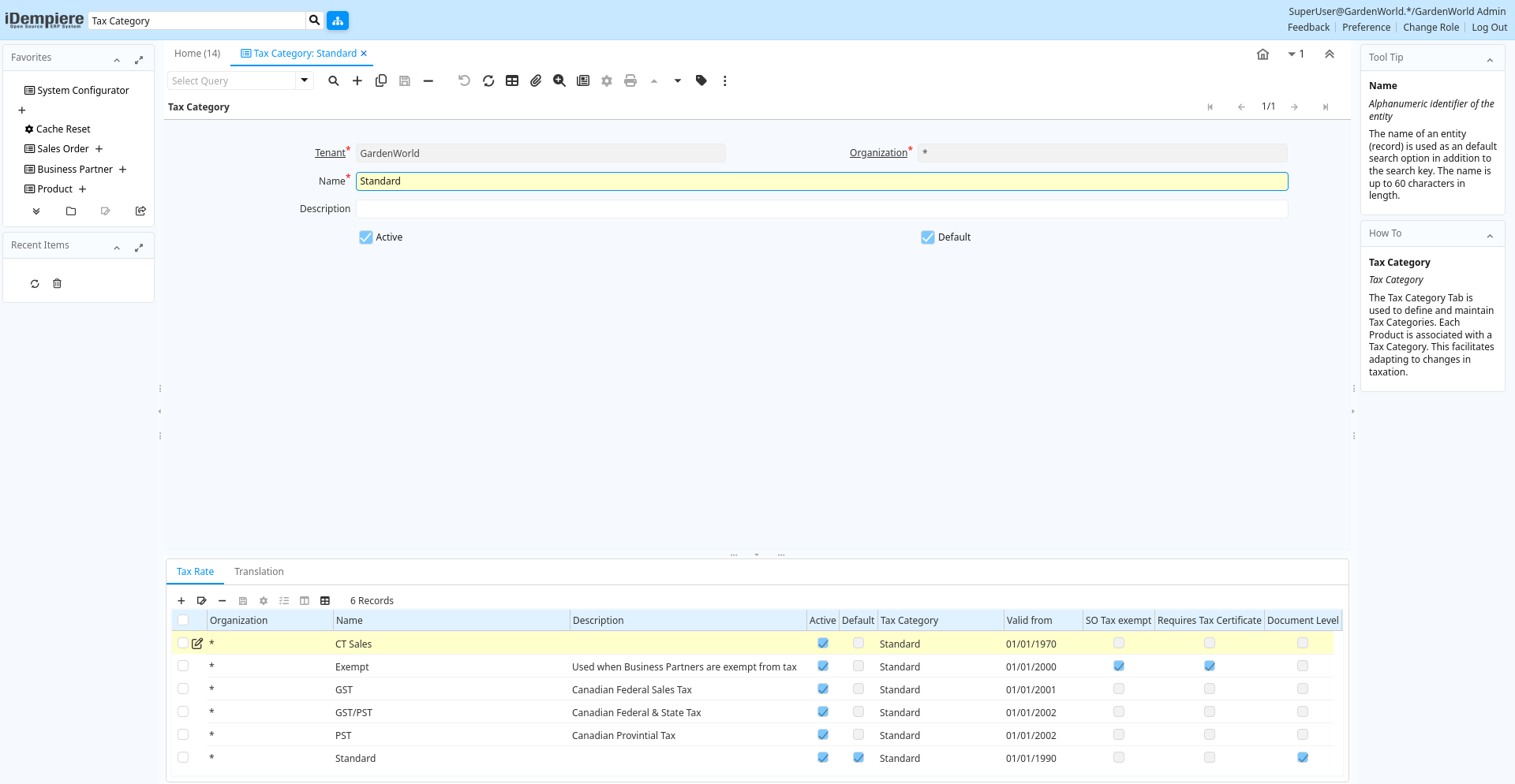
Tab: Tax Category
[Created: 09/08/1999 - Updated: 03/03/2008 ]
Description: Tax Category
Help: The Tax Category Tab is used to define and maintain Tax Categories. Each Product is associated with a Tax Category. This facilitates adapting to changes in taxation.
Tab Level: 0
Table 10: Tax Category - Fields
Table: Report Parameters
| Name | Description | Help | Technical Info |
|---|---|---|---|
| Tenant | Tenant for this installation. | A Tenant is a company or a legal entity. You cannot share data between Tenants. | c_taxcategory.AD_Client_ID numeric(10) Table Direct |
| Organization | Organizational entity within tenant | An organization is a unit of your tenant or legal entity - examples are store, department. You can share data between organizations. | c_taxcategory.AD_Org_ID numeric(10) Table Direct |
| Name | Alphanumeric identifier of the entity | The name of an entity (record) is used as an default search option in addition to the search key. The name is up to 60 characters in length. | c_taxcategory.Name character varying(60) String |
| Description | Optional short description of the record | A description is limited to 255 characters. | c_taxcategory.Description character varying(255) String |
| Active | The record is active in the system | There are two methods of making records unavailable in the system: One is to delete the record, the other is to de-activate the record. A de-activated record is not available for selection, but available for reports.There are two reasons for de-activating and not deleting records:(1) The system requires the record for audit purposes.(2) The record is referenced by other records. E.g., you cannot delete a Business Partner, if there are invoices for this partner record existing. You de-activate the Business Partner and prevent that this record is used for future entries. | c_taxcategory.IsActive character(1) Yes-No |
| Default | Default value | The Default Checkbox indicates if this record will be used as a default value. | c_taxcategory.IsDefault character(1) Yes-No |
Tab: Tax Rate
[Created: 18/10/2023 - Updated: 18/10/2023 ]
Description:
Help:
Tab Level: 1
Table 15: Tax Rate - Fields
Table: Report Parameters
| Name | Description | Help | Technical Info |
|---|---|---|---|
| Tenant | Tenant for this installation. | A Tenant is a company or a legal entity. You cannot share data between Tenants. | c_tax.AD_Client_ID numeric(10) Table Direct |
| Organization | Organizational entity within tenant | An organization is a unit of your tenant or legal entity - examples are store, department. You can share data between organizations. | c_tax.AD_Org_ID numeric(10) Table Direct |
| Name | Alphanumeric identifier of the entity | The name of an entity (record) is used as an default search option in addition to the search key. The name is up to 60 characters in length. | c_tax.Name character varying(60) String |
| Description | Optional short description of the record | A description is limited to 255 characters. | c_tax.Description character varying(255) String |
| Active | The record is active in the system | There are two methods of making records unavailable in the system: One is to delete the record, the other is to de-activate the record. A de-activated record is not available for selection, but available for reports.There are two reasons for de-activating and not deleting records:(1) The system requires the record for audit purposes.(2) The record is referenced by other records. E.g., you cannot delete a Business Partner, if there are invoices for this partner record existing. You de-activate the Business Partner and prevent that this record is used for future entries. | c_tax.IsActive character(1) Yes-No |
| Default | Default value | The Default Checkbox indicates if this record will be used as a default value. | c_tax.IsDefault character(1) Yes-No |
| Tax Category | Tax Category | The Tax Category provides a method of grouping similar taxes. For example, Sales Tax or Value Added Tax. | c_tax.C_TaxCategory_ID numeric(10) Table Direct |
| Valid from | Valid from including this date (first day) | The Valid From date indicates the first day of a date range | c_tax.ValidFrom timestamp without time zone Date |
| SO Tax exempt | Business partner is exempt from tax on sales | If a business partner is exempt from tax on sales, the exempt tax rate is used. For this, you need to set up a tax rate with a 0% rate and indicate that this is your tax exempt rate. This is required for tax reporting, so that you can track tax exempt transactions. | c_tax.IsTaxExempt character(1) Yes-No |
| Requires Tax Certificate | This tax rate requires the Business Partner to be tax exempt | The Requires Tax Certificate indicates that a tax certificate is required for a Business Partner to be tax exempt. | c_tax.RequiresTaxCertificate character(1) Yes-No |
| Document Level | Tax is calculated on document level (rather than line by line) | If the tax is calculated on document level, all lines with that tax rate are added before calculating the total tax for the document.Otherwise the tax is calculated per line and then added.Due to rounding, the tax amount can differ. | c_tax.IsDocumentLevel character(1) Yes-No |
| Sales Tax | This is a sales tax (i.e. not a value added tax) | If selected AP tax is handled as expense, otherwise it is handled as a VAT credit. | c_tax.IsSalesTax character(1) Yes-No |
| Summary Level | This is a summary entity | A summary entity represents a branch in a tree rather than an end-node. Summary entities are used for reporting and do not have own values. | c_tax.IsSummary character(1) Yes-No |
| Parent Tax | Parent Tax indicates a tax that is made up of multiple taxes | The Parent Tax indicates a tax that is a reference for multiple taxes. This allows you to charge multiple taxes on a document by entering the Parent Tax | c_tax.Parent_Tax_ID numeric(10) Table |
| SO/PO Type | Sales Tax applies to sales situations, Purchase Tax to purchase situations | Sales Tax: charged when selling - examples: Sales Tax, Output VAT (payable)Purchase Tax: tax charged when purchasing - examples: Use Tax, Input VAT (receivable) | c_tax.SOPOType character(1) List |
| Tax Indicator | Short form for Tax to be printed on documents | The Tax Indicator identifies the short name that will print on documents referencing this tax. | c_tax.TaxIndicator character varying(10) String |
| Rate | Rate or Tax or Exchange | The Rate indicates the percentage to be multiplied by the source to arrive at the tax or exchange amount. | c_tax.Rate numeric Number |
| Posting Indicator | Type of input tax (deductible and non deductible) | Separate Tax Posting: Tax is calculated on the full amount of the item and posted separately.Distribute Tax with Relevant Expense: Tax amount is added to the item amount during account posting time and for updating of Product Cost. | c_tax.TaxPostingIndicator character(1) List |
| Country Group | c_tax.C_CountryGroupFrom_ID numeric(10) Table | ||
| To | c_tax.C_CountryGroupTo_ID numeric(10) Table | ||
| Country | Country | The Country defines a Country. Each Country must be defined before it can be used in any document. | c_tax.C_Country_ID numeric(10) Table |
| To | Receiving Country | The To Country indicates the receiving country on a document | c_tax.To_Country_ID numeric(10) Table |
| Region | Identifies a geographical Region | The Region identifies a unique Region for this Country. | c_tax.C_Region_ID numeric(10) Table |
| To | Receiving Region | The To Region indicates the receiving region on a document | c_tax.To_Region_ID numeric(10) Table |
| Tax Provider | c_tax.C_TaxProvider_ID numeric(10) Table Direct |
Tab: Translation
[Created: 19/03/2000 - Updated: 27/10/2024 ]
Description:
Help:
Tab Level: 1
Table 20: Translation - Fields
Table: Report Parameters
| Name | Description | Help | Technical Info |
|---|---|---|---|
| Tenant | Tenant for this installation. | A Tenant is a company or a legal entity. You cannot share data between Tenants. | c_taxcategory_trl.AD_Client_ID numeric(10) Table Direct |
| Organization | Organizational entity within tenant | An organization is a unit of your tenant or legal entity - examples are store, department. You can share data between organizations. | c_taxcategory_trl.AD_Org_ID numeric(10) Table Direct |
| Tax Category | Tax Category | The Tax Category provides a method of grouping similar taxes. For example, Sales Tax or Value Added Tax. | c_taxcategory_trl.C_TaxCategory_ID numeric(10) Table Direct |
| Language | Language for this entity | The Language identifies the language to use for display and formatting | c_taxcategory_trl.AD_Language character varying(6) Table |
| Active | The record is active in the system | There are two methods of making records unavailable in the system: One is to delete the record, the other is to de-activate the record. A de-activated record is not available for selection, but available for reports.There are two reasons for de-activating and not deleting records:(1) The system requires the record for audit purposes.(2) The record is referenced by other records. E.g., you cannot delete a Business Partner, if there are invoices for this partner record existing. You de-activate the Business Partner and prevent that this record is used for future entries. | c_taxcategory_trl.IsActive character(1) Yes-No |
| Translated | This column is translated | The Translated checkbox indicates if this column is translated. | c_taxcategory_trl.IsTranslated character(1) Yes-No |
| Name | Alphanumeric identifier of the entity | The name of an entity (record) is used as an default search option in addition to the search key. The name is up to 60 characters in length. | c_taxcategory_trl.Name character varying(60) String |
| Description | Optional short description of the record | A description is limited to 255 characters. | c_taxcategory_trl.Description character varying(255) String |