Window: Alert
[Created: 07/06/2003 - Updated: 02/01/2000 ]
Description: iDempiere Alert
Help: iDempiere Alerts allow you define system conditions you want to be alerted of
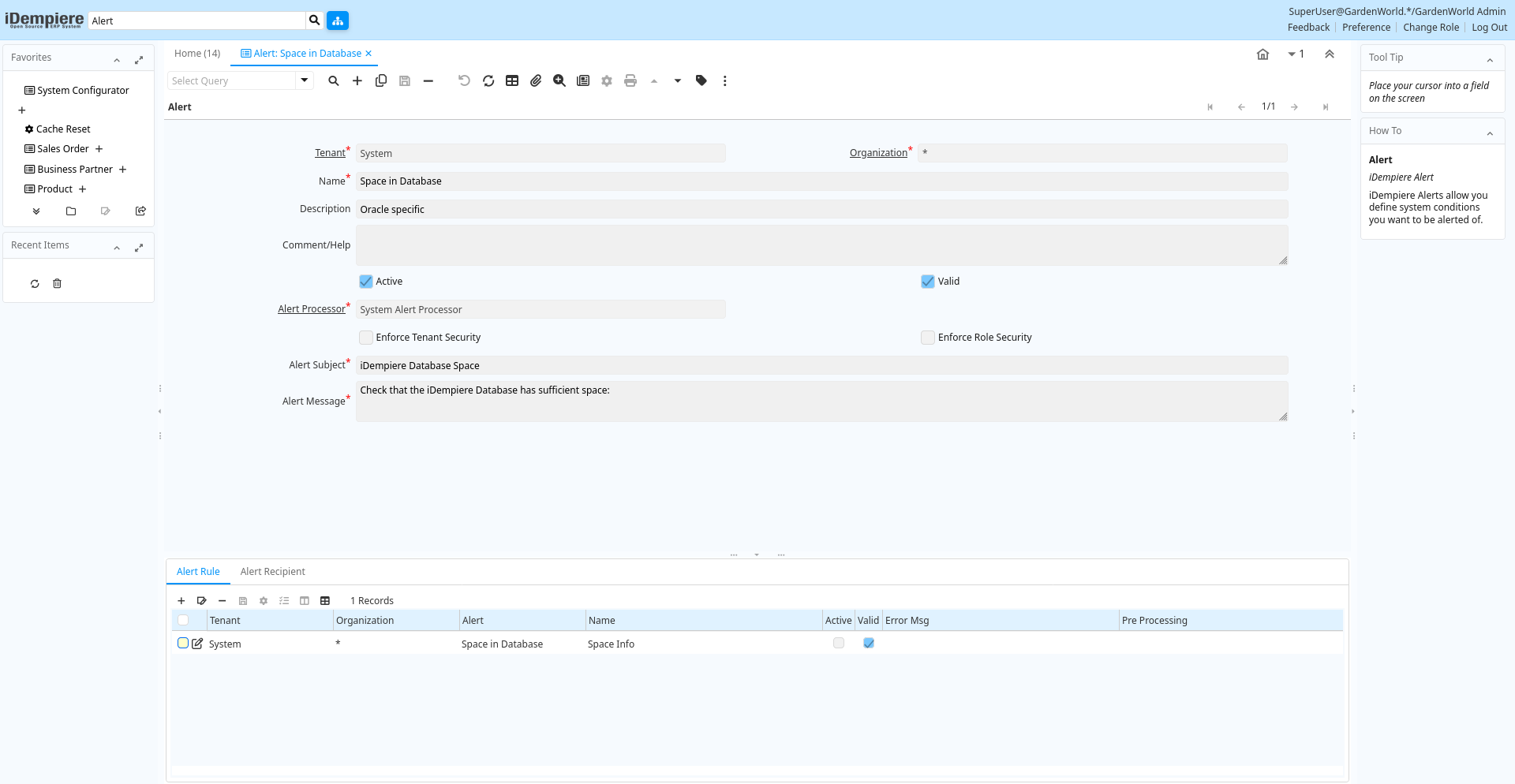
Tab: Alert
[Created: 07/06/2003 - Updated: 02/01/2000 ]
Description: iDempiere Alert
Help: iDempiere Alerts allow you define system conditions you want to be alerted of.
Tab Level: 0
Table 10: Alert - Fields
Table: Report Parameters
| Name | Description | Help | Technical Info |
|---|---|---|---|
| Tenant | Tenant for this installation. | A Tenant is a company or a legal entity. You cannot share data between Tenants. | ad_alert.AD_Client_ID numeric(10) Table Direct |
| Organization | Organizational entity within tenant | An organization is a unit of your tenant or legal entity - examples are store, department. You can share data between organizations. | ad_alert.AD_Org_ID numeric(10) Table Direct |
| Name | Alphanumeric identifier of the entity | The name of an entity (record) is used as an default search option in addition to the search key. The name is up to 60 characters in length. | ad_alert.Name character varying(60) String |
| Description | Optional short description of the record | A description is limited to 255 characters. | ad_alert.Description character varying(255) String |
| Comment/Help | Comment or Hint | The Help field contains a hint, comment or help about the use of this item. | ad_alert.Help character varying(2000) Text |
| Active | The record is active in the system | There are two methods of making records unavailable in the system: One is to delete the record, the other is to de-activate the record. A de-activated record is not available for selection, but available for reports.There are two reasons for de-activating and not deleting records:(1) The system requires the record for audit purposes.(2) The record is referenced by other records. E.g., you cannot delete a Business Partner, if there are invoices for this partner record existing. You de-activate the Business Partner and prevent that this record is used for future entries. | ad_alert.IsActive character(1) Yes-No |
| Valid | Element is valid | The element passed the validation check | ad_alert.IsValid character(1) Yes-No |
| Alert Processor | Alert Processor/Server Parameter | Alert Processor/Server Parameter | ad_alert.AD_AlertProcessor_ID numeric(10) Table Direct |
| Enforce Tenant Security | Send alerts to recipient only if the tenant security rules of the role allows | ad_alert.EnforceClientSecurity character(1) Yes-No | |
| Enforce Role Security | Send alerts to recipient only if the data security rules of the role allows | ad_alert.EnforceRoleSecurity character(1) Yes-No | |
| Alert Subject | Subject of the Alert | The subject of the email message sent for the alert | ad_alert.AlertSubject character varying(255) String |
| Alert Message | Message of the Alert | The message of the email sent for the alert | ad_alert.AlertMessage character varying(2000) Text |
Tab: Alert Rule
[Created: 07/06/2003 - Updated: 06/08/2013 ]
Description: Definition of the alert element
Help: The definition of the altert or action
Tab Level: 1
Table 20: Alert Rule - Fields
Table: Report Parameters
| Name | Description | Help | Technical Info |
|---|---|---|---|
| Tenant | Tenant for this installation. | A Tenant is a company or a legal entity. You cannot share data between Tenants. | ad_alertrule.AD_Client_ID numeric(10) Table Direct |
| Organization | Organizational entity within tenant | An organization is a unit of your tenant or legal entity - examples are store, department. You can share data between organizations. | ad_alertrule.AD_Org_ID numeric(10) Table Direct |
| Alert | iDempiere Alert | iDempiere Alerts allow you define system conditions you want to be alerted of | ad_alertrule.AD_Alert_ID numeric(10) Table Direct |
| Name | Alphanumeric identifier of the entity | The name of an entity (record) is used as an default search option in addition to the search key. The name is up to 60 characters in length. | ad_alertrule.Name character varying(60) String |
| Active | The record is active in the system | There are two methods of making records unavailable in the system: One is to delete the record, the other is to de-activate the record. A de-activated record is not available for selection, but available for reports.There are two reasons for de-activating and not deleting records:(1) The system requires the record for audit purposes.(2) The record is referenced by other records. E.g., you cannot delete a Business Partner, if there are invoices for this partner record existing. You de-activate the Business Partner and prevent that this record is used for future entries. | ad_alertrule.IsActive character(1) Yes-No |
| Valid | Element is valid | The element passed the validation check | ad_alertrule.IsValid character(1) Yes-No |
| Error Msg | ad_alertrule.ErrorMsg character varying(2000) Text | ||
| Pre Processing | Process SQL before executing the query | Could be Update/Delete/etc. statement | ad_alertrule.PreProcessing character varying(2000) Text |
| Sql SELECT | SQL SELECT clause | The Select Clause indicates the SQL SELECT clause to use for selecting the record for a measure calculation. Do not include the SELECT itself. | ad_alertrule.SelectClause character varying(2000) Text |
| Table | Database Table information | The Database Table provides the information of the table definition | ad_alertrule.AD_Table_ID numeric(10) Table Direct |
| Sql FROM | SQL FROM clause | The Select Clause indicates the SQL FROM clause to use for selecting the record for a measure calculation. It can have JOIN clauses. Do not include the FROM itself. | ad_alertrule.FromClause character varying(2000) Text |
| Sql WHERE | Fully qualified SQL WHERE clause | The Where Clause indicates the SQL WHERE clause to use for record selection. The WHERE clause is added to the query. Fully qualified means "tablename.columnname". | ad_alertrule.WhereClause character varying(2000) Text |
| Other SQL Clause | Other SQL Clause | Any other complete clause like GROUP BY, HAVING, ORDER BY, etc. after WHERE clause. | ad_alertrule.OtherClause character varying(2000) Text |
| Post Processing | Process SQL after executing the query | Could be Update/Delete/etc. statement | ad_alertrule.PostProcessing character varying(2000) Text |
Tab: Alert Recipient
[Created: 07/06/2003 - Updated: 02/01/2000 ]
Description: Recipient of the Alert Notification
Help: You can send the notifications to users or roles
Tab Level: 1
Table 30: Alert Recipient - Fields
Table: Report Parameters
| Name | Description | Help | Technical Info |
|---|---|---|---|
| Tenant | Tenant for this installation. | A Tenant is a company or a legal entity. You cannot share data between Tenants. | ad_alertrecipient.AD_Client_ID numeric(10) Table Direct |
| Organization | Organizational entity within tenant | An organization is a unit of your tenant or legal entity - examples are store, department. You can share data between organizations. | ad_alertrecipient.AD_Org_ID numeric(10) Table Direct |
| Alert | iDempiere Alert | iDempiere Alerts allow you define system conditions you want to be alerted of | ad_alertrecipient.AD_Alert_ID numeric(10) Table Direct |
| Active | The record is active in the system | There are two methods of making records unavailable in the system: One is to delete the record, the other is to de-activate the record. A de-activated record is not available for selection, but available for reports.There are two reasons for de-activating and not deleting records:(1) The system requires the record for audit purposes.(2) The record is referenced by other records. E.g., you cannot delete a Business Partner, if there are invoices for this partner record existing. You de-activate the Business Partner and prevent that this record is used for future entries. | ad_alertrecipient.IsActive character(1) Yes-No |
| User/Contact | User within the system - Internal or Business Partner Contact | The User identifies a unique user in the system. This could be an internal user or a business partner contact | ad_alertrecipient.AD_User_ID numeric(10) Search |
| Role | Responsibility Role | The Role determines security and access a user who has this Role will have in the System. | ad_alertrecipient.AD_Role_ID numeric(10) Table Direct |