Window: Print Table Format
[Created: 24/08/2002 - Updated: 02/01/2000 ]
Description: Define Report Table Format
Help: The Print Table Format lets you define how table header, etc. is printed. Please note that the Report Table FOrmat is cached to improve performance.
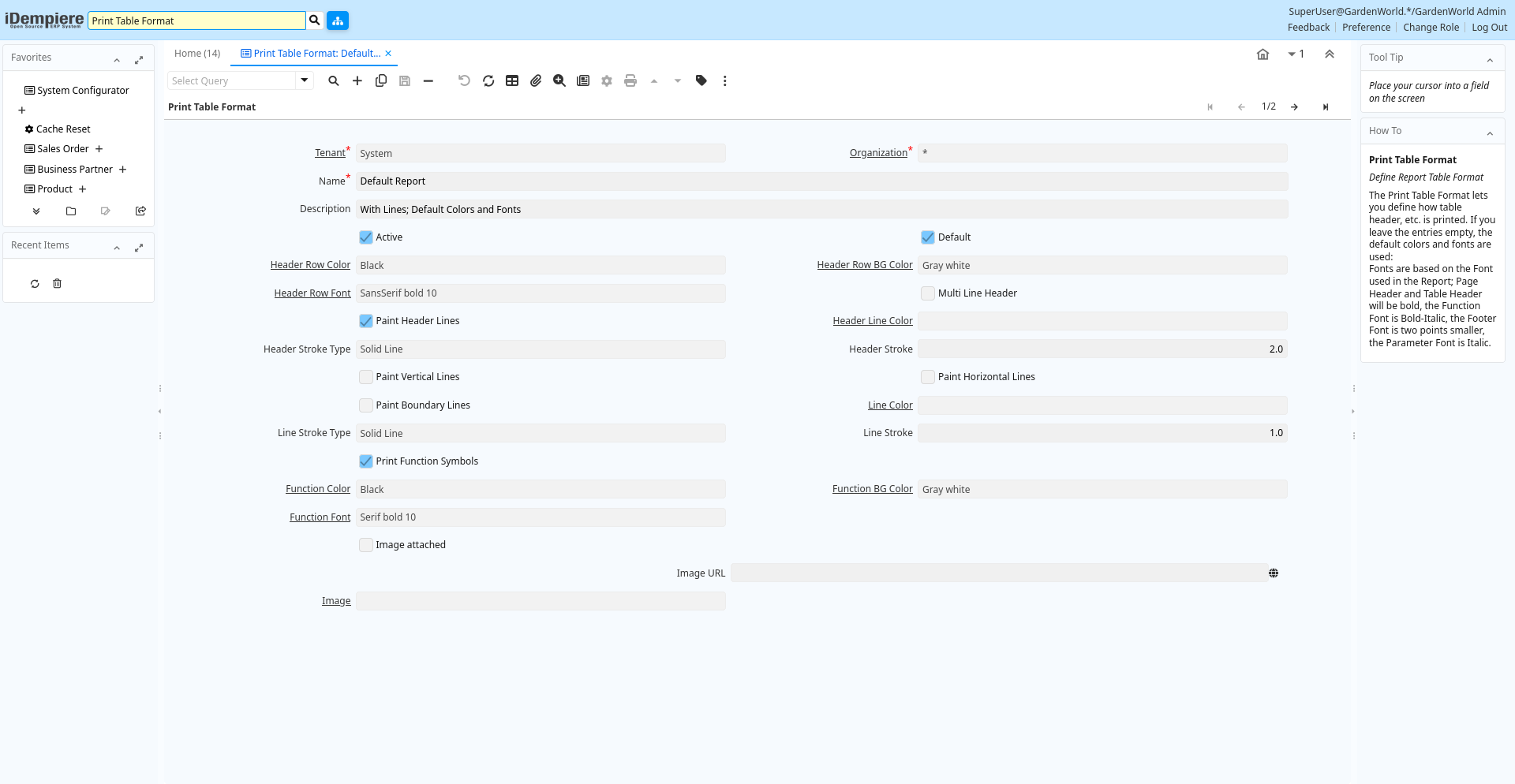
Tab: Print Table Format
[Created: 24/08/2002 - Updated: 02/01/2000 ]
Description: Define Report Table Format
Help: The Print Table Format lets you define how table header, etc. is printed. If you leave the entries empty, the default colors and fonts are used:Fonts are based on the Font used in the Report; Page Header and Table Header will be bold, the Function Font is Bold-Italic, the Footer Font is two points smaller, the Parameter Font is Italic.
Tab Level: 0
Table 10: Print Table Format - Fields
Table: Report Parameters
| Name | Description | Help | Technical Info |
|---|---|---|---|
| Tenant | Tenant for this installation. | A Tenant is a company or a legal entity. You cannot share data between Tenants. | ad_printtableformat.AD_Client_ID numeric(10) Table Direct |
| Organization | Organizational entity within tenant | An organization is a unit of your tenant or legal entity - examples are store, department. You can share data between organizations. | ad_printtableformat.AD_Org_ID numeric(10) Table Direct |
| Name | Alphanumeric identifier of the entity | The name of an entity (record) is used as an default search option in addition to the search key. The name is up to 60 characters in length. | ad_printtableformat.Name character varying(60) String |
| Description | Optional short description of the record | A description is limited to 255 characters. | ad_printtableformat.Description character varying(255) String |
| Active | The record is active in the system | There are two methods of making records unavailable in the system: One is to delete the record, the other is to de-activate the record. A de-activated record is not available for selection, but available for reports.There are two reasons for de-activating and not deleting records:(1) The system requires the record for audit purposes.(2) The record is referenced by other records. E.g., you cannot delete a Business Partner, if there are invoices for this partner record existing. You de-activate the Business Partner and prevent that this record is used for future entries. | ad_printtableformat.IsActive character(1) Yes-No |
| Default | Default value | The Default Checkbox indicates if this record will be used as a default value. | ad_printtableformat.IsDefault character(1) Yes-No |
| Header Row Color | Foreground color if the table header row | Table header row foreground color | ad_printtableformat.HdrTextFG_PrintColor_ID numeric(10) Table |
| Header Row BG Color | Background color of header row | Table header row background color | ad_printtableformat.HdrTextBG_PrintColor_ID numeric(10) Table |
| Header Row Font | Header row Font | Font of the table header row | ad_printtableformat.Hdr_PrintFont_ID numeric(10) Table |
| Multi Line Header | Print column headers on multiple lines if necessary. | If selected, column header text will wrap onto the next line -- otherwise the text will be truncated. | ad_printtableformat.IsMultiLineHeader character(1) Yes-No |
| Paint Header Lines | Paint Lines over/under the Header Line | If selected, a line is painted above and below the header line using the stroke information | ad_printtableformat.IsPaintHeaderLines character(1) Yes-No |
| Header Line Color | Table header row line color | Color of the table header row lines | ad_printtableformat.HdrLine_PrintColor_ID numeric(10) Table |
| Header Stroke Type | Type of the Header Line Stroke | Type of the line printed | ad_printtableformat.HdrStrokeType character(1) List |
| Header Stroke | Width of the Header Line Stroke | The width of the header line stroke (line thickness) in Points. | ad_printtableformat.HdrStroke numeric Number |
| Paint Vertical Lines | Paint vertical lines | Paint vertical table lines | ad_printtableformat.IsPaintVLines character(1) Yes-No |
| Paint Horizontal Lines | Paint horizontal lines | Paint horizontal table lines | ad_printtableformat.IsPaintHLines character(1) Yes-No |
| Paint Boundary Lines | Paint table boundary lines | Paint lines around table | ad_printtableformat.IsPaintBoundaryLines character(1) Yes-No |
| Line Color | Table line color | ad_printtableformat.Line_PrintColor_ID numeric(10) Table | |
| Line Stroke Type | Type of the Line Stroke | Type of the line printed | ad_printtableformat.LineStrokeType character(1) List |
| Line Stroke | Width of the Line Stroke | The width of the line stroke (line thickness) in Points. | ad_printtableformat.LineStroke numeric Number |
| Print Function Symbols | Print Symbols for Functions (Sum, Average, Count) | If selected, print symbols - otherwise print names of the function | ad_printtableformat.IsPrintFunctionSymbols character(1) Yes-No |
| Function Color | Function Foreground Color | Foreground color of a function row | ad_printtableformat.FunctFG_PrintColor_ID numeric(10) Table |
| Function BG Color | Function Background Color | Background color of a function row | ad_printtableformat.FunctBG_PrintColor_ID numeric(10) Table |
| Function Font | Function row Font | Font of the function row | ad_printtableformat.Funct_PrintFont_ID numeric(10) Table |
| Image attached | The image to be printed is attached to the record | The image to be printed is stored in the database as attachment to this record. The image can be a gif, jpeg or png. | ad_printtableformat.ImageIsAttached character(1) Yes-No |
| Image URL | URL of image | URL of image; The image is not stored in the database, but retrieved at runtime. The image can be a gif, jpeg or png. | ad_printtableformat.ImageURL character varying(120) URL |
| Image | Image or Icon | Images and Icon can be used to display supported graphic formats (gif, jpg, png).You can either load the image (in the database) or point to a graphic via a URI (i.e. it can point to a resource, http address) | ad_printtableformat.AD_Image_ID numeric(10) Table Direct |