Window: Commission
[Created: 11/03/2001 - Updated: 02/01/2000 ]
Description: Maintain Commissions and Royalties
Help: Define how and when you want the commissions to be calculated and to whom to pay it.The Commissions Window allows you define how commissions and royalties will be paid. You can pay multiple commissions for the same order or invoice (e.g. to the person entering the transaction, to the person responsible for sale of the product (category) and or business partner (group).
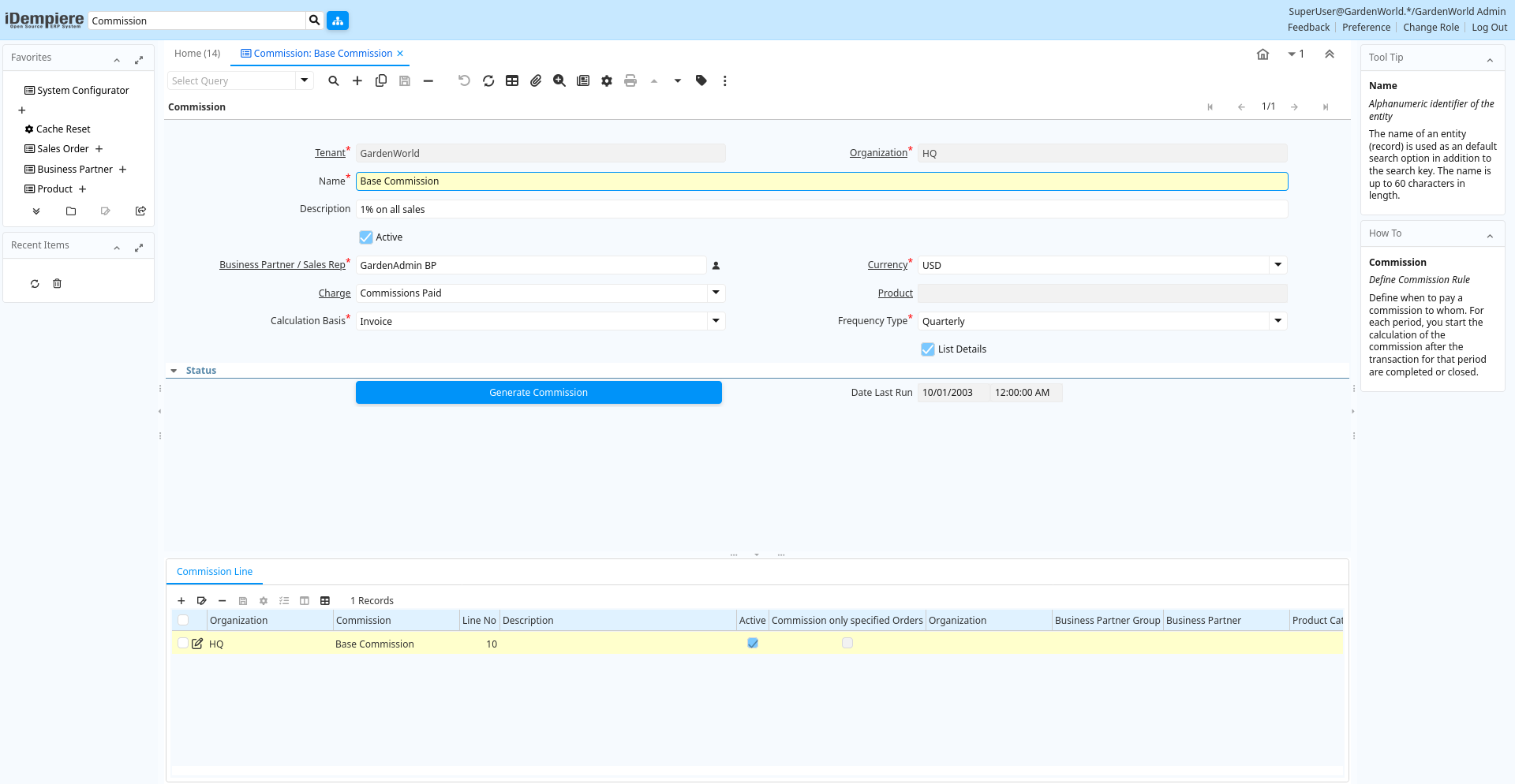
Tab: Commission
[Created: 11/03/2001 - Updated: 02/01/2000 ]
Description: Define Commission Rule
Help: Define when to pay a commission to whom. For each period, you start the calculation of the commission after the transaction for that period are completed or closed.
Tab Level: 0
Table 10: Commission - Fields
Table: Report Parameters
| Name | Description | Help | Technical Info |
|---|---|---|---|
| Tenant | Tenant for this installation. | A Tenant is a company or a legal entity. You cannot share data between Tenants. | c_commission.AD_Client_ID numeric(10) Table Direct |
| Organization | Organizational entity within tenant | An organization is a unit of your tenant or legal entity - examples are store, department. You can share data between organizations. | c_commission.AD_Org_ID numeric(10) Table Direct |
| Name | Alphanumeric identifier of the entity | The name of an entity (record) is used as an default search option in addition to the search key. The name is up to 60 characters in length. | c_commission.Name character varying(60) String |
| Description | Optional short description of the record | A description is limited to 255 characters. | c_commission.Description character varying(255) String |
| Active | The record is active in the system | There are two methods of making records unavailable in the system: One is to delete the record, the other is to de-activate the record. A de-activated record is not available for selection, but available for reports.There are two reasons for de-activating and not deleting records:(1) The system requires the record for audit purposes.(2) The record is referenced by other records. E.g., you cannot delete a Business Partner, if there are invoices for this partner record existing. You de-activate the Business Partner and prevent that this record is used for future entries. | c_commission.IsActive character(1) Yes-No |
| Business Partner / Sales Rep | Identifies a Business Partner (Sales Rep) receiving the Commission | The Business Partner should be a vendor and may be a Sales Representative | c_commission.C_BPartner_ID numeric(10) Search |
| Currency | The Currency for this record | Indicates the Currency to be used when processing or reporting on this record | c_commission.C_Currency_ID numeric(10) Table Direct |
| Charge | Additional document charges | The Charge indicates a type of Charge (Handling, Shipping, Restocking) | c_commission.C_Charge_ID numeric(10) Table Direct |
| Product | Product, Service, Item | Identifies an item which is either purchased or sold in this organization. | c_commission.M_Product_ID numeric(10) Search |
| Calculation Basis | Basis for the calculation the commission | The Calculation Basis indicates the basis to be used for the commission calculation. | c_commission.DocBasisType character(1) List |
| Frequency Type | Frequency of event | The frequency type is used for calculating the date of the next event. | c_commission.FrequencyType character(1) List |
| Copy Lines | Copy Commission Lines from other Commission | c_commission.CreateFrom character(1) Button | |
| List Details | List document details | The List Details checkbox indicates that the details for each document line will be displayed. | c_commission.ListDetails character(1) Yes-No |
| Generate Commission | Generate Commission | c_commission.Processing character(1) Button | |
| Date Last Run | Date the process was last run. | The Date Last Run indicates the last time that a process was run. | c_commission.DateLastRun timestamp without time zone Date+Time |
Tab: Commission Line
[Created: 11/03/2001 - Updated: 02/01/2000 ]
Description: Define your commission calculation rule
Help: Define the selection criteria for paying the commission. If you do not enter restricting parameters (e.g. for specific Business Partner (Groups) or Product (Categories), etc. all transactions for the period will be used to calculate the commission.After converting from the transaction to the commission currency,the formula for calculating the commission is:(Converted Amount - Subtract Amount) * Amount Multiplier+ (Actual Quantity - Subtract Quantity) * Quantity MultiplierYou can choose, that only positive amounts (Converted Amount - Subtract Amount) and positive quantities (Actual Quantity - Subtract Quantity) are used in the calculation.
Tab Level: 1
Table 20: Commission Line - Fields
Table: Report Parameters
| Name | Description | Help | Technical Info |
|---|---|---|---|
| Tenant | Tenant for this installation. | A Tenant is a company or a legal entity. You cannot share data between Tenants. | c_commissionline.AD_Client_ID numeric(10) Table Direct |
| Organization | Organizational entity within tenant | An organization is a unit of your tenant or legal entity - examples are store, department. You can share data between organizations. | c_commissionline.AD_Org_ID numeric(10) Table Direct |
| Commission | Commission | The Commission Rules or internal or external company agents, sales reps or vendors. | c_commissionline.C_Commission_ID numeric(10) Table Direct |
| Line No | Unique line for this document | Indicates the unique line for a document. It will also control the display order of the lines within a document. | c_commissionline.Line numeric(10) Integer |
| Description | Optional short description of the record | A description is limited to 255 characters. | c_commissionline.Description character varying(255) String |
| Active | The record is active in the system | There are two methods of making records unavailable in the system: One is to delete the record, the other is to de-activate the record. A de-activated record is not available for selection, but available for reports.There are two reasons for de-activating and not deleting records:(1) The system requires the record for audit purposes.(2) The record is referenced by other records. E.g., you cannot delete a Business Partner, if there are invoices for this partner record existing. You de-activate the Business Partner and prevent that this record is used for future entries. | c_commissionline.IsActive character(1) Yes-No |
| Commission only specified Orders | Commission only Orders or Invoices, where this Sales Rep is entered | Sales Reps are entered in Orders and Invoices. If selected, only Orders and Invoices for this Sales Reps are included in the calculation of the commission. | c_commissionline.CommissionOrders character(1) Yes-No |
| Organization | Organizational entity within tenant | An organization is a unit of your tenant or legal entity - examples are store, department. | c_commissionline.Org_ID numeric(10) Table |
| Business Partner Group | Business Partner Group | The Business Partner Group provides a method of defining defaults to be used for individual Business Partners. | c_commissionline.C_BP_Group_ID numeric(10) Table Direct |
| Business Partner | Identifies a Business Partner | A Business Partner is anyone with whom you transact. This can include Vendor, Customer, Employee or Salesperson | c_commissionline.C_BPartner_ID numeric(10) Search |
| Product Category | Category of a Product | Identifies the category which this product belongs to. Product categories are used for pricing and selection. | c_commissionline.M_Product_Category_ID numeric(10) Table Direct |
| Product | Product, Service, Item | Identifies an item which is either purchased or sold in this organization. | c_commissionline.M_Product_ID numeric(10) Search |
| Sales Region | Sales coverage region | The Sales Region indicates a specific area of sales coverage. | c_commissionline.C_SalesRegion_ID numeric(10) Table Direct |
| Payment Rule | How you pay the invoice | The Payment Rule indicates the method of invoice payment. | c_commissionline.PaymentRule character varying(1) List |
| Subtract Quantity | Quantity to subtract when generating commissions | The Quantity Subtract identifies the quantity to be subtracted before multiplication | c_commissionline.QtySubtract numeric Number |
| Multiplier Quantity | Value to multiply quantities by for generating commissions. | The Multiplier Quantity field indicates the amount to multiply the quantities accumulated for this commission run. | c_commissionline.QtyMultiplier numeric Number |
| Subtract Amount | Subtract Amount for generating commissions | The Subtract Amount indicates the amount to subtract from the total amount prior to multiplication. | c_commissionline.AmtSubtract numeric Amount |
| Multiplier Amount | Multiplier Amount for generating commissions | The Multiplier Amount indicates the amount to multiply the total amount generated by this commission run by. | c_commissionline.AmtMultiplier numeric Number |
| Positive only | Do not generate negative commissions | The Positive Only check box indicates that if the result of the subtraction is negative, it is ignored. This would mean that negative commissions would not be generated. | c_commissionline.IsPositiveOnly character(1) Yes-No |