Window: Mail Template
[Created: 11/01/2001 - Updated: 13/11/2005 ]
Description: Maintain Mail Template
Help: Mail templates can contain variables of the user, business partner or a general object. The priority of parsing is User/Contact, Business Partner and then the underlying business object (like Request, Dunning, Workflow object).So, @Name@ would resolve into the User name (if user is defined defined), then Business Partner name (if business partner is defined) and then the Name of the business object if it has a Name.For Multi-Lingual systems, the template is translated based on the Business Partner's language selection.
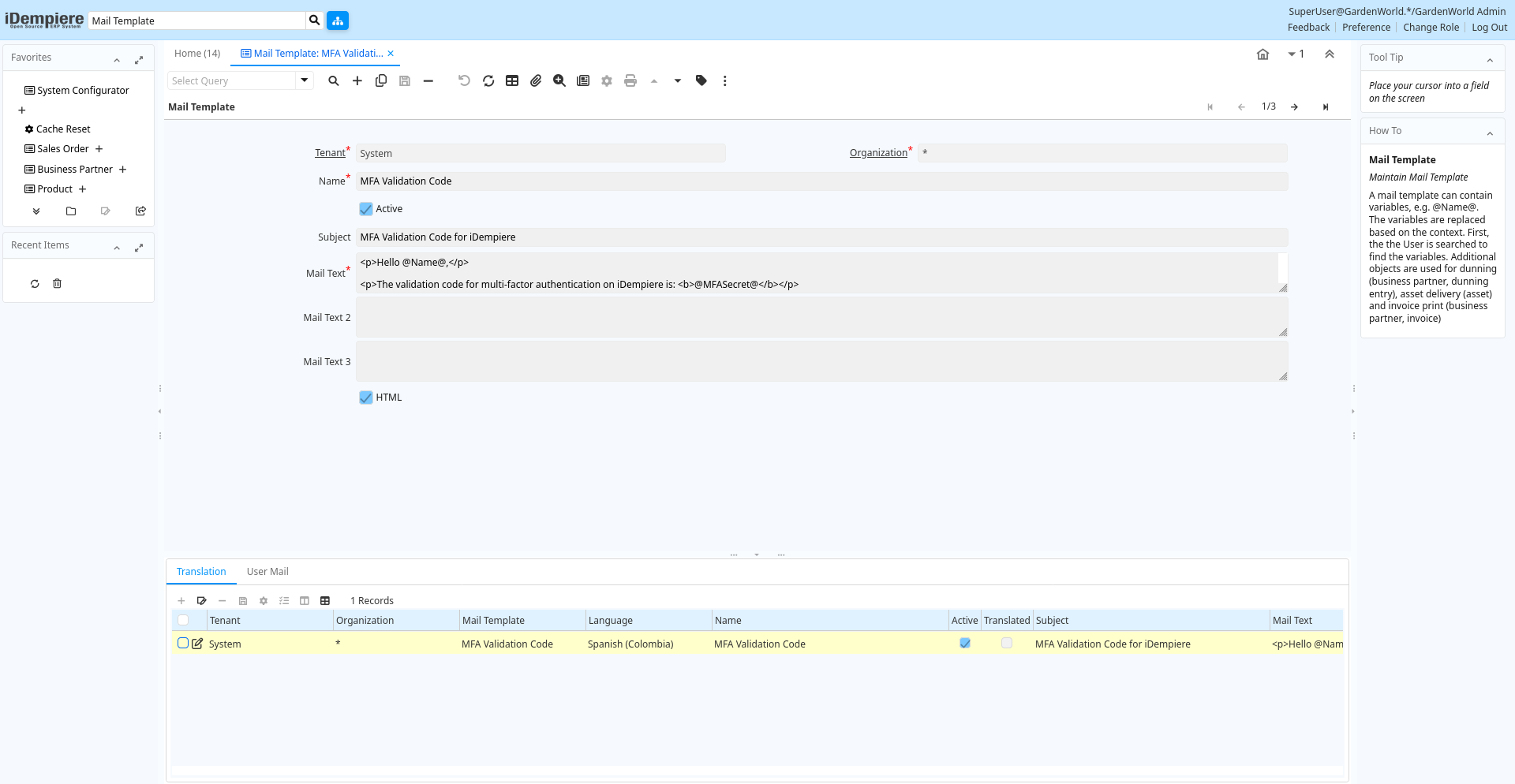
Tab: Mail Template
[Created: 11/01/2001 - Updated: 07/07/2005 ]
Description: Maintain Mail Template
Help: A mail template can contain variables, e.g. @Name@. The variables are replaced based on the context. First, the the User is searched to find the variables.Additional objects are used for dunning (business partner, dunning entry), asset delivery (asset) and invoice print (business partner, invoice)
Tab Level: 0
Table 10: Mail Template - Fields
Table: Report Parameters
| Name | Description | Help | Technical Info |
|---|---|---|---|
| Tenant | Tenant for this installation. | A Tenant is a company or a legal entity. You cannot share data between Tenants. | r_mailtext.AD_Client_ID numeric(10) Table Direct |
| Organization | Organizational entity within tenant | An organization is a unit of your tenant or legal entity - examples are store, department. You can share data between organizations. | r_mailtext.AD_Org_ID numeric(10) Table Direct |
| Name | Alphanumeric identifier of the entity | The name of an entity (record) is used as an default search option in addition to the search key. The name is up to 60 characters in length. | r_mailtext.Name character varying(60) String |
| Active | The record is active in the system | There are two methods of making records unavailable in the system: One is to delete the record, the other is to de-activate the record. A de-activated record is not available for selection, but available for reports.There are two reasons for de-activating and not deleting records:(1) The system requires the record for audit purposes.(2) The record is referenced by other records. E.g., you cannot delete a Business Partner, if there are invoices for this partner record existing. You de-activate the Business Partner and prevent that this record is used for future entries. | r_mailtext.IsActive character(1) Yes-No |
| Subject | Mail Header (Subject) | The subject of the mail message | r_mailtext.MailHeader character varying(2000) String |
| Mail Text | Text used for Mail message | The Mail Text indicates the text used for mail messages. | r_mailtext.MailText text Text |
| Mail Text 2 | Optional second text part used for Mail message | The Mail Text indicates the text used for mail messages. | r_mailtext.MailText2 character varying(2000) Text |
| Mail Text 3 | Optional third text part used for Mail message | The Mail Text indicates the text used for mail messages. | r_mailtext.MailText3 character varying(2000) Text |
| HTML | Text has HTML tags | r_mailtext.IsHtml character(1) Yes-No |
Tab: Translation
[Created: 13/11/2005 - Updated: 27/10/2024 ]
Description: Translation
Help:
Tab Level: 1
Table 20: Translation - Fields
Table: Report Parameters
| Name | Description | Help | Technical Info |
|---|---|---|---|
| Tenant | Tenant for this installation. | A Tenant is a company or a legal entity. You cannot share data between Tenants. | r_mailtext_trl.AD_Client_ID numeric(10) Table Direct |
| Organization | Organizational entity within tenant | An organization is a unit of your tenant or legal entity - examples are store, department. You can share data between organizations. | r_mailtext_trl.AD_Org_ID numeric(10) Table Direct |
| Mail Template | Text templates for mailings | The Mail Template indicates the mail template for return messages. Mail text can include variables. The priority of parsing is User/Contact, Business Partner and then the underlying business object (like Request, Dunning, Workflow object).So, @Name@ would resolve into the User name (if user is defined defined), then Business Partner name (if business partner is defined) and then the Name of the business object if it has a Name.For Multi-Lingual systems, the template is translated based on the Business Partner's language selection. | r_mailtext_trl.R_MailText_ID numeric(10) Table Direct |
| Language | Language for this entity | The Language identifies the language to use for display and formatting | r_mailtext_trl.AD_Language character varying(6) Table |
| Name | Alphanumeric identifier of the entity | The name of an entity (record) is used as an default search option in addition to the search key. The name is up to 60 characters in length. | r_mailtext_trl.Name character varying(60) String |
| Active | The record is active in the system | There are two methods of making records unavailable in the system: One is to delete the record, the other is to de-activate the record. A de-activated record is not available for selection, but available for reports.There are two reasons for de-activating and not deleting records:(1) The system requires the record for audit purposes.(2) The record is referenced by other records. E.g., you cannot delete a Business Partner, if there are invoices for this partner record existing. You de-activate the Business Partner and prevent that this record is used for future entries. | r_mailtext_trl.IsActive character(1) Yes-No |
| Translated | This column is translated | The Translated checkbox indicates if this column is translated. | r_mailtext_trl.IsTranslated character(1) Yes-No |
| Subject | Mail Header (Subject) | The subject of the mail message | r_mailtext_trl.MailHeader character varying(2000) Text |
| Mail Text | Text used for Mail message | The Mail Text indicates the text used for mail messages. | r_mailtext_trl.MailText text Text |
| Mail Text 2 | Optional second text part used for Mail message | The Mail Text indicates the text used for mail messages. | r_mailtext_trl.MailText2 character varying(2000) Text |
| Mail Text 3 | Optional third text part used for Mail message | The Mail Text indicates the text used for mail messages. | r_mailtext_trl.MailText3 character varying(2000) Text |
Tab: User Mail
[Created: 02/05/2005 - Updated: 13/11/2005 ]
Description: Mail sent to the user
Help:
Tab Level: 1
Table 30: User Mail - Fields
Table: Report Parameters
| Name | Description | Help | Technical Info |
|---|---|---|---|
| Tenant | Tenant for this installation. | A Tenant is a company or a legal entity. You cannot share data between Tenants. | ad_usermail.AD_Client_ID numeric(10) Table Direct |
| Organization | Organizational entity within tenant | An organization is a unit of your tenant or legal entity - examples are store, department. You can share data between organizations. | ad_usermail.AD_Org_ID numeric(10) Table Direct |
| Mail Template | Text templates for mailings | The Mail Template indicates the mail template for return messages. Mail text can include variables. The priority of parsing is User/Contact, Business Partner and then the underlying business object (like Request, Dunning, Workflow object).So, @Name@ would resolve into the User name (if user is defined defined), then Business Partner name (if business partner is defined) and then the Name of the business object if it has a Name.For Multi-Lingual systems, the template is translated based on the Business Partner's language selection. | ad_usermail.R_MailText_ID numeric(10) Table Direct |
| User/Contact | User within the system - Internal or Business Partner Contact | The User identifies a unique user in the system. This could be an internal user or a business partner contact | ad_usermail.AD_User_ID numeric(10) Search |
| Message ID | EMail Message ID | SMTP Message ID for tracking purposes | ad_usermail.MessageID character varying(120) String |
| Delivery Confirmation | EMail Delivery confirmation | ad_usermail.DeliveryConfirmation character varying(120) String | |
| Delivered | ad_usermail.IsDelivered character(1) List |