Window: Scheduler
[Created: 19/02/2004 - Updated: 02/01/2000 ]
Description: Maintain Schedule Processes and Logs
Help: Schedule processes to be executed asynchronously
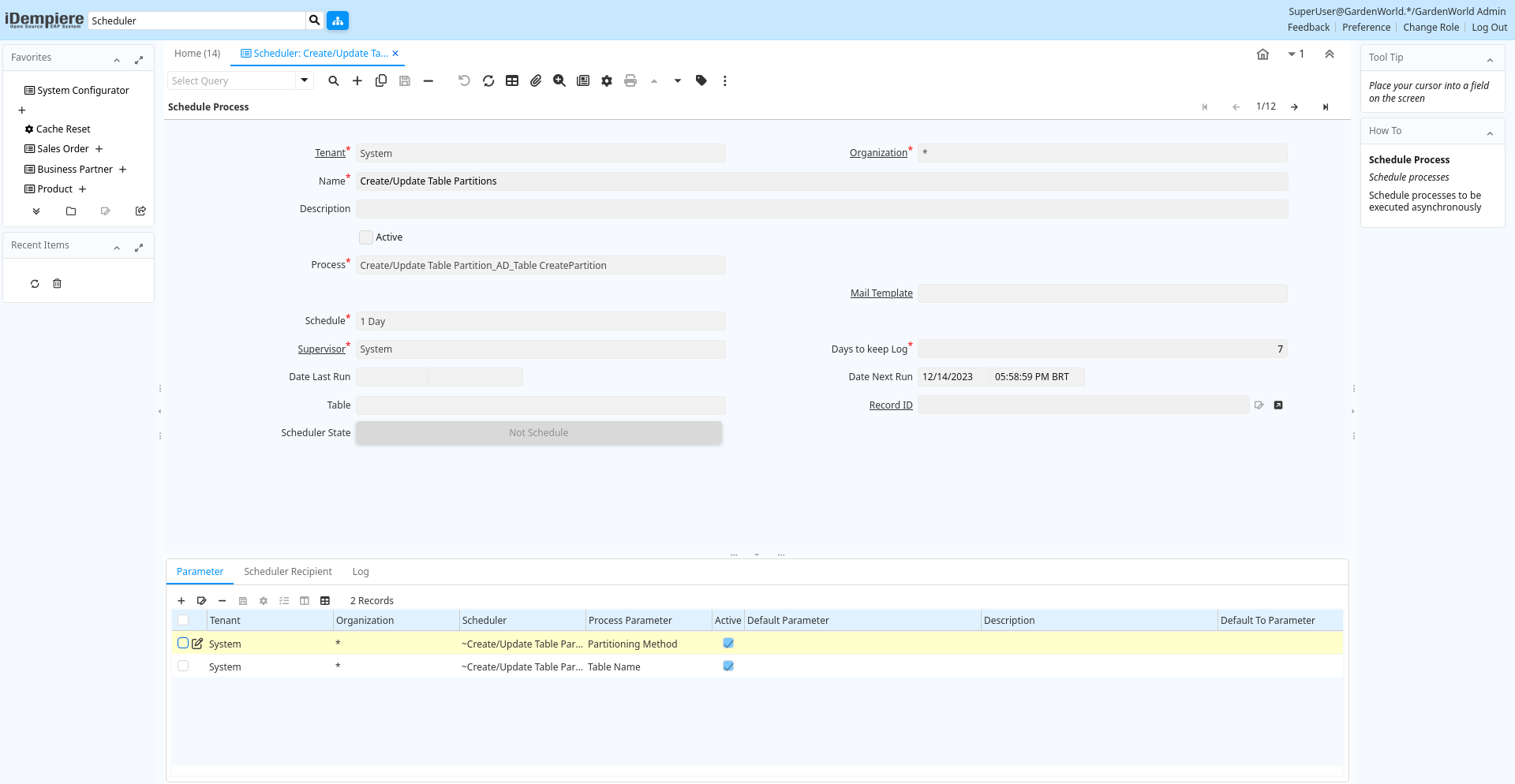
Tab: Schedule Process
[Created: 19/02/2004 - Updated: 02/01/2000 ]
Description: Schedule processes
Help: Schedule processes to be executed asynchronously
Tab Level: 0
Table 10: Schedule Process - Fields
Table: Report Parameters
| Name | Description | Help | Technical Info |
|---|---|---|---|
| Tenant | Tenant for this installation. | A Tenant is a company or a legal entity. You cannot share data between Tenants. | ad_scheduler.AD_Client_ID numeric(10) Table Direct |
| Organization | Organizational entity within tenant | An organization is a unit of your tenant or legal entity - examples are store, department. You can share data between organizations. | ad_scheduler.AD_Org_ID numeric(10) Table Direct |
| Name | Alphanumeric identifier of the entity | The name of an entity (record) is used as an default search option in addition to the search key. The name is up to 60 characters in length. | ad_scheduler.Name character varying(60) String |
| Description | Optional short description of the record | A description is limited to 255 characters. | ad_scheduler.Description character varying(255) String |
| Active | The record is active in the system | There are two methods of making records unavailable in the system: One is to delete the record, the other is to de-activate the record. A de-activated record is not available for selection, but available for reports.There are two reasons for de-activating and not deleting records:(1) The system requires the record for audit purposes.(2) The record is referenced by other records. E.g., you cannot delete a Business Partner, if there are invoices for this partner record existing. You de-activate the Business Partner and prevent that this record is used for future entries. | ad_scheduler.IsActive character(1) Yes-No |
| Process | Process or Report | The Process field identifies a unique Process or Report in the system. | ad_scheduler.AD_Process_ID numeric(10) Table Direct |
| Print Format | Data Print Format | The print format determines how data is rendered for print. | ad_scheduler.AD_PrintFormat_ID numeric(10) Table Direct |
| Report Output Type | ad_scheduler.ReportOutputType character varying(4) List | ||
| Mail Template | Text templates for mailings | The Mail Template indicates the mail template for return messages. Mail text can include variables. The priority of parsing is User/Contact, Business Partner and then the underlying business object (like Request, Dunning, Workflow object).So, @Name@ would resolve into the User name (if user is defined defined), then Business Partner name (if business partner is defined) and then the Name of the business object if it has a Name.For Multi-Lingual systems, the template is translated based on the Business Partner's language selection. | ad_scheduler.R_MailText_ID numeric(10) Table Direct |
| Schedule | ad_scheduler.AD_Schedule_ID numeric(10) Table Direct | ||
| Supervisor | Supervisor for this user/organization - used for escalation and approval | The Supervisor indicates who will be used for forwarding and escalating issues for this user - or for approvals. | ad_scheduler.Supervisor_ID numeric(10) Table |
| Days to keep Log | Number of days to keep the log entries | Older Log entries may be deleted | ad_scheduler.KeepLogDays numeric(10) Integer |
| Date Last Run | Date the process was last run. | The Date Last Run indicates the last time that a process was run. | ad_scheduler.DateLastRun timestamp with time zone Timestamp With Time Zone |
| Date Next Run | Date the process will run next | The Date Next Run indicates the next time this process will run. | ad_scheduler.DateNextRun timestamp with time zone Timestamp With Time Zone |
| Table | Database Table information | The Database Table provides the information of the table definition | ad_scheduler.AD_Table_ID numeric(10) Table Direct |
| Record ID | Direct internal record ID | The Record ID is the internal unique identifier of a record. Please note that zooming to the record may not be successful for Orders, Invoices and Shipment/Receipts as sometimes the Sales Order type is not known. | ad_scheduler.Record_ID numeric(10) Record ID |
Tab: Parameter
[Created: 19/02/2004 - Updated: 02/01/2000 ]
Description: Scheduler Parameter
Help: Provide parameter for scheduled process
Tab Level: 1
Table 20: Parameter - Fields
Table: Report Parameters
| Name | Description | Help | Technical Info |
|---|---|---|---|
| Tenant | Tenant for this installation. | A Tenant is a company or a legal entity. You cannot share data between Tenants. | ad_scheduler_para.AD_Client_ID numeric(10) Table Direct |
| Organization | Organizational entity within tenant | An organization is a unit of your tenant or legal entity - examples are store, department. You can share data between organizations. | ad_scheduler_para.AD_Org_ID numeric(10) Table Direct |
| Scheduler | Schedule Processes | Schedule processes to be executed asynchronously | ad_scheduler_para.AD_Scheduler_ID numeric(10) Table Direct |
| Process Parameter | ad_scheduler_para.AD_Process_Para_ID numeric(10) Table Direct | ||
| Active | The record is active in the system | There are two methods of making records unavailable in the system: One is to delete the record, the other is to de-activate the record. A de-activated record is not available for selection, but available for reports.There are two reasons for de-activating and not deleting records:(1) The system requires the record for audit purposes.(2) The record is referenced by other records. E.g., you cannot delete a Business Partner, if there are invoices for this partner record existing. You de-activate the Business Partner and prevent that this record is used for future entries. | ad_scheduler_para.IsActive character(1) Yes-No |
| Default Parameter | Default value of the parameter | The default value can be a variable like @#Date@ | ad_scheduler_para.ParameterDefault character varying(255) String |
| Default To Parameter | Default value of the to parameter | The default value can be a variable like @#Date@ | ad_scheduler_para.ParameterToDefault character varying(255) String |
| Description | Optional short description of the record | A description is limited to 255 characters. | ad_scheduler_para.Description character varying(255) String |
Tab: Scheduler Recipient
[Created: 12/03/2004 - Updated: 02/01/2000 ]
Description: Recipient of the Scheduler Notification
Help: You can send the notifications to users or roles
Tab Level: 1
Table 30: Scheduler Recipient - Fields
Table: Report Parameters
| Name | Description | Help | Technical Info |
|---|---|---|---|
| Tenant | Tenant for this installation. | A Tenant is a company or a legal entity. You cannot share data between Tenants. | ad_schedulerrecipient.AD_Client_ID numeric(10) Table Direct |
| Organization | Organizational entity within tenant | An organization is a unit of your tenant or legal entity - examples are store, department. You can share data between organizations. | ad_schedulerrecipient.AD_Org_ID numeric(10) Table Direct |
| Scheduler | Schedule Processes | Schedule processes to be executed asynchronously | ad_schedulerrecipient.AD_Scheduler_ID numeric(10) Table Direct |
| Active | The record is active in the system | There are two methods of making records unavailable in the system: One is to delete the record, the other is to de-activate the record. A de-activated record is not available for selection, but available for reports.There are two reasons for de-activating and not deleting records:(1) The system requires the record for audit purposes.(2) The record is referenced by other records. E.g., you cannot delete a Business Partner, if there are invoices for this partner record existing. You de-activate the Business Partner and prevent that this record is used for future entries. | ad_schedulerrecipient.IsActive character(1) Yes-No |
| User/Contact | User within the system - Internal or Business Partner Contact | The User identifies a unique user in the system. This could be an internal user or a business partner contact | ad_schedulerrecipient.AD_User_ID numeric(10) Search |
| Role | Responsibility Role | The Role determines security and access a user who has this Role will have in the System. | ad_schedulerrecipient.AD_Role_ID numeric(10) Table Direct |
| Upload | ad_schedulerrecipient.IsUpload character(1) Yes-No | ||
| Authorization Account | ad_schedulerrecipient.AD_AuthorizationAccount_ID numeric(10) Table Direct | ||
| File Name | Name of the local file or URL | Name of a file in the local directory space - or URL (file://.., http://.., ftp://..) | ad_schedulerrecipient.FileName character varying(255) String |
Tab: Log
[Created: 19/02/2004 - Updated: 02/01/2000 ]
Description: Scheduler Log
Help: Result of the execution of the Scheduler
Tab Level: 1
Table 40: Log - Fields
Table: Report Parameters
| Name | Description | Help | Technical Info |
|---|---|---|---|
| Tenant | Tenant for this installation. | A Tenant is a company or a legal entity. You cannot share data between Tenants. | ad_schedulerlog.AD_Client_ID numeric(10) Table Direct |
| Organization | Organizational entity within tenant | An organization is a unit of your tenant or legal entity - examples are store, department. You can share data between organizations. | ad_schedulerlog.AD_Org_ID numeric(10) Table Direct |
| Scheduler | Schedule Processes | Schedule processes to be executed asynchronously | ad_schedulerlog.AD_Scheduler_ID numeric(10) Table Direct |
| Created | Date this record was created | The Created field indicates the date that this record was created. | ad_schedulerlog.Created timestamp without time zone Date+Time |
| Summary | Textual summary of this request | The Summary allows free form text entry of a recap of this request. | ad_schedulerlog.Summary character varying(2000) Text |
| Error | An Error occurred in the execution | ad_schedulerlog.IsError character(1) Yes-No | |
| Reference | Reference for this record | The Reference displays the source document number. | ad_schedulerlog.Reference character varying(60) String |
| Text Message | Text Message | ad_schedulerlog.TextMsg character varying(2000) Text | |
| Description | Optional short description of the record | A description is limited to 255 characters. | ad_schedulerlog.Description character varying(255) String |