Window: Performance Goal
[Created: 24/04/2001 - Updated: 31/12/2005 ]
Description: Define Performance Goals
Help: The Performance Goal Window allows you to define performance goals or all, a role or a user
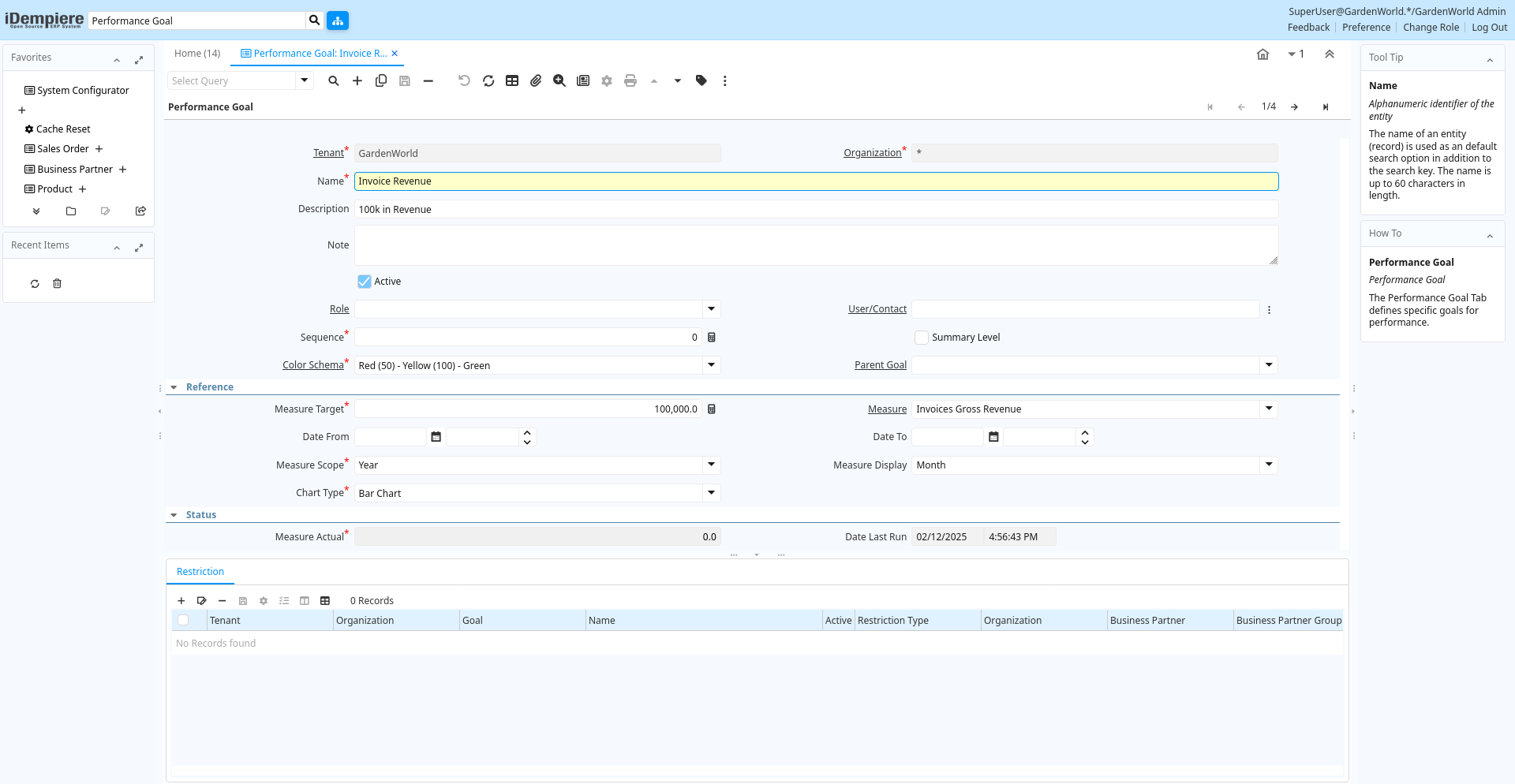
Tab: Performance Goal
[Created: 24/04/2001 - Updated: 28/03/2013 ]
Description: Performance Goal
Help: The Performance Goal Tab defines specific goals for performance.
Tab Level: 0
Table 10: Performance Goal - Fields
Table: Report Parameters
| Name | Description | Help | Technical Info |
|---|---|---|---|
| Tenant | Tenant for this installation. | A Tenant is a company or a legal entity. You cannot share data between Tenants. | pa_goal.AD_Client_ID numeric(10) Table Direct |
| Organization | Organizational entity within tenant | An organization is a unit of your tenant or legal entity - examples are store, department. You can share data between organizations. | pa_goal.AD_Org_ID numeric(10) Table Direct |
| Name | Alphanumeric identifier of the entity | The name of an entity (record) is used as an default search option in addition to the search key. The name is up to 60 characters in length. | pa_goal.Name character varying(60) String |
| Description | Optional short description of the record | A description is limited to 255 characters. | pa_goal.Description character varying(255) String |
| Note | Optional additional user defined information | The Note field allows for optional entry of user defined information regarding this record | pa_goal.Note character varying(2000) Text |
| Active | The record is active in the system | There are two methods of making records unavailable in the system: One is to delete the record, the other is to de-activate the record. A de-activated record is not available for selection, but available for reports.There are two reasons for de-activating and not deleting records:(1) The system requires the record for audit purposes.(2) The record is referenced by other records. E.g., you cannot delete a Business Partner, if there are invoices for this partner record existing. You de-activate the Business Partner and prevent that this record is used for future entries. | pa_goal.IsActive character(1) Yes-No |
| Role | Responsibility Role | The Role determines security and access a user who has this Role will have in the System. | pa_goal.AD_Role_ID numeric(10) Table Direct |
| User/Contact | User within the system - Internal or Business Partner Contact | The User identifies a unique user in the system. This could be an internal user or a business partner contact | pa_goal.AD_User_ID numeric(10) Search |
| Sequence | Method of ordering records; lowest number comes first | The Sequence indicates the order of records | pa_goal.SeqNo numeric(10) Integer |
| Summary Level | This is a summary entity | A summary entity represents a branch in a tree rather than an end-node. Summary entities are used for reporting and do not have own values. | pa_goal.IsSummary character(1) Yes-No |
| Color Schema | Performance Color Schema | Visual representation of performance by color. The Schema has often three levels (e.g. red-yellow-green). iDempiere supports two levels (e.g. red-green) or four levels (e.g. gray-bronce-silver-gold). Note that Measures without a goal are represented white. The percentages could be between 0 and unlimited (i.e. above 100%). | pa_goal.PA_ColorSchema_ID numeric(10) Table Direct |
| Parent Goal | Parent Goal | You can create a hierarchy of goals by linking the sub-goals to the summary goal.The measures are automatically rolled up | pa_goal.PA_GoalParent_ID numeric(10) Table |
| Measure Target | Target value for measure | The Measure Target indicates the target or goal for this measure. It is used as in comparing against the actual measures | pa_goal.MeasureTarget numeric Number |
| Measure | Concrete Performance Measurement | The Measure identifies a concrete, measurable indicator of performance. For example, sales dollars, prospects contacted. | pa_goal.PA_Measure_ID numeric(10) Table Direct |
| Date From | Starting date for a range | The Date From indicates the starting date of a range. | pa_goal.DateFrom timestamp without time zone Date+Time |
| Date To | End date of a date range | The Date To indicates the end date of a range (inclusive) | pa_goal.DateTo timestamp without time zone Date+Time |
| Measure Scope | Performance Measure Scope | The scope of the goal can be broken down for initial display. Example: Scope is Year, Display is Month - the goal is entered as a yearly number, the display divides the goal by 12 | pa_goal.MeasureScope character(1) List |
| Measure Display | Measure Scope initially displayed | pa_goal.MeasureDisplay character(1) List | |
| Chart Type | Type of chart to render | pa_goal.ChartType character varying(2) List | |
| Measure Actual | Actual value that has been measured. | The Measure Actual indicates the actual measured value. The measured values are used in determining if a performance goal has been met | pa_goal.MeasureActual numeric Number |
| Date Last Run | Date the process was last run. | The Date Last Run indicates the last time that a process was run. | pa_goal.DateLastRun timestamp without time zone Date+Time |
| Performance Goal | Target achievement from 0..1 | The Goal Performance indicates the target achievement from 0 to 1. | pa_goal.GoalPerformance numeric Number |
| Relative Weight | Relative weight of this step (0 = ignored) | The relative weight allows you to adjust the project cycle report based on probabilities. For example, if you have a 1:10 chance in closing a contract when it is in the prospect stage and a 1:2 chance when it is in the contract stage, you may put a weight of 0.1 and 0.5 on those steps. This allows sales funnels or measures of completion of your project. | pa_goal.RelativeWeight numeric Number |
Tab: Restriction
[Created: 23/12/2005 - Updated: 28/03/2013 ]
Description: Performance Goal Restriction
Help: Restriction of the performance measure to the Organization, Business Partner or Product defined.Example: The performance is only measured for HQThe measure must support the data, otherwise it is ignored.
Tab Level: 1
Table 20: Restriction - Fields
Table: Report Parameters
| Name | Description | Help | Technical Info |
|---|---|---|---|
| Tenant | Tenant for this installation. | A Tenant is a company or a legal entity. You cannot share data between Tenants. | pa_goalrestriction.AD_Client_ID numeric(10) Table Direct |
| Organization | Organizational entity within tenant | An organization is a unit of your tenant or legal entity - examples are store, department. You can share data between organizations. | pa_goalrestriction.AD_Org_ID numeric(10) Table Direct |
| Goal | Performance Goal | The Performance Goal indicates what this users performance will be measured against. | pa_goalrestriction.PA_Goal_ID numeric(10) Table Direct |
| Name | Alphanumeric identifier of the entity | The name of an entity (record) is used as an default search option in addition to the search key. The name is up to 60 characters in length. | pa_goalrestriction.Name character varying(60) String |
| Active | The record is active in the system | There are two methods of making records unavailable in the system: One is to delete the record, the other is to de-activate the record. A de-activated record is not available for selection, but available for reports.There are two reasons for de-activating and not deleting records:(1) The system requires the record for audit purposes.(2) The record is referenced by other records. E.g., you cannot delete a Business Partner, if there are invoices for this partner record existing. You de-activate the Business Partner and prevent that this record is used for future entries. | pa_goalrestriction.IsActive character(1) Yes-No |
| Restriction Type | Goal Restriction Type | Enter one or more records per Goal Restriction Type (e.g. Org o1, o2) | pa_goalrestriction.GoalRestrictionType character(1) List |
| Organization | Organizational entity within tenant | An organization is a unit of your tenant or legal entity - examples are store, department. | pa_goalrestriction.Org_ID numeric(10) Table |
| Business Partner | Identifies a Business Partner | A Business Partner is anyone with whom you transact. This can include Vendor, Customer, Employee or Salesperson | pa_goalrestriction.C_BPartner_ID numeric(10) Search |
| Business Partner Group | Business Partner Group | The Business Partner Group provides a method of defining defaults to be used for individual Business Partners. | pa_goalrestriction.C_BP_Group_ID numeric(10) Table Direct |
| Product | Product, Service, Item | Identifies an item which is either purchased or sold in this organization. | pa_goalrestriction.M_Product_ID numeric(10) Search |
| Product Category | Category of a Product | Identifies the category which this product belongs to. Product categories are used for pricing and selection. | pa_goalrestriction.M_Product_Category_ID numeric(10) Table Direct |