Window: Discount Schema
[Created: 28/12/2001 - Updated: 02/01/2000 ]
Description: Maintain Trade Discount Schema
Help: Trade discount schema calculates the trade discount percentage
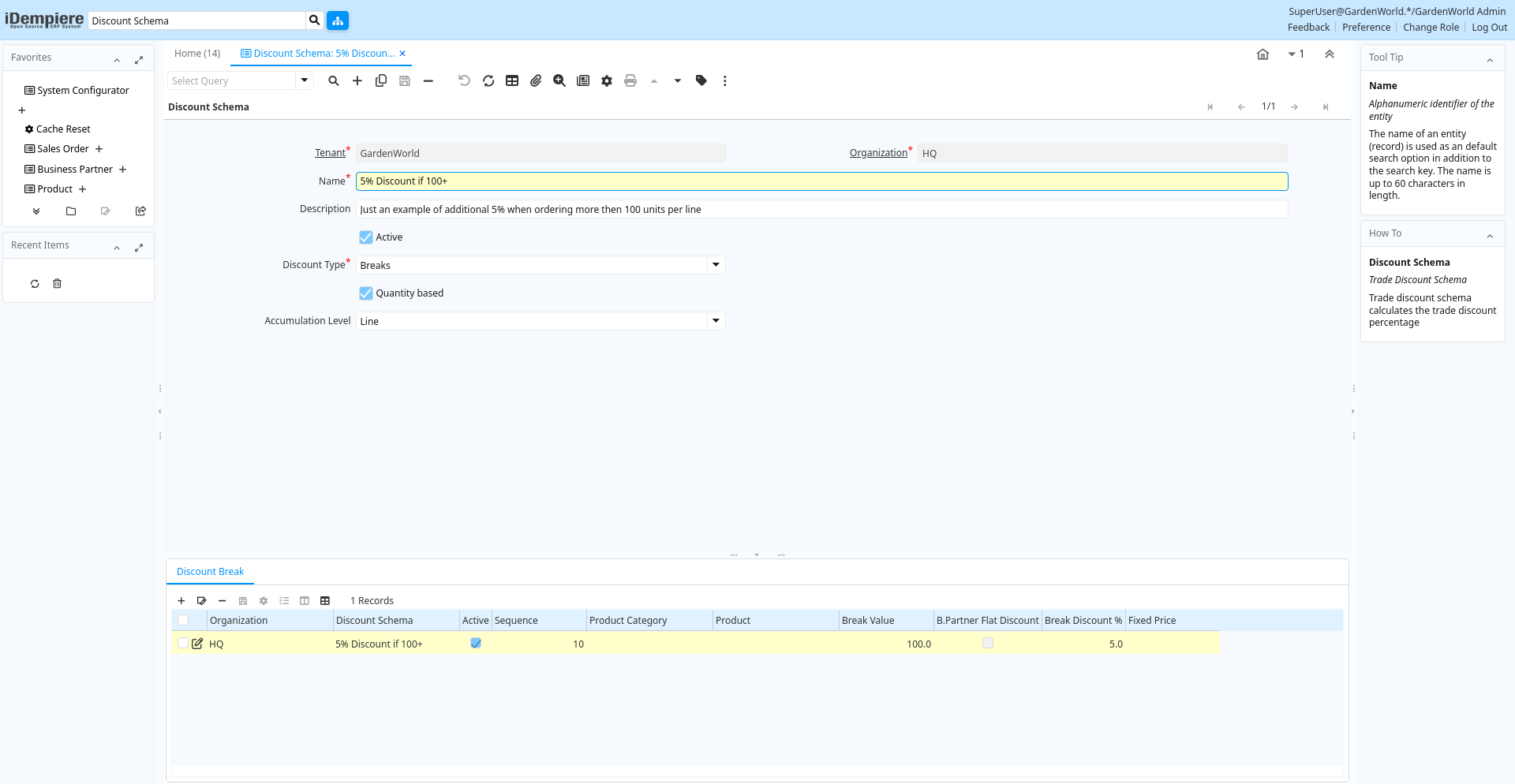
Tab: Discount Schema
[Created: 28/12/2001 - Updated: 30/09/2009 ]
Description: Trade Discount Schema
Help: Trade discount schema calculates the trade discount percentage
Tab Level: 0
Table 10: Discount Schema - Fields
Table: Report Parameters
| Name | Description | Help | Technical Info |
|---|---|---|---|
| Tenant | Tenant for this installation. | A Tenant is a company or a legal entity. You cannot share data between Tenants. | m_discountschema.AD_Client_ID numeric(10) Table Direct |
| Organization | Organizational entity within tenant | An organization is a unit of your tenant or legal entity - examples are store, department. You can share data between organizations. | m_discountschema.AD_Org_ID numeric(10) Table Direct |
| Name | Alphanumeric identifier of the entity | The name of an entity (record) is used as an default search option in addition to the search key. The name is up to 60 characters in length. | m_discountschema.Name character varying(60) String |
| Description | Optional short description of the record | A description is limited to 255 characters. | m_discountschema.Description character varying(255) String |
| Active | The record is active in the system | There are two methods of making records unavailable in the system: One is to delete the record, the other is to de-activate the record. A de-activated record is not available for selection, but available for reports.There are two reasons for de-activating and not deleting records:(1) The system requires the record for audit purposes.(2) The record is referenced by other records. E.g., you cannot delete a Business Partner, if there are invoices for this partner record existing. You de-activate the Business Partner and prevent that this record is used for future entries. | m_discountschema.IsActive character(1) Yes-No |
| Discount Type | Type of trade discount calculation | Type of procedure used to calculate the trade discount percentage | m_discountschema.DiscountType character(1) List |
| Script | Dynamic Java Language Script to calculate result | Use Java language constructs to define the result of the calculation | m_discountschema.Script character varying(2000) Text |
| B.Partner Flat Discount | Use flat discount defined on Business Partner Level | For calculation of the discount, use the discount defined on Business Partner Level | m_discountschema.IsBPartnerFlatDiscount character(1) Yes-No |
| Flat Discount % | Flat discount percentage | m_discountschema.FlatDiscount numeric Number | |
| Quantity based | Trade discount break level based on Quantity (not value) | The calculation of the trade discount level is based on the quantity of the order and not the value amount of the order | m_discountschema.IsQuantityBased character(1) Yes-No |
| Accumulation Level | Level for accumulative calculations | m_discountschema.CumulativeLevel character(1) List | |
| Renumber | Renumber Discount entries | m_discountschema.Processing character(1) Button |
Tab: Discount Break
[Created: 28/12/2001 - Updated: 15/12/2008 ]
Description: Trade discount based on breaks (steps)
Help:
Tab Level: 1
Table 30: Discount Break - Fields
Table: Report Parameters
| Name | Description | Help | Technical Info |
|---|---|---|---|
| Tenant | Tenant for this installation. | A Tenant is a company or a legal entity. You cannot share data between Tenants. | m_discountschemabreak.AD_Client_ID numeric(10) Table Direct |
| Organization | Organizational entity within tenant | An organization is a unit of your tenant or legal entity - examples are store, department. You can share data between organizations. | m_discountschemabreak.AD_Org_ID numeric(10) Table Direct |
| Discount Schema | Schema to calculate the trade discount percentage | After calculation of the (standard) price, the trade discount percentage is calculated and applied resulting in the final price. | m_discountschemabreak.M_DiscountSchema_ID numeric(10) Table Direct |
| Active | The record is active in the system | There are two methods of making records unavailable in the system: One is to delete the record, the other is to de-activate the record. A de-activated record is not available for selection, but available for reports.There are two reasons for de-activating and not deleting records:(1) The system requires the record for audit purposes.(2) The record is referenced by other records. E.g., you cannot delete a Business Partner, if there are invoices for this partner record existing. You de-activate the Business Partner and prevent that this record is used for future entries. | m_discountschemabreak.IsActive character(1) Yes-No |
| Sequence | Method of ordering records; lowest number comes first | The Sequence indicates the order of records | m_discountschemabreak.SeqNo numeric(10) Integer |
| Product Category | Category of a Product | Identifies the category which this product belongs to. Product categories are used for pricing and selection. | m_discountschemabreak.M_Product_Category_ID numeric(10) Table Direct |
| Product | Product, Service, Item | Identifies an item which is either purchased or sold in this organization. | m_discountschemabreak.M_Product_ID numeric(10) Search |
| Break Value | Low Value of trade discount break level | Starting Quantity or Amount Value for break level | m_discountschemabreak.BreakValue numeric Number |
| B.Partner Flat Discount | Use flat discount defined on Business Partner Level | For calculation of the discount, use the discount defined on Business Partner Level | m_discountschemabreak.IsBPartnerFlatDiscount character(1) Yes-No |
| Break Discount % | Trade Discount in Percent for the break level | Trade Discount in Percent for the break level | m_discountschemabreak.BreakDiscount numeric Number |
| Fixed Price | Fixed Price for Product | m_discountschemabreak.FixedPrice numeric Costs+Prices |