Window: Print Form
[Created: 28/07/2001 - Updated: 15/01/2024 ]
Description: Maintain Print Forms (Invoices, Checks, ..) used
Help: Define the documents you use for this Tenant/Organization. Note that the check format is defined in the Bank (Account) Window.The highest priority has the Print Format you define on a Document Type (example specific Export Invoice format). The next level is the set of Print Formats you defined for the organization of the document printed. The default is the set of Print Formats defines for all organizations of the Tenant (Organization=*).
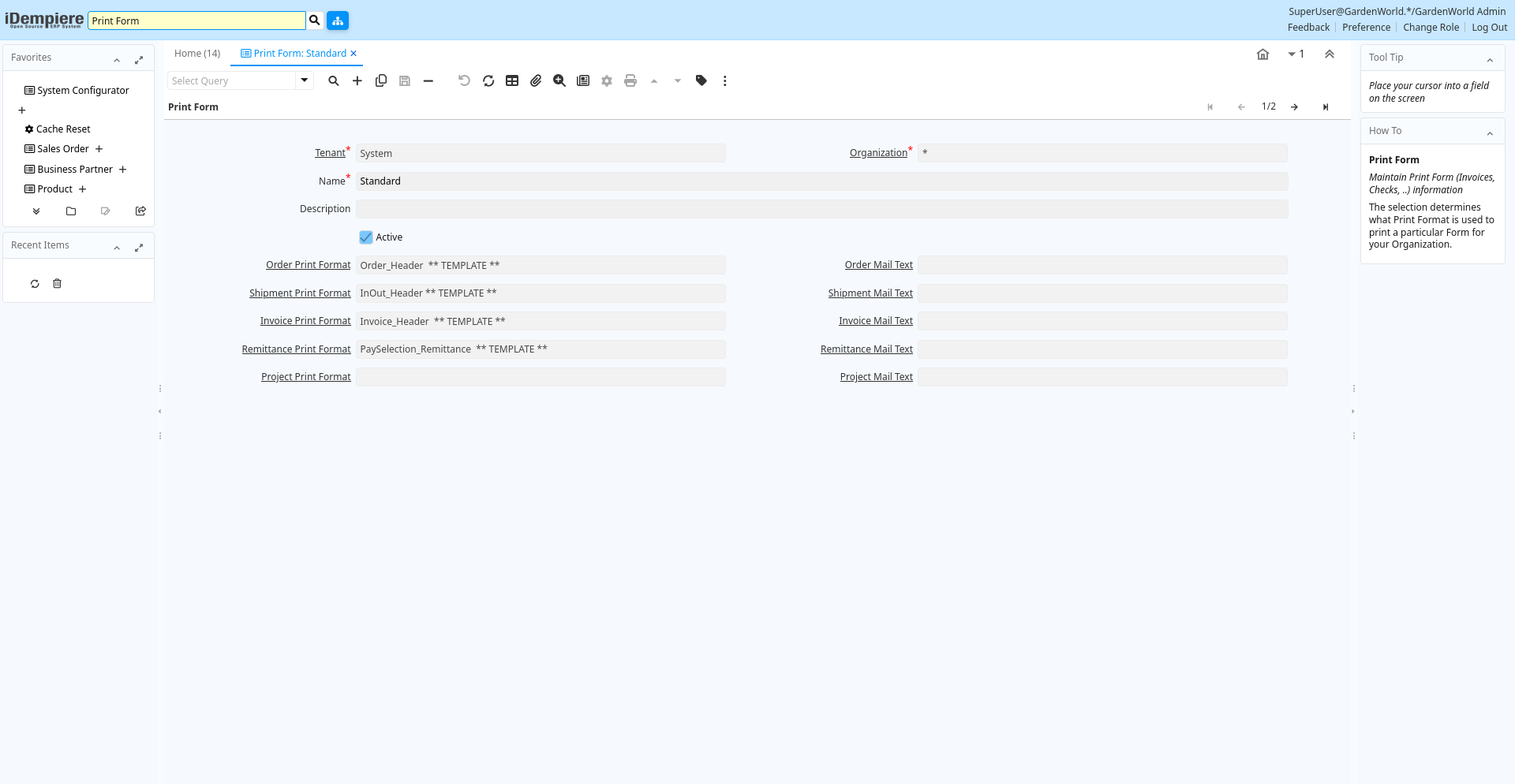
Tab: Print Form
[Created: 28/07/2001 - Updated: 02/01/2000 ]
Description: Maintain Print Form (Invoices, Checks, ..) information
Help: The selection determines what Print Format is used to print a particular Form for your Organization.
Tab Level: 0
Table 10: Print Form - Fields
Table: Report Parameters
| Name | Description | Help | Technical Info |
|---|---|---|---|
| Tenant | Tenant for this installation. | A Tenant is a company or a legal entity. You cannot share data between Tenants. | ad_printform.AD_Client_ID numeric(10) Table Direct |
| Organization | Organizational entity within tenant | An organization is a unit of your tenant or legal entity - examples are store, department. You can share data between organizations. | ad_printform.AD_Org_ID numeric(10) Table Direct |
| Name | Alphanumeric identifier of the entity | The name of an entity (record) is used as an default search option in addition to the search key. The name is up to 60 characters in length. | ad_printform.Name character varying(60) String |
| Description | Optional short description of the record | A description is limited to 255 characters. | ad_printform.Description character varying(255) String |
| Active | The record is active in the system | There are two methods of making records unavailable in the system: One is to delete the record, the other is to de-activate the record. A de-activated record is not available for selection, but available for reports.There are two reasons for de-activating and not deleting records:(1) The system requires the record for audit purposes.(2) The record is referenced by other records. E.g., you cannot delete a Business Partner, if there are invoices for this partner record existing. You de-activate the Business Partner and prevent that this record is used for future entries. | ad_printform.IsActive character(1) Yes-No |
| Order Print Format | Print Format for Orders, Quotes, Offers | You need to define a Print Format to print the document. | ad_printform.Order_PrintFormat_ID numeric(10) Table |
| Order Mail Text | Email text used for sending order acknowledgements or quotations | Standard email template used to send acknowledgements or quotations as attachments. | ad_printform.Order_MailText_ID numeric(10) Table |
| Shipment Print Format | Print Format for Shipments, Receipts, Pick Lists | You need to define a Print Format to print the document. | ad_printform.Shipment_PrintFormat_ID numeric(10) Table |
| Shipment Mail Text | Email text used for sending delivery notes | Standard email template used to send delivery notes as attachments. | ad_printform.Shipment_MailText_ID numeric(10) Table |
| Invoice Print Format | Print Format for printing Invoices | You need to define a Print Format to print the document. | ad_printform.Invoice_PrintFormat_ID numeric(10) Table |
| Invoice Mail Text | Email text used for sending invoices | Standard email template used to send invoices as attachments. | ad_printform.Invoice_MailText_ID numeric(10) Table |
| Remittance Print Format | Print Format for separate Remittances | You need to define a Print Format to print the document. | ad_printform.Remittance_PrintFormat_ID numeric(10) Table |
| Remittance Mail Text | Email text used for sending payment remittances | Standard email template used to send remittances as attachments. | ad_printform.Remittance_MailText_ID numeric(10) Table |
| Project Print Format | Standard Project Print Format | Standard Project Print Format | ad_printform.Project_PrintFormat_ID numeric(10) Table |
| Project Mail Text | Standard text for Project EMails | Standard text for Project EMails | ad_printform.Project_MailText_ID numeric(10) Table |