Window: Import Currency Rate
[Created: 29/12/2003 - Updated: 02/01/2000 ]
Description: Import Currency Conversion Rates
Help: The rates are imported after validation of currencies and conversion rate type as well as rates. The multiply rate is used. If a reciprocal rate is to be created, the divide rate is used.
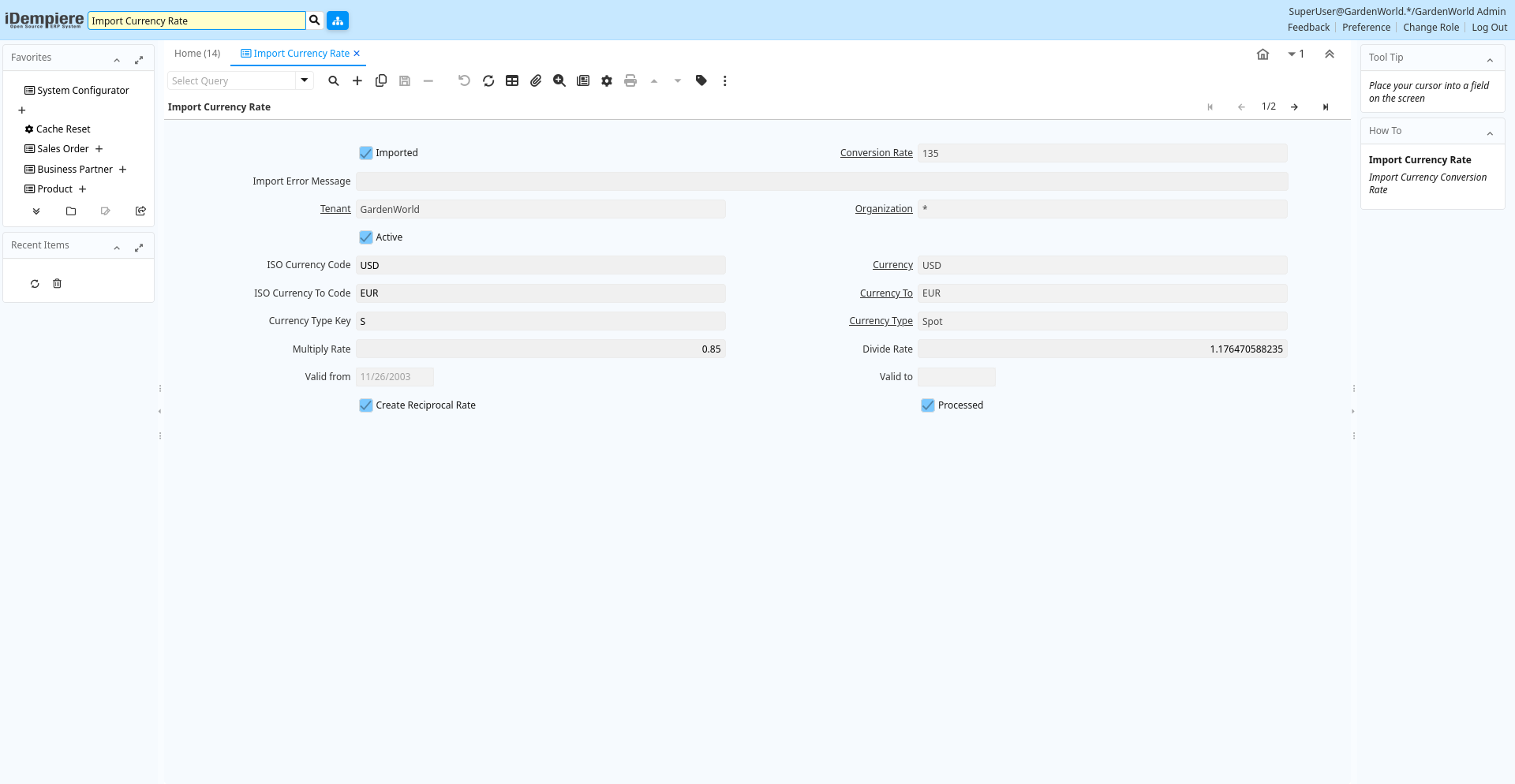
Tab: Import Currency Rate
[Created: 29/12/2003 - Updated: 02/01/2000 ]
Description: Import Currency Conversion Rate
Help:
Tab Level: 0
Table 10: Import Currency Rate - Fields
Table: Report Parameters
| Name | Description | Help | Technical Info |
|---|---|---|---|
| Import Conversion Rate | Import Currency Conversion Rate | i_conversion_rate.I_Conversion_Rate_ID numeric(10) ID | |
| Imported | Has this import been processed | The Imported check box indicates if this import has been processed. | i_conversion_rate.I_IsImported character(1) Yes-No |
| Conversion Rate | Rate used for converting currencies | The Conversion Rate defines the rate (multiply or divide) to use when converting a source currency to an accounting currency. | i_conversion_rate.C_Conversion_Rate_ID numeric(10) Table Direct |
| Import Error Message | Messages generated from import process | The Import Error Message displays any error messages generated during the import process. | i_conversion_rate.I_ErrorMsg character varying(2000) String |
| Tenant | Tenant for this installation. | A Tenant is a company or a legal entity. You cannot share data between Tenants. | i_conversion_rate.AD_Client_ID numeric(10) Table Direct |
| Organization | Organizational entity within tenant | An organization is a unit of your tenant or legal entity - examples are store, department. You can share data between organizations. | i_conversion_rate.AD_Org_ID numeric(10) Table Direct |
| Active | The record is active in the system | There are two methods of making records unavailable in the system: One is to delete the record, the other is to de-activate the record. A de-activated record is not available for selection, but available for reports.There are two reasons for de-activating and not deleting records:(1) The system requires the record for audit purposes.(2) The record is referenced by other records. E.g., you cannot delete a Business Partner, if there are invoices for this partner record existing. You de-activate the Business Partner and prevent that this record is used for future entries. | i_conversion_rate.IsActive character(1) Yes-No |
| ISO Currency Code | Three letter ISO 4217 Code of the Currency | For details - http://www.unece.org/trade/rec/rec09en.htm | i_conversion_rate.ISO_Code character(3) String |
| Currency | The Currency for this record | Indicates the Currency to be used when processing or reporting on this record | i_conversion_rate.C_Currency_ID numeric(10) Table Direct |
| ISO Currency To Code | Three letter ISO 4217 Code of the To Currency | For details - http://www.unece.org/trade/rec/rec09en.htm | i_conversion_rate.ISO_Code_To character(3) String |
| Currency To | Target currency | The Currency To defines the target currency for this conversion rate. | i_conversion_rate.C_Currency_ID_To numeric(10) Table |
| Currency Type Key | Key value for the Currency Conversion Rate Type | The date type key for the conversion of foreign currency transactions | i_conversion_rate.ConversionTypeValue character varying(40) String |
| Currency Type | Currency Conversion Rate Type | The Currency Conversion Rate Type lets you define different type of rates, e.g. Spot, Corporate and/or Sell/Buy rates. | i_conversion_rate.C_ConversionType_ID numeric(10) Table Direct |
| Multiply Rate | Rate to multiple the source by to calculate the target. | To convert Source number to Target number, the Source is multiplied by the multiply rate. If the Multiply Rate is entered, then the Divide Rate will be automatically calculated. | i_conversion_rate.MultiplyRate numeric Number |
| Divide Rate | To convert Source number to Target number, the Source is divided | To convert Source number to Target number, the Source is divided by the divide rate. If you enter a Divide Rate, the Multiply Rate will be automatically calculated. | i_conversion_rate.DivideRate numeric Number |
| Valid from | Valid from including this date (first day) | The Valid From date indicates the first day of a date range | i_conversion_rate.ValidFrom timestamp without time zone Date |
| Valid to | Valid to including this date (last day) | The Valid To date indicates the last day of a date range | i_conversion_rate.ValidTo timestamp without time zone Date |
| Create Reciprocal Rate | Create Reciprocal Rate from current information | If selected, the imported USD->EUR rate is used to create/calculate the reciprocal rate EUR->USD. | i_conversion_rate.CreateReciprocalRate character(1) Yes-No |
| Import Conversion Rate | Import Currency Conversion Rate | i_conversion_rate.Processing character(1) Button | |
| Processed | The document has been processed | The Processed checkbox indicates that a document has been processed. | i_conversion_rate.Processed character(1) Yes-No |