Window: Dunning Run
[Created: 06/03/2004 - Updated: 03/06/2021 ]
Description: Manage Dunning Runs
Help: Manage Dunning Runs
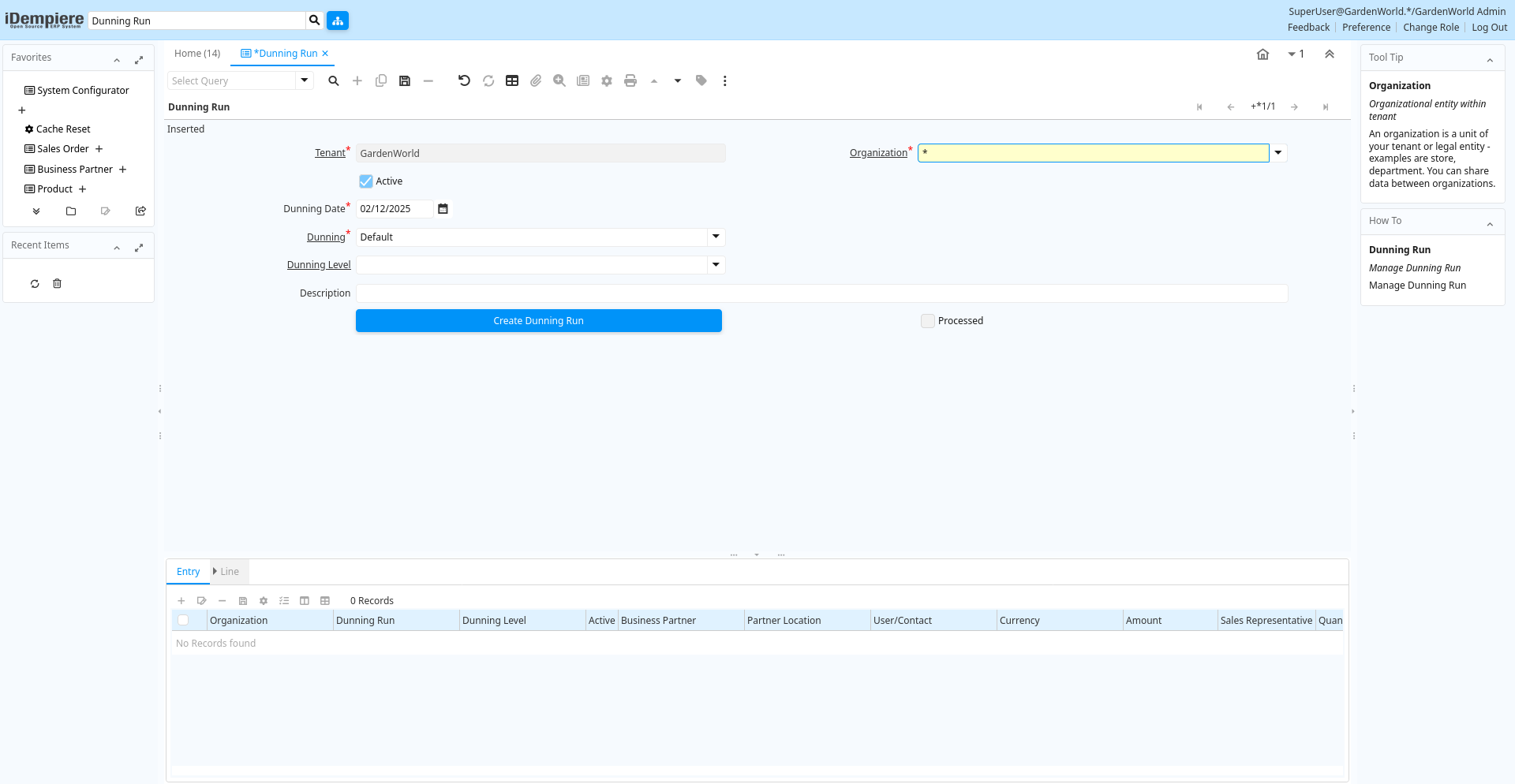
Tab: Dunning Run
[Created: 06/03/2004 - Updated: 02/01/2000 ]
Description: Manage Dunning Run
Help: Manage Dunning Run
Tab Level: 0
Table 10: Dunning Run - Fields
Table: Report Parameters
| Name | Description | Help | Technical Info |
|---|---|---|---|
| Tenant | Tenant for this installation. | A Tenant is a company or a legal entity. You cannot share data between Tenants. | c_dunningrun.AD_Client_ID numeric(10) Table Direct |
| Organization | Organizational entity within tenant | An organization is a unit of your tenant or legal entity - examples are store, department. You can share data between organizations. | c_dunningrun.AD_Org_ID numeric(10) Table Direct |
| Active | The record is active in the system | There are two methods of making records unavailable in the system: One is to delete the record, the other is to de-activate the record. A de-activated record is not available for selection, but available for reports.There are two reasons for de-activating and not deleting records:(1) The system requires the record for audit purposes.(2) The record is referenced by other records. E.g., you cannot delete a Business Partner, if there are invoices for this partner record existing. You de-activate the Business Partner and prevent that this record is used for future entries. | c_dunningrun.IsActive character(1) Yes-No |
| Dunning Date | Date of Dunning | c_dunningrun.DunningDate timestamp without time zone Date | |
| Dunning | Dunning Rules for overdue invoices | The Dunning indicates the rules and method of dunning for past due payments. | c_dunningrun.C_Dunning_ID numeric(10) Table Direct |
| Dunning Level | c_dunningrun.C_DunningLevel_ID numeric(10) Table Direct | ||
| Description | Optional short description of the record | A description is limited to 255 characters. | c_dunningrun.Description character varying(255) String |
| Create Dunning Run | Create Dunning Run Entries based on the Dunning Level criteria | c_dunningrun.Processing character(1) Button | |
| Processed | The document has been processed | The Processed checkbox indicates that a document has been processed. | c_dunningrun.Processed character(1) Yes-No |
Tab: Entry
[Created: 06/03/2004 - Updated: 02/01/2000 ]
Description: Dunning Run Entry
Help: Maintain details of the dunning letter to a business partner
Tab Level: 1
Table 20: Entry - Fields
Table: Report Parameters
| Name | Description | Help | Technical Info |
|---|---|---|---|
| Tenant | Tenant for this installation. | A Tenant is a company or a legal entity. You cannot share data between Tenants. | c_dunningrunentry.AD_Client_ID numeric(10) Table Direct |
| Organization | Organizational entity within tenant | An organization is a unit of your tenant or legal entity - examples are store, department. You can share data between organizations. | c_dunningrunentry.AD_Org_ID numeric(10) Table Direct |
| Dunning Run | Dunning Run | c_dunningrunentry.C_DunningRun_ID numeric(10) Table Direct | |
| Dunning Level | c_dunningrunentry.C_DunningLevel_ID numeric(10) Table Direct | ||
| Active | The record is active in the system | There are two methods of making records unavailable in the system: One is to delete the record, the other is to de-activate the record. A de-activated record is not available for selection, but available for reports.There are two reasons for de-activating and not deleting records:(1) The system requires the record for audit purposes.(2) The record is referenced by other records. E.g., you cannot delete a Business Partner, if there are invoices for this partner record existing. You de-activate the Business Partner and prevent that this record is used for future entries. | c_dunningrunentry.IsActive character(1) Yes-No |
| Business Partner | Identifies a Business Partner | A Business Partner is anyone with whom you transact. This can include Vendor, Customer, Employee or Salesperson | c_dunningrunentry.C_BPartner_ID numeric(10) Search |
| Partner Location | Identifies the (ship to) address for this Business Partner | The Partner address indicates the location of a Business Partner | c_dunningrunentry.C_BPartner_Location_ID numeric(10) Table Direct |
| User/Contact | User within the system - Internal or Business Partner Contact | The User identifies a unique user in the system. This could be an internal user or a business partner contact | c_dunningrunentry.AD_User_ID numeric(10) Table Direct |
| Currency | The Currency for this record | Indicates the Currency to be used when processing or reporting on this record | c_dunningrunentry.C_Currency_ID numeric(10) Search |
| Amount | Amount | Amount | c_dunningrunentry.Amt numeric Amount |
| Sales Representative | Sales Representative or Company Agent | The Sales Representative indicates the Sales Rep for this Region. Any Sales Rep must be a valid internal user. | c_dunningrunentry.SalesRep_ID numeric(10) Table |
| Quantity | Quantity | The Quantity indicates the number of a specific product or item for this document. | c_dunningrunentry.Qty numeric Quantity |
| Note | Optional additional user defined information | The Note field allows for optional entry of user defined information regarding this record | c_dunningrunentry.Note character varying(2000) Text |
| Processed | The document has been processed | The Processed checkbox indicates that a document has been processed. | c_dunningrunentry.Processed character(1) Yes-No |
Tab: Line
[Created: 06/03/2004 - Updated: 02/01/2000 ]
Description: Dinning Run Line
Help: Maintain the information of the dunning letter line
Tab Level: 2
Table 30: Line - Fields
Table: Report Parameters
| Name | Description | Help | Technical Info |
|---|---|---|---|
| Tenant | Tenant for this installation. | A Tenant is a company or a legal entity. You cannot share data between Tenants. | c_dunningrunline.AD_Client_ID numeric(10) Table Direct |
| Organization | Organizational entity within tenant | An organization is a unit of your tenant or legal entity - examples are store, department. You can share data between organizations. | c_dunningrunline.AD_Org_ID numeric(10) Table Direct |
| Dunning Run Entry | Dunning Run Entry | c_dunningrunline.C_DunningRunEntry_ID numeric(10) Table Direct | |
| Active | The record is active in the system | There are two methods of making records unavailable in the system: One is to delete the record, the other is to de-activate the record. A de-activated record is not available for selection, but available for reports.There are two reasons for de-activating and not deleting records:(1) The system requires the record for audit purposes.(2) The record is referenced by other records. E.g., you cannot delete a Business Partner, if there are invoices for this partner record existing. You de-activate the Business Partner and prevent that this record is used for future entries. | c_dunningrunline.IsActive character(1) Yes-No |
| Invoice | Invoice Identifier | The Invoice Document. | c_dunningrunline.C_Invoice_ID numeric(10) Search |
| Payment | Payment identifier | The Payment is a unique identifier of this payment. | c_dunningrunline.C_Payment_ID numeric(10) Search |
| Invoice Payment Schedule | Invoice Payment Schedule | The Invoice Payment Schedule determines when partial payments are due. | c_dunningrunline.C_InvoicePaySchedule_ID numeric(10) Search |
| Amount | Amount | Amount | c_dunningrunline.Amt numeric Amount |
| In Dispute | Document is in dispute | The document is in dispute. Use Requests to track details. | c_dunningrunline.IsInDispute character(1) Yes-No |
| Open Amount | Open item amount | c_dunningrunline.OpenAmt numeric Amount | |
| Converted Amount | Converted Amount | The Converted Amount is the result of multiplying the Source Amount by the Conversion Rate for this target currency. | c_dunningrunline.ConvertedAmt numeric Amount |
| Days due | Number of days due (negative: due in number of days) | c_dunningrunline.DaysDue numeric(10) Integer | |
| Times Dunned | Number of times dunned previously | c_dunningrunline.TimesDunned numeric(10) Integer | |
| Fee Amount | Fee amount in invoice currency | The Fee Amount indicates the charge amount on a dunning letter for overdue invoices. This field will only display if the charge fee checkbox has been selected. | c_dunningrunline.FeeAmt numeric Amount |
| Interest Amount | Interest Amount | The Interest Amount indicates any interest charged or received on a Bank Statement. | c_dunningrunline.InterestAmt numeric Amount |
| Total Amount | Total Amount | The Total Amount indicates the total document amount. | c_dunningrunline.TotalAmt numeric Amount |
| Processed | The document has been processed | The Processed checkbox indicates that a document has been processed. | c_dunningrunline.Processed character(1) Yes-No |