Window: RfQ Topic
[Created: 19/02/2004 - Updated: 25/03/2022 ]
Description: Maintain RfQ Topics and Subscribers
Help: A Request for Quotation Topic allows you to maintain a subscriber list of potential Vendors to respond to RfQs
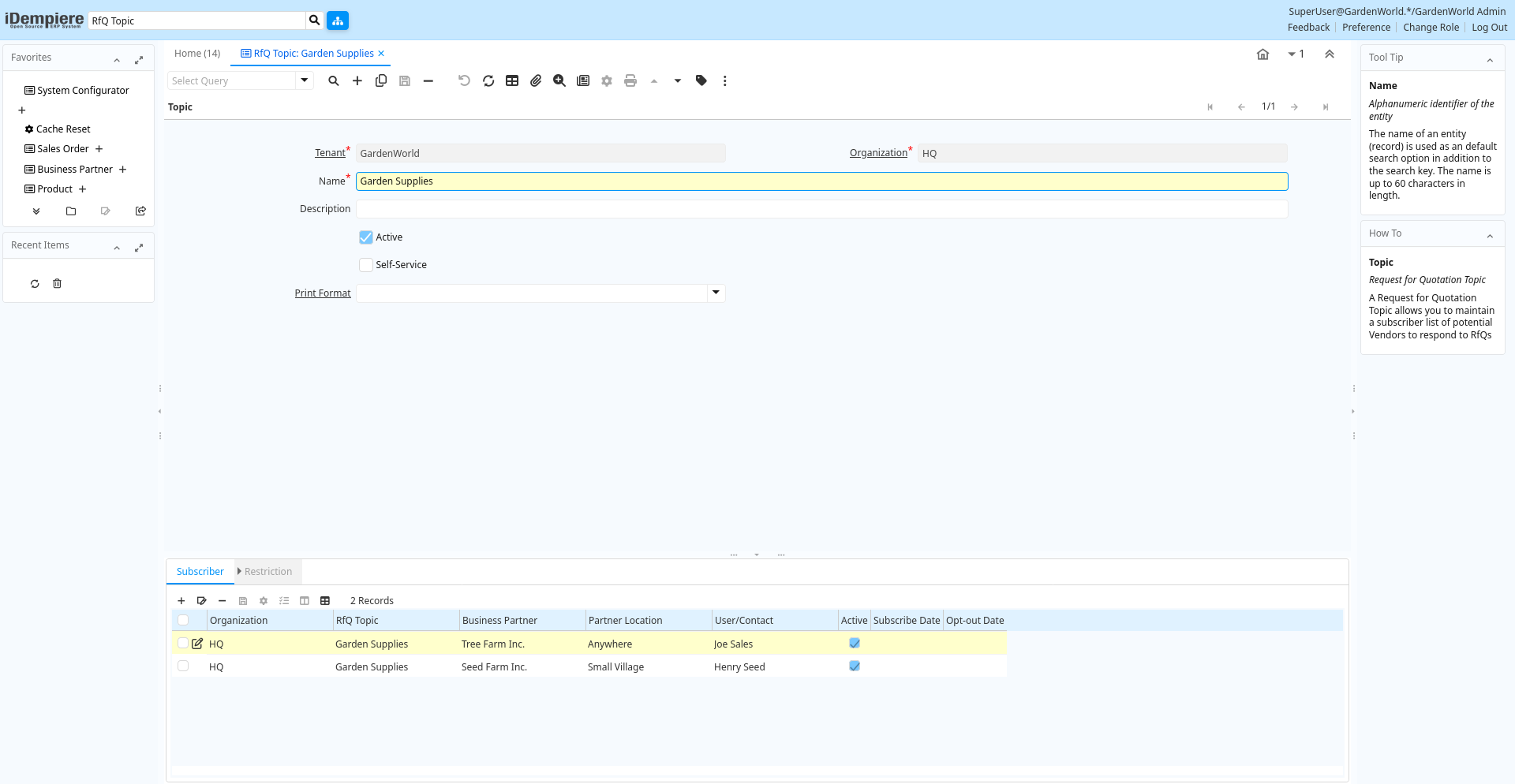
Tab: Topic
[Created: 19/02/2004 - Updated: 02/01/2000 ]
Description: Request for Quotation Topic
Help: A Request for Quotation Topic allows you to maintain a subscriber list of potential Vendors to respond to RfQs
Tab Level: 0
Table 10: Topic - Fields
Table: Report Parameters
| Name | Description | Help | Technical Info |
|---|---|---|---|
| Tenant | Tenant for this installation. | A Tenant is a company or a legal entity. You cannot share data between Tenants. | c_rfq_topic.AD_Client_ID numeric(10) Table Direct |
| Organization | Organizational entity within tenant | An organization is a unit of your tenant or legal entity - examples are store, department. You can share data between organizations. | c_rfq_topic.AD_Org_ID numeric(10) Table Direct |
| Name | Alphanumeric identifier of the entity | The name of an entity (record) is used as an default search option in addition to the search key. The name is up to 60 characters in length. | c_rfq_topic.Name character varying(60) String |
| Description | Optional short description of the record | A description is limited to 255 characters. | c_rfq_topic.Description character varying(255) String |
| Active | The record is active in the system | There are two methods of making records unavailable in the system: One is to delete the record, the other is to de-activate the record. A de-activated record is not available for selection, but available for reports.There are two reasons for de-activating and not deleting records:(1) The system requires the record for audit purposes.(2) The record is referenced by other records. E.g., you cannot delete a Business Partner, if there are invoices for this partner record existing. You de-activate the Business Partner and prevent that this record is used for future entries. | c_rfq_topic.IsActive character(1) Yes-No |
| Self-Service | This is a Self-Service entry or this entry can be changed via Self-Service | Self-Service allows users to enter data or update their data. The flag indicates, that this record was entered or created via Self-Service or that the user can change it via the Self-Service functionality. | c_rfq_topic.IsSelfService character(1) Yes-No |
| Print Format | Data Print Format | The print format determines how data is rendered for print. | c_rfq_topic.AD_PrintFormat_ID numeric(10) Table Direct |
Tab: Subscriber
[Created: 19/02/2004 - Updated: 02/01/2000 ]
Description: Request for Quotation Topic Subscriber
Help: Subcriber to invite to respond to RfQs
Tab Level: 1
Table 20: Subscriber - Fields
Table: Report Parameters
| Name | Description | Help | Technical Info |
|---|---|---|---|
| Tenant | Tenant for this installation. | A Tenant is a company or a legal entity. You cannot share data between Tenants. | c_rfq_topicsubscriber.AD_Client_ID numeric(10) Table Direct |
| Organization | Organizational entity within tenant | An organization is a unit of your tenant or legal entity - examples are store, department. You can share data between organizations. | c_rfq_topicsubscriber.AD_Org_ID numeric(10) Table Direct |
| RfQ Topic | Topic for Request for Quotations | A Request for Quotation Topic allows you to maintain a subscriber list of potential Vendors to respond to RfQs | c_rfq_topicsubscriber.C_RfQ_Topic_ID numeric(10) Table Direct |
| Business Partner | Identifies a Business Partner | A Business Partner is anyone with whom you transact. This can include Vendor, Customer, Employee or Salesperson | c_rfq_topicsubscriber.C_BPartner_ID numeric(10) Search |
| Partner Location | Identifies the (ship from) address for this Business Partner | The Partner address indicates the location of a Business Partner | c_rfq_topicsubscriber.C_BPartner_Location_ID numeric(10) Table Direct |
| User/Contact | User within the system - Internal or Business Partner Contact | The User identifies a unique user in the system. This could be an internal user or a business partner contact | c_rfq_topicsubscriber.AD_User_ID numeric(10) Table Direct |
| Active | The record is active in the system | There are two methods of making records unavailable in the system: One is to delete the record, the other is to de-activate the record. A de-activated record is not available for selection, but available for reports.There are two reasons for de-activating and not deleting records:(1) The system requires the record for audit purposes.(2) The record is referenced by other records. E.g., you cannot delete a Business Partner, if there are invoices for this partner record existing. You de-activate the Business Partner and prevent that this record is used for future entries. | c_rfq_topicsubscriber.IsActive character(1) Yes-No |
| Subscribe Date | Date the contact actively subscribed | Date the contact subscribe the interest area | c_rfq_topicsubscriber.SubscribeDate timestamp without time zone Date |
| Opt-out Date | Date the contact opted out | If the field has a date, the customer opted out (unsubscribed) and cannot receive mails for the Interest Area | c_rfq_topicsubscriber.OptOutDate timestamp without time zone Date |
Tab: Restriction
[Created: 07/07/2004 - Updated: 02/01/2000 ]
Description: Include Subscriber Only for certain products or product categories
Help: Enter the products / product categories for which the subscriber should be included. If no product / category is entered, the subscriber is requested to answer requests for all lines in a RfQ
Tab Level: 2
Table 30: Restriction - Fields
Table: Report Parameters
| Name | Description | Help | Technical Info |
|---|---|---|---|
| Tenant | Tenant for this installation. | A Tenant is a company or a legal entity. You cannot share data between Tenants. | c_rfq_topicsubscriberonly.AD_Client_ID numeric(10) Table Direct |
| Organization | Organizational entity within tenant | An organization is a unit of your tenant or legal entity - examples are store, department. You can share data between organizations. | c_rfq_topicsubscriberonly.AD_Org_ID numeric(10) Table Direct |
| RfQ Subscriber | Request for Quotation Topic Subscriber | Subscriber to invite to respond to RfQs | c_rfq_topicsubscriberonly.C_RfQ_TopicSubscriber_ID numeric(10) Table Direct |
| Active | The record is active in the system | There are two methods of making records unavailable in the system: One is to delete the record, the other is to de-activate the record. A de-activated record is not available for selection, but available for reports.There are two reasons for de-activating and not deleting records:(1) The system requires the record for audit purposes.(2) The record is referenced by other records. E.g., you cannot delete a Business Partner, if there are invoices for this partner record existing. You de-activate the Business Partner and prevent that this record is used for future entries. | c_rfq_topicsubscriberonly.IsActive character(1) Yes-No |
| Product | Product, Service, Item | Identifies an item which is either purchased or sold in this organization. | c_rfq_topicsubscriberonly.M_Product_ID numeric(10) Search |
| Product Category | Category of a Product | Identifies the category which this product belongs to. Product categories are used for pricing and selection. | c_rfq_topicsubscriberonly.M_Product_Category_ID numeric(10) Table Direct |
| Description | Optional short description of the record | A description is limited to 255 characters. | c_rfq_topicsubscriberonly.Description character varying(255) String |