Window: Import Account
[Created: 11/01/2003 - Updated: 02/01/2000 ]
Description: Import Natural Account Values
Help: The Import Natural Account Window is an interim table which is used when importing external data into the system. Selecting the 'Process' button will either add or modify the appropriate records.
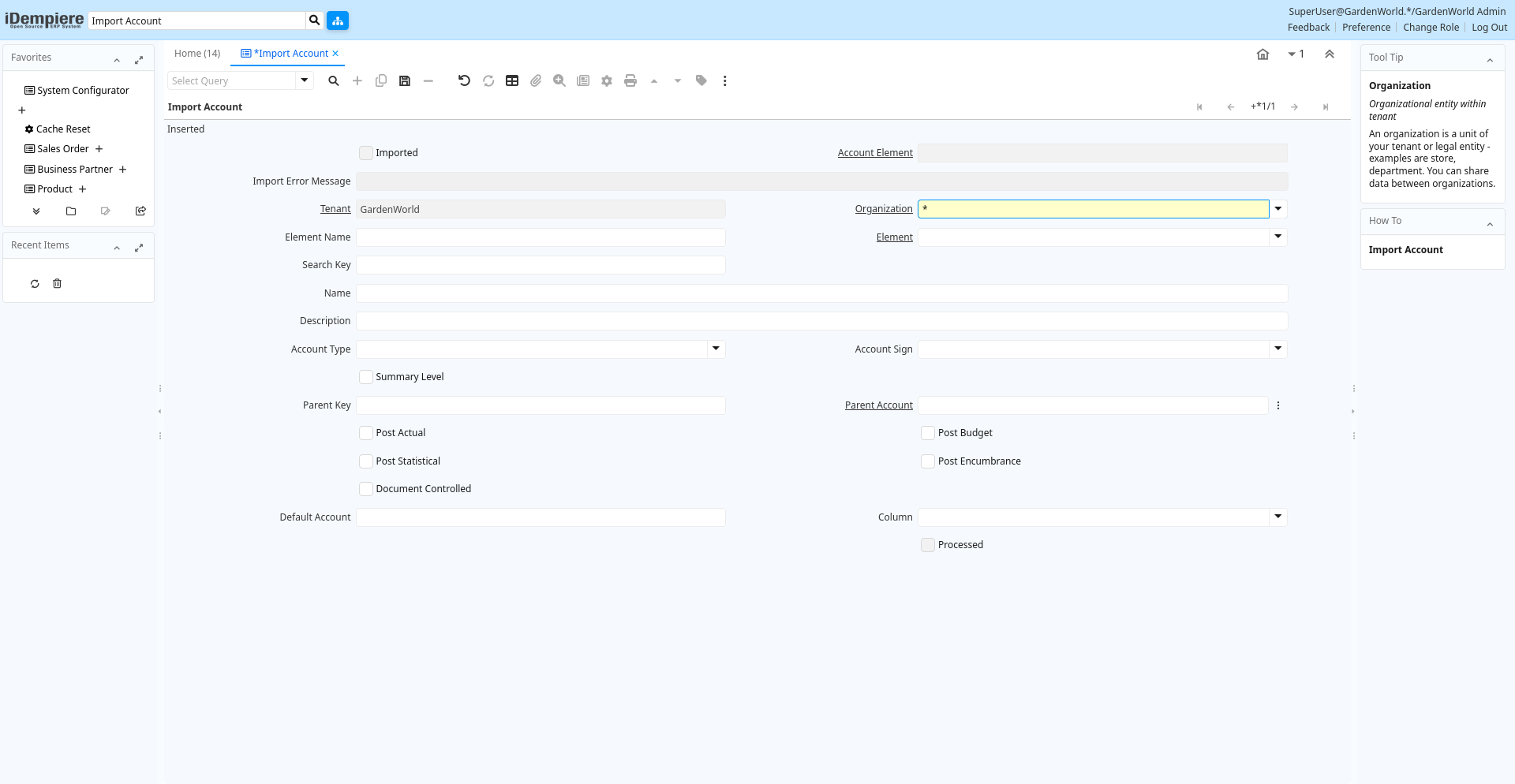
Tab: Import Account
[Created: 11/01/2003 - Updated: 02/01/2000 ]
Description:
Help:
Tab Level: 0
Table 10: Import Account - Fields
Table: Report Parameters
| Name | Description | Help | Technical Info |
|---|---|---|---|
| Import Account | Import Account Value | i_elementvalue.I_ElementValue_ID numeric(10) ID | |
| Imported | Has this import been processed | The Imported check box indicates if this import has been processed. | i_elementvalue.I_IsImported character(1) Yes-No |
| Account Element | Account Element | Account Elements can be natural accounts or user defined values. | i_elementvalue.C_ElementValue_ID numeric(10) Search |
| Import Error Message | Messages generated from import process | The Import Error Message displays any error messages generated during the import process. | i_elementvalue.I_ErrorMsg character varying(2000) String |
| Tenant | Tenant for this installation. | A Tenant is a company or a legal entity. You cannot share data between Tenants. | i_elementvalue.AD_Client_ID numeric(10) Table Direct |
| Organization | Organizational entity within tenant | An organization is a unit of your tenant or legal entity - examples are store, department. You can share data between organizations. | i_elementvalue.AD_Org_ID numeric(10) Table Direct |
| Element Name | Name of the Element | i_elementvalue.ElementName character varying(60) String | |
| Element | Accounting Element | The Account Element uniquely identifies an Account Type. These are commonly known as a Chart of Accounts. | i_elementvalue.C_Element_ID numeric(10) Table Direct |
| Search Key | Search key for the record in the format required - must be unique | A search key allows you a fast method of finding a particular record.If you leave the search key empty, the system automatically creates a numeric number. The document sequence used for this fallback number is defined in the "Maintain Sequence" window with the name "DocumentNo_", where TableName is the actual name of the table (e.g. C_Order). | i_elementvalue.Value character varying(40) String |
| Name | Alphanumeric identifier of the entity | The name of an entity (record) is used as an default search option in addition to the search key. The name is up to 60 characters in length. | i_elementvalue.Name character varying(60) String |
| Description | Optional short description of the record | A description is limited to 255 characters. | i_elementvalue.Description character varying(255) String |
| Account Type | Indicates the type of account | Valid account types are A - Asset, E - Expense, L - Liability, O- Owner's Equity, R -Revenue and M- Memo. The account type is used to determine what taxes, if any are applicable, validating payables and receivables for business partners. Note: Memo account amounts are ignored when checking for balancing | i_elementvalue.AccountType character(1) List |
| Account Sign | Indicates the Natural Sign of the Account as a Debit or Credit | Indicates if the expected balance for this account should be a Debit or a Credit. If set to Natural, the account sign for an asset or expense account is Debit Sign (i.e. negative if a credit balance). | i_elementvalue.AccountSign character(1) List |
| Summary Level | This is a summary entity | A summary entity represents a branch in a tree rather than an end-node. Summary entities are used for reporting and do not have own values. | i_elementvalue.IsSummary character(1) Yes-No |
| Parent Key | Key if the Parent | i_elementvalue.ParentValue character varying(40) String | |
| Parent Account | The parent (summary) account | i_elementvalue.ParentElementValue_ID numeric(10) Search | |
| Post Actual | Actual Values can be posted | The Post Actual indicates if actual values can be posted to this element value. | i_elementvalue.PostActual character(1) Yes-No |
| Post Budget | Budget values can be posted | The Post Budget indicates if budget values can be posted to this element value. | i_elementvalue.PostBudget character(1) Yes-No |
| Post Statistical | Post statistical quantities to this account? | i_elementvalue.PostStatistical character(1) Yes-No | |
| Post Encumbrance | Post commitments to this account | i_elementvalue.PostEncumbrance character(1) Yes-No | |
| Document Controlled | Control account - If an account is controlled by a document, you cannot post manually to it | i_elementvalue.IsDocControlled character(1) Yes-No | |
| Default Account | Name of the Default Account Column | i_elementvalue.Default_Account character varying(30) String | |
| Column | Column in the table | Link to the database column of the table | i_elementvalue.AD_Column_ID numeric(10) Table |
| Import Accounts | Import Natural Accounts | Import accounts and their hierarchies and optional update the default accounts. Updating the Default Accounts changes the natural account segment of the used account, e.g. account 01-240 becomes 01-300). If you create a new combination, the old account (e.g. 01-240) will remain, otherwise replaced.If you select this, make sure that you not multiple default accounts using one natural account and HAVE A BACKUP !!The Parameters are default values for null import record values, they do not overwrite any data. | i_elementvalue.Processing character(1) Button |
| Processed | The document has been processed | The Processed checkbox indicates that a document has been processed. | i_elementvalue.Processed character(1) Yes-No |