Window: Asset Disposal
[Created: 17/06/2010 - Updated: 24/03/2013 ]
Description: Dispose of Assets
Help:
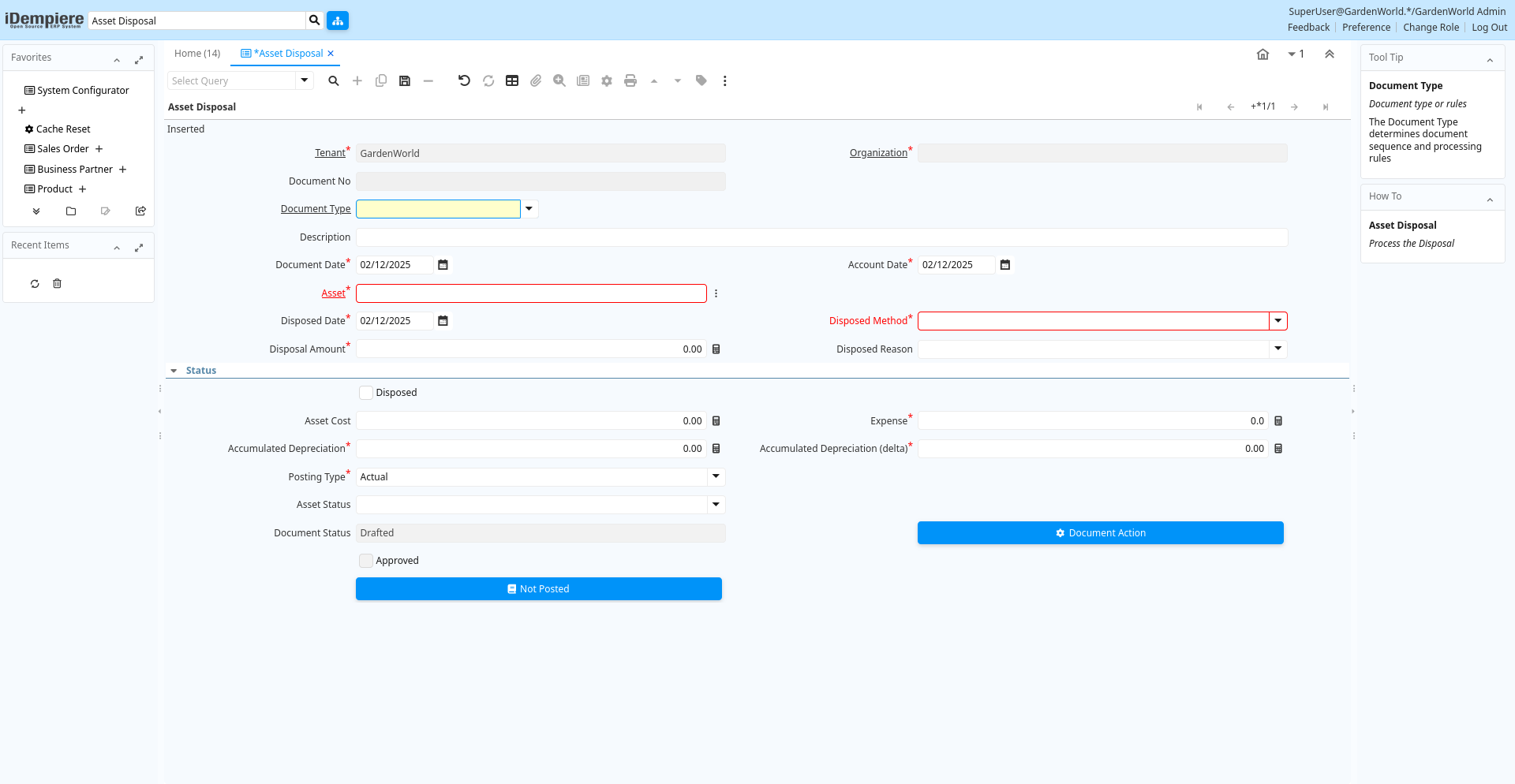
Tab: Asset Disposal
[Created: 17/06/2010 - Updated: 26/06/2013 ]
Description: Process the Disposal
Help:
Tab Level: 0
Table 10: Asset Disposal - Fields
Table: Report Parameters
| Name | Description | Help | Technical Info |
|---|---|---|---|
| Tenant | Tenant for this installation. | A Tenant is a company or a legal entity. You cannot share data between Tenants. | a_asset_disposed.AD_Client_ID numeric(10) Table Direct |
| Organization | Organizational entity within tenant | An organization is a unit of your tenant or legal entity - examples are store, department. You can share data between organizations. | a_asset_disposed.AD_Org_ID numeric(10) Table Direct |
| Document No | Document sequence number of the document | The document number is usually automatically generated by the system and determined by the document type of the document. If the document is not saved, the preliminary number is displayed in "".If the document type of your document has no automatic document sequence defined, the field is empty if you create a new document. This is for documents which usually have an external number (like vendor invoice). If you leave the field empty, the system will generate a document number for you. The document sequence used for this fallback number is defined in the "Maintain Sequence" window with the name "DocumentNo_", where TableName is the actual name of the table (e.g. C_Order). | a_asset_disposed.DocumentNo character varying(30) String |
| Document Type | Document type or rules | The Document Type determines document sequence and processing rules | a_asset_disposed.C_DocType_ID numeric(10) Table Direct |
| Description | Optional short description of the record | A description is limited to 255 characters. | a_asset_disposed.Description character varying(255) String |
| Document Date | Date of the Document | The Document Date indicates the date the document was generated. It may or may not be the same as the accounting date. | a_asset_disposed.DateDoc timestamp without time zone Date |
| Account Date | Accounting Date | The Accounting Date indicates the date to be used on the General Ledger account entries generated from this document. It is also used for any currency conversion. | a_asset_disposed.DateAcct timestamp without time zone Date |
| Asset | Asset used internally or by customers | An asset is either created by purchasing or by delivering a product. An asset can be used internally or be a customer asset. | a_asset_disposed.A_Asset_ID numeric(10) Search |
| Disposed Date | a_asset_disposed.A_Disposed_Date timestamp without time zone Date | ||
| Disposed Method | a_asset_disposed.A_Disposed_Method character varying(2) List | ||
| Disposal Amount | a_asset_disposed.A_Disposal_Amt numeric Amount | ||
| Disposed Reason | a_asset_disposed.A_Disposed_Reason character varying(10) List | ||
| Disposed | The asset is disposed | The asset is no longer used and disposed | a_asset_disposed.IsDisposed character(1) Yes-No |
| Asset Cost | a_asset_disposed.A_Asset_Cost numeric Amount | ||
| Expense | a_asset_disposed.Expense numeric Number | ||
| Accumulated Depreciation | a_asset_disposed.A_Accumulated_Depr numeric Amount | ||
| Accumulated Depreciation (delta) | a_asset_disposed.A_Accumulated_Depr_Delta numeric Amount | ||
| Posting Type | The type of posted amount for the transaction | The Posting Type indicates the type of amount (Actual, Budget, Reservation, Commitment, Statistical) the transaction. | a_asset_disposed.PostingType character(1) List |
| Asset Status | a_asset_disposed.A_Asset_Status character varying(2) List | ||
| Document Status | The current status of the document | The Document Status indicates the status of a document at this time. If you want to change the document status, use the Document Action field | a_asset_disposed.DocStatus character varying(2) List |
| Asset Disposed Process | a_asset_disposed.DocAction character(2) Button | ||
| Approved | Indicates if this document requires approval | The Approved checkbox indicates if this document requires approval before it can be processed. | a_asset_disposed.IsApproved character(1) Yes-No |
| Posted | Posting status | The Posted field indicates the status of the Generation of General Ledger Accounting Lines | a_asset_disposed.Posted character(1) Button |