Window: Revenue Recognition
[Created: 25/01/2000 - Updated: 17/02/2022 ]
Description: Revenue Recognition Rules
Help: The Revenue Recognition Window defines the intervals at which revenue will be recognized. Alternatively, the revenue recognition may be linked to service levels provided.
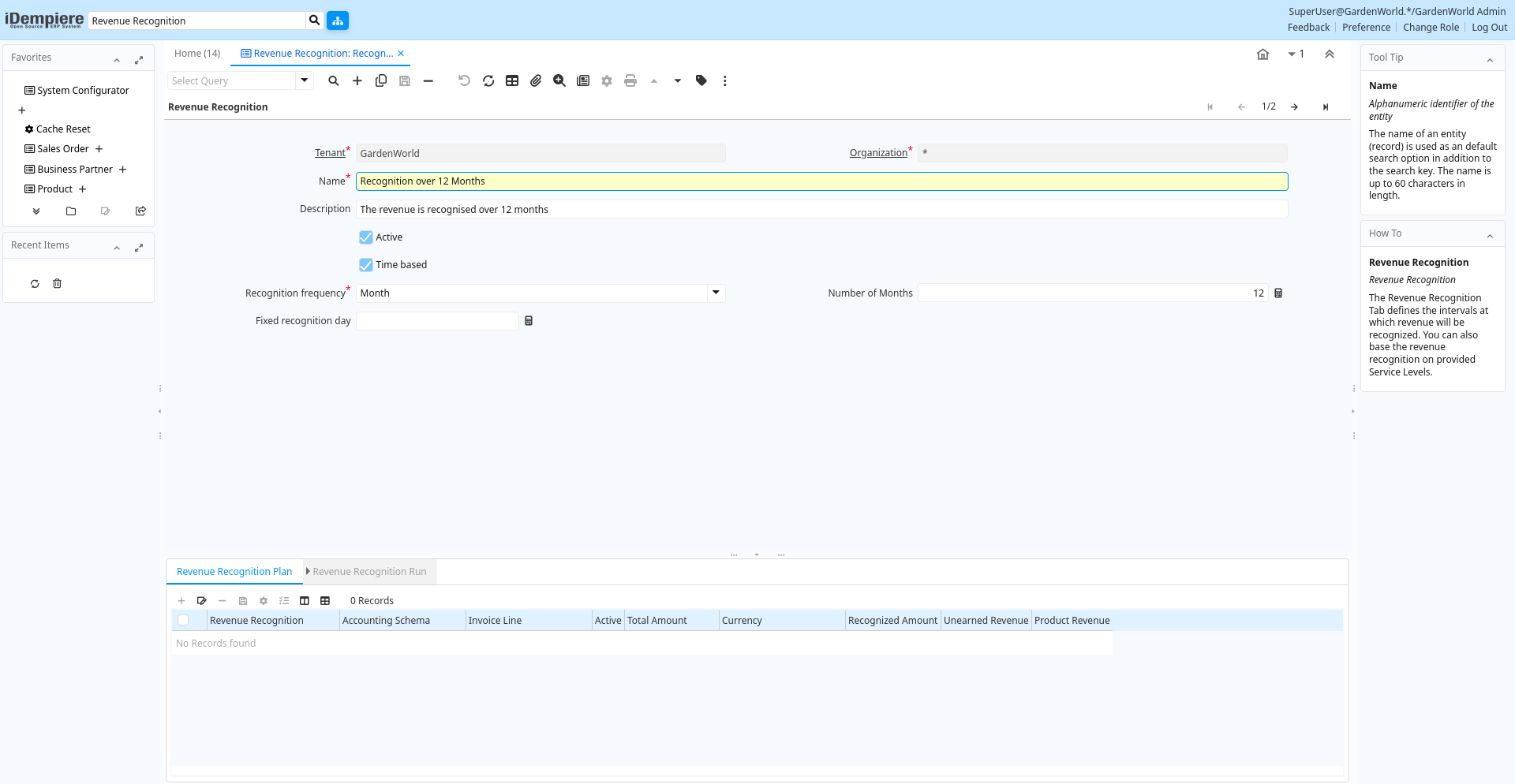
Tab: Revenue Recognition
[Created: 25/01/2000 - Updated: 02/01/2000 ]
Description: Revenue Recognition
Help: The Revenue Recognition Tab defines the intervals at which revenue will be recognized. You can also base the revenue recognition on provided Service Levels.
Tab Level: 0
Table 10: Revenue Recognition - Fields
Table: Report Parameters
| Name | Description | Help | Technical Info |
|---|---|---|---|
| Tenant | Tenant for this installation. | A Tenant is a company or a legal entity. You cannot share data between Tenants. | c_revenuerecognition.AD_Client_ID numeric(10) Table Direct |
| Organization | Organizational entity within tenant | An organization is a unit of your tenant or legal entity - examples are store, department. You can share data between organizations. | c_revenuerecognition.AD_Org_ID numeric(10) Table Direct |
| Name | Alphanumeric identifier of the entity | The name of an entity (record) is used as an default search option in addition to the search key. The name is up to 60 characters in length. | c_revenuerecognition.Name character varying(60) String |
| Description | Optional short description of the record | A description is limited to 255 characters. | c_revenuerecognition.Description character varying(255) String |
| Active | The record is active in the system | There are two methods of making records unavailable in the system: One is to delete the record, the other is to de-activate the record. A de-activated record is not available for selection, but available for reports.There are two reasons for de-activating and not deleting records:(1) The system requires the record for audit purposes.(2) The record is referenced by other records. E.g., you cannot delete a Business Partner, if there are invoices for this partner record existing. You de-activate the Business Partner and prevent that this record is used for future entries. | c_revenuerecognition.IsActive character(1) Yes-No |
| Time based | Time based Revenue Recognition rather than Service Level based | Revenue Recognition can be time or service level based. | c_revenuerecognition.IsTimeBased character(1) Yes-No |
| Recognition frequency | c_revenuerecognition.RecognitionFrequency character(1) List | ||
| Number of Months | c_revenuerecognition.NoMonths numeric(10) Integer | ||
| Fixed recognition day | Day of the period recognition occurs | The Fix Recognition Day indicates the day of the period that unearned revenue is recognised. If zero, the invoice date is used. | c_revenuerecognition.FixedRecogDay numeric(10) Integer |
Tab: Service
[Created: 28/10/2014 - Updated: 28/10/2014 ]
Description:
Help:
Tab Level: 1
Table 15: Service - Fields
Table: Report Parameters
| Name | Description | Help | Technical Info |
|---|---|---|---|
| Tenant | Tenant for this installation. | A Tenant is a company or a legal entity. You cannot share data between Tenants. | c_revenuerecog_service.AD_Client_ID numeric(10) Table Direct |
| Organization | Organizational entity within tenant | An organization is a unit of your tenant or legal entity - examples are store, department. You can share data between organizations. | c_revenuerecog_service.AD_Org_ID numeric(10) Table Direct |
| Revenue Recognition | Method for recording revenue | The Revenue Recognition indicates how revenue will be recognized for this product | c_revenuerecog_service.C_RevenueRecognition_ID numeric(10) Table Direct |
| Active | The record is active in the system | There are two methods of making records unavailable in the system: One is to delete the record, the other is to de-activate the record. A de-activated record is not available for selection, but available for reports.There are two reasons for de-activating and not deleting records:(1) The system requires the record for audit purposes.(2) The record is referenced by other records. E.g., you cannot delete a Business Partner, if there are invoices for this partner record existing. You de-activate the Business Partner and prevent that this record is used for future entries. | c_revenuerecog_service.IsActive character(1) Yes-No |
| Line No | Unique line for this document | Indicates the unique line for a document. It will also control the display order of the lines within a document. | c_revenuerecog_service.Line numeric(10) Integer |
| Percent | Percentage | The Percent indicates the percentage used. | c_revenuerecog_service.Percent numeric Amount |
| Description | Optional short description of the record | A description is limited to 255 characters. | c_revenuerecog_service.Description character varying(255) String |
Tab: Revenue Recognition Plan
[Created: 13/05/2001 - Updated: 02/01/2000 ]
Description: View Revenue Recognition Plan
Help: The Revenue Recognition plan is generated then invoicing a product with revenue recognition. With Revenue Recognition, the amount is posted to the Unrecognized revenue and over time or based on Service Level booked to Earned Revenue.
Tab Level: 1
Table 20: Revenue Recognition Plan - Fields
Table: Report Parameters
| Name | Description | Help | Technical Info |
|---|---|---|---|
| Tenant | Tenant for this installation. | A Tenant is a company or a legal entity. You cannot share data between Tenants. | c_revenuerecognition_plan.AD_Client_ID numeric(10) Table Direct |
| Organization | Organizational entity within tenant | An organization is a unit of your tenant or legal entity - examples are store, department. You can share data between organizations. | c_revenuerecognition_plan.AD_Org_ID numeric(10) Table Direct |
| Accounting Schema | Rules for accounting | An Accounting Schema defines the rules used in accounting such as costing method, currency and calendar | c_revenuerecognition_plan.C_AcctSchema_ID numeric(10) Table Direct |
| Revenue Recognition | Method for recording revenue | The Revenue Recognition indicates how revenue will be recognized for this product | c_revenuerecognition_plan.C_RevenueRecognition_ID numeric(10) Table Direct |
| Invoice Line | Invoice Detail Line | The Invoice Line uniquely identifies a single line of an Invoice. | c_revenuerecognition_plan.C_InvoiceLine_ID numeric(10) Search |
| Active | The record is active in the system | There are two methods of making records unavailable in the system: One is to delete the record, the other is to de-activate the record. A de-activated record is not available for selection, but available for reports.There are two reasons for de-activating and not deleting records:(1) The system requires the record for audit purposes.(2) The record is referenced by other records. E.g., you cannot delete a Business Partner, if there are invoices for this partner record existing. You de-activate the Business Partner and prevent that this record is used for future entries. | c_revenuerecognition_plan.IsActive character(1) Yes-No |
| Total Amount | Total Amount | The Total Amount indicates the total document amount. | c_revenuerecognition_plan.TotalAmt numeric Amount |
| Currency | The Currency for this record | Indicates the Currency to be used when processing or reporting on this record | c_revenuerecognition_plan.C_Currency_ID numeric(10) Table Direct |
| Recognized Amount | c_revenuerecognition_plan.RecognizedAmt numeric Amount | ||
| Unearned Revenue | Account for unearned revenue | The Unearned Revenue indicates the account used for recording invoices sent for products or services not yet delivered. It is used in revenue recognition | c_revenuerecognition_plan.UnEarnedRevenue_Acct numeric(10) Account |
| Product Revenue | Account for Product Revenue (Sales Account) | The Product Revenue Account indicates the account used for recording sales revenue for this product. | c_revenuerecognition_plan.P_Revenue_Acct numeric(10) Account |
Tab: Revenue Recognition Run
[Created: 13/05/2001 - Updated: 02/01/2000 ]
Description: View Revenue Recognition Run History
Help:
Tab Level: 2
Table 30: Revenue Recognition Run - Fields
Table: Report Parameters
| Name | Description | Help | Technical Info |
|---|---|---|---|
| Tenant | Tenant for this installation. | A Tenant is a company or a legal entity. You cannot share data between Tenants. | c_revenuerecognition_run.AD_Client_ID numeric(10) Table Direct |
| Organization | Organizational entity within tenant | An organization is a unit of your tenant or legal entity - examples are store, department. You can share data between organizations. | c_revenuerecognition_run.AD_Org_ID numeric(10) Table Direct |
| Revenue Recognition Plan | Plan for recognizing or recording revenue | The Revenue Recognition Plan identifies a unique Revenue Recognition Plan. | c_revenuerecognition_run.C_RevenueRecognition_Plan_ID numeric(10) Table Direct |
| Active | The record is active in the system | There are two methods of making records unavailable in the system: One is to delete the record, the other is to de-activate the record. A de-activated record is not available for selection, but available for reports.There are two reasons for de-activating and not deleting records:(1) The system requires the record for audit purposes.(2) The record is referenced by other records. E.g., you cannot delete a Business Partner, if there are invoices for this partner record existing. You de-activate the Business Partner and prevent that this record is used for future entries. | c_revenuerecognition_run.IsActive character(1) Yes-No |
| Revenue Recognition Service | c_revenuerecognition_run.C_RevenueRecog_Service_ID numeric(10) Table Direct | ||
| Recognition Date | c_revenuerecognition_run.DateRecognized timestamp without time zone Date | ||
| Journal | General Ledger Journal | The General Ledger Journal identifies a group of journal lines which represent a logical business transaction | c_revenuerecognition_run.GL_Journal_ID numeric(10) Search |
| Recognized Amount | c_revenuerecognition_run.RecognizedAmt numeric Amount |