Window: Lead
[Created: 25/08/2013 - Updated: 04/01/2021 ]
Description: Maintain Leads
Help: The Lead Window allows you to maintain Leads (can be Sales or Purchase). These are unqualified contacts to who you wish to recruit or market to.
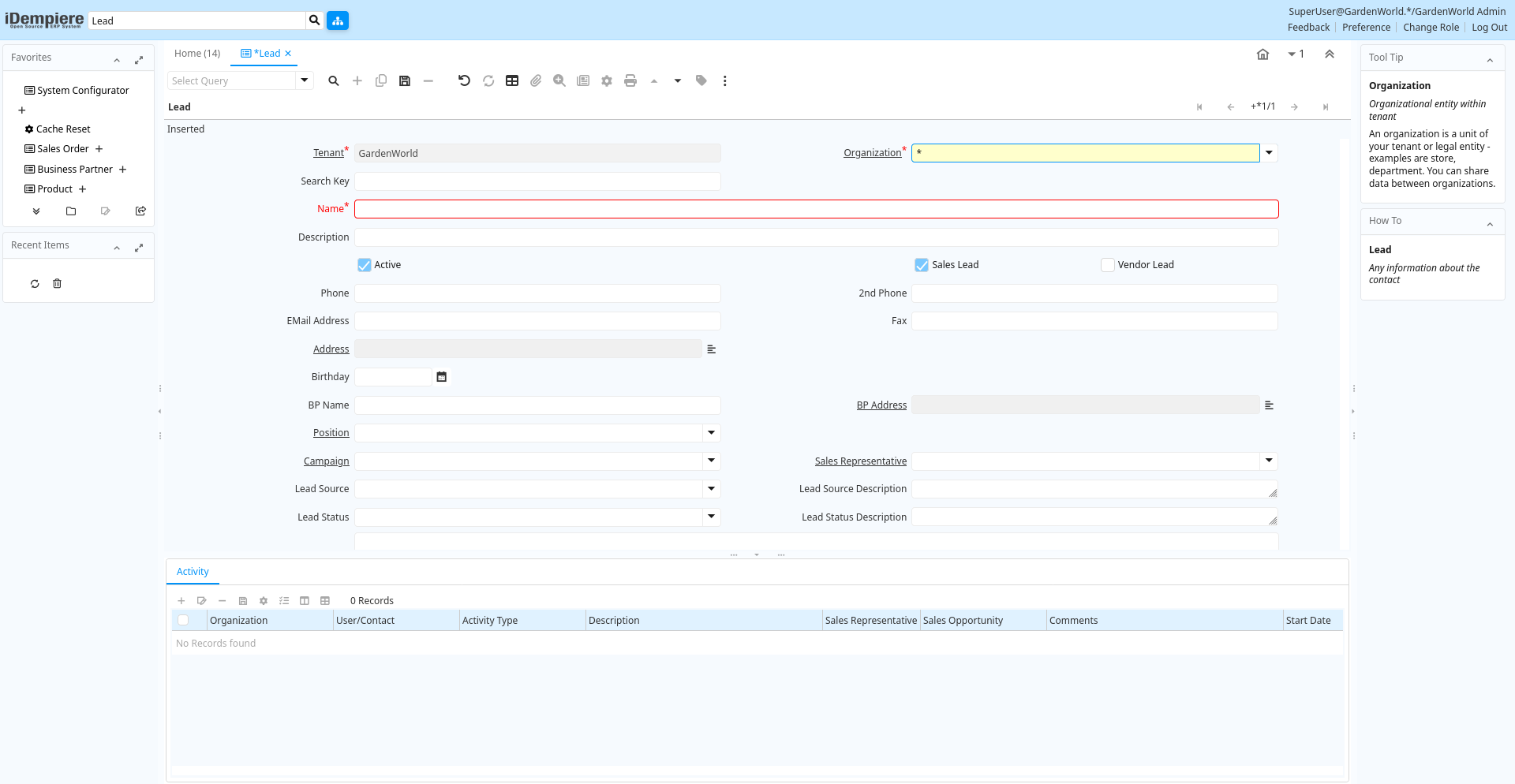
Tab: Lead
[Created: 25/08/2013 - Updated: 31/12/2020 ]
Description: Any information about the contact
Help:
Tab Level: 0
Table 10: Lead - Fields
Table: Report Parameters
| Name | Description | Help | Technical Info |
|---|---|---|---|
| Tenant | Tenant for this installation. | A Tenant is a company or a legal entity. You cannot share data between Tenants. | ad_user.AD_Client_ID numeric(10) Table Direct |
| Organization | Organizational entity within tenant | An organization is a unit of your tenant or legal entity - examples are store, department. You can share data between organizations. | ad_user.AD_Org_ID numeric(10) Table Direct |
| Search Key | Search key for the record in the format required - must be unique | A search key allows you a fast method of finding a particular record.If you leave the search key empty, the system automatically creates a numeric number. The document sequence used for this fallback number is defined in the "Maintain Sequence" window with the name "DocumentNo_", where TableName is the actual name of the table (e.g. C_Order). | ad_user.Value character varying(40) String |
| Business Partner | Identifies a Business Partner | A Business Partner is anyone with whom you transact. This can include Vendor, Customer, Employee or Salesperson | ad_user.C_BPartner_ID numeric(10) Search |
| Name | Alphanumeric identifier of the entity | The name of an entity (record) is used as an default search option in addition to the search key. The name is up to 60 characters in length. | ad_user.Name character varying(60) String |
| Description | Optional short description of the record | A description is limited to 255 characters. | ad_user.Description character varying(255) String |
| Convert Lead | Convert Lead to BP and Opportunity | Convert Lead into a Business Partner and (optional) Sales Opportunity | ad_user.Processing character(1) Button |
| Active | The record is active in the system | There are two methods of making records unavailable in the system: One is to delete the record, the other is to de-activate the record. A de-activated record is not available for selection, but available for reports.There are two reasons for de-activating and not deleting records:(1) The system requires the record for audit purposes.(2) The record is referenced by other records. E.g., you cannot delete a Business Partner, if there are invoices for this partner record existing. You de-activate the Business Partner and prevent that this record is used for future entries. | ad_user.IsActive character(1) Yes-No |
| Sales Lead | This contact is a sales lead | Sales leads can be converted into full contacts with Business Partners. | ad_user.IsSalesLead character(1) Yes-No |
| Vendor Lead | This contact is a vendor lead | Vendor leads can be converted into full contacts with Business Partners. | ad_user.IsVendorLead character(1) Yes-No |
| Phone | Identifies a telephone number | The Phone field identifies a telephone number | ad_user.Phone character varying(40) String |
| 2nd Phone | Identifies an alternate telephone number. | The 2nd Phone field identifies an alternate telephone number. | ad_user.Phone2 character varying(40) String |
| EMail Address | Electronic Mail Address | The Email Address is the Electronic Mail ID for this User and should be fully qualified (e.g. joe.smith@company.com). The Email Address is used to access the self service application functionality from the web. | ad_user.EMail character varying(60) String |
| Fax | Facsimile number | The Fax identifies a facsimile number for this Business Partner or Location | ad_user.Fax character varying(40) String |
| Address | Location or Address | The Location / Address field defines the location of an entity. | ad_user.C_Location_ID numeric(10) Location (Address) |
| Birthday | Birthday or Anniversary day | Birthday or Anniversary day | ad_user.Birthday timestamp without time zone Date |
| BP Name | ad_user.BPName character varying(60) String | ||
| BP Address | Address of the Business Partner | ad_user.BP_Location_ID numeric(10) Location (Address) | |
| Position | Job Position | ad_user.C_Job_ID numeric(10) Table Direct | |
| Campaign | Marketing Campaign | The Campaign defines a unique marketing program. Projects can be associated with a pre defined Marketing Campaign. You can then report based on a specific Campaign. | ad_user.C_Campaign_ID numeric(10) Table Direct |
| Sales Representative | Sales Representative or Company Agent | The Sales Representative indicates the Sales Rep for this Region. Any Sales Rep must be a valid internal user. | ad_user.SalesRep_ID numeric(10) Table |
| Lead Source | The source of this lead/opportunity | ad_user.LeadSource character varying(10) List | |
| Lead Source Description | Additional information on the source of this lead/opportunity | ad_user.LeadSourceDescription character varying(255) Text | |
| Lead Status | The status of this lead/opportunity in the sales cycle | ad_user.LeadStatus character varying(10) List | |
| Lead Status Description | Additional information on the status of this lead/opportunity | ad_user.LeadStatusDescription character varying(255) Text | |
| Comments | Comments or additional information | The Comments field allows for free form entry of additional information. | ad_user.Comments character varying(2000) Text |
Tab: Activity
[Created: 25/08/2013 - Updated: 25/08/2013 ]
Description:
Help:
Tab Level: 1
Table 20: Activity - Fields
Table: Report Parameters
| Name | Description | Help | Technical Info |
|---|---|---|---|
| Tenant | Tenant for this installation. | A Tenant is a company or a legal entity. You cannot share data between Tenants. | c_contactactivity.AD_Client_ID numeric(10) Table Direct |
| Organization | Organizational entity within tenant | An organization is a unit of your tenant or legal entity - examples are store, department. You can share data between organizations. | c_contactactivity.AD_Org_ID numeric(10) Table Direct |
| User/Contact | User within the system - Internal or Business Partner Contact | The User identifies a unique user in the system. This could be an internal user or a business partner contact | c_contactactivity.AD_User_ID numeric(10) Search |
| Activity Type | Type of activity, e.g. task, email, phone call | c_contactactivity.ContactActivityType character varying(10) List | |
| Description | Optional short description of the record | A description is limited to 255 characters. | c_contactactivity.Description character varying(255) String |
| Sales Representative | Sales Representative or Company Agent | The Sales Representative indicates the Sales Rep for this Region. Any Sales Rep must be a valid internal user. | c_contactactivity.SalesRep_ID numeric(10) Table |
| Sales Opportunity | c_contactactivity.C_Opportunity_ID numeric(10) Table Direct | ||
| Comments | Comments or additional information | The Comments field allows for free form entry of additional information. | c_contactactivity.Comments text Text |
| Start Date | First effective day (inclusive) | The Start Date indicates the first or starting date | c_contactactivity.StartDate timestamp without time zone Date+Time |
| End Date | Last effective date (inclusive) | The End Date indicates the last date in this range. | c_contactactivity.EndDate timestamp without time zone Date+Time |
| Complete | It is complete | Indication that this is complete | c_contactactivity.IsComplete character(1) Yes-No |