Window: GL Journal Generator
[Created: 24/09/2012 - Updated: 03/06/2021 ]
Description:
Help:
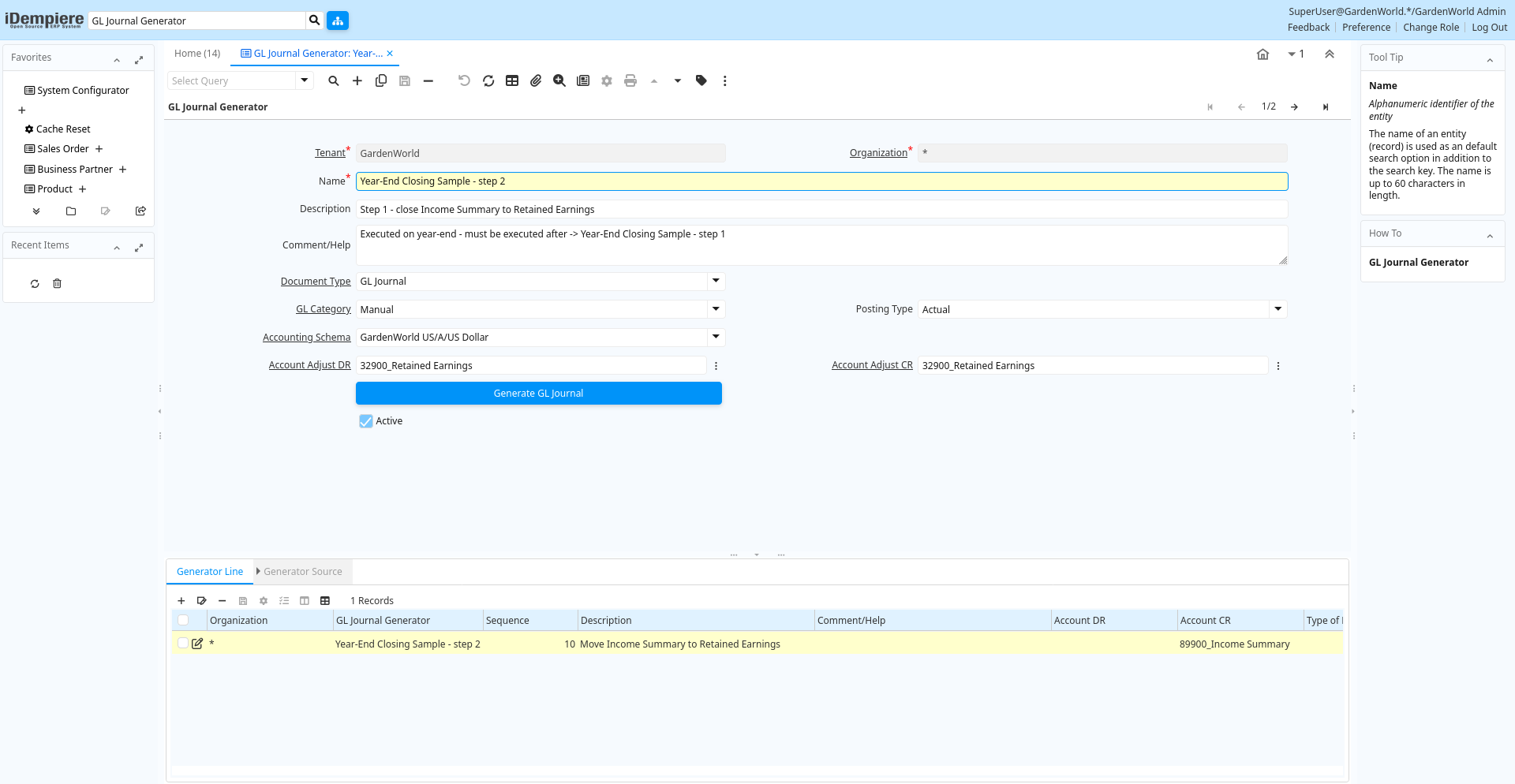
Tab: GL Journal Generator
[Created: 24/09/2012 - Updated: 24/09/2012 ]
Description:
Help:
Tab Level: 0
Table 10: GL Journal Generator - Fields
Table: Report Parameters
| Name | Description | Help | Technical Info |
|---|---|---|---|
| Tenant | Tenant for this installation. | A Tenant is a company or a legal entity. You cannot share data between Tenants. | gl_journalgenerator.AD_Client_ID numeric(10) Table Direct |
| Organization | Organizational entity within tenant | An organization is a unit of your tenant or legal entity - examples are store, department. You can share data between organizations. | gl_journalgenerator.AD_Org_ID numeric(10) Table Direct |
| Name | Alphanumeric identifier of the entity | The name of an entity (record) is used as an default search option in addition to the search key. The name is up to 60 characters in length. | gl_journalgenerator.Name character varying(60) String |
| Description | Optional short description of the record | A description is limited to 255 characters. | gl_journalgenerator.Description character varying(255) String |
| Comment/Help | Comment or Hint | The Help field contains a hint, comment or help about the use of this item. | gl_journalgenerator.Help character varying(2000) Text |
| Document Type | Document type or rules | The Document Type determines document sequence and processing rules | gl_journalgenerator.C_DocType_ID numeric(10) Table Direct |
| GL Category | General Ledger Category | The General Ledger Category is an optional, user defined method of grouping journal lines. | gl_journalgenerator.GL_Category_ID numeric(10) Table Direct |
| Posting Type | The type of posted amount for the transaction | The Posting Type indicates the type of amount (Actual, Budget, Reservation, Commitment, Statistical) the transaction. | gl_journalgenerator.PostingType character(1) List |
| Accounting Schema | Rules for accounting | An Accounting Schema defines the rules used in accounting such as costing method, currency and calendar | gl_journalgenerator.C_AcctSchema_ID numeric(10) Table Direct |
| Account Adjust DR | gl_journalgenerator.C_ElementValueAdjustDR_ID numeric(10) Search | ||
| Account Adjust CR | gl_journalgenerator.C_ElementValueAdjustCR_ID numeric(10) Search | ||
| Generate GL Journal | gl_journalgenerator.GenerateGLJournal character(1) Button | ||
| Active | The record is active in the system | There are two methods of making records unavailable in the system: One is to delete the record, the other is to de-activate the record. A de-activated record is not available for selection, but available for reports.There are two reasons for de-activating and not deleting records:(1) The system requires the record for audit purposes.(2) The record is referenced by other records. E.g., you cannot delete a Business Partner, if there are invoices for this partner record existing. You de-activate the Business Partner and prevent that this record is used for future entries. | gl_journalgenerator.IsActive character(1) Yes-No |
Tab: Generator Line
[Created: 24/09/2012 - Updated: 24/09/2012 ]
Description:
Help:
Tab Level: 1
Table 20: Generator Line - Fields
Table: Report Parameters
| Name | Description | Help | Technical Info |
|---|---|---|---|
| Tenant | Tenant for this installation. | A Tenant is a company or a legal entity. You cannot share data between Tenants. | gl_journalgeneratorline.AD_Client_ID numeric(10) Table Direct |
| Organization | Organizational entity within tenant | An organization is a unit of your tenant or legal entity - examples are store, department. You can share data between organizations. | gl_journalgeneratorline.AD_Org_ID numeric(10) Table Direct |
| GL Journal Generator | gl_journalgeneratorline.GL_JournalGenerator_ID numeric(10) Table Direct | ||
| Sequence | Method of ordering records; lowest number comes first | The Sequence indicates the order of records | gl_journalgeneratorline.SeqNo numeric(10) Integer |
| Description | Optional short description of the record | A description is limited to 255 characters. | gl_journalgeneratorline.Description character varying(255) String |
| Comment/Help | Comment or Hint | The Help field contains a hint, comment or help about the use of this item. | gl_journalgeneratorline.Help character varying(2000) Text |
| Account DR | gl_journalgeneratorline.C_ElementValueDR_ID numeric(10) Search | ||
| Account CR | gl_journalgeneratorline.C_ElementValueCR_ID numeric(10) Search | ||
| Type of BP Dimension | gl_journalgeneratorline.BPDimensionType character(1) List | ||
| Business Partner | Identifies a Business Partner | A Business Partner is anyone with whom you transact. This can include Vendor, Customer, Employee or Salesperson | gl_journalgeneratorline.C_BPartner_ID numeric(10) Search |
| BP Column | gl_journalgeneratorline.BPColumn character varying(124) String | ||
| Same Product | gl_journalgeneratorline.IsSameProduct character(1) Yes-No | ||
| Copy All Dimensions | gl_journalgeneratorline.IsCopyAllDimensions character(1) Yes-No | ||
| Multiplier Amount | Multiplier Amount for generating commissions | The Multiplier Amount indicates the amount to multiply the total amount generated by this commission run by. | gl_journalgeneratorline.AmtMultiplier numeric Number |
| Round Factor | gl_journalgeneratorline.RoundFactor numeric(10) Integer | ||
| Active | The record is active in the system | There are two methods of making records unavailable in the system: One is to delete the record, the other is to de-activate the record. A de-activated record is not available for selection, but available for reports.There are two reasons for de-activating and not deleting records:(1) The system requires the record for audit purposes.(2) The record is referenced by other records. E.g., you cannot delete a Business Partner, if there are invoices for this partner record existing. You de-activate the Business Partner and prevent that this record is used for future entries. | gl_journalgeneratorline.IsActive character(1) Yes-No |
Tab: Generator Source
[Created: 24/09/2012 - Updated: 24/09/2012 ]
Description:
Help:
Tab Level: 2
Table 30: Generator Source - Fields
Table: Report Parameters
| Name | Description | Help | Technical Info |
|---|---|---|---|
| Tenant | Tenant for this installation. | A Tenant is a company or a legal entity. You cannot share data between Tenants. | gl_journalgeneratorsource.AD_Client_ID numeric(10) Table Direct |
| Organization | Organizational entity within tenant | An organization is a unit of your tenant or legal entity - examples are store, department. You can share data between organizations. | gl_journalgeneratorsource.AD_Org_ID numeric(10) Table Direct |
| Generator Line | gl_journalgeneratorsource.GL_JournalGeneratorLine_ID numeric(10) Table Direct | ||
| Account Element | Account Element | Account Elements can be natural accounts or user defined values. | gl_journalgeneratorsource.C_ElementValue_ID numeric(10) Search |
| GL Category | General Ledger Category | The General Ledger Category is an optional, user defined method of grouping journal lines. | gl_journalgeneratorsource.GL_Category_ID numeric(10) Table Direct |
| Multiplier Amount | Multiplier Amount for generating commissions | The Multiplier Amount indicates the amount to multiply the total amount generated by this commission run by. | gl_journalgeneratorsource.AmtMultiplier numeric Number |
| Round Factor | gl_journalgeneratorsource.RoundFactor numeric(10) Integer | ||
| Comment/Help | Comment or Hint | The Help field contains a hint, comment or help about the use of this item. | gl_journalgeneratorsource.Help character varying(2000) Text |
| Active | The record is active in the system | There are two methods of making records unavailable in the system: One is to delete the record, the other is to de-activate the record. A de-activated record is not available for selection, but available for reports.There are two reasons for de-activating and not deleting records:(1) The system requires the record for audit purposes.(2) The record is referenced by other records. E.g., you cannot delete a Business Partner, if there are invoices for this partner record existing. You de-activate the Business Partner and prevent that this record is used for future entries. | gl_journalgeneratorsource.IsActive character(1) Yes-No |