Window: Print Format
[Created: 11/07/2002 - Updated: 02/01/2000 ]
Description: Maintain Print Format
Help: The print format determines how data is rendered for print.
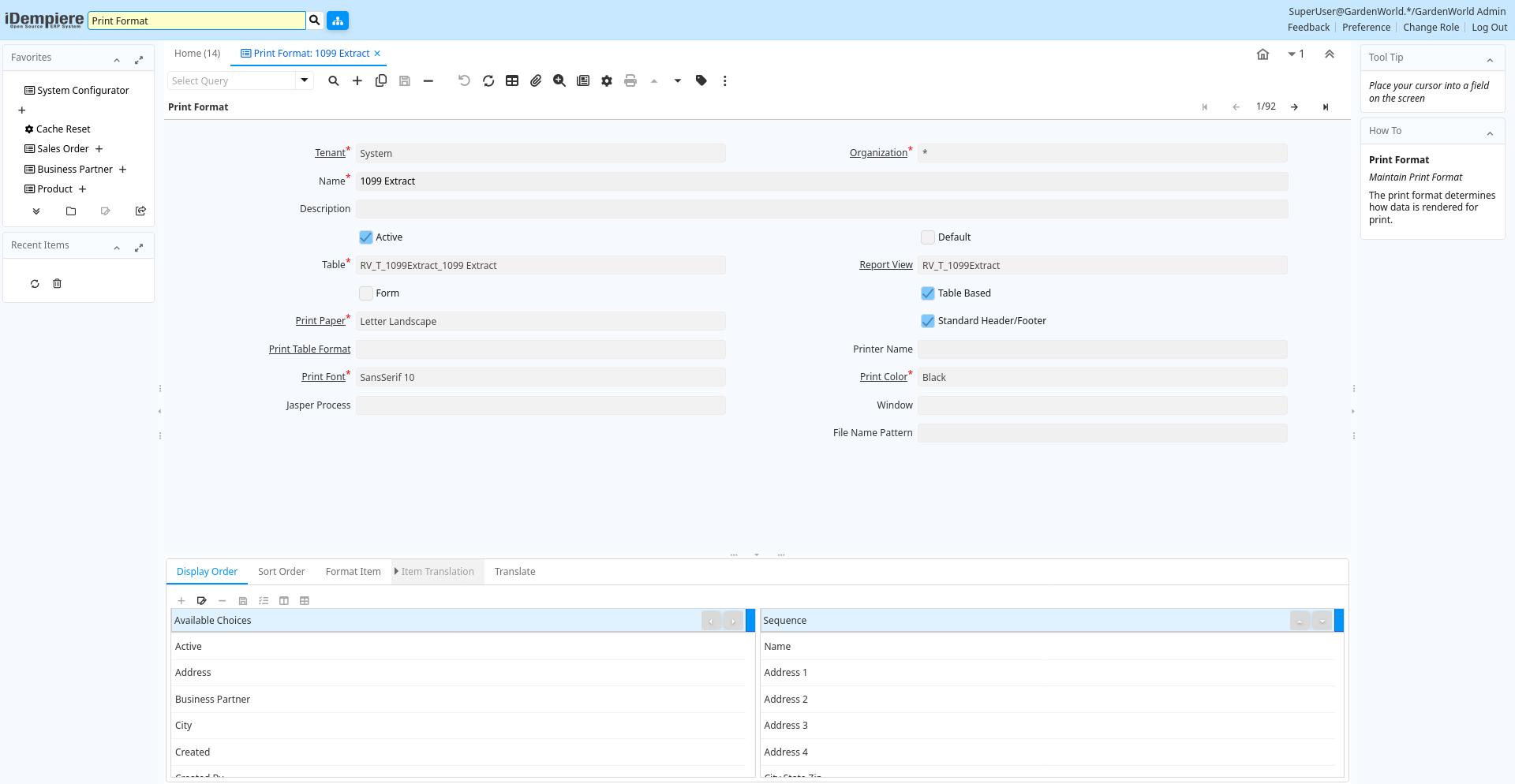
Tab: Print Format
[Created: 11/07/2002 - Updated: 02/01/2000 ]
Description: Maintain Print Format
Help: The print format determines how data is rendered for print.
Tab Level: 0
Table 10: Print Format - Fields
Table: Report Parameters
| Name | Description | Help | Technical Info |
|---|---|---|---|
| Tenant | Tenant for this installation. | A Tenant is a company or a legal entity. You cannot share data between Tenants. | ad_printformat.AD_Client_ID numeric(10) Table Direct |
| Organization | Organizational entity within tenant | An organization is a unit of your tenant or legal entity - examples are store, department. You can share data between organizations. | ad_printformat.AD_Org_ID numeric(10) Table Direct |
| Name | Alphanumeric identifier of the entity | The name of an entity (record) is used as an default search option in addition to the search key. The name is up to 60 characters in length. | ad_printformat.Name character varying(60) String |
| Description | Optional short description of the record | A description is limited to 255 characters. | ad_printformat.Description character varying(255) String |
| Active | The record is active in the system | There are two methods of making records unavailable in the system: One is to delete the record, the other is to de-activate the record. A de-activated record is not available for selection, but available for reports.There are two reasons for de-activating and not deleting records:(1) The system requires the record for audit purposes.(2) The record is referenced by other records. E.g., you cannot delete a Business Partner, if there are invoices for this partner record existing. You de-activate the Business Partner and prevent that this record is used for future entries. | ad_printformat.IsActive character(1) Yes-No |
| Default | Default value | The Default Checkbox indicates if this record will be used as a default value. | ad_printformat.IsDefault character(1) Yes-No |
| Table | Database Table information | The Database Table provides the information of the table definition | ad_printformat.AD_Table_ID numeric(10) Table Direct |
| Report View | View used to generate this report | The Report View indicates the view used to generate this report. | ad_printformat.AD_ReportView_ID numeric(10) Table Direct |
| Form | If Selected, a Form is printed, if not selected a columnar List report | A form has individual elements with layout information (example: invoice, check)A columnar list report has individual columns (example: list of invoices) | ad_printformat.IsForm character(1) Yes-No |
| Table Based | Table based List Reporting | Table based columnar list reporting is invoked from the Window Report button | ad_printformat.IsTableBased character(1) Yes-No |
| Print Paper | Printer paper definition | Printer Paper Size, Orientation and Margins | ad_printformat.AD_PrintPaper_ID numeric(10) Table Direct |
| Standard Header/Footer | The standard Header and Footer is used | If the standard header is not used, it must be explicitly defined. | ad_printformat.IsStandardHeaderFooter character(1) Yes-No |
| Print Header/Footer | ad_printformat.AD_PrintHeaderFooter_ID numeric(10) Table Direct | ||
| Print Table Format | Table Format in Reports | Print Table Format determines Fonts, Colors of the printed Table | ad_printformat.AD_PrintTableFormat_ID numeric(10) Table Direct |
| Printer Name | Name of the Printer | Internal (Operating System) Name of the Printer; Please mote that the printer name may be different on different tenants. Enter a printer name, which applies to ALL tenants (e.g. printer on a server). If none is entered, the default printer is used. You specify your default printer when you log in. You can also change the default printer in Preferences. | ad_printformat.PrinterName character varying(40) String |
| Header Margin | Margin of the Header in 1/72 of an inch | Distance from the top of the printable page to the start of the main content in 1/72 of an inch (point) | ad_printformat.HeaderMargin numeric(10) Integer |
| Footer Margin | Margin of the Footer in 1/72 of an inch | Distance from the bottom of the main content to the end of the printable page in 1/72 of an inch (point) | ad_printformat.FooterMargin numeric(10) Integer |
| Print Font | Maintain Print Font | Font used for printing | ad_printformat.AD_PrintFont_ID numeric(10) Table Direct |
| Print Color | Color used for printing and display | Colors used for printing and display | ad_printformat.AD_PrintColor_ID numeric(10) Table Direct |
| Jasper Process | The Jasper Process used by the print engine if any process defined | ad_printformat.JasperProcess_ID numeric(10) Table | |
| Window | Data entry or display window | The Window field identifies a unique Window in the system. | ad_printformat.AD_Window_ID numeric(10) Table Direct |
| Copy/Create | Copy existing OR create Print Format from Table | Select either a table to create a print format [creates initial rough layout]OR a print format to copy into the current print format [copies layout]. | ad_printformat.CreateCopy character(1) Button |
| Page break per record | Page Break after each record | ad_printformat.IsBreakPagePerRecord character(1) Yes-No | |
| File Name Pattern | ad_printformat.FileNamePattern character varying(255) String |
Tab: Format Item
[Created: 11/07/2002 - Updated: 15/01/2024 ]
Description: Print Format Item
Help: Item in the print format maintaining layout information. The following additional variables are available when printing:@*Page@ - the current page number@*PageCount@ - the total number of pages@*MultiPageInfo@ - "Page x of y" - only printed if more than one page@*CopyInfo@ - if it is a copy of the document "Duplicate" is printed@*ReportName@ - name of the report@*Header@ - Full Header with user/tenant/org name and connection@*CurrentDate@ - the print date@*CurrentDateTime@ - the print timeThe layout logic for forms is: - if not printed: ignore - set New Line Position - new page - new line, if something was printed since last new line- format item- print it (if not null/empty selected)(i.e. suppress null does not prevent new line)
Tab Level: 1
Table 40: Format Item - Fields
Table: Report Parameters
| Name | Description | Help | Technical Info |
|---|---|---|---|
| Tenant | Tenant for this installation. | A Tenant is a company or a legal entity. You cannot share data between Tenants. | ad_printformatitem.AD_Client_ID numeric(10) Table Direct |
| Organization | Organizational entity within tenant | An organization is a unit of your tenant or legal entity - examples are store, department. You can share data between organizations. | ad_printformatitem.AD_Org_ID numeric(10) Table Direct |
| Print Format | Data Print Format | The print format determines how data is rendered for print. | ad_printformatitem.AD_PrintFormat_ID numeric(10) Table Direct |
| Sequence | Method of ordering records; lowest number comes first | The Sequence indicates the order of records | ad_printformatitem.SeqNo numeric(10) Integer |
| Name | Alphanumeric identifier of the entity | The name of an entity (record) is used as an default search option in addition to the search key. The name is up to 60 characters in length. | ad_printformatitem.Name character varying(60) String |
| Print Text | The label text to be printed on a document or correspondence. | The Label to be printed indicates the name that will be printed on a document or correspondence. The max length is 2000 characters. | ad_printformatitem.PrintName character varying(2000) String |
| Print Label Suffix | The label text to be printed on a document or correspondence after the field | The Label to be printed indicates the name that will be printed on a document or correspondence after the field. The max length is 60 characters. | ad_printformatitem.PrintNameSuffix character varying(60) String |
| Active | The record is active in the system | There are two methods of making records unavailable in the system: One is to delete the record, the other is to de-activate the record. A de-activated record is not available for selection, but available for reports.There are two reasons for de-activating and not deleting records:(1) The system requires the record for audit purposes.(2) The record is referenced by other records. E.g., you cannot delete a Business Partner, if there are invoices for this partner record existing. You de-activate the Business Partner and prevent that this record is used for future entries. | ad_printformatitem.IsActive character(1) Yes-No |
| Centrally maintained | Information maintained in System Element table | The Centrally Maintained checkbox indicates if the Name, Description and Help maintained in 'System Element' table or 'Window' table. | ad_printformatitem.IsCentrallyMaintained character(1) Yes-No |
| Suppress Null | Suppress columns or elements with NULL value | If a Form entry is NULL and if selected, the field (including label) is not printed. If all elements in a table column are NULL and if selected, the column is not printed. | ad_printformatitem.IsSuppressNull character(1) Yes-No |
| Suppress Repeats | Suppress repeated elements in column. | Determines whether repeated elements in a column are repeated in a printed table. | ad_printformatitem.IsSuppressRepeats character(1) Yes-No |
| Format Type | Print Format Type | The print format type determines what will be printed. | ad_printformatitem.PrintFormatType character(1) List |
| Column | Column in the table | Link to the database column of the table | ad_printformatitem.AD_Column_ID numeric(10) Table Direct |
| Line Width | Width of the lines | ad_printformatitem.LineWidth numeric(10) Integer | |
| Format Pattern | The pattern used to format a number or date. | A string complying with either Java SimpleDateFormat or DecimalFormat pattern syntax used to override the default presentation format of a date or number type field. | ad_printformatitem.FormatPattern character varying(60) String |
| Print Attributes | Print each attributes as report column instead of printing the description of attribute set instance | This control the printing of product attribute set instance. When checked, the report will have one column for each attribute instead of printing the description of attribute set instance. | ad_printformatitem.IsPrintInstanceAttributes character(1) Yes-No |
| Included Print Format | Print format that is included here. | Included Print formats allow to e.g. Lines to Header records. The Column provides the parent link. | ad_printformatitem.AD_PrintFormatChild_ID numeric(10) Table |
| Image Field | The image is retrieved from the data column | The Image URL is retrieved from the data column | ad_printformatitem.IsImageField character(1) Yes-No |
| Image attached | The image to be printed is attached to the record | The image to be printed is stored in the database as attachment to this record. The image can be a gif, jpeg or png. | ad_printformatitem.ImageIsAttached character(1) Yes-No |
| Image URL | URL of image | URL of image; The image is not stored in the database, but retrieved at runtime. The image can be a gif, jpeg or png. | ad_printformatitem.ImageURL character varying(120) URL |
| Area | Print Area | Print area of this item | ad_printformatitem.PrintAreaType character(1) List |
| Barcode Type | Type of barcode | ad_printformatitem.BarcodeType character(3) List | |
| Print Barcode Text | Print barcode text at the bottom of barcode | ad_printformatitem.IsPrintBarcodeText character(1) Yes-No | |
| Relative Position | The item is relative positioned (not absolute) | The relative positioning of the item is determined by X-Z space and next line | ad_printformatitem.IsRelativePosition character(1) Yes-No |
| Set NL Position | Set New Line Position | When enabled, the current x (horizontal) Position before printing the item is saved. The next New Line will use the saved x (horizontal) Position, enabling to print data in columns.The setting is not restricted to an area (header, content, footer), allowing to align information also with Header and Footer with the Content. | ad_printformatitem.IsSetNLPosition character(1) Yes-No |
| X Position | Absolute X (horizontal) position in 1/72 of an inch | Absolute X (horizontal) position in 1/72 of an inch | ad_printformatitem.XPosition numeric(10) Integer |
| Y Position | Absolute Y (vertical) position in 1/72 of an inch | Absolute Y (vertical) position in 1/72 of an inch | ad_printformatitem.YPosition numeric(10) Integer |
| Next Line | Print item on next line | If not selected, the item is printed on the same line | ad_printformatitem.IsNextLine character(1) Yes-No |
| Next Page | The column is printed on the next page | Before printing this column, there will be a page break. | ad_printformatitem.IsNextPage character(1) Yes-No |
| Below Column | Print this column below the column index entered | This column is printed in a second line below the content of the first line identified. Please be aware, that this is depends on the actual sequence. Enter a 1 to add the info below the first column. | ad_printformatitem.BelowColumn numeric(10) Integer |
| Line Alignment | Line Alignment | For relative positioning, the line alignment | ad_printformatitem.LineAlignmentType character(1) List |
| Field Alignment | Field Text Alignment | Alignment of field text. The default is determined by the data/display type: Numbers are right aligned, other data is left aligned | ad_printformatitem.FieldAlignmentType character(1) List |
| X Space | Relative X (horizontal) space in 1/72 of an inch | Relative X (horizontal) space in 1/72 of an inch in relation to the end of the previous item. | ad_printformatitem.XSpace numeric(10) Integer |
| Y Space | Relative Y (vertical) space in 1/72 of an inch | Relative Y (vertical) space in 1/72 of an inch in relation to the end of the previous item. | ad_printformatitem.YSpace numeric(10) Integer |
| Max Width | Maximum Width in 1/72 if an inch - 0 = no restriction | Maximum width of the element in 1/72 of an inch (point). If zero (0), there is no width restriction. | ad_printformatitem.MaxWidth numeric(10) Integer |
| Fixed Width | Column has a fixed width | The Column has a fixed width, independent from the content | ad_printformatitem.IsFixedWidth character(1) Yes-No |
| Shape Type | Type of the shape to be painted | ad_printformatitem.ShapeType character(1) List | |
| Max Height | Maximum Height in 1/72 if an inch - 0 = no restriction | Maximum height of the element in 1/72 of an inch (point). If zero (0), there is no height restriction. | ad_printformatitem.MaxHeight numeric(10) Integer |
| One Line Only | If selected, only one line is printed | If the column has a width restriction, the text is broken into multiple lines. If One Line is selected, only the first line is printed. | ad_printformatitem.IsHeightOneLine character(1) Yes-No |
| Fill Shape | Fill the shape with the color selected | ad_printformatitem.IsFilledRectangle character(1) Yes-No | |
| Print Color | Color used for printing and display | Colors used for printing and display | ad_printformatitem.AD_PrintColor_ID numeric(10) Table Direct |
| Print Font | Maintain Print Font | Font used for printing | ad_printformatitem.AD_PrintFont_ID numeric(10) Table Direct |
| Field Style | Field CSS Style | ad_printformatitem.AD_FieldStyle_ID numeric(10) Table | |
| Display Logic | If the Field is displayed, the result determines if the field is actually displayed | format := {expression} [{logic} {expression}] expression := @{context}@{operand}{value} or @{context}@{operand}{value} logic := { | } |
| Arc Diameter | Arc Diameter for rounded Rectangles | Width of the horizontal/vertical diameter of the arc at the four corners | ad_printformatitem.ArcDiameter numeric(10) Integer |
| Order by | Include in sort order | The records are ordered by the value of this column. If a column is used for grouping, it needs to be included in the sort order as well. | ad_printformatitem.IsOrderBy character(1) Yes-No |
| Record Sort No | Determines in what order the records are displayed | The Record Sort No indicates the ascending sort sequence of the records. If the number is negative, the records are sorted descending. Example: A tab with C_DocType_ID (1), DocumentNo (-2) will be sorted ascending by document type and descending by document number (SQL: ORDER BY C_DocType, DocumentNo DESC) | ad_printformatitem.SortNo numeric(10) Integer |
| Descending | Sort your data using a SQL Desc Order By statement | ad_printformatitem.IsDesc character(1) Yes-No | |
| Group by | After a group change, totals, etc. are printed | Grouping allows to print sub-totals. If a group changes, the totals are printed. Group by columns need to be included in the sort order. | ad_printformatitem.IsGroupBy character(1) Yes-No |
| Page break | Start with new page | Before printing this item, create a new page | ad_printformatitem.IsPageBreak character(1) Yes-No |
| Calculate Sum (Σ) | Calculate the Sum of numeric content or length | Calculate the Sum (Σ) of the data if the field is numeric, otherwise total sum length of the field. | ad_printformatitem.IsSummarized character(1) Yes-No |
| Running Total | Create a running total (sum) | A running total creates a sum at the end of a page and on the top of the next page for all columns, which have a Sum function. You should define running total only once per format. | ad_printformatitem.IsRunningTotal character(1) Yes-No |
| Calculate Count (№) | Count number of not empty elements | Calculate the total number (№) of not empty (NULL) elements (maximum is the number of lines). | ad_printformatitem.IsCounted character(1) Yes-No |
| Running Total Lines | Create Running Total Lines (page break) every x lines | When you want to print running totals, enter the number of lines per page after you want to create a running total line and page break. You should define running total only once per format. | ad_printformatitem.RunningTotalLines numeric(10) Integer |
| Calculate Minimum (↓) | Calculate the minimum amount | Calculate the Minimum (↓) of the data if the field is numeric, otherwise minimum length of the field. | ad_printformatitem.IsMinCalc character(1) Yes-No |
| Calculate Maximum (↑) | Calculate the maximum amount | Calculate the Maximum (↑) of the data if the field is numeric, otherwise maximum length of the field. | ad_printformatitem.IsMaxCalc character(1) Yes-No |
| Calculate Mean (μ) | Calculate Average of numeric content or length | Calculate the Mean (μ) of the data if the field is numeric, otherwise calculate the average length of the field. | ad_printformatitem.IsAveraged character(1) Yes-No |
| Calculate Variance (σ²) | Calculate Variance | The Variance (σ²) is the a measure of dispersion - used in combination with the Mean (μ) | ad_printformatitem.IsVarianceCalc character(1) Yes-No |
| Calculate Deviation (σ) | Calculate Standard Deviation | The Standard Deviation (σ) is the a measure of dispersion - used in combination with the Mean (μ) | ad_printformatitem.IsDeviationCalc character(1) Yes-No |
| Script | Dynamic Java Language Script to calculate result | Use Java language constructs to define the result of the calculation | ad_printformatitem.Script character varying(2000) Text |
Tab: Item Translation
[Created: 24/08/2002 - Updated: 27/10/2024 ]
Description: Print Format Translation
Help:
Tab Level: 2
Table 50: Item Translation - Fields
Table: Report Parameters
| Name | Description | Help | Technical Info |
|---|---|---|---|
| Tenant | Tenant for this installation. | A Tenant is a company or a legal entity. You cannot share data between Tenants. | ad_printformatitem_trl.AD_Client_ID numeric(10) Table Direct |
| Organization | Organizational entity within tenant | An organization is a unit of your tenant or legal entity - examples are store, department. You can share data between organizations. | ad_printformatitem_trl.AD_Org_ID numeric(10) Table Direct |
| Print Format Item | Item/Column in the Print format | Item/Column in the print format maintaining layout information | ad_printformatitem_trl.AD_PrintFormatItem_ID numeric(10) Table Direct |
| Language | Language for this entity | The Language identifies the language to use for display and formatting | ad_printformatitem_trl.AD_Language character varying(6) Table |
| Active | The record is active in the system | There are two methods of making records unavailable in the system: One is to delete the record, the other is to de-activate the record. A de-activated record is not available for selection, but available for reports.There are two reasons for de-activating and not deleting records:(1) The system requires the record for audit purposes.(2) The record is referenced by other records. E.g., you cannot delete a Business Partner, if there are invoices for this partner record existing. You de-activate the Business Partner and prevent that this record is used for future entries. | ad_printformatitem_trl.IsActive character(1) Yes-No |
| Translated | This column is translated | The Translated checkbox indicates if this column is translated. | ad_printformatitem_trl.IsTranslated character(1) Yes-No |
| Name | Alphanumeric identifier of the entity | The name of an entity (record) is used as an default search option in addition to the search key. The name is up to 60 characters in length. | ad_printformatitem_trl.Name character varying(60) String |
| Print Text | The label text to be printed on a document or correspondence. | The Label to be printed indicates the name that will be printed on a document or correspondence. The max length is 2000 characters. | ad_printformatitem_trl.PrintName character varying(2000) String |
| Print Label Suffix | The label text to be printed on a document or correspondence after the field | The Label to be printed indicates the name that will be printed on a document or correspondence after the field. The max length is 60 characters. | ad_printformatitem_trl.PrintNameSuffix character varying(60) String |
Tab: Translate
[Created: 27/05/2014 - Updated: 27/10/2024 ]
Description:
Help:
Tab Level: 1
Table 70: Translate - Fields
Table: Report Parameters
| Name | Description | Help | Technical Info |
|---|---|---|---|
| Tenant | Tenant for this installation. | A Tenant is a company or a legal entity. You cannot share data between Tenants. | ad_printformat_trl.AD_Client_ID numeric(10) Table Direct |
| Organization | Organizational entity within tenant | An organization is a unit of your tenant or legal entity - examples are store, department. You can share data between organizations. | ad_printformat_trl.AD_Org_ID numeric(10) Table Direct |
| Print Format | Data Print Format | The print format determines how data is rendered for print. | ad_printformat_trl.AD_PrintFormat_ID numeric(10) Table Direct |
| Language | Language for this entity | The Language identifies the language to use for display and formatting | ad_printformat_trl.AD_Language character varying(6) Table |
| Name | Alphanumeric identifier of the entity | The name of an entity (record) is used as an default search option in addition to the search key. The name is up to 60 characters in length. | ad_printformat_trl.Name character varying(60) String |
| Description | Optional short description of the record | A description is limited to 255 characters. | ad_printformat_trl.Description character varying(255) String |
| File Name Pattern | ad_printformat_trl.FileNamePattern character varying(255) String | ||
| Translated | This column is translated | The Translated checkbox indicates if this column is translated. | ad_printformat_trl.IsTranslated character(1) Yes-No |
| Active | The record is active in the system | There are two methods of making records unavailable in the system: One is to delete the record, the other is to de-activate the record. A de-activated record is not available for selection, but available for reports.There are two reasons for de-activating and not deleting records:(1) The system requires the record for audit purposes.(2) The record is referenced by other records. E.g., you cannot delete a Business Partner, if there are invoices for this partner record existing. You de-activate the Business Partner and prevent that this record is used for future entries. | ad_printformat_trl.IsActive character(1) Yes-No |