Window: Password Rule
[Created: 19/04/2012 - Updated: 19/04/2012 ]
Description:
Help:
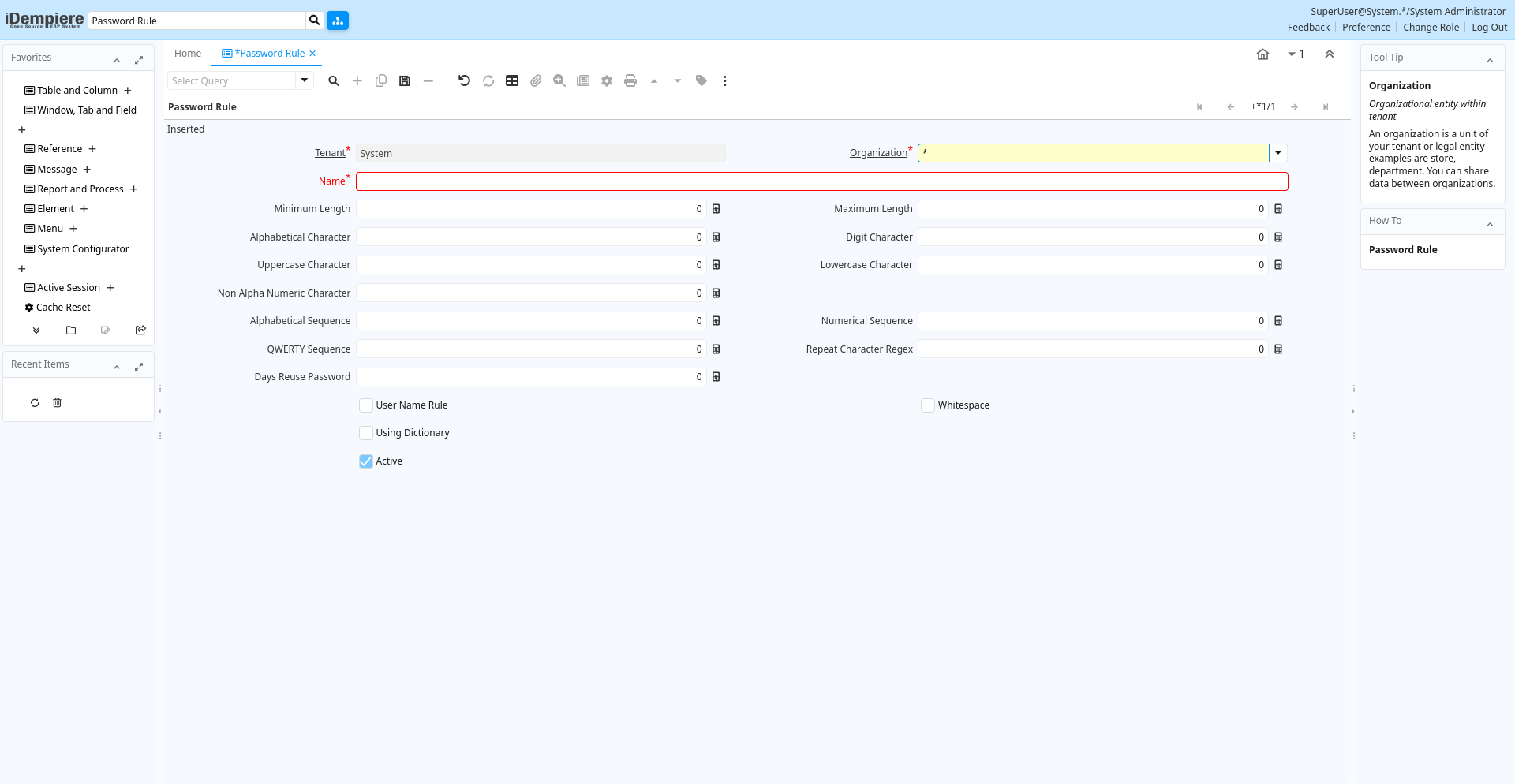
Tab: Password Rule
[Created: 19/04/2012 - Updated: 19/04/2012 ]
Description:
Help:
Tab Level: 0
Table 10: Password Rule - Fields
Table: Report Parameters
| Name | Description | Help | Technical Info |
|---|---|---|---|
| Tenant | Tenant for this installation. | A Tenant is a company or a legal entity. You cannot share data between Tenants. | ad_passwordrule.AD_Client_ID numeric(10) Table Direct |
| Organization | Organizational entity within tenant | An organization is a unit of your tenant or legal entity - examples are store, department. You can share data between organizations. | ad_passwordrule.AD_Org_ID numeric(10) Table Direct |
| Name | Alphanumeric identifier of the entity | The name of an entity (record) is used as an default search option in addition to the search key. The name is up to 60 characters in length. | ad_passwordrule.Name character varying(60) String |
| Minimum Length | ad_passwordrule.MinLength numeric(10) Integer | ||
| Maximum Length | Maximum Length of Data | ad_passwordrule.MaxLength numeric(10) Integer | |
| Alphabetical Character | Require at least # alphabetical in passwords | ad_passwordrule.AlphabeticalCharacter numeric(10) Integer | |
| Digit Character | Require at least # digit in passwords | ad_passwordrule.DigitCharacter numeric(10) Integer | |
| Uppercase Character | Require at least # upper case char | ad_passwordrule.UppercaseCharacter numeric(10) Integer | |
| Lowercase Character | Require at least # lower case char | ad_passwordrule.LowercaseCharacter numeric(10) Integer | |
| Non Alpha Numeric Character | Require at least # non-alphanumeric char | ad_passwordrule.NonAlphaNumericCharacter numeric(10) Integer | |
| Alphabetical Sequence | Length of alphabetical sequence to validate | ad_passwordrule.AlphabeticalSequence numeric(10) Integer | |
| Numerical Sequence | Length of numerical sequence to validate | ad_passwordrule.NumericalSequence numeric(10) Integer | |
| QWERTY Sequence | Length of QWERTY sequences to validate | ad_passwordrule.QWERTYSequence numeric(10) Integer | |
| Repeat Character Regex | Length of repeated characters to validate | ad_passwordrule.RepeatCharacterRegex numeric(10) Integer | |
| Days Reuse Password | Define number of day can reuse password | Each time change password, old password keep in historyExample this value = 60. user can't reuse password in history has age < 60 | ad_passwordrule.Days_Reuse_Password numeric(10) Integer |
| User Name Rule | Validate the password doesn't contain user name (ignore case and match backwards) | ad_passwordrule.IsUserNameRule character(1) Yes-No | |
| Whitespace | Whitespace validation | ad_passwordrule.IsWhitespace character(1) Yes-No | |
| Using Dictionary | ad_passwordrule.IsUsingDictionary character(1) Yes-No | ||
| Match Backwards of Dictionary | Match dictionary words backwards | ad_passwordrule.IsDictMatchBackwards character(1) Yes-No | |
| Path Dictionary | ad_passwordrule.PathDictionary character varying(255) FileName | ||
| Active | The record is active in the system | There are two methods of making records unavailable in the system: One is to delete the record, the other is to de-activate the record. A de-activated record is not available for selection, but available for reports.There are two reasons for de-activating and not deleting records:(1) The system requires the record for audit purposes.(2) The record is referenced by other records. E.g., you cannot delete a Business Partner, if there are invoices for this partner record existing. You de-activate the Business Partner and prevent that this record is used for future entries. | ad_passwordrule.IsActive character(1) Yes-No |