Window: Interest Area
[Created: 01/10/2002 - Updated: 02/01/2000 ]
Description: Interest Area or Topic
Help: Interest Areas reflect interest in a topic by a contact. Interest areas can be used for marketing campaigns.
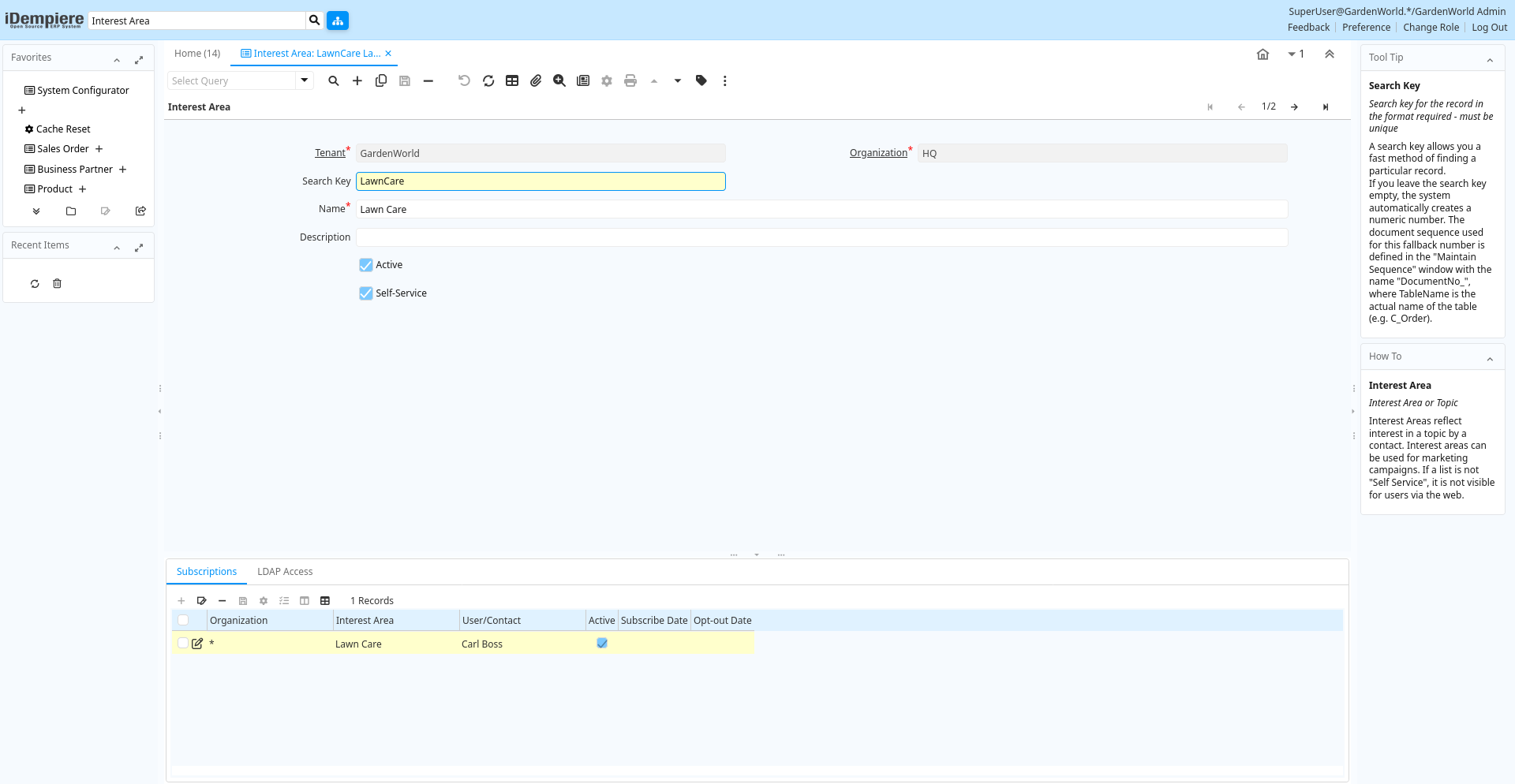
Tab: Interest Area
[Created: 01/10/2002 - Updated: 02/01/2000 ]
Description: Interest Area or Topic
Help: Interest Areas reflect interest in a topic by a contact. Interest areas can be used for marketing campaigns. If a list is not "Self Service", it is not visible for users via the web.
Tab Level: 0
Table 10: Interest Area - Fields
Table: Report Parameters
| Name | Description | Help | Technical Info |
|---|---|---|---|
| Tenant | Tenant for this installation. | A Tenant is a company or a legal entity. You cannot share data between Tenants. | r_interestarea.AD_Client_ID numeric(10) Table Direct |
| Organization | Organizational entity within tenant | An organization is a unit of your tenant or legal entity - examples are store, department. You can share data between organizations. | r_interestarea.AD_Org_ID numeric(10) Table Direct |
| Search Key | Search key for the record in the format required - must be unique | A search key allows you a fast method of finding a particular record.If you leave the search key empty, the system automatically creates a numeric number. The document sequence used for this fallback number is defined in the "Maintain Sequence" window with the name "DocumentNo_", where TableName is the actual name of the table (e.g. C_Order). | r_interestarea.Value character varying(40) String |
| Name | Alphanumeric identifier of the entity | The name of an entity (record) is used as an default search option in addition to the search key. The name is up to 60 characters in length. | r_interestarea.Name character varying(60) String |
| Description | Optional short description of the record | A description is limited to 255 characters. | r_interestarea.Description character varying(255) String |
| Active | The record is active in the system | There are two methods of making records unavailable in the system: One is to delete the record, the other is to de-activate the record. A de-activated record is not available for selection, but available for reports.There are two reasons for de-activating and not deleting records:(1) The system requires the record for audit purposes.(2) The record is referenced by other records. E.g., you cannot delete a Business Partner, if there are invoices for this partner record existing. You de-activate the Business Partner and prevent that this record is used for future entries. | r_interestarea.IsActive character(1) Yes-No |
| Self-Service | This is a Self-Service entry or this entry can be changed via Self-Service | Self-Service allows users to enter data or update their data. The flag indicates, that this record was entered or created via Self-Service or that the user can change it via the Self-Service functionality. | r_interestarea.IsSelfService character(1) Yes-No |
Tab: Subscriptions
[Created: 05/07/2003 - Updated: 02/12/2024 ]
Description: User Subscriptions
Help:
Tab Level: 1
Table 20: Subscriptions - Fields
Table: Report Parameters
| Name | Description | Help | Technical Info |
|---|---|---|---|
| Tenant | Tenant for this installation. | A Tenant is a company or a legal entity. You cannot share data between Tenants. | r_contactinterest.AD_Client_ID numeric(10) Table Direct |
| Organization | Organizational entity within tenant | An organization is a unit of your tenant or legal entity - examples are store, department. You can share data between organizations. | r_contactinterest.AD_Org_ID numeric(10) Table Direct |
| Interest Area | Interest Area or Topic | Interest Areas reflect interest in a topic by a contact. Interest areas can be used for marketing campaigns. | r_contactinterest.R_InterestArea_ID numeric(10) Table Direct |
| User/Contact | User within the system - Internal or Business Partner Contact | The User identifies a unique user in the system. This could be an internal user or a business partner contact | r_contactinterest.AD_User_ID numeric(10) Table Direct |
| Active | The record is active in the system | There are two methods of making records unavailable in the system: One is to delete the record, the other is to de-activate the record. A de-activated record is not available for selection, but available for reports.There are two reasons for de-activating and not deleting records:(1) The system requires the record for audit purposes.(2) The record is referenced by other records. E.g., you cannot delete a Business Partner, if there are invoices for this partner record existing. You de-activate the Business Partner and prevent that this record is used for future entries. | r_contactinterest.IsActive character(1) Yes-No |
| Subscribe Date | Date the contact actively subscribed | Date the contact subscribe the interest area | r_contactinterest.SubscribeDate timestamp without time zone Date |
| Opt-out Date | Date the contact opted out | If the field has a date, the customer opted out (unsubscribed) and cannot receive mails for the Interest Area | r_contactinterest.OptOutDate timestamp without time zone Date |
Tab: LDAP Access
[Created: 29/10/2006 - Updated: 29/10/2006 ]
Description: User Access via LDAP
Help:
Tab Level: 1
Table 30: LDAP Access - Fields
Table: Report Parameters
| Name | Description | Help | Technical Info |
|---|---|---|---|
| Tenant | Tenant for this installation. | A Tenant is a company or a legal entity. You cannot share data between Tenants. | ad_ldapaccess.AD_Client_ID numeric(10) Table Direct |
| Organization | Organizational entity within tenant | An organization is a unit of your tenant or legal entity - examples are store, department. You can share data between organizations. | ad_ldapaccess.AD_Org_ID numeric(10) Table Direct |
| Interest Area | Interest Area or Topic | Interest Areas reflect interest in a topic by a contact. Interest areas can be used for marketing campaigns. | ad_ldapaccess.R_InterestArea_ID numeric(10) Table Direct |
| Ldap Processor | LDAP Server to authenticate and authorize external systems based on iDempiere | The LDAP Server allows third party software (e.g. Apache) to use the users defined in the system to authentificate and authorize them. There is only one server per iDempiere system. The "o" is the Tenant key and the optional "ou" is the Interest Area key. | ad_ldapaccess.AD_LdapProcessor_ID numeric(10) Table Direct |
| User/Contact | User within the system - Internal or Business Partner Contact | The User identifies a unique user in the system. This could be an internal user or a business partner contact | ad_ldapaccess.AD_User_ID numeric(10) Table Direct |
| Created | Date this record was created | The Created field indicates the date that this record was created. | ad_ldapaccess.Created timestamp without time zone Date+Time |
| Error | An Error occurred in the execution | ad_ldapaccess.IsError character(1) Yes-No | |
| Summary | Textual summary of this request | The Summary allows free form text entry of a recap of this request. | ad_ldapaccess.Summary character varying(2000) Text |
| Description | Optional short description of the record | A description is limited to 255 characters. | ad_ldapaccess.Description character varying(255) String |