Window: My Profile
[Created: 12/09/2009 - Updated: 12/09/2009 ]
Description: My user information
Help:
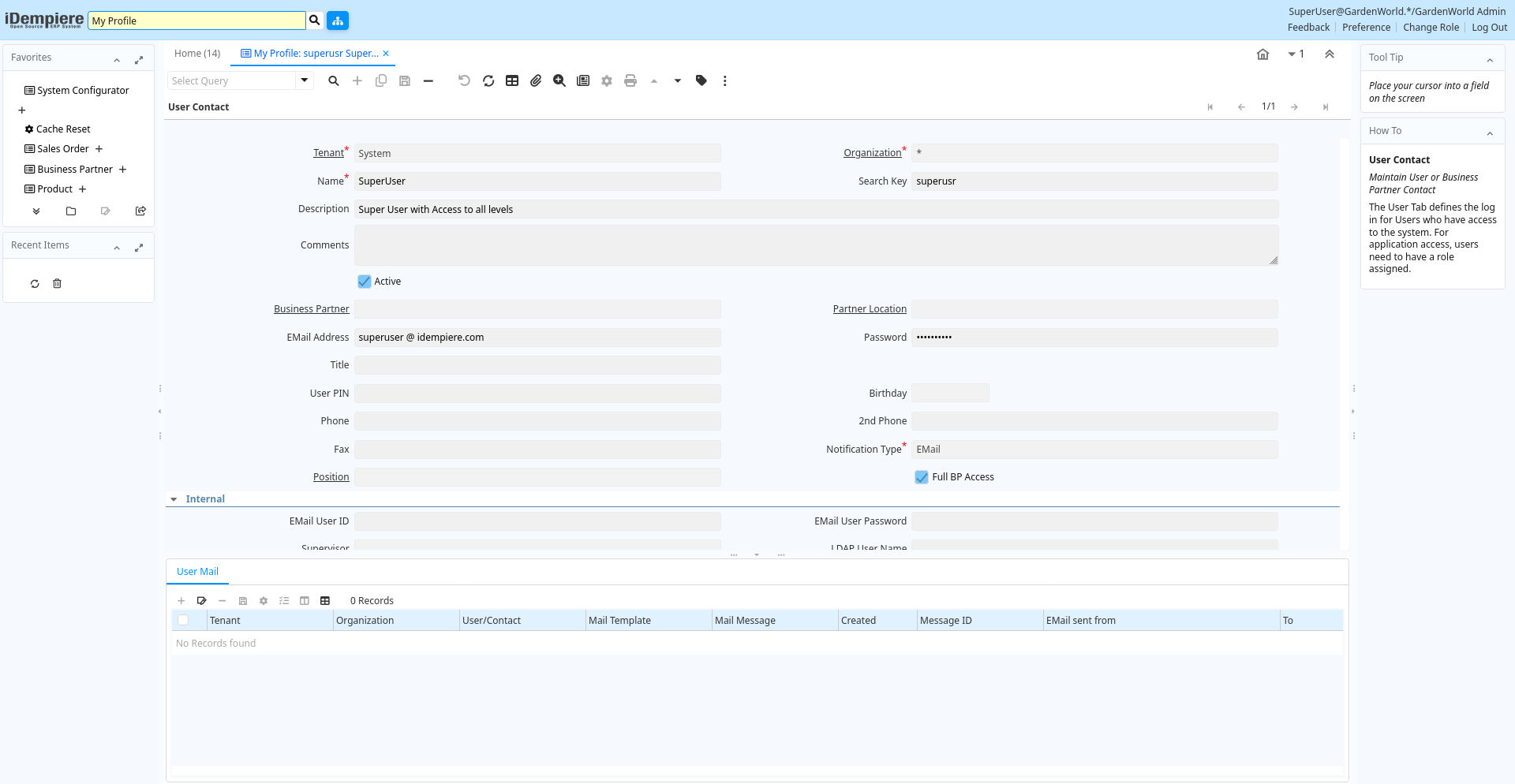
Tab: User Contact
[Created: 12/09/2009 - Updated: 12/09/2009 ]
Description: Maintain User or Business Partner Contact
Help: The User Tab defines the log in for Users who have access to the system. For application access, users need to have a role assigned.
Tab Level: 0
Table 10: User Contact - Fields
Table: Report Parameters
| Name | Description | Help | Technical Info |
|---|---|---|---|
| Tenant | Tenant for this installation. | A Tenant is a company or a legal entity. You cannot share data between Tenants. | ad_user.AD_Client_ID numeric(10) Table Direct |
| Organization | Organizational entity within tenant | An organization is a unit of your tenant or legal entity - examples are store, department. You can share data between organizations. | ad_user.AD_Org_ID numeric(10) Table Direct |
| Name | Alphanumeric identifier of the entity | The name of an entity (record) is used as an default search option in addition to the search key. The name is up to 60 characters in length. | ad_user.Name character varying(60) String |
| Search Key | Search key for the record in the format required | 7 bit lower case alpha numeric - max length 8 - can be used for operating system names. | ad_user.Value character varying(40) String |
| Description | Optional short description of the record | A description is limited to 255 characters. | ad_user.Description character varying(255) String |
| Comments | Comments or additional information | The Comments field allows for free form entry of additional information. | ad_user.Comments character varying(2000) Text |
| Active | The record is active in the system | There are two methods of making records unavailable in the system: One is to delete the record, the other is to de-activate the record. A de-activated record is not available for selection, but available for reports.There are two reasons for de-activating and not deleting records:(1) The system requires the record for audit purposes.(2) The record is referenced by other records. E.g., you cannot delete a Business Partner, if there are invoices for this partner record existing. You de-activate the Business Partner and prevent that this record is used for future entries. | ad_user.IsActive character(1) Yes-No |
| Business Partner | Identifies a Business Partner | A Business Partner is anyone with whom you transact. This can include Vendor, Customer, Employee or Salesperson | ad_user.C_BPartner_ID numeric(10) Search |
| Partner Location | Identifies the (ship to) address for this Business Partner | The Partner address indicates the location of a Business Partner | ad_user.C_BPartner_Location_ID numeric(10) Table Direct |
| EMail Address | Electronic Mail Address | The Email Address is the Electronic Mail ID for this User and should be fully qualified (e.g. joe.smith@company.com). The Email Address is used to access the self service application functionality from the web. | ad_user.EMail character varying(60) String |
| Password | Password of any length (case sensitive) | The Password for this User. Passwords are required to identify authorized users. For iDempiere Users, you can change the password via the Process "Reset Password". | ad_user.Password character varying(1024) String |
| Title | Name this entity is referred to as | The Title indicates the name that an entity is referred to as. | ad_user.Title character varying(40) String |
| User PIN | ad_user.UserPIN character varying(20) String | ||
| Birthday | Birthday or Anniversary day | Birthday or Anniversary day | ad_user.Birthday timestamp without time zone Date |
| Phone | Identifies a telephone number | The Phone field identifies a telephone number | ad_user.Phone character varying(40) String |
| 2nd Phone | Identifies an alternate telephone number. | The 2nd Phone field identifies an alternate telephone number. | ad_user.Phone2 character varying(40) String |
| Fax | Facsimile number | The Fax identifies a facsimile number for this Business Partner or Location | ad_user.Fax character varying(40) String |
| Notification Type | Type of Notifications | Emails or Notification sent out for Request Updates, etc. | ad_user.NotificationType character(1) List |
| Position | Job Position | ad_user.C_Job_ID numeric(10) Table Direct | |
| Full BP Access | The user/contact has full access to Business Partner information and resources | If selected, the user has full access to the Business Partner (BP) information (Business Documents like Orders, Invoices - Requests) or resources (Assets, Downloads). If you deselect it, the user has no access rights unless, you explicitly grant it in tab "BP Access" | ad_user.IsFullBPAccess character(1) Yes-No |
| EMail User ID | User Name (ID) in the Mail System | The user name in the mail system is usually the string before the @ of your email address. Required if the mail server requires authentication to send emails. | ad_user.EMailUser character varying(60) String |
| EMail User Password | Password of your email user id | Required if the mail server requires authentication to send emails. | ad_user.EMailUserPW character varying(255) String |
| Supervisor | Supervisor for this user/organization - used for escalation and approval | The Supervisor indicates who will be used for forwarding and escalating issues for this user - or for approvals. | ad_user.Supervisor_ID numeric(10) Search |
| LDAP User Name | User Name used for authorization via LDAP (directory) services | Optional LDAP system user name for the user. If not defined, the normal Name of the user is used. This allows to use the internal (LDAP) user id (e.g. jjanke) and the normal display name (e.g. Jorg Janke). The LDAP User Name can also be used without LDAP enables (see system window). This would allow to sign in as jjanke and use the display name of Jorg Janke. | ad_user.LDAPUser character varying(60) String |
| Trx Organization | Performing or initiating organization | The organization which performs or initiates this transaction (for another organization). The owning Organization may not be the transaction organization in a service bureau environment, with centralized services, and inter-organization transactions. | ad_user.AD_OrgTrx_ID numeric(10) Table |
| Connection Profile | How a Java Tenant connects to the server(s) | Depending on the connection profile, different protocols are used and tasks are performed on the server rather then the tenant. Usually the user can select different profiles, unless it is enforced by the User or Role definition. The User level profile overwrites the Role based profile. | ad_user.ConnectionProfile character(1) List |
| Auto expand menu | If ticked, the menu is automatically expanded | ad_user.IsMenuAutoExpand character(1) List | |
| Greeting | Greeting to print on correspondence | The Greeting identifies the greeting to print on correspondence. | ad_user.C_Greeting_ID numeric(10) Table Direct |
| EMail Verify | Date Email was verified | ad_user.EMailVerifyDate timestamp without time zone Date+Time | |
| Last Contact | Date this individual was last contacted | The Last Contact indicates the date that this Business Partner Contact was last contacted. | ad_user.LastContact timestamp without time zone Date |
| Verification Info | Verification information of EMail Address | The field contains additional information how the EMail Address has been verified | ad_user.EMailVerify character varying(40) String |
| Last Result | Result of last contact | The Last Result identifies the result of the last contact made. | ad_user.LastResult character varying(255) String |
Tab: User Mail
[Created: 12/09/2009 - Updated: 12/09/2009 ]
Description: Mail sent to the user
Help: Archive of mails sent to users
Tab Level: 1
Table 20: User Mail - Fields
Table: Report Parameters
| Name | Description | Help | Technical Info |
|---|---|---|---|
| Tenant | Tenant for this installation. | A Tenant is a company or a legal entity. You cannot share data between Tenants. | ad_usermail.AD_Client_ID numeric(10) Table Direct |
| Organization | Organizational entity within tenant | An organization is a unit of your tenant or legal entity - examples are store, department. You can share data between organizations. | ad_usermail.AD_Org_ID numeric(10) Table Direct |
| User/Contact | User within the system - Internal or Business Partner Contact | The User identifies a unique user in the system. This could be an internal user or a business partner contact | ad_usermail.AD_User_ID numeric(10) Search |
| Mail Template | Text templates for mailings | The Mail Template indicates the mail template for return messages. Mail text can include variables. The priority of parsing is User/Contact, Business Partner and then the underlying business object (like Request, Dunning, Workflow object).So, @Name@ would resolve into the User name (if user is defined defined), then Business Partner name (if business partner is defined) and then the Name of the business object if it has a Name.For Multi-Lingual systems, the template is translated based on the Business Partner's language selection. | ad_usermail.R_MailText_ID numeric(10) Table Direct |
| Mail Message | Web Store Mail Message Template | ad_usermail.W_MailMsg_ID numeric(10) Table Direct | |
| Created | Date this record was created | The Created field indicates the date that this record was created. | ad_usermail.Created timestamp without time zone Date+Time |
| Message ID | EMail Message ID | SMTP Message ID for tracking purposes | ad_usermail.MessageID character varying(120) String |
| EMail sent from | ad_usermail.EMailFrom character varying(255) String | ||
| To | ad_usermail.RecipientTo character varying(2000) String | ||
| Cc | ad_usermail.RecipientCc character varying(2000) String | ||
| Bcc | ad_usermail.RecipientBcc character varying(2000) String | ||
| Subject | Email Message Subject | Subject of the EMail | ad_usermail.Subject character varying(255) String |
| Mail Text | Text used for Mail message | The Mail Text indicates the text used for mail messages. | ad_usermail.MailText character varying(2000) Text |
| Delivery Confirmation | EMail Delivery confirmation | ad_usermail.DeliveryConfirmation character varying(120) String | |
| Delivered | ad_usermail.IsDelivered character(1) List |