Window: Role
[Created: 11/06/1999 - Updated: 10/03/2022 ]
Description: Maintain User Responsibilities
Help: The Role Window allows you to define the different roles that users of this system will have. Roles control access to windows, tasks, reports, etc. For a tenant an Administrator and User role are predefined. You may add additional roles to control access for specific functionality or data.You can add users to the role.Note that access information is cached and requires re-login or reset of cache.
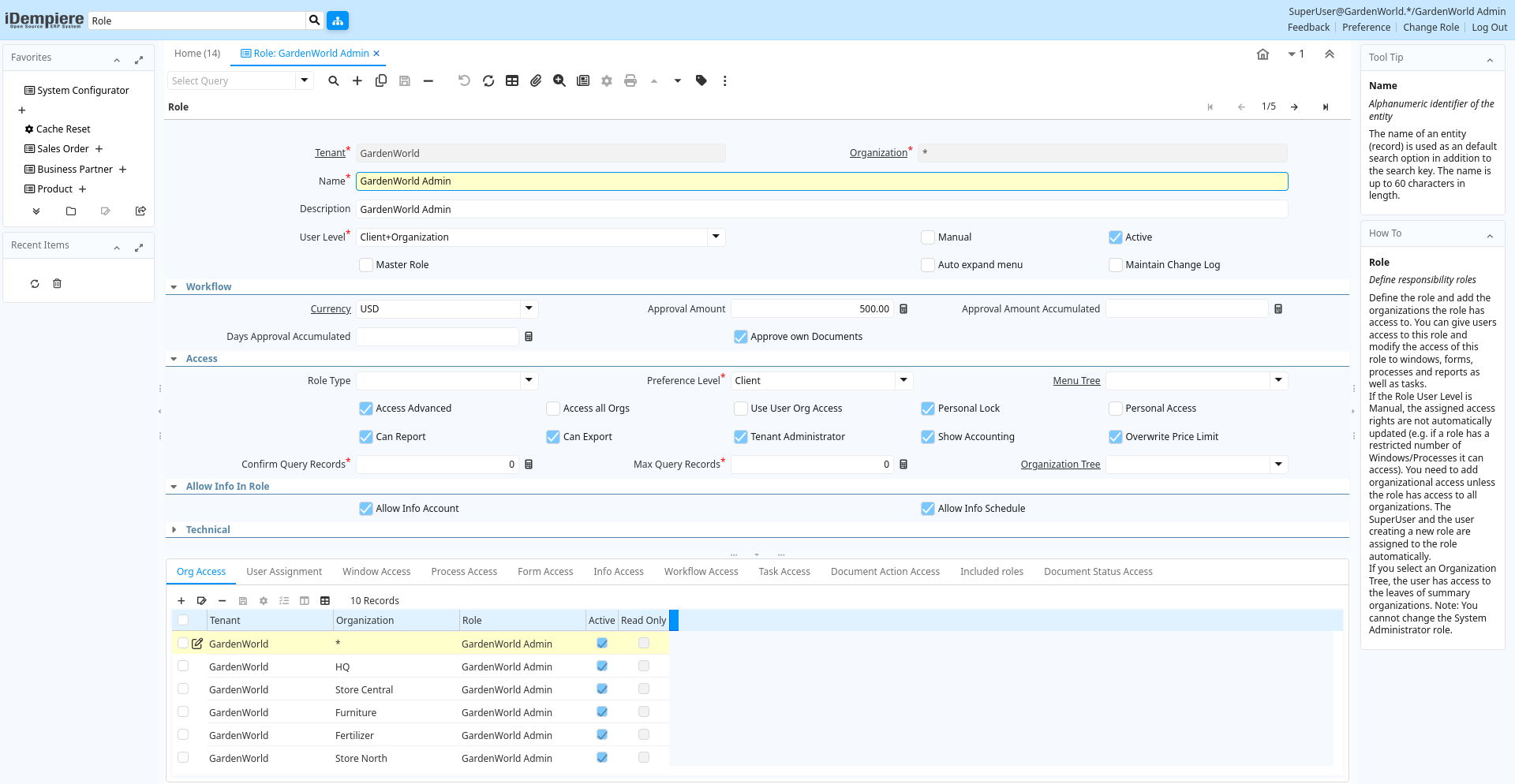
Tab: Role
[Created: 11/06/1999 - Updated: 15/01/2024 ]
Description: Define responsibility roles
Help: Define the role and add the organizations the role has access to. You can give users access to this role and modify the access of this role to windows, forms, processes and reports as well as tasks. If the Role User Level is Manual, the assigned access rights are not automatically updated (e.g. if a role has a restricted number of Windows/Processes it can access). You need to add organizational access unless the role has access to all organizations. The SuperUser and the user creating a new role are assigned to the role automatically. If you select an Organization Tree, the user has access to the leaves of summary organizations.Note: You cannot change the System Administrator role.
Tab Level: 0
Table 10: Role - Fields
Table: Report Parameters
| Name | Description | Help | Technical Info |
|---|---|---|---|
| Tenant | Tenant for this installation. | A Tenant is a company or a legal entity. You cannot share data between Tenants. | ad_role.AD_Client_ID numeric(10) Table Direct |
| Organization | Organizational entity within tenant | An organization is a unit of your tenant or legal entity - examples are store, department. You can share data between organizations. | ad_role.AD_Org_ID numeric(10) Table Direct |
| Name | Alphanumeric identifier of the entity | The name of an entity (record) is used as an default search option in addition to the search key. The name is up to 60 characters in length. | ad_role.Name character varying(60) String |
| Description | Optional short description of the record | A description is limited to 255 characters. | ad_role.Description character varying(255) String |
| User Level | System Tenant Organization | The User Level field determines if users of this Role will have access to System level data, Organization level data, Tenant level data or Tenant and Organization level data. | ad_role.UserLevel character(3) List |
| Manual | This is a manual process | The Manual check box indicates if the process will done manually. | ad_role.IsManual character(1) Yes-No |
| Active | The record is active in the system | There are two methods of making records unavailable in the system: One is to delete the record, the other is to de-activate the record. A de-activated record is not available for selection, but available for reports.There are two reasons for de-activating and not deleting records:(1) The system requires the record for audit purposes.(2) The record is referenced by other records. E.g., you cannot delete a Business Partner, if there are invoices for this partner record existing. You de-activate the Business Partner and prevent that this record is used for future entries. | ad_role.IsActive character(1) Yes-No |
| Master Role | A master role cannot be assigned to users, it is intended to define access to menu option and documents and inherit to other roles | ad_role.IsMasterRole character(1) Yes-No | |
| Auto expand menu | If ticked, the menu is automatically expanded | ad_role.IsMenuAutoExpand character(1) Yes-No | |
| Maintain Change Log | Maintain a log of changes | If selected, a log of all changes is maintained. | ad_role.IsChangeLog character(1) Yes-No |
| Currency | The Currency for this record | Indicates the Currency to be used when processing or reporting on this record | ad_role.C_Currency_ID numeric(10) Table Direct |
| Approval Amount | The approval amount limit for this role | The Approval Amount field indicates the amount limit this Role has for approval of documents. | ad_role.AmtApproval numeric Amount |
| Approval Amount Accumulated | The approval amount limit for this role accumulated on a period | The Approval Amount field indicates the amount limit this Role has for approval of documents within a period limit. | ad_role.AmtApprovalAccum numeric Amount |
| Days Approval Accumulated | The days approval indicates the days to take into account to verify the accumulated approval amount. | The Days Approval Accumulated field indicates the days to take into account to verify the accumulated approval amount. | ad_role.DaysApprovalAccum numeric(10) Integer |
| Approve own Documents | Users with this role can approve their own documents | If a user cannot approve their own documents (orders, etc.), it needs to be approved by someone else. | ad_role.IsCanApproveOwnDoc character(1) Yes-No |
| Role Type | ad_role.RoleType character varying(2) List | ||
| Preference Level | Determines what preferences the user can set | Preferences allow you to define default values. If set to None, you cannot set any preference nor value preference. Only if set to Tenant, you can see the Record Info Change Log. | ad_role.PreferenceType character(1) List |
| Menu Tree | Tree of the menu | Menu access tree | ad_role.AD_Tree_Menu_ID numeric(10) Table |
| Access Advanced | ad_role.IsAccessAdvanced character(1) Yes-No | ||
| Access all Orgs | Access all Organizations (no org access control) of the tenant | When selected, the role has access to all organizations of the tenant automatically. This also increases performance where you have many organizations. | ad_role.IsAccessAllOrgs character(1) Yes-No |
| Use User Org Access | Use Org Access defined by user instead of Role Org Access | You can define the access to Organization either by Role or by User. You would select this, if you have many organizations. | ad_role.IsUseUserOrgAccess character(1) Yes-No |
| Personal Lock | Allow users with role to lock access to personal records | If enabled, the user with the role can prevent access of others to personal records. If a record is locked, only the user or people who can read personal locked records can see the record. | ad_role.IsPersonalLock character(1) Yes-No |
| Personal Access | Allow access to all personal records | Users of this role have access to all records locked as personal. | ad_role.IsPersonalAccess character(1) Yes-No |
| Can Report | Users with this role can create reports | You can restrict the ability to report on data. | ad_role.IsCanReport character(1) Yes-No |
| Can Export | Users with this role can export data | You can restrict the ability to export data from iDempiere. | ad_role.IsCanExport character(1) Yes-No |
| Tenant Administrator | This role is a tenant administrator | ad_role.IsClientAdministrator character(1) Yes-No | |
| Show Accounting | Users with this role can see accounting information | This allows to prevent access to any accounting information. | ad_role.IsShowAcct character(1) Yes-No |
| Overwrite Price Limit | Overwrite Price Limit if the Price List enforces the Price Limit | The Price List allows to enforce the Price Limit. If set, a user with this role can overwrite the price limit (i.e. enter any price). | ad_role.OverwritePriceLimit character(1) Yes-No |
| Confirm Query Records | Require Confirmation if more records will be returned by the query (If not defined 500) | Enter the number of records the query will return without confirmation to avoid unnecessary system load. If 0, the system default of 500 is used. | ad_role.ConfirmQueryRecords numeric(10) Integer |
| Max Query Records | If defined, you cannot query more records as defined - the query criteria needs to be changed to query less records | Enter the number of records a user will be able to query to avoid unnecessary system load. If 0, no restrictions are imposed. | ad_role.MaxQueryRecords numeric(10) Integer |
| Organization Tree | Trees are used for (financial) reporting and security access (via role) | Trees are used for (finanial) reporting and security access (via role) | ad_role.AD_Tree_Org_ID numeric(10) Table |
| Allow Info Account | ad_role.Allow_Info_Account character(1) Yes-No | ||
| Allow Info Schedule | ad_role.Allow_Info_Schedule character(1) Yes-No | ||
| Allow Info Product | ad_role.Allow_Info_Product character(1) Yes-No | ||
| Allow Info BPartner | ad_role.Allow_Info_BPartner character(1) Yes-No | ||
| Allow Info Order | ad_role.Allow_Info_Order character(1) Yes-No | ||
| Allow Info Invoice | ad_role.Allow_Info_Invoice character(1) Yes-No | ||
| Allow Shipment Info | ad_role.Allow_Info_InOut character(1) Yes-No | ||
| Allow Info Payment | ad_role.Allow_Info_Payment character(1) Yes-No | ||
| Allow Info Asset | ad_role.Allow_Info_Asset character(1) Yes-No | ||
| Allow Info Resource | ad_role.Allow_Info_Resource character(1) Yes-No | ||
| Predefined Context Variables | Predefined context variables to inject when opening a menu entry or a window | ad_role.PredefinedContextVariables character varying(4000) String |
Tab: Org Access
[Created: 27/01/2001 - Updated: 10/03/2022 ]
Description: Maintain Role Org Access
Help: Add the tenant and organizations the user has access to. Entries here are ignored, if User Org Access is selected or the role has access to all roles.Note that access information is cached and requires re-login or reset of cache.
Tab Level: 1
Table 20: Org Access - Fields
Table: Report Parameters
| Name | Description | Help | Technical Info |
|---|---|---|---|
| Tenant | Tenant for this installation. | A Tenant is a company or a legal entity. You cannot share data between Tenants. | ad_role_orgaccess.AD_Client_ID numeric(10) Table Direct |
| Organization | Organizational entity within tenant | An organization is a unit of your tenant or legal entity - examples are store, department. You can share data between organizations. | ad_role_orgaccess.AD_Org_ID numeric(10) Table Direct |
| Role | Responsibility Role | The Role determines security and access a user who has this Role will have in the System. | ad_role_orgaccess.AD_Role_ID numeric(10) Table Direct |
| Active | The record is active in the system | There are two methods of making records unavailable in the system: One is to delete the record, the other is to de-activate the record. A de-activated record is not available for selection, but available for reports.There are two reasons for de-activating and not deleting records:(1) The system requires the record for audit purposes.(2) The record is referenced by other records. E.g., you cannot delete a Business Partner, if there are invoices for this partner record existing. You de-activate the Business Partner and prevent that this record is used for future entries. | ad_role_orgaccess.IsActive character(1) Yes-No |
| Read Only | Field is read only | The Read Only indicates that this field may only be Read. It may not be updated. | ad_role_orgaccess.IsReadOnly character(1) Yes-No |
Tab: User Assignment
[Created: 11/06/1999 - Updated: 04/09/2012 ]
Description: Users with this Role
Help: The User Assignment Tab displays Users who have been defined for this Role.
Tab Level: 1
Table 30: User Assignment - Fields
Table: Report Parameters
| Name | Description | Help | Technical Info |
|---|---|---|---|
| Tenant | Tenant for this installation. | A Tenant is a company or a legal entity. You cannot share data between Tenants. | ad_user_roles.AD_Client_ID numeric(10) Table Direct |
| Organization | Organizational entity within tenant | An organization is a unit of your tenant or legal entity - examples are store, department. You can share data between organizations. | ad_user_roles.AD_Org_ID numeric(10) Table Direct |
| Role | Responsibility Role | The Role determines security and access a user who has this Role will have in the System. | ad_user_roles.AD_Role_ID numeric(10) Search |
| User/Contact | User within the system - Internal or Business Partner Contact | The User identifies a unique user in the system. This could be an internal user or a business partner contact | ad_user_roles.AD_User_ID numeric(10) Search |
| Active | The record is active in the system | There are two methods of making records unavailable in the system: One is to delete the record, the other is to de-activate the record. A de-activated record is not available for selection, but available for reports.There are two reasons for de-activating and not deleting records:(1) The system requires the record for audit purposes.(2) The record is referenced by other records. E.g., you cannot delete a Business Partner, if there are invoices for this partner record existing. You de-activate the Business Partner and prevent that this record is used for future entries. | ad_user_roles.IsActive character(1) Yes-No |
Tab: Window Access
[Created: 15/07/2000 - Updated: 02/01/2000 ]
Description: Window Access
Help: The Window Access Tab defines the Windows and type of access that this Role is granted.
Tab Level: 1
Table 40: Window Access - Fields
Table: Report Parameters
| Name | Description | Help | Technical Info |
|---|---|---|---|
| Tenant | Tenant for this installation. | A Tenant is a company or a legal entity. You cannot share data between Tenants. | ad_window_access.AD_Client_ID numeric(10) Table Direct |
| Organization | Organizational entity within tenant | An organization is a unit of your tenant or legal entity - examples are store, department. You can share data between organizations. | ad_window_access.AD_Org_ID numeric(10) Table Direct |
| Role | Responsibility Role | The Role determines security and access a user who has this Role will have in the System. | ad_window_access.AD_Role_ID numeric(10) Table Direct |
| Window | Data entry or display window | The Window field identifies a unique Window in the system. | ad_window_access.AD_Window_ID numeric(10) Table Direct |
| Active | The record is active in the system | There are two methods of making records unavailable in the system: One is to delete the record, the other is to de-activate the record. A de-activated record is not available for selection, but available for reports.There are two reasons for de-activating and not deleting records:(1) The system requires the record for audit purposes.(2) The record is referenced by other records. E.g., you cannot delete a Business Partner, if there are invoices for this partner record existing. You de-activate the Business Partner and prevent that this record is used for future entries. | ad_window_access.IsActive character(1) Yes-No |
| Read Write | Field is read / write | The Read Write indicates that this field may be read and updated. | ad_window_access.IsReadWrite character(1) Yes-No |
Tab: Process Access
[Created: 15/07/2000 - Updated: 02/01/2000 ]
Description: Process Access
Help: The Process Access Tab defines the Processes and type of access that this Role is granted.
Tab Level: 1
Table 50: Process Access - Fields
Table: Report Parameters
| Name | Description | Help | Technical Info |
|---|---|---|---|
| Tenant | Tenant for this installation. | A Tenant is a company or a legal entity. You cannot share data between Tenants. | ad_process_access.AD_Client_ID numeric(10) Table Direct |
| Organization | Organizational entity within tenant | An organization is a unit of your tenant or legal entity - examples are store, department. You can share data between organizations. | ad_process_access.AD_Org_ID numeric(10) Table Direct |
| Role | Responsibility Role | The Role determines security and access a user who has this Role will have in the System. | ad_process_access.AD_Role_ID numeric(10) Table Direct |
| Process | Process or Report | The Process field identifies a unique Process or Report in the system. | ad_process_access.AD_Process_ID numeric(10) Table Direct |
| Active | The record is active in the system | There are two methods of making records unavailable in the system: One is to delete the record, the other is to de-activate the record. A de-activated record is not available for selection, but available for reports.There are two reasons for de-activating and not deleting records:(1) The system requires the record for audit purposes.(2) The record is referenced by other records. E.g., you cannot delete a Business Partner, if there are invoices for this partner record existing. You de-activate the Business Partner and prevent that this record is used for future entries. | ad_process_access.IsActive character(1) Yes-No |
| Read Write | Field is read / write | The Read Write indicates that this field may be read and updated. | ad_process_access.IsReadWrite character(1) Yes-No |
Tab: Form Access
[Created: 15/07/2000 - Updated: 02/01/2000 ]
Description: Form Access
Help: The Form Access Tab defines the Forms and type of access that this Role is granted.
Tab Level: 1
Table 60: Form Access - Fields
Table: Report Parameters
| Name | Description | Help | Technical Info |
|---|---|---|---|
| Tenant | Tenant for this installation. | A Tenant is a company or a legal entity. You cannot share data between Tenants. | ad_form_access.AD_Client_ID numeric(10) Table Direct |
| Organization | Organizational entity within tenant | An organization is a unit of your tenant or legal entity - examples are store, department. You can share data between organizations. | ad_form_access.AD_Org_ID numeric(10) Table Direct |
| Role | Responsibility Role | The Role determines security and access a user who has this Role will have in the System. | ad_form_access.AD_Role_ID numeric(10) Table Direct |
| Special Form | Special Form | The Special Form field identifies a unique Special Form in the system. | ad_form_access.AD_Form_ID numeric(10) Table Direct |
| Active | The record is active in the system | There are two methods of making records unavailable in the system: One is to delete the record, the other is to de-activate the record. A de-activated record is not available for selection, but available for reports.There are two reasons for de-activating and not deleting records:(1) The system requires the record for audit purposes.(2) The record is referenced by other records. E.g., you cannot delete a Business Partner, if there are invoices for this partner record existing. You de-activate the Business Partner and prevent that this record is used for future entries. | ad_form_access.IsActive character(1) Yes-No |
| Read Write | Field is read / write | The Read Write indicates that this field may be read and updated. | ad_form_access.IsReadWrite character(1) Yes-No |
Tab: Info Access
[Created: 08/01/2013 - Updated: 08/01/2013 ]
Description:
Help:
Tab Level: 1
Table 65: Info Access - Fields
Table: Report Parameters
| Name | Description | Help | Technical Info |
|---|---|---|---|
| Tenant | Tenant for this installation. | A Tenant is a company or a legal entity. You cannot share data between Tenants. | ad_infowindow_access.AD_Client_ID numeric(10) Table Direct |
| Organization | Organizational entity within tenant | An organization is a unit of your tenant or legal entity - examples are store, department. You can share data between organizations. | ad_infowindow_access.AD_Org_ID numeric(10) Table Direct |
| Role | Responsibility Role | The Role determines security and access a user who has this Role will have in the System. | ad_infowindow_access.AD_Role_ID numeric(10) Table Direct |
| Info Window | Info and search/select Window | The Info window is used to search and select records as well as display information relevant to the selection. | ad_infowindow_access.AD_InfoWindow_ID numeric(10) Table Direct |
| Active | The record is active in the system | There are two methods of making records unavailable in the system: One is to delete the record, the other is to de-activate the record. A de-activated record is not available for selection, but available for reports.There are two reasons for de-activating and not deleting records:(1) The system requires the record for audit purposes.(2) The record is referenced by other records. E.g., you cannot delete a Business Partner, if there are invoices for this partner record existing. You de-activate the Business Partner and prevent that this record is used for future entries. | ad_infowindow_access.IsActive character(1) Yes-No |
Tab: Workflow Access
[Created: 15/07/2000 - Updated: 02/01/2000 ]
Description: Workflow Access
Help: The Workflow Access Tab defines the Workflows and type of access that this Role is granted.
Tab Level: 1
Table 70: Workflow Access - Fields
Table: Report Parameters
| Name | Description | Help | Technical Info |
|---|---|---|---|
| Tenant | Tenant for this installation. | A Tenant is a company or a legal entity. You cannot share data between Tenants. | ad_workflow_access.AD_Client_ID numeric(10) Table Direct |
| Organization | Organizational entity within tenant | An organization is a unit of your tenant or legal entity - examples are store, department. You can share data between organizations. | ad_workflow_access.AD_Org_ID numeric(10) Table Direct |
| Role | Responsibility Role | The Role determines security and access a user who has this Role will have in the System. | ad_workflow_access.AD_Role_ID numeric(10) Table Direct |
| Workflow | Workflow or combination of tasks | The Workflow field identifies a unique Workflow in the system. | ad_workflow_access.AD_Workflow_ID numeric(10) Table Direct |
| Active | The record is active in the system | There are two methods of making records unavailable in the system: One is to delete the record, the other is to de-activate the record. A de-activated record is not available for selection, but available for reports.There are two reasons for de-activating and not deleting records:(1) The system requires the record for audit purposes.(2) The record is referenced by other records. E.g., you cannot delete a Business Partner, if there are invoices for this partner record existing. You de-activate the Business Partner and prevent that this record is used for future entries. | ad_workflow_access.IsActive character(1) Yes-No |
| Read Write | Field is read / write | The Read Write indicates that this field may be read and updated. | ad_workflow_access.IsReadWrite character(1) Yes-No |
Tab: Task Access
[Created: 04/09/2000 - Updated: 02/01/2000 ]
Description: Task Access
Help: The Task Access Tab defines the Task and type of access that this Role is granted.
Tab Level: 1
Table 80: Task Access - Fields
Table: Report Parameters
| Name | Description | Help | Technical Info |
|---|---|---|---|
| Tenant | Tenant for this installation. | A Tenant is a company or a legal entity. You cannot share data between Tenants. | ad_task_access.AD_Client_ID numeric(10) Table Direct |
| Organization | Organizational entity within tenant | An organization is a unit of your tenant or legal entity - examples are store, department. You can share data between organizations. | ad_task_access.AD_Org_ID numeric(10) Table Direct |
| Role | Responsibility Role | The Role determines security and access a user who has this Role will have in the System. | ad_task_access.AD_Role_ID numeric(10) Table Direct |
| OS Task | Operation System Task | The Task field identifies a Operation System Task in the system. | ad_task_access.AD_Task_ID numeric(10) Table Direct |
| Active | The record is active in the system | There are two methods of making records unavailable in the system: One is to delete the record, the other is to de-activate the record. A de-activated record is not available for selection, but available for reports.There are two reasons for de-activating and not deleting records:(1) The system requires the record for audit purposes.(2) The record is referenced by other records. E.g., you cannot delete a Business Partner, if there are invoices for this partner record existing. You de-activate the Business Partner and prevent that this record is used for future entries. | ad_task_access.IsActive character(1) Yes-No |
| Read Write | Field is read / write | The Read Write indicates that this field may be read and updated. | ad_task_access.IsReadWrite character(1) Yes-No |
Tab: Document Action Access
[Created: 29/08/0001 - Updated: 29/08/0001 ]
Description: Define access to document type / document action / role combinations.
Help: Define access to document type / document action / role combinations.
Tab Level: 1
Table 90: Document Action Access - Fields
Table: Report Parameters
| Name | Description | Help | Technical Info |
|---|---|---|---|
| Tenant | Tenant for this installation. | A Tenant is a company or a legal entity. You cannot share data between Tenants. | ad_document_action_access.AD_Client_ID numeric(10) Table Direct |
| Organization | Organizational entity within tenant | An organization is a unit of your tenant or legal entity - examples are store, department. You can share data between organizations. | ad_document_action_access.AD_Org_ID numeric(10) Table Direct |
| Role | Responsibility Role | The Role determines security and access a user who has this Role will have in the System. | ad_document_action_access.AD_Role_ID numeric(10) Table Direct |
| Document Type | Document type or rules | The Document Type determines document sequence and processing rules | ad_document_action_access.C_DocType_ID numeric(10) Table Direct |
| Reference List | Reference List based on Table | The Reference List field indicates a list of reference values from a database tables. Reference lists populate drop down list boxes in data entry screens | ad_document_action_access.AD_Ref_List_ID numeric(10) Table Direct |
| Active | The record is active in the system | There are two methods of making records unavailable in the system: One is to delete the record, the other is to de-activate the record. A de-activated record is not available for selection, but available for reports.There are two reasons for de-activating and not deleting records:(1) The system requires the record for audit purposes.(2) The record is referenced by other records. E.g., you cannot delete a Business Partner, if there are invoices for this partner record existing. You de-activate the Business Partner and prevent that this record is used for future entries. | ad_document_action_access.IsActive character(1) Yes-No |
Tab: Included roles
[Created: 27/07/2009 - Updated: 04/09/2012 ]
Description:
Help:
Tab Level: 1
Table 100: Included roles - Fields
Table: Report Parameters
| Name | Description | Help | Technical Info |
|---|---|---|---|
| Sequence | Method of ordering records; lowest number comes first | The Sequence indicates the order of records | ad_role_included.SeqNo numeric(10) Integer |
| Active | The record is active in the system | There are two methods of making records unavailable in the system: One is to delete the record, the other is to de-activate the record. A de-activated record is not available for selection, but available for reports.There are two reasons for de-activating and not deleting records:(1) The system requires the record for audit purposes.(2) The record is referenced by other records. E.g., you cannot delete a Business Partner, if there are invoices for this partner record existing. You de-activate the Business Partner and prevent that this record is used for future entries. | ad_role_included.IsActive character(1) Yes-No |
| Role | Responsibility Role | The Role determines security and access a user who has this Role will have in the System. | ad_role_included.AD_Role_ID numeric(10) Search |
| Included Role | ad_role_included.Included_Role_ID numeric(10) Table |
Tab: Document Status Access
[Created: 28/06/2021 - Updated: 28/06/2021 ]
Description:
Help:
Tab Level: 1
Table 130: Document Status Access - Fields
Table: Report Parameters
| Name | Description | Help | Technical Info |
|---|---|---|---|
| Tenant | Tenant for this installation. | A Tenant is a company or a legal entity. You cannot share data between Tenants. | pa_documentstatusaccess.AD_Client_ID numeric(10) Table Direct |
| Organization | Organizational entity within tenant | An organization is a unit of your tenant or legal entity - examples are store, department. You can share data between organizations. | pa_documentstatusaccess.AD_Org_ID numeric(10) Search |
| Role | Responsibility Role | The Role determines security and access a user who has this Role will have in the System. | pa_documentstatusaccess.AD_Role_ID numeric(10) Table Direct |
| User/Contact | User within the system - Internal or Business Partner Contact | The User identifies a unique user in the system. This could be an internal user or a business partner contact | pa_documentstatusaccess.AD_User_ID numeric(10) Search |
| Document Status | pa_documentstatusaccess.PA_DocumentStatus_ID numeric(10) Table Direct | ||
| Active | The record is active in the system | There are two methods of making records unavailable in the system: One is to delete the record, the other is to de-activate the record. A de-activated record is not available for selection, but available for reports.There are two reasons for de-activating and not deleting records:(1) The system requires the record for audit purposes.(2) The record is referenced by other records. E.g., you cannot delete a Business Partner, if there are invoices for this partner record existing. You de-activate the Business Partner and prevent that this record is used for future entries. | pa_documentstatusaccess.IsActive character(1) Yes-No |