Window: Entity Type
[Created: 11/06/2006 - Updated: 11/06/2006 ]
Description: Maintain System Entity Type
Help: The entity type determines the ownership of Application Dictionary entries. The types "Dictionary" and "iDempiere" should not be used and are maintainted by iDempiere (i.e. all changes are reversed during migration to the current definition).
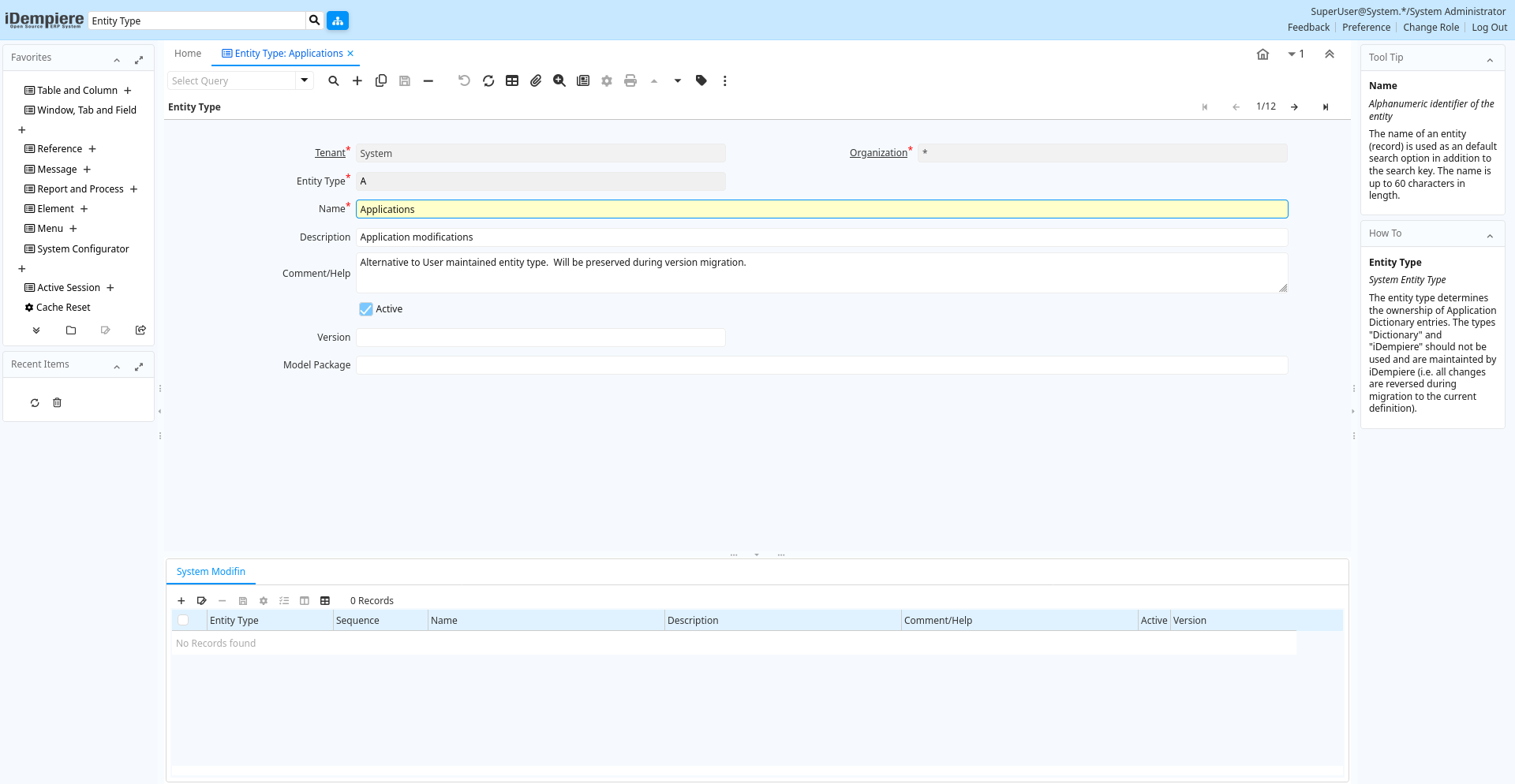
Tab: Entity Type
[Created: 11/06/2006 - Updated: 11/06/2006 ]
Description: System Entity Type
Help: The entity type determines the ownership of Application Dictionary entries. The types "Dictionary" and "iDempiere" should not be used and are maintainted by iDempiere (i.e. all changes are reversed during migration to the current definition).
Tab Level: 0
Table 10: Entity Type - Fields
Table: Report Parameters
| Name | Description | Help | Technical Info |
|---|---|---|---|
| Tenant | Tenant for this installation. | A Tenant is a company or a legal entity. You cannot share data between Tenants. | ad_entitytype.AD_Client_ID numeric(10) Table Direct |
| Organization | Organizational entity within tenant | An organization is a unit of your tenant or legal entity - examples are store, department. You can share data between organizations. | ad_entitytype.AD_Org_ID numeric(10) Table Direct |
| Entity Type | Dictionary Entity Type; Determines ownership and synchronization | The Entity Types "Dictionary", "iDempiere" and "Application" might be automatically synchronized and customizations deleted or overwritten. For customizations, copy the entity and select "User"! | ad_entitytype.EntityType character varying(40) String |
| Name | Alphanumeric identifier of the entity | The name of an entity (record) is used as an default search option in addition to the search key. The name is up to 60 characters in length. | ad_entitytype.Name character varying(60) String |
| Description | Optional short description of the record | A description is limited to 255 characters. | ad_entitytype.Description character varying(255) String |
| Comment/Help | Comment or Hint | The Help field contains a hint, comment or help about the use of this item. | ad_entitytype.Help character varying(2000) Text |
| Active | The record is active in the system | There are two methods of making records unavailable in the system: One is to delete the record, the other is to de-activate the record. A de-activated record is not available for selection, but available for reports.There are two reasons for de-activating and not deleting records:(1) The system requires the record for audit purposes.(2) The record is referenced by other records. E.g., you cannot delete a Business Partner, if there are invoices for this partner record existing. You de-activate the Business Partner and prevent that this record is used for future entries. | ad_entitytype.IsActive character(1) Yes-No |
| Version | Version of the table definition | The Version indicates the version of this table definition. | ad_entitytype.Version character varying(20) String |
| Model Package | Java Package of the model classes | By default, the Java model classes for extensions are in the compiere.model package. If you provide a jar file in the classpath, you can define here your specific model package. The model classes are used to save/modify/delete entries and as well as in Workflow. Refer to the Compiere naming convention to make sure that your class is used rather then the base classes. | ad_entitytype.ModelPackage character varying(255) String |
Tab: System Modifin
[Created: 11/06/2006 - Updated: 11/06/2006 ]
Description: System Modification or Extension
Help: Description of the System modification or extension
Tab Level: 1
Table 20: System Modifin - Fields
Table: Report Parameters
| Name | Description | Help | Technical Info |
|---|---|---|---|
| Tenant | Tenant for this installation. | A Tenant is a company or a legal entity. You cannot share data between Tenants. | ad_modification.AD_Client_ID numeric(10) Table Direct |
| Organization | Organizational entity within tenant | An organization is a unit of your tenant or legal entity - examples are store, department. You can share data between organizations. | ad_modification.AD_Org_ID numeric(10) Table Direct |
| Entity Type | Dictionary Entity Type; Determines ownership and synchronization | The Entity Types "Dictionary", "iDempiere" and "Application" might be automatically synchronized and customizations deleted or overwritten. For customizations, copy the entity and select "User"! | ad_modification.EntityType character varying(40) Table |
| Sequence | Method of ordering records; lowest number comes first | The Sequence indicates the order of records | ad_modification.SeqNo numeric(10) Integer |
| Name | Alphanumeric identifier of the entity | The name of an entity (record) is used as an default search option in addition to the search key. The name is up to 60 characters in length. | ad_modification.Name character varying(60) String |
| Description | Optional short description of the record | A description is limited to 255 characters. | ad_modification.Description character varying(255) String |
| Comment/Help | Comment or Hint | The Help field contains a hint, comment or help about the use of this item. | ad_modification.Help character varying(2000) Text |
| Active | The record is active in the system | There are two methods of making records unavailable in the system: One is to delete the record, the other is to de-activate the record. A de-activated record is not available for selection, but available for reports.There are two reasons for de-activating and not deleting records:(1) The system requires the record for audit purposes.(2) The record is referenced by other records. E.g., you cannot delete a Business Partner, if there are invoices for this partner record existing. You de-activate the Business Partner and prevent that this record is used for future entries. | ad_modification.IsActive character(1) Yes-No |
| Version | Version of the table definition | The Version indicates the version of this table definition. | ad_modification.Version character varying(20) String |