Window: Marketing Campaign
[Created: 23/09/1999 - Updated: 02/01/2000 ]
Description: Maintain Marketing Campaigns
Help: The Marketing Campaign Window defines the start and end date for a campaign. It also gives a running balance of the invoice amounts which referred to this campaign.
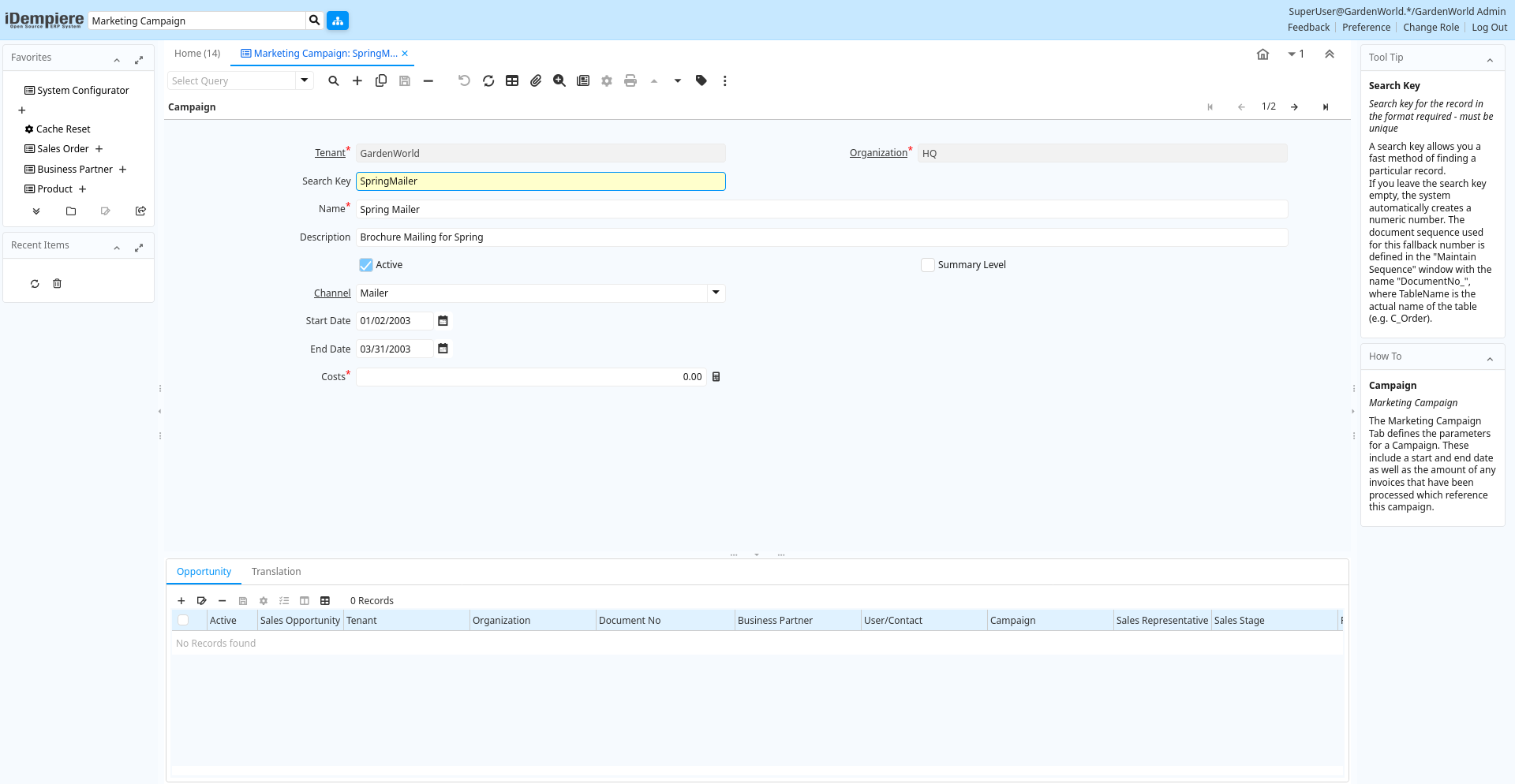
Tab: Campaign
[Created: 23/09/1999 - Updated: 02/01/2000 ]
Description: Marketing Campaign
Help: The Marketing Campaign Tab defines the parameters for a Campaign. These include a start and end date as well as the amount of any invoices that have been processed which reference this campaign.
Tab Level: 0
Table 10: Campaign - Fields
Table: Report Parameters
| Name | Description | Help | Technical Info |
|---|---|---|---|
| Tenant | Tenant for this installation. | A Tenant is a company or a legal entity. You cannot share data between Tenants. | c_campaign.AD_Client_ID numeric(10) Table Direct |
| Organization | Organizational entity within tenant | An organization is a unit of your tenant or legal entity - examples are store, department. You can share data between organizations. | c_campaign.AD_Org_ID numeric(10) Table Direct |
| Search Key | Search key for the record in the format required - must be unique | A search key allows you a fast method of finding a particular record.If you leave the search key empty, the system automatically creates a numeric number. The document sequence used for this fallback number is defined in the "Maintain Sequence" window with the name "DocumentNo_", where TableName is the actual name of the table (e.g. C_Order). | c_campaign.Value character varying(40) String |
| Name | Alphanumeric identifier of the entity | The name of an entity (record) is used as an default search option in addition to the search key. The name is up to 60 characters in length. | c_campaign.Name character varying(60) String |
| Description | Optional short description of the record | A description is limited to 255 characters. | c_campaign.Description character varying(255) String |
| Active | The record is active in the system | There are two methods of making records unavailable in the system: One is to delete the record, the other is to de-activate the record. A de-activated record is not available for selection, but available for reports.There are two reasons for de-activating and not deleting records:(1) The system requires the record for audit purposes.(2) The record is referenced by other records. E.g., you cannot delete a Business Partner, if there are invoices for this partner record existing. You de-activate the Business Partner and prevent that this record is used for future entries. | c_campaign.IsActive character(1) Yes-No |
| Summary Level | This is a summary entity | A summary entity represents a branch in a tree rather than an end-node. Summary entities are used for reporting and do not have own values. | c_campaign.IsSummary character(1) Yes-No |
| Channel | Sales Channel | The Sales Channel identifies a channel (or method) of sales generation. | c_campaign.C_Channel_ID numeric(10) Table Direct |
| Start Date | First effective day (inclusive) | The Start Date indicates the first or starting date | c_campaign.StartDate timestamp without time zone Date |
| End Date | Last effective date (inclusive) | The End Date indicates the last date in this range. | c_campaign.EndDate timestamp without time zone Date |
| Costs | Costs in accounting currency | The Costs indicates the cost of a campaign in an Organizations accounting currency. | c_campaign.Costs numeric Costs+Prices |
Tab: Opportunity
[Created: 25/08/2013 - Updated: 25/08/2013 ]
Description:
Help:
Tab Level: 1
Table 20: Opportunity - Fields
Table: Report Parameters
| Name | Description | Help | Technical Info |
|---|---|---|---|
| Tenant | Tenant for this installation. | A Tenant is a company or a legal entity. You cannot share data between Tenants. | c_opportunity.AD_Client_ID numeric(10) Table Direct |
| Organization | Organizational entity within tenant | An organization is a unit of your tenant or legal entity - examples are store, department. You can share data between organizations. | c_opportunity.AD_Org_ID numeric(10) Table Direct |
| Document No | Document sequence number of the document | The document number is usually automatically generated by the system and determined by the document type of the document. If the document is not saved, the preliminary number is displayed in "".If the document type of your document has no automatic document sequence defined, the field is empty if you create a new document. This is for documents which usually have an external number (like vendor invoice). If you leave the field empty, the system will generate a document number for you. The document sequence used for this fallback number is defined in the "Maintain Sequence" window with the name "DocumentNo_", where TableName is the actual name of the table (e.g. C_Order). | c_opportunity.DocumentNo character varying(60) String |
| Business Partner | Identifies a Business Partner | A Business Partner is anyone with whom you transact. This can include Vendor, Customer, Employee or Salesperson | c_opportunity.C_BPartner_ID numeric(10) Search |
| User/Contact | User within the system - Internal or Business Partner Contact | The User identifies a unique user in the system. This could be an internal user or a business partner contact | c_opportunity.AD_User_ID numeric(10) Table Direct |
| Campaign | Marketing Campaign | The Campaign defines a unique marketing program. Projects can be associated with a pre defined Marketing Campaign. You can then report based on a specific Campaign. | c_opportunity.C_Campaign_ID numeric(10) Table Direct |
| Sales Representative | Sales Representative or Company Agent | The Sales Representative indicates the Sales Rep for this Region. Any Sales Rep must be a valid internal user. | c_opportunity.SalesRep_ID numeric(10) Table |
| Sales Stage | Stages of the sales process | Define what stages your sales process will move through | c_opportunity.C_SalesStage_ID numeric(10) Table |
| Probability | c_opportunity.Probability numeric Amount | ||
| Expected Close Date | Expected Close Date | The Expected Close Date indicates the expected last or final date | c_opportunity.ExpectedCloseDate timestamp without time zone Date |
| Opportunity Amount | The estimated value of this opportunity. | c_opportunity.OpportunityAmt numeric Amount | |
| Currency | The Currency for this record | Indicates the Currency to be used when processing or reporting on this record | c_opportunity.C_Currency_ID numeric(10) Table Direct |
| Description | Optional short description of the record | A description is limited to 255 characters. | c_opportunity.Description character varying(255) String |
| Comments | Comments or additional information | The Comments field allows for free form entry of additional information. | c_opportunity.Comments text Text |
| Order | Order | The Order is a control document. The Order is complete when the quantity ordered is the same as the quantity shipped and invoiced. When you close an order, unshipped (backordered) quantities are cancelled. | c_opportunity.C_Order_ID numeric(10) Search |
| Close Date | Close Date | The Start Date indicates the last or final date | c_opportunity.CloseDate timestamp without time zone Date |
| Cost | Cost information | c_opportunity.Cost numeric Amount |
Tab: Translation
[Created: 21/03/2014 - Updated: 27/10/2024 ]
Description:
Help:
Tab Level: 1
Table 30: Translation - Fields
Table: Report Parameters
| Name | Description | Help | Technical Info |
|---|---|---|---|
| Tenant | Tenant for this installation. | A Tenant is a company or a legal entity. You cannot share data between Tenants. | c_campaign_trl.AD_Client_ID numeric(10) Table Direct |
| Organization | Organizational entity within tenant | An organization is a unit of your tenant or legal entity - examples are store, department. You can share data between organizations. | c_campaign_trl.AD_Org_ID numeric(10) Table Direct |
| Campaign | Marketing Campaign | The Campaign defines a unique marketing program. Projects can be associated with a pre defined Marketing Campaign. You can then report based on a specific Campaign. | c_campaign_trl.C_Campaign_ID numeric(10) Search |
| Language | Language for this entity | The Language identifies the language to use for display and formatting | c_campaign_trl.AD_Language character varying(6) Table |
| Active | The record is active in the system | There are two methods of making records unavailable in the system: One is to delete the record, the other is to de-activate the record. A de-activated record is not available for selection, but available for reports.There are two reasons for de-activating and not deleting records:(1) The system requires the record for audit purposes.(2) The record is referenced by other records. E.g., you cannot delete a Business Partner, if there are invoices for this partner record existing. You de-activate the Business Partner and prevent that this record is used for future entries. | c_campaign_trl.IsActive character(1) Yes-No |
| Translated | This column is translated | The Translated checkbox indicates if this column is translated. | c_campaign_trl.IsTranslated character(1) Yes-No |
| Name | Alphanumeric identifier of the entity | The name of an entity (record) is used as an default search option in addition to the search key. The name is up to 60 characters in length. | c_campaign_trl.Name character varying(60) String |
| Description | Optional short description of the record | A description is limited to 255 characters. | c_campaign_trl.Description character varying(255) String |