Window: Import Inventory Move
[Created: 20/06/2010 - Updated: 03/06/2021 ]
Description: This window allow import Inventory Move transaction
Help:
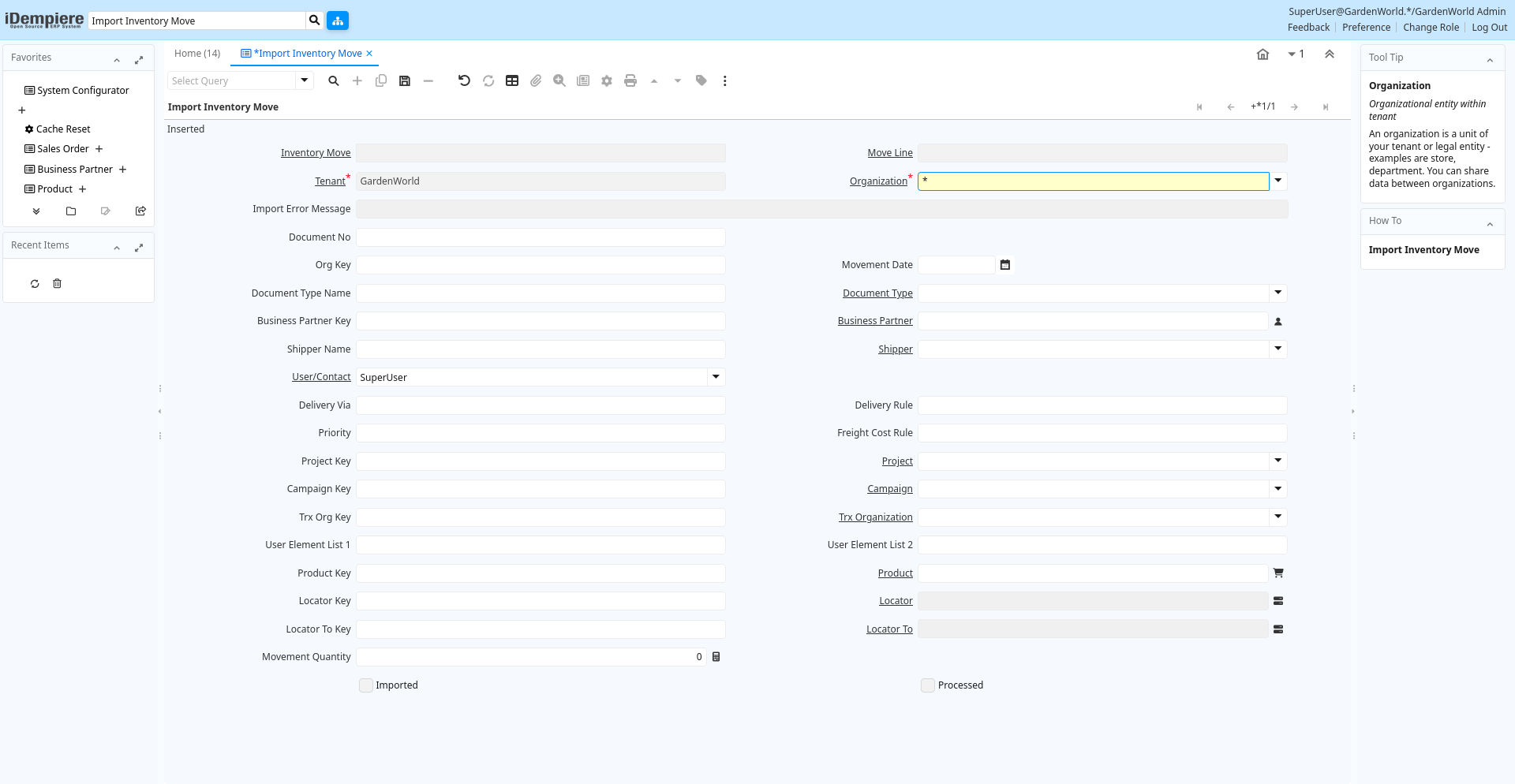
Tab: Import Inventory Move
[Created: 20/06/2010 - Updated: 20/06/2010 ]
Description:
Help:
Tab Level: 0
Table 10: Import Inventory Move - Fields
Table: Report Parameters
| Name | Description | Help | Technical Info |
|---|---|---|---|
| Inventory Move | Movement of Inventory | The Inventory Movement uniquely identifies a group of movement lines. | i_movement.M_Movement_ID numeric(10) Search |
| Move Line | Inventory Move document Line | The Movement Line indicates the inventory movement document line (if applicable) for this transaction | i_movement.M_MovementLine_ID numeric(10) Table Direct |
| Tenant | Tenant for this installation. | A Tenant is a company or a legal entity. You cannot share data between Tenants. | i_movement.AD_Client_ID numeric(10) Table Direct |
| Organization | Organizational entity within tenant | An organization is a unit of your tenant or legal entity - examples are store, department. You can share data between organizations. | i_movement.AD_Org_ID numeric(10) Table Direct |
| Import Error Message | Messages generated from import process | The Import Error Message displays any error messages generated during the import process. | i_movement.I_ErrorMsg character varying(2000) String |
| Document No | Document sequence number of the document | The document number is usually automatically generated by the system and determined by the document type of the document. If the document is not saved, the preliminary number is displayed in "".If the document type of your document has no automatic document sequence defined, the field is empty if you create a new document. This is for documents which usually have an external number (like vendor invoice). If you leave the field empty, the system will generate a document number for you. The document sequence used for this fallback number is defined in the "Maintain Sequence" window with the name "DocumentNo_", where TableName is the actual name of the table (e.g. C_Order). | i_movement.DocumentNo character varying(40) String |
| Org Key | Key of the Organization | i_movement.OrgValue character varying(40) String | |
| Movement Date | Date a product was moved in or out of inventory | The Movement Date indicates the date that a product moved in or out of inventory. This is the result of a shipment, receipt or inventory movement. | i_movement.MovementDate timestamp without time zone Date |
| Document Type Name | Name of the Document Type | i_movement.DocTypeName character varying(40) String | |
| Document Type | Document type or rules | The Document Type determines document sequence and processing rules | i_movement.C_DocType_ID numeric(10) Table Direct |
| Business Partner Key | Key of the Business Partner | i_movement.BPartnerValue character varying(40) String | |
| Business Partner | Identifies a Business Partner | A Business Partner is anyone with whom you transact. This can include Vendor, Customer, Employee or Salesperson | i_movement.C_BPartner_ID numeric(10) Search |
| Shipper Name | i_movement.ShipperName character varying(40) String | ||
| Shipper | Method or manner of product delivery | The Shipper indicates the method of delivering product | i_movement.M_Shipper_ID numeric(10) Table |
| User/Contact | User within the system - Internal or Business Partner Contact | The User identifies a unique user in the system. This could be an internal user or a business partner contact | i_movement.AD_User_ID numeric(10) Table Direct |
| Delivery Via | How the order will be delivered | The Delivery Via indicates how the products should be delivered. For example, will the order be picked up or shipped. | i_movement.DeliveryViaRule character varying(40) String |
| Delivery Rule | Defines the timing of Delivery | The Delivery Rule indicates when an order should be delivered. For example should the order be delivered when the entire order is complete, when a line is complete or as the products become available. | i_movement.DeliveryRule character varying(40) String |
| Priority | Priority of a document | The Priority indicates the importance (high, medium, low) of this document | i_movement.PriorityRule character varying(40) String |
| Freight Cost Rule | Method for charging Freight | The Freight Cost Rule indicates the method used when charging for freight. | i_movement.FreightCostRule character varying(40) String |
| Project Key | Key of the Project | i_movement.ProjectValue character varying(40) String | |
| Project | Financial Project | A Project allows you to track and control internal or external activities. | i_movement.C_Project_ID numeric(10) Table Direct |
| Campaign Key | Text key of the Campaign | i_movement.CampaignValue character varying(40) String | |
| Campaign | Marketing Campaign | The Campaign defines a unique marketing program. Projects can be associated with a pre defined Marketing Campaign. You can then report based on a specific Campaign. | i_movement.C_Campaign_ID numeric(10) Table Direct |
| Trx Org Key | Key of the Transaction Organization | i_movement.OrgTrxValue character varying(40) String | |
| Trx Organization | Performing or initiating organization | The organization which performs or initiates this transaction (for another organization). The owning Organization may not be the transaction organization in a service bureau environment, with centralized services, and inter-organization transactions. | i_movement.AD_OrgTrx_ID numeric(10) Table |
| User Element List 1 | User defined list element #1 | The user defined element displays the optional elements that have been defined for this account combination. | i_movement.User1_ID character varying(10) String |
| User Element List 2 | User defined list element #2 | The user defined element displays the optional elements that have been defined for this account combination. | i_movement.User2_ID character varying(10) String |
| Product Key | Key of the Product | i_movement.ProductValue character varying(40) String | |
| Product | Product, Service, Item | Identifies an item which is either purchased or sold in this organization. | i_movement.M_Product_ID numeric(10) Search |
| Locator Key | Key of the Warehouse Locator | i_movement.LocatorValue character varying(40) String | |
| Locator | Warehouse Locator | The Locator indicates where in a Warehouse a product is located. | i_movement.M_Locator_ID numeric(10) Locator (WH) |
| Locator To Key | i_movement.LocatorToValue character varying(40) String | ||
| Locator To | Location inventory is moved to | The Locator To indicates the location where the inventory is being moved to. | i_movement.M_LocatorTo_ID numeric(10) Locator (WH) |
| Movement Quantity | Quantity of a product moved. | The Movement Quantity indicates the quantity of a product that has been moved. | i_movement.MovementQty numeric Quantity |
| Imported | Has this import been processed | The Imported check box indicates if this import has been processed. | i_movement.I_IsImported character(1) Yes-No |
| Processed | The document has been processed | The Processed checkbox indicates that a document has been processed. | i_movement.Processed character(1) Yes-No |
| Import Inventory Move | i_movement.Processing character(1) Button |