Window: GL Distribution
[Created: 19/03/2004 - Updated: 02/01/2000 ]
Description: General Ledger Distribution
Help: If the account combination criteria of the Distribution is met, the posting to the account combination is replaced by the account combinations of the distribution lines. The distribution is a one-step operation based on the percentage of the lines.
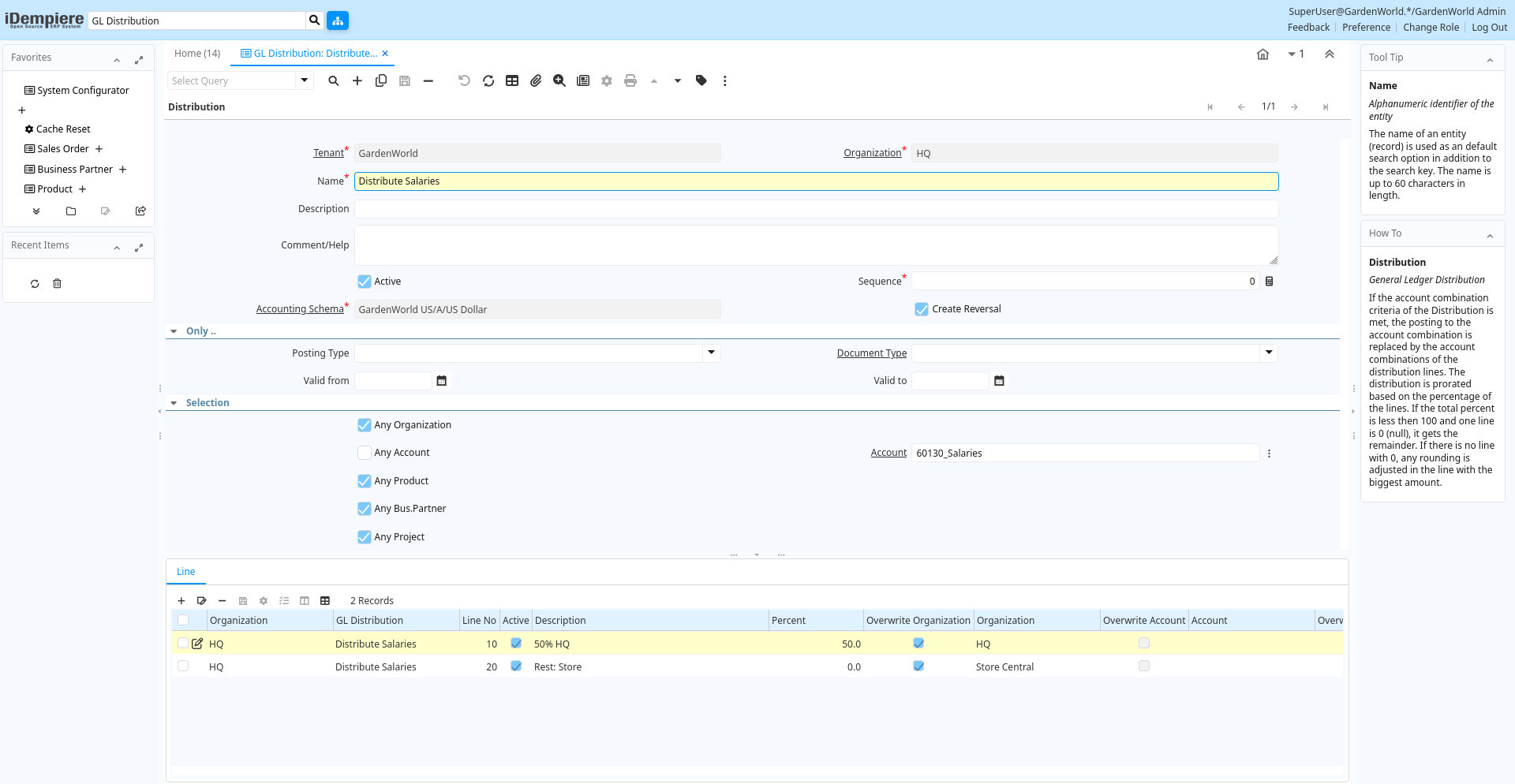
Tab: Distribution
[Created: 19/03/2004 - Updated: 20/08/2020 ]
Description: General Ledger Distribution
Help: If the account combination criteria of the Distribution is met, the posting to the account combination is replaced by the account combinations of the distribution lines. The distribution is prorated based on the percentage of the lines. If the total percent is less then 100 and one line is 0 (null), it gets the remainder. If there is no line with 0, any rounding is adjusted in the line with the biggest amount.
Tab Level: 0
Table 10: Distribution - Fields
Table: Report Parameters
| Name | Description | Help | Technical Info |
|---|---|---|---|
| Tenant | Tenant for this installation. | A Tenant is a company or a legal entity. You cannot share data between Tenants. | gl_distribution.AD_Client_ID numeric(10) Table Direct |
| Organization | Organizational entity within tenant | An organization is a unit of your tenant or legal entity - examples are store, department. You can share data between organizations. | gl_distribution.AD_Org_ID numeric(10) Table Direct |
| Name | Alphanumeric identifier of the entity | The name of an entity (record) is used as an default search option in addition to the search key. The name is up to 60 characters in length. | gl_distribution.Name character varying(60) String |
| Description | Optional short description of the record | A description is limited to 255 characters. | gl_distribution.Description character varying(255) String |
| Comment/Help | Comment or Hint | The Help field contains a hint, comment or help about the use of this item. | gl_distribution.Help character varying(2000) Text |
| Active | The record is active in the system | There are two methods of making records unavailable in the system: One is to delete the record, the other is to de-activate the record. A de-activated record is not available for selection, but available for reports.There are two reasons for de-activating and not deleting records:(1) The system requires the record for audit purposes.(2) The record is referenced by other records. E.g., you cannot delete a Business Partner, if there are invoices for this partner record existing. You de-activate the Business Partner and prevent that this record is used for future entries. | gl_distribution.IsActive character(1) Yes-No |
| Sequence | Method of ordering records; lowest number comes first | The Sequence indicates the order of records | gl_distribution.SeqNo numeric(10) Integer |
| Accounting Schema | Rules for accounting | An Accounting Schema defines the rules used in accounting such as costing method, currency and calendar | gl_distribution.C_AcctSchema_ID numeric(10) Table Direct |
| Create Reversal | Indicates that reversal movement will be created, if disabled the original movement will be deleted. | gl_distribution.IsCreateReversal character(1) Yes-No | |
| Posting Type | The type of posted amount for the transaction | The Posting Type indicates the type of amount (Actual, Budget, Reservation, Commitment, Statistical) the transaction. | gl_distribution.PostingType character(1) List |
| Document Type | Document type or rules | The Document Type determines document sequence and processing rules | gl_distribution.C_DocType_ID numeric(10) Table Direct |
| Valid from | Valid from including this date (first day) | The Valid From date indicates the first day of a date range | gl_distribution.ValidFrom timestamp without time zone Date |
| Valid to | Valid to including this date (last day) | The Valid To date indicates the last day of a date range | gl_distribution.ValidTo timestamp without time zone Date |
| Any Organization | Match any value of the Organization segment | If selected, any value of the account segment will match. If not selected, but no value of the accounting segment is selected, the matched value must be null (i.e. not defined). | gl_distribution.AnyOrg character(1) Yes-No |
| Organization | Organizational entity within tenant | An organization is a unit of your tenant or legal entity - examples are store, department. | gl_distribution.Org_ID numeric(10) Table |
| Any Account | Match any value of the Account segment | If selected, any value of the account segment will match. If not selected, but no value of the accounting segment is selected, the matched value must be null (i.e. not defined). | gl_distribution.AnyAcct character(1) Yes-No |
| Account | Account used | The (natural) account used | gl_distribution.Account_ID numeric(10) Search |
| Any Activity | Match any value of the Activity segment | If selected, any value of the account segment will match. If not selected, but no value of the accounting segment is selected, the matched value must be null (i.e. not defined). | gl_distribution.AnyActivity character(1) Yes-No |
| Activity | Business Activity | Activities indicate tasks that are performed and used to utilize Activity based Costing | gl_distribution.C_Activity_ID numeric(10) Table Direct |
| Any Product | Match any value of the Product segment | If selected, any value of the account segment will match. If not selected, but no value of the accounting segment is selected, the matched value must be null (i.e. not defined). | gl_distribution.AnyProduct character(1) Yes-No |
| Product | Product, Service, Item | Identifies an item which is either purchased or sold in this organization. | gl_distribution.M_Product_ID numeric(10) Search |
| Any Bus.Partner | Match any value of the Business Partner segment | If selected, any value of the account segment will match. If not selected, but no value of the accounting segment is selected, the matched value must be null (i.e. not defined). | gl_distribution.AnyBPartner character(1) Yes-No |
| Business Partner | Identifies a Business Partner | A Business Partner is anyone with whom you transact. This can include Vendor, Customer, Employee or Salesperson | gl_distribution.C_BPartner_ID numeric(10) Search |
| Any Project | Match any value of the Project segment | If selected, any value of the account segment will match. If not selected, but no value of the accounting segment is selected, the matched value must be null (i.e. not defined). | gl_distribution.AnyProject character(1) Yes-No |
| Project | Financial Project | A Project allows you to track and control internal or external activities. | gl_distribution.C_Project_ID numeric(10) Search |
| Any Campaign | Match any value of the Campaign segment | If selected, any value of the account segment will match. If not selected, but no value of the accounting segment is selected, the matched value must be null (i.e. not defined). | gl_distribution.AnyCampaign character(1) Yes-No |
| Campaign | Marketing Campaign | The Campaign defines a unique marketing program. Projects can be associated with a pre defined Marketing Campaign. You can then report based on a specific Campaign. | gl_distribution.C_Campaign_ID numeric(10) Table Direct |
| Any Location From | Match any value of the Location From segment | If selected, any value of the account segment will match. If not selected, but no value of the accounting segment is selected, the matched value must be null (i.e. not defined). | gl_distribution.AnyLocFrom character(1) Yes-No |
| Location From | Location that inventory was moved from | The Location From indicates the location that a product was moved from. | gl_distribution.C_LocFrom_ID numeric(10) Table |
| Any Location To | Match any value of the Location To segment | If selected, any value of the account segment will match. If not selected, but no value of the accounting segment is selected, the matched value must be null (i.e. not defined). | gl_distribution.AnyLocTo character(1) Yes-No |
| Location To | Location that inventory was moved to | The Location To indicates the location that a product was moved to. | gl_distribution.C_LocTo_ID numeric(10) Table |
| Any Sales Region | Match any value of the Sales Region segment | If selected, any value of the account segment will match. If not selected, but no value of the accounting segment is selected, the matched value must be null (i.e. not defined). | gl_distribution.AnySalesRegion character(1) Yes-No |
| Sales Region | Sales coverage region | The Sales Region indicates a specific area of sales coverage. | gl_distribution.C_SalesRegion_ID numeric(10) Table Direct |
| Any Trx Organization | Match any value of the Transaction Organization segment | If selected, any value of the account segment will match. If not selected, but no value of the accounting segment is selected, the matched value must be null (i.e. not defined). | gl_distribution.AnyOrgTrx character(1) Yes-No |
| Trx Organization | Performing or initiating organization | The organization which performs or initiates this transaction (for another organization). The owning Organization may not be the transaction organization in a service bureau environment, with centralized services, and inter-organization transactions. | gl_distribution.AD_OrgTrx_ID numeric(10) Table |
| Any User 1 | Match any value of the User 1 segment | If selected, any value of the account segment will match. If not selected, but no value of the accounting segment is selected, the matched value must be null (i.e. not defined). | gl_distribution.AnyUser1 character(1) Yes-No |
| User Element List 1 | User defined list element #1 | The user defined element displays the optional elements that have been defined for this account combination. | gl_distribution.User1_ID numeric(10) Search |
| Any User 2 | Match any value of the User 2 segment | If selected, any value of the account segment will match. If not selected, but no value of the accounting segment is selected, the matched value must be null (i.e. not defined). | gl_distribution.AnyUser2 character(1) Yes-No |
| User Element List 2 | User defined list element #2 | The user defined element displays the optional elements that have been defined for this account combination. | gl_distribution.User2_ID numeric(10) Search |
| Total Percent | Sum of the Percent details | gl_distribution.PercentTotal numeric Number | |
| Valid | Element is valid | The element passed the validation check | gl_distribution.IsValid character(1) Yes-No |
| Verify | Verify GL Distribution | gl_distribution.Processing character(1) Button |
Tab: Line
[Created: 19/03/2004 - Updated: 02/01/2000 ]
Description: General Ledger Distribution Target Line
Help: If the account combination criteria of the Distribution is met, the posting to the account combination is replaced by the account combinations of the distribution lines. The distribution is prorated based on the perecent value of the lines. A Percent value of 0 (null) indicates the remainder to 100. There can only be one line with 0 percent.
Tab Level: 1
Table 20: Line - Fields
Table: Report Parameters
| Name | Description | Help | Technical Info |
|---|---|---|---|
| Tenant | Tenant for this installation. | A Tenant is a company or a legal entity. You cannot share data between Tenants. | gl_distributionline.AD_Client_ID numeric(10) Table Direct |
| Organization | Organizational entity within tenant | An organization is a unit of your tenant or legal entity - examples are store, department. You can share data between organizations. | gl_distributionline.AD_Org_ID numeric(10) Table Direct |
| GL Distribution | General Ledger Distribution | If the account combination criteria of the Distribution is met, the posting to the account combination is replaced by the account combinations of the distribution lines. The distribution is prorated based on the ratio of the lines. The distribution must be valid to be used. | gl_distributionline.GL_Distribution_ID numeric(10) Table Direct |
| Line No | Unique line for this document | Indicates the unique line for a document. It will also control the display order of the lines within a document. | gl_distributionline.Line numeric(10) Integer |
| Active | The record is active in the system | There are two methods of making records unavailable in the system: One is to delete the record, the other is to de-activate the record. A de-activated record is not available for selection, but available for reports.There are two reasons for de-activating and not deleting records:(1) The system requires the record for audit purposes.(2) The record is referenced by other records. E.g., you cannot delete a Business Partner, if there are invoices for this partner record existing. You de-activate the Business Partner and prevent that this record is used for future entries. | gl_distributionline.IsActive character(1) Yes-No |
| Description | Optional short description of the record | A description is limited to 255 characters. | gl_distributionline.Description character varying(255) String |
| Percent | Percentage | The Percent indicates the percentage used. | gl_distributionline.Percent numeric Number |
| Overwrite Organization | Overwrite the account segment Organization with the value specified | If not overwritten, the value of the original account combination is used. If selected, but not specified, the segment is set to null. | gl_distributionline.OverwriteOrg character(1) Yes-No |
| Organization | Organizational entity within tenant | An organization is a unit of your tenant or legal entity - examples are store, department. | gl_distributionline.Org_ID numeric(10) Table |
| Overwrite Account | Overwrite the account segment Account with the value specified | If not overwritten, the value of the original account combination is used. If selected, but not specified, the segment is set to null. | gl_distributionline.OverwriteAcct character(1) Yes-No |
| Account | Account used | The (natural) account used | gl_distributionline.Account_ID numeric(10) Search |
| Overwrite Activity | Overwrite the account segment Activity with the value specified | If not overwritten, the value of the original account combination is used. If selected, but not specified, the segment is set to null. | gl_distributionline.OverwriteActivity character(1) Yes-No |
| Activity | Business Activity | Activities indicate tasks that are performed and used to utilize Activity based Costing | gl_distributionline.C_Activity_ID numeric(10) Table Direct |
| Overwrite Product | Overwrite the account segment Product with the value specified | If not overwritten, the value of the original account combination is used. If selected, but not specified, the segment is set to null. | gl_distributionline.OverwriteProduct character(1) Yes-No |
| Product | Product, Service, Item | Identifies an item which is either purchased or sold in this organization. | gl_distributionline.M_Product_ID numeric(10) Search |
| Overwrite Bus.Partner | Overwrite the account segment Business Partner with the value specified | If not overwritten, the value of the original account combination is used. If selected, but not specified, the segment is set to null. | gl_distributionline.OverwriteBPartner character(1) Yes-No |
| Business Partner | Identifies a Business Partner | A Business Partner is anyone with whom you transact. This can include Vendor, Customer, Employee or Salesperson | gl_distributionline.C_BPartner_ID numeric(10) Search |
| Overwrite Project | Overwrite the account segment Project with the value specified | If not overwritten, the value of the original account combination is used. If selected, but not specified, the segment is set to null. | gl_distributionline.OverwriteProject character(1) Yes-No |
| Project | Financial Project | A Project allows you to track and control internal or external activities. | gl_distributionline.C_Project_ID numeric(10) Table Direct |
| Overwrite Campaign | Overwrite the account segment Campaign with the value specified | If not overwritten, the value of the original account combination is used. If selected, but not specified, the segment is set to null. | gl_distributionline.OverwriteCampaign character(1) Yes-No |
| Campaign | Marketing Campaign | The Campaign defines a unique marketing program. Projects can be associated with a pre defined Marketing Campaign. You can then report based on a specific Campaign. | gl_distributionline.C_Campaign_ID numeric(10) Table Direct |
| Overwrite Location From | Overwrite the account segment Location From with the value specified | If not overwritten, the value of the original account combination is used. If selected, but not specified, the segment is set to null. | gl_distributionline.OverwriteLocFrom character(1) Yes-No |
| Location From | Location that inventory was moved from | The Location From indicates the location that a product was moved from. | gl_distributionline.C_LocFrom_ID numeric(10) Table |
| Overwrite Location To | Overwrite the account segment Location From with the value specified | If not overwritten, the value of the original account combination is used. If selected, but not specified, the segment is set to null. | gl_distributionline.OverwriteLocTo character(1) Yes-No |
| Location To | Location that inventory was moved to | The Location To indicates the location that a product was moved to. | gl_distributionline.C_LocTo_ID numeric(10) Table |
| Overwrite Sales Region | Overwrite the account segment Sales Region with the value specified | If not overwritten, the value of the original account combination is used. If selected, but not specified, the segment is set to null. | gl_distributionline.OverwriteSalesRegion character(1) Yes-No |
| Sales Region | Sales coverage region | The Sales Region indicates a specific area of sales coverage. | gl_distributionline.C_SalesRegion_ID numeric(10) Table Direct |
| Overwrite Trx Organization | Overwrite the account segment Transaction Organization with the value specified | If not overwritten, the value of the original account combination is used. If selected, but not specified, the segment is set to null. | gl_distributionline.OverwriteOrgTrx character(1) Yes-No |
| Trx Organization | Performing or initiating organization | The organization which performs or initiates this transaction (for another organization). The owning Organization may not be the transaction organization in a service bureau environment, with centralized services, and inter-organization transactions. | gl_distributionline.AD_OrgTrx_ID numeric(10) Table |
| Overwrite User1 | Overwrite the account segment User 1 with the value specified | If not overwritten, the value of the original account combination is used. If selected, but not specified, the segment is set to null. | gl_distributionline.OverwriteUser1 character(1) Yes-No |
| User Element List 1 | User defined list element #1 | The user defined element displays the optional elements that have been defined for this account combination. | gl_distributionline.User1_ID numeric(10) Search |
| Overwrite User2 | Overwrite the account segment User 2 with the value specified | If not overwritten, the value of the original account combination is used. If selected, but not specified, the segment is set to null. | gl_distributionline.OverwriteUser2 character(1) Yes-No |
| User Element List 2 | User defined list element #2 | The user defined element displays the optional elements that have been defined for this account combination. | gl_distributionline.User2_ID numeric(10) Search |