Window: Web Store
[Created: 02/05/2005 - Updated: 03/05/2020 ]
Description: Define Web Store
Help: Define the web store setup.
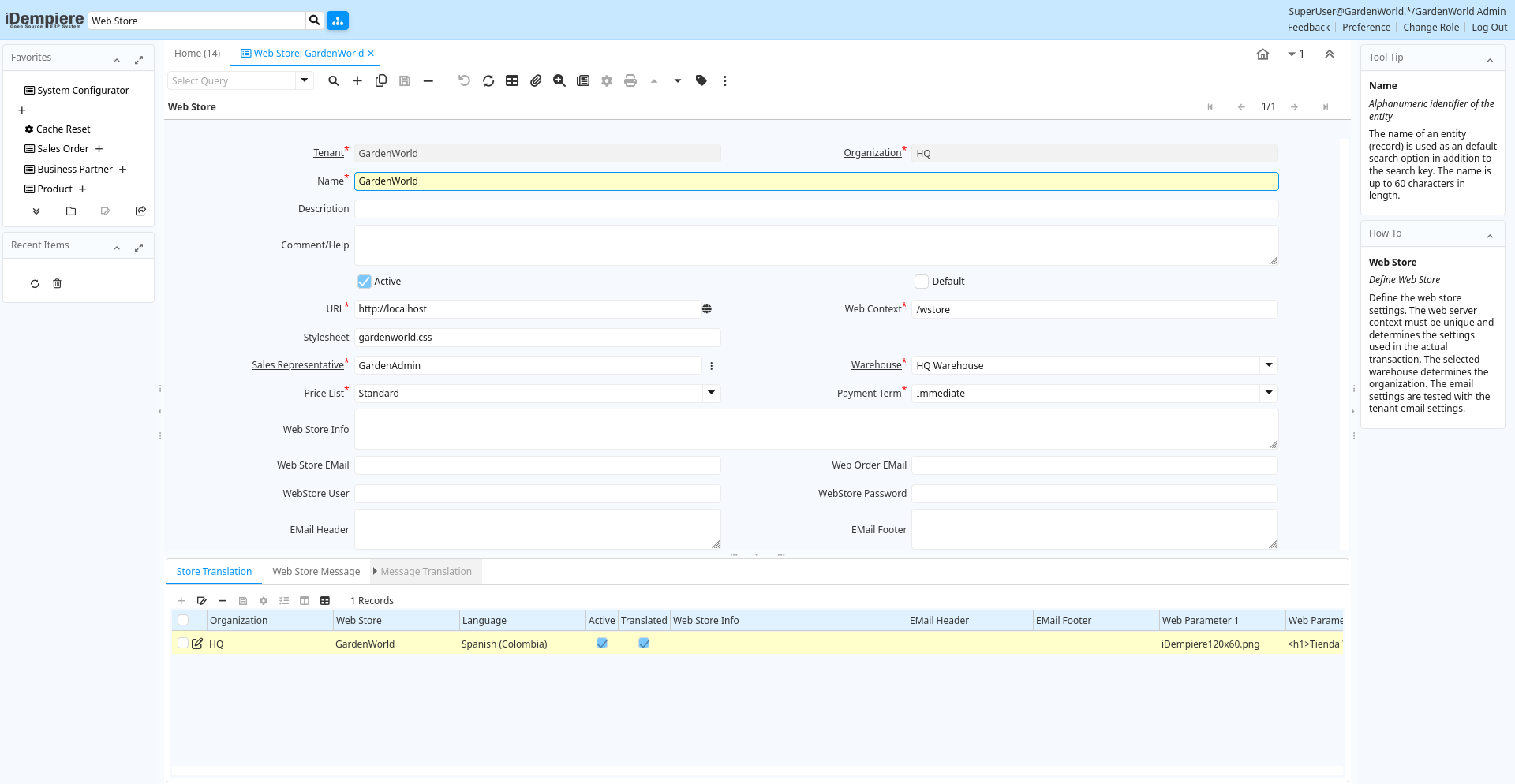
Tab: Web Store
[Created: 02/05/2005 - Updated: 10/03/2022 ]
Description: Define Web Store
Help: Define the web store settings. The web server context must be unique and determines the settings used in the actual transaction. The selected warehouse determines the organization. The email settings are tested with the tenant email settings.
Tab Level: 0
Table 10: Web Store - Fields
Table: Report Parameters
| Name | Description | Help | Technical Info |
|---|---|---|---|
| Tenant | Tenant for this installation. | A Tenant is a company or a legal entity. You cannot share data between Tenants. | w_store.AD_Client_ID numeric(10) Table Direct |
| Organization | Organizational entity within tenant | An organization is a unit of your tenant or legal entity - examples are store, department. You can share data between organizations. | w_store.AD_Org_ID numeric(10) Table Direct |
| Name | Alphanumeric identifier of the entity | The name of an entity (record) is used as an default search option in addition to the search key. The name is up to 60 characters in length. | w_store.Name character varying(60) String |
| Description | Optional short description of the record | A description is limited to 255 characters. | w_store.Description character varying(255) String |
| Comment/Help | Comment or Hint | The Help field contains a hint, comment or help about the use of this item. | w_store.Help character varying(2000) Text |
| Active | The record is active in the system | There are two methods of making records unavailable in the system: One is to delete the record, the other is to de-activate the record. A de-activated record is not available for selection, but available for reports.There are two reasons for de-activating and not deleting records:(1) The system requires the record for audit purposes.(2) The record is referenced by other records. E.g., you cannot delete a Business Partner, if there are invoices for this partner record existing. You de-activate the Business Partner and prevent that this record is used for future entries. | w_store.IsActive character(1) Yes-No |
| Default | Default value | The Default Checkbox indicates if this record will be used as a default value. | w_store.IsDefault character(1) Yes-No |
| URL | Full URL address - e.g. http://www.idempiere.org | The URL defines an fully qualified web address like http://www.idempiere.org | w_store.URL character varying(120) URL |
| Web Context | Web Server Context - e.g. /wstore | Unique Web Server Context for this Web Store - will set context-root in application.xml.The web context usually starts with / and needs to be a valid context name (not checked). | w_store.WebContext character varying(20) String |
| Stylesheet | CSS (Stylesheet) used | Base Stylesheet (.css file) to use - if empty, the default (standard.css) is used. The Style sheet can be a URL. | w_store.Stylesheet character varying(60) String |
| Sales Representative | Sales Representative or Company Agent | The Sales Representative indicates the Sales Rep for this Region. Any Sales Rep must be a valid internal user. | w_store.SalesRep_ID numeric(10) Search |
| Warehouse | Storage Warehouse and Service Point | The Warehouse identifies a unique Warehouse where products are stored or Services are provided. | w_store.M_Warehouse_ID numeric(10) Table Direct |
| Price List | Unique identifier of a Price List | Price Lists are used to determine the pricing, margin and cost of items purchased or sold. | w_store.M_PriceList_ID numeric(10) Table Direct |
| Payment Term | The terms of Payment (timing, discount) | Payment Terms identify the method and timing of payment. | w_store.C_PaymentTerm_ID numeric(10) Table Direct |
| Web Store Info | Web Store Header Information | Display HTML Info in the Web Store - by default in the header. | w_store.WebInfo character varying(2000) Text |
| Web Store EMail | EMail address used as the sender (From) | The EMail address is used to send mails to users of the web store | w_store.WStoreEMail character varying(60) String |
| Web Order EMail | EMail address to receive notifications when web orders were processed | When processing a web order, a confirmation is sent to the EMail address of the customer from the request EMail address copying this email address when entered. | w_store.WebOrderEMail character varying(60) String |
| WebStore User | User ID of the Web Store EMail address | User ID to connect to the Mail Server | w_store.WStoreUser character varying(60) String |
| WebStore Password | Password of the Web Store EMail address | Password to connect to the Mail Server | w_store.WStoreUserPW character varying(20) String |
| EMail Header | Header added to EMails | The header is added to every email. | w_store.EMailHeader character varying(2000) Text |
| EMail Footer | Footer added to EMails | The footer is added to every email. | w_store.EMailFooter character varying(2000) Text |
| Menu Orders | Show Menu Orders | w_store.IsMenuOrders character(1) Yes-No | |
| Menu Shipments | Show Menu Shipments | w_store.IsMenuShipments character(1) Yes-No | |
| Menu Invoices | Show Menu Invoices | w_store.IsMenuInvoices character(1) Yes-No | |
| Menu Assets | Show Menu Assets | w_store.IsMenuAssets character(1) Yes-No | |
| Menu Payments | Show Menu Payments | w_store.IsMenuPayments character(1) Yes-No | |
| Menu RfQs | Show Menu RfQs | w_store.IsMenuRfQs character(1) Yes-No | |
| Menu Requests | Show Menu Requests | w_store.IsMenuRequests character(1) Yes-No | |
| Menu Registrations | Show Menu Registrations | w_store.IsMenuRegistrations character(1) Yes-No | |
| Menu Interests | Show Menu Interests | w_store.IsMenuInterests character(1) Yes-No | |
| Menu Contact | Show Menu Contact | w_store.IsMenuContact character(1) Yes-No | |
| Web Parameter 1 | Web Site Parameter 1 (default: header image) | The parameter could be used in the JSP page for variables like logos, passwords, URLs or entire HTML blocks. The access is via ctx.webParam1 - By default, it is positioned on the upper left side with 130 pixel width. | w_store.WebParam1 character varying(2000) Text |
| Web Parameter 2 | Web Site Parameter 2 (default index page) | The parameter could be used in the JSP page for variables like logos, passwords, URLs or entire HTML blocks. The access is via ctx.webParam2 - By default, it is positioned after the header on the web store index page. | w_store.WebParam2 character varying(2000) Text |
| Web Parameter 3 | Web Site Parameter 3 (default left - menu) | The parameter could be used in the JSP page for variables like logos, passwords, URLs or entire HTML blocks. The access is via ctx.webParam3 - By default, it is positioned at the end in the menu column with 130 pixel width. | w_store.WebParam3 character varying(2000) Text |
| Web Parameter 4 | Web Site Parameter 4 (default footer left) | The parameter could be used in the JSP page for variables like logos, passwords, URLs or entire HTML blocks. The access is via ctx.webParam4 - By default, it is positioned on the left side of the footer with 130 pixel width. | w_store.WebParam4 character varying(2000) Text |
| Web Parameter 5 | Web Site Parameter 5 (default footer center) | The parameter could be used in the JSP page for variables like logos, passwords, URLs or entire HTML blocks. The access is via ctx.webParam5 - By default, it is positioned in the center of the footer. | w_store.WebParam5 character varying(2000) Text |
| Web Parameter 6 | Web Site Parameter 6 (default footer right) | The parameter could be used in the JSP page for variables like logos, passwords, URLs or entire HTML blocks. The access is via ctx.webParam6 - By default, it is positioned on the right side of the footer. | w_store.WebParam6 character varying(2000) Text |
Tab: Store Translation
[Created: 02/05/2005 - Updated: 27/10/2024 ]
Description:
Help:
Tab Level: 1
Table 20: Store Translation - Fields
Table: Report Parameters
| Name | Description | Help | Technical Info |
|---|---|---|---|
| Tenant | Tenant for this installation. | A Tenant is a company or a legal entity. You cannot share data between Tenants. | w_store_trl.AD_Client_ID numeric(10) Table Direct |
| Organization | Organizational entity within tenant | An organization is a unit of your tenant or legal entity - examples are store, department. You can share data between organizations. | w_store_trl.AD_Org_ID numeric(10) Table Direct |
| Web Store | A Web Store of the Tenant | w_store_trl.W_Store_ID numeric(10) Table Direct | |
| Language | Language for this entity | The Language identifies the language to use for display and formatting | w_store_trl.AD_Language character varying(6) Table |
| Active | The record is active in the system | There are two methods of making records unavailable in the system: One is to delete the record, the other is to de-activate the record. A de-activated record is not available for selection, but available for reports.There are two reasons for de-activating and not deleting records:(1) The system requires the record for audit purposes.(2) The record is referenced by other records. E.g., you cannot delete a Business Partner, if there are invoices for this partner record existing. You de-activate the Business Partner and prevent that this record is used for future entries. | w_store_trl.IsActive character(1) Yes-No |
| Translated | This column is translated | The Translated checkbox indicates if this column is translated. | w_store_trl.IsTranslated character(1) Yes-No |
| Web Store Info | Web Store Header Information | Display HTML Info in the Web Store - by default in the header. | w_store_trl.WebInfo character varying(2000) Text |
| EMail Header | Header added to EMails | The header is added to every email. | w_store_trl.EMailHeader character varying(2000) Text |
| EMail Footer | Footer added to EMails | The footer is added to every email. | w_store_trl.EMailFooter character varying(2000) Text |
| Web Parameter 1 | Web Site Parameter 1 (default: header image) | The parameter could be used in the JSP page for variables like logos, passwords, URLs or entire HTML blocks. The access is via ctx.webParam1 - By default, it is positioned on the upper left side with 130 pixel width. | w_store_trl.WebParam1 character varying(2000) Text |
| Web Parameter 2 | Web Site Parameter 2 (default index page) | The parameter could be used in the JSP page for variables like logos, passwords, URLs or entire HTML blocks. The access is via ctx.webParam2 - By default, it is positioned after the header on the web store index page. | w_store_trl.WebParam2 character varying(2000) Text |
| Web Parameter 3 | Web Site Parameter 3 (default left - menu) | The parameter could be used in the JSP page for variables like logos, passwords, URLs or entire HTML blocks. The access is via ctx.webParam3 - By default, it is positioned at the end in the menu column with 130 pixel width. | w_store_trl.WebParam3 character varying(2000) Text |
| Web Parameter 4 | Web Site Parameter 4 (default footer left) | The parameter could be used in the JSP page for variables like logos, passwords, URLs or entire HTML blocks. The access is via ctx.webParam4 - By default, it is positioned on the left side of the footer with 130 pixel width. | w_store_trl.WebParam4 character varying(2000) Text |
| Web Parameter 5 | Web Site Parameter 5 (default footer center) | The parameter could be used in the JSP page for variables like logos, passwords, URLs or entire HTML blocks. The access is via ctx.webParam5 - By default, it is positioned in the center of the footer. | w_store_trl.WebParam5 character varying(2000) Text |
| Web Parameter 6 | Web Site Parameter 6 (default footer right) | The parameter could be used in the JSP page for variables like logos, passwords, URLs or entire HTML blocks. The access is via ctx.webParam6 - By default, it is positioned on the right side of the footer. | w_store_trl.WebParam6 character varying(2000) Text |
Tab: Web Store Message
[Created: 02/05/2005 - Updated: 03/05/2020 ]
Description: Definine Web Store Messages
Help:
Tab Level: 1
Table 30: Web Store Message - Fields
Table: Report Parameters
| Name | Description | Help | Technical Info |
|---|---|---|---|
| Tenant | Tenant for this installation. | A Tenant is a company or a legal entity. You cannot share data between Tenants. | w_mailmsg.AD_Client_ID numeric(10) Table Direct |
| Organization | Organizational entity within tenant | An organization is a unit of your tenant or legal entity - examples are store, department. You can share data between organizations. | w_mailmsg.AD_Org_ID numeric(10) Table Direct |
| Web Store | A Web Store of the Tenant | w_mailmsg.W_Store_ID numeric(10) Table Direct | |
| Message Type | Mail Message Type | w_mailmsg.MailMsgType character(2) List | |
| Name | Alphanumeric identifier of the entity | The name of an entity (record) is used as an default search option in addition to the search key. The name is up to 60 characters in length. | w_mailmsg.Name character varying(60) String |
| Description | Optional short description of the record | A description is limited to 255 characters. | w_mailmsg.Description character varying(255) String |
| Active | The record is active in the system | There are two methods of making records unavailable in the system: One is to delete the record, the other is to de-activate the record. A de-activated record is not available for selection, but available for reports.There are two reasons for de-activating and not deleting records:(1) The system requires the record for audit purposes.(2) The record is referenced by other records. E.g., you cannot delete a Business Partner, if there are invoices for this partner record existing. You de-activate the Business Partner and prevent that this record is used for future entries. | w_mailmsg.IsActive character(1) Yes-No |
| Subject | Email Message Subject | Subject of the EMail | w_mailmsg.Subject character varying(255) Text |
| Message | EMail Message | Message of the EMail | w_mailmsg.Message character varying(2000) Text |
| Message 2 | Optional second part of the EMail Message | Message of the EMail | w_mailmsg.Message2 character varying(2000) Text |
| Message 3 | Optional third part of the EMail Message | Message of the EMail | w_mailmsg.Message3 character varying(2000) Text |
Tab: Message Translation
[Created: 02/05/2005 - Updated: 27/10/2024 ]
Description:
Help:
Tab Level: 2
Table 40: Message Translation - Fields
Table: Report Parameters
| Name | Description | Help | Technical Info |
|---|---|---|---|
| Tenant | Tenant for this installation. | A Tenant is a company or a legal entity. You cannot share data between Tenants. | w_mailmsg_trl.AD_Client_ID numeric(10) Table Direct |
| Organization | Organizational entity within tenant | An organization is a unit of your tenant or legal entity - examples are store, department. You can share data between organizations. | w_mailmsg_trl.AD_Org_ID numeric(10) Table Direct |
| Mail Message | Web Store Mail Message Template | w_mailmsg_trl.W_MailMsg_ID numeric(10) Table Direct | |
| Language | Language for this entity | The Language identifies the language to use for display and formatting | w_mailmsg_trl.AD_Language character varying(6) Table |
| Active | The record is active in the system | There are two methods of making records unavailable in the system: One is to delete the record, the other is to de-activate the record. A de-activated record is not available for selection, but available for reports.There are two reasons for de-activating and not deleting records:(1) The system requires the record for audit purposes.(2) The record is referenced by other records. E.g., you cannot delete a Business Partner, if there are invoices for this partner record existing. You de-activate the Business Partner and prevent that this record is used for future entries. | w_mailmsg_trl.IsActive character(1) Yes-No |
| Translated | This column is translated | The Translated checkbox indicates if this column is translated. | w_mailmsg_trl.IsTranslated character(1) Yes-No |
| Subject | Email Message Subject | Subject of the EMail | w_mailmsg_trl.Subject character varying(255) Text |
| Message | EMail Message | Message of the EMail | w_mailmsg_trl.Message character varying(2000) Text |
| Message 2 | Optional second part of the EMail Message | Message of the EMail | w_mailmsg_trl.Message2 character varying(2000) Text |
| Message 3 | Optional third part of the EMail Message | Message of the EMail | w_mailmsg_trl.Message3 character varying(2000) Text |