Window: Form
[Created: 13/07/2000 - Updated: 02/01/2000 ]
Description: Special Forms
Help: The Forms Window defines any window which is not automatically generated. For System Admin use only.
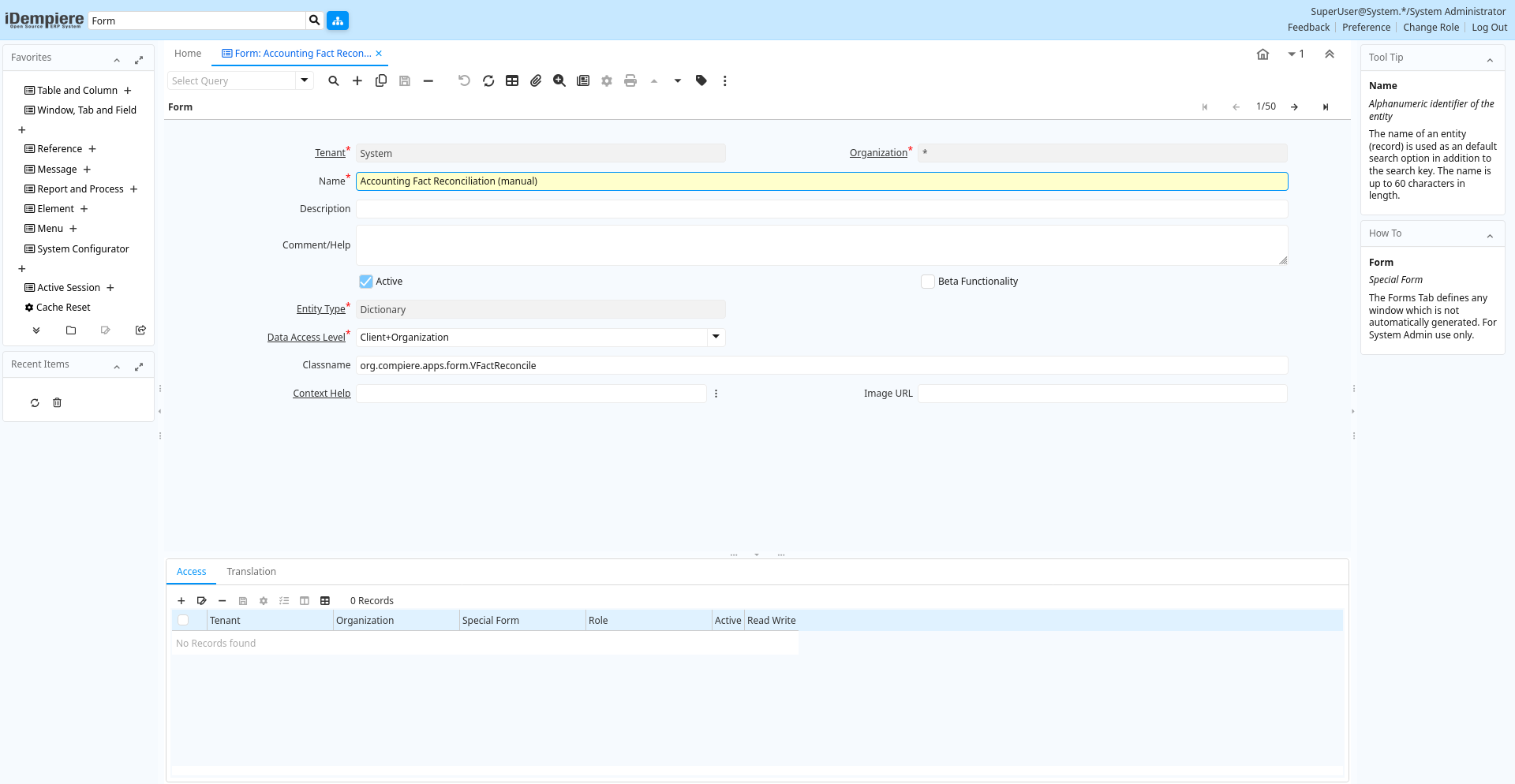
Tab: Form
[Created: 13/07/2000 - Updated: 02/01/2000 ]
Description: Special Form
Help: The Forms Tab defines any window which is not automatically generated. For System Admin use only.
Tab Level: 0
Table 10: Form - Fields
Table: Report Parameters
| Name | Description | Help | Technical Info |
|---|---|---|---|
| Tenant | Tenant for this installation. | A Tenant is a company or a legal entity. You cannot share data between Tenants. | ad_form.AD_Client_ID numeric(10) Table Direct |
| Organization | Organizational entity within tenant | An organization is a unit of your tenant or legal entity - examples are store, department. You can share data between organizations. | ad_form.AD_Org_ID numeric(10) Table Direct |
| Name | Alphanumeric identifier of the entity | The name of an entity (record) is used as an default search option in addition to the search key. The name is up to 60 characters in length. | ad_form.Name character varying(60) String |
| Description | Optional short description of the record | A description is limited to 255 characters. | ad_form.Description character varying(255) String |
| Comment/Help | Comment or Hint | The Help field contains a hint, comment or help about the use of this item. | ad_form.Help character varying(2000) Text |
| Active | The record is active in the system | There are two methods of making records unavailable in the system: One is to delete the record, the other is to de-activate the record. A de-activated record is not available for selection, but available for reports.There are two reasons for de-activating and not deleting records:(1) The system requires the record for audit purposes.(2) The record is referenced by other records. E.g., you cannot delete a Business Partner, if there are invoices for this partner record existing. You de-activate the Business Partner and prevent that this record is used for future entries. | ad_form.IsActive character(1) Yes-No |
| Beta Functionality | This functionality is considered Beta | Beta functionality is not fully tested or completed. | ad_form.IsBetaFunctionality character(1) Yes-No |
| Entity Type | Dictionary Entity Type; Determines ownership and synchronization | The Entity Types "Dictionary", "iDempiere" and "Application" might be automatically synchronized and customizations deleted or overwritten. For customizations, copy the entity and select "User"! | ad_form.EntityType character varying(40) Table |
| Data Access Level | Access Level required | Indicates the access level required for this record or process. | ad_form.AccessLevel character(1) List |
| Classname | Java Classname | The Classname identifies the Java classname used by this report or process. | ad_form.Classname character varying(60) String |
| Context Help | ad_form.AD_CtxHelp_ID numeric(10) Search | ||
| Image URL | URL of image | URL of image; The image is not stored in the database, but retrieved at runtime. The image can be a gif, jpeg or png. | ad_form.ImageURL character varying(120) String |
Tab: Access
[Created: 04/09/2000 - Updated: 16/11/2012 ]
Description: Form Access
Help: The Forms Access Tab defines the access rules for this form
Tab Level: 1
Table 20: Access - Fields
Table: Report Parameters
| Name | Description | Help | Technical Info |
|---|---|---|---|
| Tenant | Tenant for this installation. | A Tenant is a company or a legal entity. You cannot share data between Tenants. | ad_form_access.AD_Client_ID numeric(10) Table Direct |
| Organization | Organizational entity within tenant | An organization is a unit of your tenant or legal entity - examples are store, department. You can share data between organizations. | ad_form_access.AD_Org_ID numeric(10) Table Direct |
| Special Form | Special Form | The Special Form field identifies a unique Special Form in the system. | ad_form_access.AD_Form_ID numeric(10) Table Direct |
| Role | Responsibility Role | The Role determines security and access a user who has this Role will have in the System. | ad_form_access.AD_Role_ID numeric(10) Table Direct |
| Active | The record is active in the system | There are two methods of making records unavailable in the system: One is to delete the record, the other is to de-activate the record. A de-activated record is not available for selection, but available for reports.There are two reasons for de-activating and not deleting records:(1) The system requires the record for audit purposes.(2) The record is referenced by other records. E.g., you cannot delete a Business Partner, if there are invoices for this partner record existing. You de-activate the Business Partner and prevent that this record is used for future entries. | ad_form_access.IsActive character(1) Yes-No |
| Read Write | Field is read / write | The Read Write indicates that this field may be read and updated. | ad_form_access.IsReadWrite character(1) Yes-No |
Tab: Translation
[Created: 13/07/2000 - Updated: 27/10/2024 ]
Description:
Help:
Tab Level: 1
Table 30: Translation - Fields
Table: Report Parameters
| Name | Description | Help | Technical Info |
|---|---|---|---|
| Tenant | Tenant for this installation. | A Tenant is a company or a legal entity. You cannot share data between Tenants. | ad_form_trl.AD_Client_ID numeric(10) Table Direct |
| Organization | Organizational entity within tenant | An organization is a unit of your tenant or legal entity - examples are store, department. You can share data between organizations. | ad_form_trl.AD_Org_ID numeric(10) Table Direct |
| Special Form | Special Form | The Special Form field identifies a unique Special Form in the system. | ad_form_trl.AD_Form_ID numeric(10) Table Direct |
| Language | Language for this entity | The Language identifies the language to use for display and formatting | ad_form_trl.AD_Language character varying(6) Table |
| Active | The record is active in the system | There are two methods of making records unavailable in the system: One is to delete the record, the other is to de-activate the record. A de-activated record is not available for selection, but available for reports.There are two reasons for de-activating and not deleting records:(1) The system requires the record for audit purposes.(2) The record is referenced by other records. E.g., you cannot delete a Business Partner, if there are invoices for this partner record existing. You de-activate the Business Partner and prevent that this record is used for future entries. | ad_form_trl.IsActive character(1) Yes-No |
| Translated | This column is translated | The Translated checkbox indicates if this column is translated. | ad_form_trl.IsTranslated character(1) Yes-No |
| Name | Alphanumeric identifier of the entity | The name of an entity (record) is used as an default search option in addition to the search key. The name is up to 60 characters in length. | ad_form_trl.Name character varying(60) String |
| Description | Optional short description of the record | A description is limited to 255 characters. | ad_form_trl.Description character varying(255) String |
| Comment/Help | Comment or Hint | The Help field contains a hint, comment or help about the use of this item. | ad_form_trl.Help character varying(2000) Text |