Window: Workflow
[Created: 11/06/1999 - Updated: 02/01/2000 ]
Description: Maintain Workflow
Help: The Workflow Window defines Workflows in the system, the access level for the Workflow and the Nodes or Steps within the Workflow.
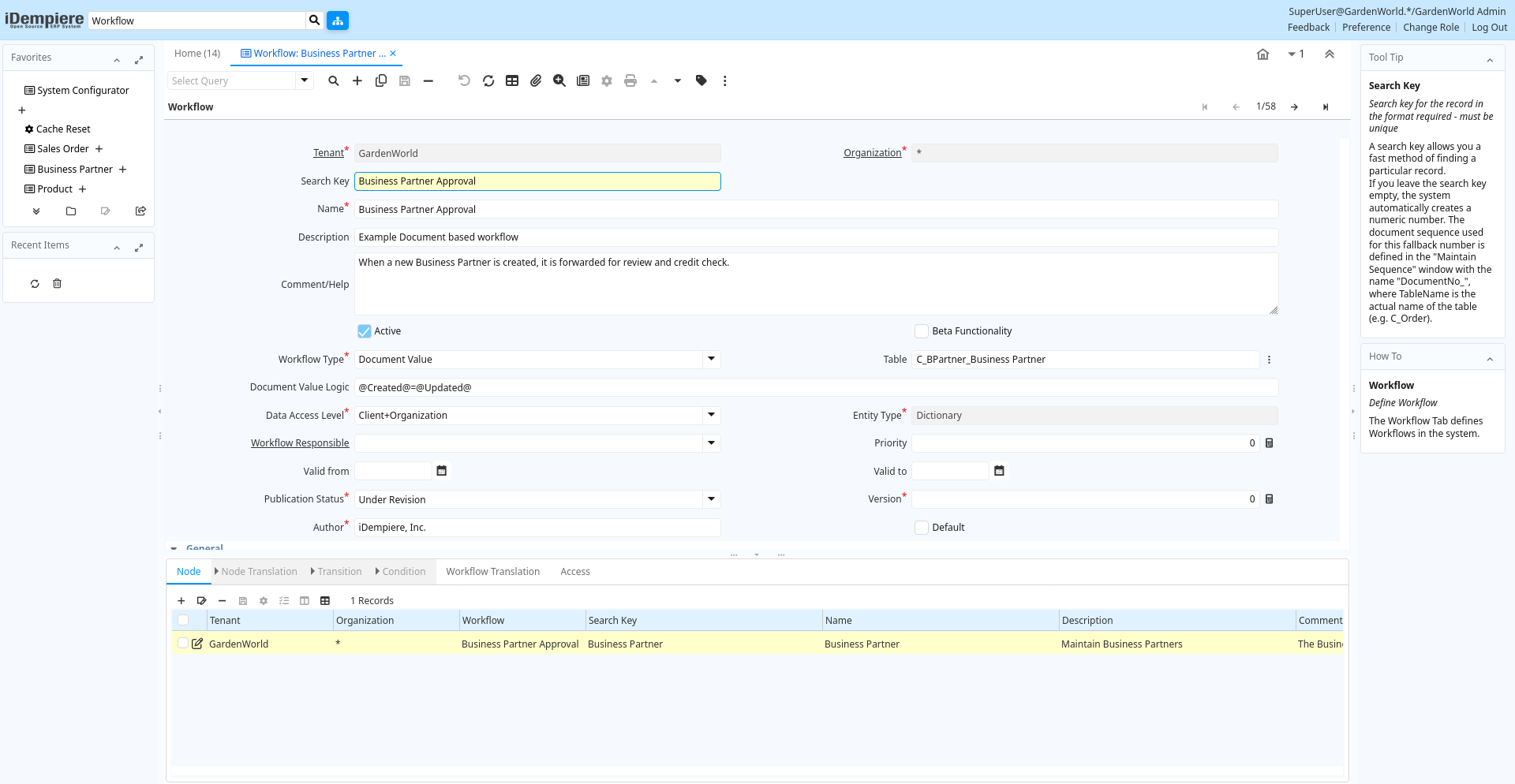
Tab: Workflow
[Created: 21/06/1999 - Updated: 02/01/2000 ]
Description: Define Workflow
Help: The Workflow Tab defines Workflows in the system.
Tab Level: 0
Table 10: Workflow - Fields
Table: Report Parameters
| Name | Description | Help | Technical Info |
|---|---|---|---|
| Tenant | Tenant for this installation. | A Tenant is a company or a legal entity. You cannot share data between Tenants. | ad_workflow.AD_Client_ID numeric(10) Table Direct |
| Organization | Organizational entity within tenant | An organization is a unit of your tenant or legal entity - examples are store, department. You can share data between organizations. | ad_workflow.AD_Org_ID numeric(10) Table Direct |
| Search Key | Search key for the record in the format required - must be unique | A search key allows you a fast method of finding a particular record.If you leave the search key empty, the system automatically creates a numeric number. The document sequence used for this fallback number is defined in the "Maintain Sequence" window with the name "DocumentNo_", where TableName is the actual name of the table (e.g. C_Order). | ad_workflow.Value character varying(40) String |
| Name | Alphanumeric identifier of the entity | The name of an entity (record) is used as an default search option in addition to the search key. The name is up to 60 characters in length. | ad_workflow.Name character varying(60) String |
| Description | Optional short description of the record | A description is limited to 255 characters. | ad_workflow.Description character varying(255) String |
| Comment/Help | Comment or Hint | The Help field contains a hint, comment or help about the use of this item. | ad_workflow.Help text Text |
| Active | The record is active in the system | There are two methods of making records unavailable in the system: One is to delete the record, the other is to de-activate the record. A de-activated record is not available for selection, but available for reports.There are two reasons for de-activating and not deleting records:(1) The system requires the record for audit purposes.(2) The record is referenced by other records. E.g., you cannot delete a Business Partner, if there are invoices for this partner record existing. You de-activate the Business Partner and prevent that this record is used for future entries. | ad_workflow.IsActive character(1) Yes-No |
| Beta Functionality | This functionality is considered Beta | Beta functionality is not fully tested or completed. | ad_workflow.IsBetaFunctionality character(1) Yes-No |
| Workflow Type | Type of Workflow | The type of workflow determines how the workflow is started. | ad_workflow.WorkflowType character(1) List |
| Table | Database Table information | The Database Table provides the information of the table definition | ad_workflow.AD_Table_ID numeric(10) Search |
| Document Value Logic | Logic to determine Workflow Start - If true, a workflow process is started for the document | You can enter simple logic using variables like @Created@=@Updated@, which fires, when a record is created. If you need to evaluate also values of other records, you need to use SQL logic and need to prefix this logic with "SQL=". Example: start a Order verify workflow, when a business partner ordered something and is over the credit limit "SQL=EXISTS (SELECT * FROM C_BPartner bp WHERE C_Order. C_BPartner_ID=bp. C_BPartner_ID AND SO_CreditUsed > SO_CreditLimit)".Note that the SQL based logic checks for duplicate workflows (i.e. a workflow is started only once per record). | ad_workflow.DocValueLogic character varying(2000) String |
| Data Access Level | Access Level required | Indicates the access level required for this record or process. | ad_workflow.AccessLevel character(1) List |
| Entity Type | Dictionary Entity Type; Determines ownership and synchronization | The Entity Types "Dictionary", "iDempiere" and "Application" might be automatically synchronized and customizations deleted or overwritten. For customizations, copy the entity and select "User"! | ad_workflow.EntityType character varying(40) Table |
| Workflow Responsible | Responsible for Workflow Execution | The ultimate responsibility for a workflow is with an actual user. The Workflow Responsible allows to define ways to find that actual User. | ad_workflow.AD_WF_Responsible_ID numeric(10) Table Direct |
| Priority | Indicates if this request is of a high, medium or low priority. | The Priority indicates the importance of this request. | ad_workflow.Priority numeric(10) Integer |
| Valid from | Valid from including this date (first day) | The Valid From date indicates the first day of a date range | ad_workflow.ValidFrom timestamp without time zone Date |
| Valid to | Valid to including this date (last day) | The Valid To date indicates the last day of a date range | ad_workflow.ValidTo timestamp without time zone Date |
| Publication Status | Status of Publication | Used for internal documentation | ad_workflow.PublishStatus character(1) List |
| Version | Version of the table definition | The Version indicates the version of this table definition. | ad_workflow.Version numeric(10) Integer |
| Author | Author/Creator of the Entity | ad_workflow.Author character varying(20) String | |
| Default | Default value | The Default Checkbox indicates if this record will be used as a default value. | ad_workflow.IsDefault character(1) Yes-No |
| Start Node | Workflow Node, step or process | The Workflow Node indicates a unique step or process in a Workflow. | ad_workflow.AD_WF_Node_ID numeric(10) Table Direct |
| Workflow Processor | Workflow Processor Server | Workflow Processor Server | ad_workflow.AD_WorkflowProcessor_ID numeric(10) Table Direct |
| Duration Unit | Unit of Duration | Unit to define the length of time for the execution | ad_workflow.DurationUnit character(1) List |
| Duration Limit | Maximum Duration in Duration Unit | Maximum (critical) Duration for time management purposes (e.g. starting an escalation procedure, etc.) in Duration Units. | ad_workflow.Limit numeric(10) Integer |
| Duration | Normal Duration in Duration Unit | Expected (normal) Length of time for the execution | ad_workflow.Duration numeric(10) Integer |
| Cost | Cost information | ad_workflow.Cost numeric Costs+Prices | |
| Working Time | Workflow Simulation Execution Time | Amount of time the performer of the activity needs to perform the task in Duration Unit | ad_workflow.WorkingTime numeric(10) Integer |
| Waiting Time | Workflow Simulation Waiting time | Amount of time needed to prepare the performance of the task on Duration Units | ad_workflow.WaitingTime numeric(10) Integer |
| Context Help | ad_workflow.AD_CtxHelp_ID numeric(10) Search | ||
| Validate Workflow | Validate that the workflow is correct | (limited checking) | ad_workflow.ValidateWorkflow character(1) Button |
| Valid | Element is valid | The element passed the validation check | ad_workflow.IsValid character(1) Yes-No |
Tab: Node
[Created: 11/06/1999 - Updated: 22/04/2020 ]
Description: Define workflow nodes
Help: The Node Tab defines each Node, Activity or step in this Workflow.The action (activity) type determines the execution: "Route" may be used in routing control conditions. "None" identifies manual execution.
Tab Level: 1
Table 20: Node - Fields
Table: Report Parameters
| Name | Description | Help | Technical Info |
|---|---|---|---|
| Tenant | Tenant for this installation. | A Tenant is a company or a legal entity. You cannot share data between Tenants. | ad_wf_node.AD_Client_ID numeric(10) Table Direct |
| Organization | Organizational entity within tenant | An organization is a unit of your tenant or legal entity - examples are store, department. You can share data between organizations. | ad_wf_node.AD_Org_ID numeric(10) Table Direct |
| Workflow | Workflow or combination of tasks | The Workflow field identifies a unique Workflow in the system. | ad_wf_node.AD_Workflow_ID numeric(10) Table Direct |
| Search Key | Search key for the record in the format required - must be unique | A search key allows you a fast method of finding a particular record.If you leave the search key empty, the system automatically creates a numeric number. The document sequence used for this fallback number is defined in the "Maintain Sequence" window with the name "DocumentNo_", where TableName is the actual name of the table (e.g. C_Order). | ad_wf_node.Value character varying(40) String |
| Name | Alphanumeric identifier of the entity | The name of an entity (record) is used as an default search option in addition to the search key. The name is up to 60 characters in length. | ad_wf_node.Name character varying(60) String |
| Description | Optional short description of the record | A description is limited to 255 characters. | ad_wf_node.Description character varying(255) String |
| Comment/Help | Comment or Hint | The Help field contains a hint, comment or help about the use of this item. | ad_wf_node.Help text Text |
| Active | The record is active in the system | There are two methods of making records unavailable in the system: One is to delete the record, the other is to de-activate the record. A de-activated record is not available for selection, but available for reports.There are two reasons for de-activating and not deleting records:(1) The system requires the record for audit purposes.(2) The record is referenced by other records. E.g., you cannot delete a Business Partner, if there are invoices for this partner record existing. You de-activate the Business Partner and prevent that this record is used for future entries. | ad_wf_node.IsActive character(1) Yes-No |
| Centrally maintained | Information maintained in System Element table | The Centrally Maintained checkbox indicates if the Name, Description and Help maintained in 'System Element' table or 'Window' table. | ad_wf_node.IsCentrallyMaintained character(1) Yes-No |
| Entity Type | Dictionary Entity Type; Determines ownership and synchronization | The Entity Types "Dictionary", "iDempiere" and "Application" might be automatically synchronized and customizations deleted or overwritten. For customizations, copy the entity and select "User"! | ad_wf_node.EntityType character varying(40) Table |
| Workflow Responsible | Responsible for Workflow Execution | The ultimate responsibility for a workflow is with an actual user. The Workflow Responsible allows to define ways to find that actual User. | ad_wf_node.AD_WF_Responsible_ID numeric(10) Table Direct |
| Priority | Indicates if this request is of a high, medium or low priority. | The Priority indicates the importance of this request. | ad_wf_node.Priority numeric(10) Integer |
| Start Mode | Workflow Activity Start Mode | How is the execution of an activity triggered. Automatic are triggered implicitly by the system, Manual explicitly by the User. | ad_wf_node.StartMode character(1) List |
| Finish Mode | Workflow Activity Finish Mode | How the system operated at the end of an activity. Automatic implies return when the invoked applications finished control - Manual the user has to explicitly terminate the activity. | ad_wf_node.FinishMode character(1) List |
| Join Element | Semantics for multiple incoming Transitions | Semantics for multiple incoming Transitions for a Node/Activity. AND joins all concurrent threads - XOR requires one thread (no synchronization). | ad_wf_node.JoinElement character(1) List |
| Split Element | Semantics for multiple outgoing Transitions | Semantics for multiple outgoing Transitions for a Node/Activity. AND represents multiple concurrent threads - XOR represents the first transition with a true Transition condition. | ad_wf_node.SplitElement character(1) List |
| Action | Indicates the Action to be performed | The Action field is a drop down list box which indicates the Action to be performed for this Item. | ad_wf_node.Action character(1) List |
| Image | Image or Icon | Images and Icon can be used to display supported graphic formats (gif, jpg, png).You can either load the image (in the database) or point to a graphic via a URI (i.e. it can point to a resource, http address) | ad_wf_node.AD_Image_ID numeric(10) Table Direct |
| Info Window | Info and search/select Window | The Info window is used to search and select records as well as display information relevant to the selection. | ad_wf_node.AD_InfoWindow_ID numeric(10) Table Direct |
| Window | Data entry or display window | The Window field identifies a unique Window in the system. | ad_wf_node.AD_Window_ID numeric(10) Table Direct |
| Special Form | Special Form | The Special Form field identifies a unique Special Form in the system. | ad_wf_node.AD_Form_ID numeric(10) Table Direct |
| Column | Column in the table | Link to the database column of the table | ad_wf_node.AD_Column_ID numeric(10) Table Direct |
| Attribute Name | Name of the Attribute | Identifier of the attribute | ad_wf_node.AttributeName character varying(60) String |
| Attribute Value | Value of the Attribute | iDempiere converts the (string) field values to the attribute data type. Booleans (Yes-No) may have the values "true" and "false", the date format is YYYY-MM-DD | ad_wf_node.AttributeValue character varying(60) String |
| EMail Recipient | Recipient of the EMail | ad_wf_node.EMailRecipient character(1) List | |
| EMail Address | Electronic Mail Address | The Email Address is the Electronic Mail ID for this User and should be fully qualified (e.g. joe.smith@company.com). The Email Address is used to access the self service application functionality from the web. | ad_wf_node.EMail character varying(60) String |
| Attached Document | Attached document to Email | ad_wf_node.IsAttachedDocumentToEmail character(1) Yes-No | |
| Mail Template | Text templates for mailings | The Mail Template indicates the mail template for return messages. Mail text can include variables. The priority of parsing is User/Contact, Business Partner and then the underlying business object (like Request, Dunning, Workflow object).So, @Name@ would resolve into the User name (if user is defined defined), then Business Partner name (if business partner is defined) and then the Name of the business object if it has a Name.For Multi-Lingual systems, the template is translated based on the Business Partner's language selection. | ad_wf_node.R_MailText_ID numeric(10) Table Direct |
| Duration Limit | Maximum Duration in Duration Unit | Maximum (critical) Duration for time management purposes (e.g. starting an escalation procedure, etc.) in Duration Units. | ad_wf_node.Limit numeric(10) Integer |
| OS Task | Operation System Task | The Task field identifies a Operation System Task in the system. | ad_wf_node.AD_Task_ID numeric(10) Table Direct |
| Workflow | Workflow or tasks | The Workflow field identifies a unique workflow. A workflow is a grouping of related tasks, in a specified sequence and optionally including approvals | ad_wf_node.Workflow_ID numeric(10) Table |
| Subflow Execution | Mode how the sub-workflow is executed | ad_wf_node.SubflowExecution character(1) List | |
| Process | Process or Report | The Process field identifies a unique Process or Report in the system. | ad_wf_node.AD_Process_ID numeric(10) Table Direct |
| Document Action | The targeted status of the document | You find the current status in the Document Status field. The options are listed in a popup | ad_wf_node.DocAction character(2) List |
| Wait Time | Time in minutes to wait (sleep) | Time in minutes to be suspended (sleep). A value of -1 means to wait and execute after the commit of the workflow transaction. | ad_wf_node.WaitTime numeric(10) Integer |
| Dynamic Priority Unit | Change of priority when Activity is suspended waiting for user | Starting with the Process / Node priority level, the priority of the suspended activity can be changed dynamically. Example +5 every 10 minutes | ad_wf_node.DynPriorityUnit character(1) List |
| Dynamic Priority Change | Change of priority when Activity is suspended waiting for user | Starting with the Process / Node priority level, the priority of the suspended activity can be changed dynamically. Example +5 every 10 minutes | ad_wf_node.DynPriorityChange numeric Number |
| Duration | Normal Duration in Duration Unit | Expected (normal) Length of time for the execution | ad_wf_node.Duration numeric(10) Integer |
| Cost | Cost information | ad_wf_node.Cost numeric Costs+Prices | |
| Working Time | Workflow Simulation Execution Time | Amount of time the performer of the activity needs to perform the task in Duration Unit | ad_wf_node.WorkingTime numeric(10) Integer |
| Waiting Time | Workflow Simulation Waiting time | Amount of time needed to prepare the performance of the task on Duration Units | ad_wf_node.WaitingTime numeric(10) Integer |
| Context Help | ad_wf_node.AD_CtxHelp_ID numeric(10) Search |
Tab: Parameter
[Created: 01/01/2004 - Updated: 28/09/2015 ]
Description: Workflow Node Parameter
Help: Parameter for the execution of the Workflow Node
Tab Level: 2
Table 30: Parameter - Fields
Table: Report Parameters
| Name | Description | Help | Technical Info |
|---|---|---|---|
| Tenant | Tenant for this installation. | A Tenant is a company or a legal entity. You cannot share data between Tenants. | ad_wf_node_para.AD_Client_ID numeric(10) Table Direct |
| Organization | Organizational entity within tenant | An organization is a unit of your tenant or legal entity - examples are store, department. You can share data between organizations. | ad_wf_node_para.AD_Org_ID numeric(10) Table Direct |
| Node | Workflow Node (activity), step or process | The Workflow Node indicates a unique step or process in a Workflow. | ad_wf_node_para.AD_WF_Node_ID numeric(10) Table Direct |
| Active | The record is active in the system | There are two methods of making records unavailable in the system: One is to delete the record, the other is to de-activate the record. A de-activated record is not available for selection, but available for reports.There are two reasons for de-activating and not deleting records:(1) The system requires the record for audit purposes.(2) The record is referenced by other records. E.g., you cannot delete a Business Partner, if there are invoices for this partner record existing. You de-activate the Business Partner and prevent that this record is used for future entries. | ad_wf_node_para.IsActive character(1) Yes-No |
| Process Parameter | ad_wf_node_para.AD_Process_Para_ID numeric(10) Table Direct | ||
| Attribute Name | Name of the Attribute | Identifier of the attribute | ad_wf_node_para.AttributeName character varying(60) String |
| Attribute Value | Value of the Attribute | iDempiere converts the (string) field values to the attribute data type. Booleans (Yes-No) may have the values "true" and "false", the date format is YYYY-MM-DD | ad_wf_node_para.AttributeValue character varying(60) String |
| Description | Optional short description of the record | A description is limited to 255 characters. | ad_wf_node_para.Description character varying(255) String |
| Entity Type | Dictionary Entity Type; Determines ownership and synchronization | The Entity Types "Dictionary", "iDempiere" and "Application" might be automatically synchronized and customizations deleted or overwritten. For customizations, copy the entity and select "User"! | ad_wf_node_para.EntityType character varying(40) Table |
Tab: Node Translation
[Created: 11/06/1999 - Updated: 27/10/2024 ]
Description: Node Translation
Help:
Tab Level: 2
Table 40: Node Translation - Fields
Table: Report Parameters
| Name | Description | Help | Technical Info |
|---|---|---|---|
| Tenant | Tenant for this installation. | A Tenant is a company or a legal entity. You cannot share data between Tenants. | ad_wf_node_trl.AD_Client_ID numeric(10) Table Direct |
| Organization | Organizational entity within tenant | An organization is a unit of your tenant or legal entity - examples are store, department. You can share data between organizations. | ad_wf_node_trl.AD_Org_ID numeric(10) Table Direct |
| Node | Workflow Node (activity), step or process | The Workflow Node indicates a unique step or process in a Workflow. | ad_wf_node_trl.AD_WF_Node_ID numeric(10) Table Direct |
| Language | Language for this entity | The Language identifies the language to use for display and formatting | ad_wf_node_trl.AD_Language character varying(6) Table |
| Active | The record is active in the system | There are two methods of making records unavailable in the system: One is to delete the record, the other is to de-activate the record. A de-activated record is not available for selection, but available for reports.There are two reasons for de-activating and not deleting records:(1) The system requires the record for audit purposes.(2) The record is referenced by other records. E.g., you cannot delete a Business Partner, if there are invoices for this partner record existing. You de-activate the Business Partner and prevent that this record is used for future entries. | ad_wf_node_trl.IsActive character(1) Yes-No |
| Translated | This column is translated | The Translated checkbox indicates if this column is translated. | ad_wf_node_trl.IsTranslated character(1) Yes-No |
| Name | Alphanumeric identifier of the entity | The name of an entity (record) is used as an default search option in addition to the search key. The name is up to 60 characters in length. | ad_wf_node_trl.Name character varying(60) String |
| Description | Optional short description of the record | A description is limited to 255 characters. | ad_wf_node_trl.Description character varying(255) String |
| Comment/Help | Comment or Hint | The Help field contains a hint, comment or help about the use of this item. | ad_wf_node_trl.Help text Text |
Tab: Transition
[Created: 11/06/1999 - Updated: 16/11/2012 ]
Description: Workflow Node Transition
Help: The Next Nodes Tab defines the order or Nodes or Steps in a Workflow.
Tab Level: 2
Table 50: Transition - Fields
Table: Report Parameters
| Name | Description | Help | Technical Info |
|---|---|---|---|
| Tenant | Tenant for this installation. | A Tenant is a company or a legal entity. You cannot share data between Tenants. | ad_wf_nodenext.AD_Client_ID numeric(10) Table Direct |
| Organization | Organizational entity within tenant | An organization is a unit of your tenant or legal entity - examples are store, department. You can share data between organizations. | ad_wf_nodenext.AD_Org_ID numeric(10) Table Direct |
| Node | Workflow Node (activity), step or process | The Workflow Node indicates a unique step or process in a Workflow. | ad_wf_nodenext.AD_WF_Node_ID numeric(10) Table Direct |
| Next Node | Next Node in workflow | The Next Node indicates the next step or task in this Workflow. | ad_wf_nodenext.AD_WF_Next_ID numeric(10) Table |
| Sequence | Method of ordering records; lowest number comes first | The Sequence indicates the order of records | ad_wf_nodenext.SeqNo numeric(10) Integer |
| Description | Optional short description of the record | A description is limited to 255 characters. | ad_wf_nodenext.Description character varying(255) String |
| Active | The record is active in the system | There are two methods of making records unavailable in the system: One is to delete the record, the other is to de-activate the record. A de-activated record is not available for selection, but available for reports.There are two reasons for de-activating and not deleting records:(1) The system requires the record for audit purposes.(2) The record is referenced by other records. E.g., you cannot delete a Business Partner, if there are invoices for this partner record existing. You de-activate the Business Partner and prevent that this record is used for future entries. | ad_wf_nodenext.IsActive character(1) Yes-No |
| Std User Workflow | Standard Manual User Approval Workflow | If selected, only documents with an open status (drafted, in progress, approved, rejected, invalid) and standard user actions (prepare, complete, approve, reject) are allowed to continue. Use this to prevent having to define details on how automatic processes (unlock, invalidate, post, re-activate) and when the document is closed for normal user action (completed, waiting, closed, voided, reversed). | ad_wf_nodenext.IsStdUserWorkflow character(1) Yes-No |
| Entity Type | Dictionary Entity Type; Determines ownership and synchronization | The Entity Types "Dictionary", "iDempiere" and "Application" might be automatically synchronized and customizations deleted or overwritten. For customizations, copy the entity and select "User"! | ad_wf_nodenext.EntityType character varying(40) Table |
Tab: Condition
[Created: 17/03/2004 - Updated: 16/11/2012 ]
Description: Workflow Node Transition Condition
Help: Optional restriction of transition of one node to the next. The (string) value is converted to the datatype. Booleans (Yes-No) are represented by "true" and "false", the date format is YYYY-mm-DD
Tab Level: 3
Table 60: Condition - Fields
Table: Report Parameters
| Name | Description | Help | Technical Info |
|---|---|---|---|
| Tenant | Tenant for this installation. | A Tenant is a company or a legal entity. You cannot share data between Tenants. | ad_wf_nextcondition.AD_Client_ID numeric(10) Table Direct |
| Organization | Organizational entity within tenant | An organization is a unit of your tenant or legal entity - examples are store, department. You can share data between organizations. | ad_wf_nextcondition.AD_Org_ID numeric(10) Table Direct |
| Node Transition | Workflow Node Transition | The Next Nodes Tab defines the order or Nodes or Steps in a Workflow. | ad_wf_nextcondition.AD_WF_NodeNext_ID numeric(10) Table Direct |
| Sequence | Method of ordering records; lowest number comes first | The Sequence indicates the order of records | ad_wf_nextcondition.SeqNo numeric(10) Integer |
| Active | The record is active in the system | There are two methods of making records unavailable in the system: One is to delete the record, the other is to de-activate the record. A de-activated record is not available for selection, but available for reports.There are two reasons for de-activating and not deleting records:(1) The system requires the record for audit purposes.(2) The record is referenced by other records. E.g., you cannot delete a Business Partner, if there are invoices for this partner record existing. You de-activate the Business Partner and prevent that this record is used for future entries. | ad_wf_nextcondition.IsActive character(1) Yes-No |
| And/Or | Logical operation: AND or OR | ad_wf_nextcondition.AndOr character(1) List | |
| Operation | Compare Operation | ad_wf_nextcondition.Operation character(2) List | |
| Column | Column in the table | Link to the database column of the table | ad_wf_nextcondition.AD_Column_ID numeric(10) Table Direct |
| SQL Expression/Statement | ad_wf_nextcondition.SQLStatement character varying(4000) String | ||
| Value | Condition Value | ad_wf_nextcondition.Value character varying(40) String | |
| Value To | Value To | ad_wf_nextcondition.Value2 character varying(40) String | |
| Entity Type | Dictionary Entity Type; Determines ownership and synchronization | The Entity Types "Dictionary", "iDempiere" and "Application" might be automatically synchronized and customizations deleted or overwritten. For customizations, copy the entity and select "User"! | ad_wf_nextcondition.EntityType character varying(40) Table |
Tab: Workflow Translation
[Created: 21/06/1999 - Updated: 27/10/2024 ]
Description:
Help:
Tab Level: 1
Table 70: Workflow Translation - Fields
Table: Report Parameters
| Name | Description | Help | Technical Info |
|---|---|---|---|
| Tenant | Tenant for this installation. | A Tenant is a company or a legal entity. You cannot share data between Tenants. | ad_workflow_trl.AD_Client_ID numeric(10) Table Direct |
| Organization | Organizational entity within tenant | An organization is a unit of your tenant or legal entity - examples are store, department. You can share data between organizations. | ad_workflow_trl.AD_Org_ID numeric(10) Table Direct |
| Workflow | Workflow or combination of tasks | The Workflow field identifies a unique Workflow in the system. | ad_workflow_trl.AD_Workflow_ID numeric(10) Table Direct |
| Language | Language for this entity | The Language identifies the language to use for display and formatting | ad_workflow_trl.AD_Language character varying(6) Table |
| Active | The record is active in the system | There are two methods of making records unavailable in the system: One is to delete the record, the other is to de-activate the record. A de-activated record is not available for selection, but available for reports.There are two reasons for de-activating and not deleting records:(1) The system requires the record for audit purposes.(2) The record is referenced by other records. E.g., you cannot delete a Business Partner, if there are invoices for this partner record existing. You de-activate the Business Partner and prevent that this record is used for future entries. | ad_workflow_trl.IsActive character(1) Yes-No |
| Translated | This column is translated | The Translated checkbox indicates if this column is translated. | ad_workflow_trl.IsTranslated character(1) Yes-No |
| Name | Alphanumeric identifier of the entity | The name of an entity (record) is used as an default search option in addition to the search key. The name is up to 60 characters in length. | ad_workflow_trl.Name character varying(60) String |
| Description | Optional short description of the record | A description is limited to 255 characters. | ad_workflow_trl.Description character varying(255) String |
| Comment/Help | Comment or Hint | The Help field contains a hint, comment or help about the use of this item. | ad_workflow_trl.Help text Text |
Tab: Access
[Created: 04/09/2000 - Updated: 16/11/2012 ]
Description: Workflow Access
Help: The Workflow Access Tab defines the Roles who have access to this Workflow.
Tab Level: 1
Table 80: Access - Fields
Table: Report Parameters
| Name | Description | Help | Technical Info |
|---|---|---|---|
| Tenant | Tenant for this installation. | A Tenant is a company or a legal entity. You cannot share data between Tenants. | ad_workflow_access.AD_Client_ID numeric(10) Table Direct |
| Organization | Organizational entity within tenant | An organization is a unit of your tenant or legal entity - examples are store, department. You can share data between organizations. | ad_workflow_access.AD_Org_ID numeric(10) Table Direct |
| Workflow | Workflow or combination of tasks | The Workflow field identifies a unique Workflow in the system. | ad_workflow_access.AD_Workflow_ID numeric(10) Table Direct |
| Role | Responsibility Role | The Role determines security and access a user who has this Role will have in the System. | ad_workflow_access.AD_Role_ID numeric(10) Table Direct |
| Active | The record is active in the system | There are two methods of making records unavailable in the system: One is to delete the record, the other is to de-activate the record. A de-activated record is not available for selection, but available for reports.There are two reasons for de-activating and not deleting records:(1) The system requires the record for audit purposes.(2) The record is referenced by other records. E.g., you cannot delete a Business Partner, if there are invoices for this partner record existing. You de-activate the Business Partner and prevent that this record is used for future entries. | ad_workflow_access.IsActive character(1) Yes-No |
| Read Write | Field is read / write | The Read Write indicates that this field may be read and updated. | ad_workflow_access.IsReadWrite character(1) Yes-No |