Window: Request Processor
[Created: 11/01/2001 - Updated: 02/01/2000 ]
Description: Define Request Processors
Help: The Request Processor Window allows you to define different processes that you want to occur and the frequency and timing of these processes A Request Processor can be just for a specific Request Type or for all.
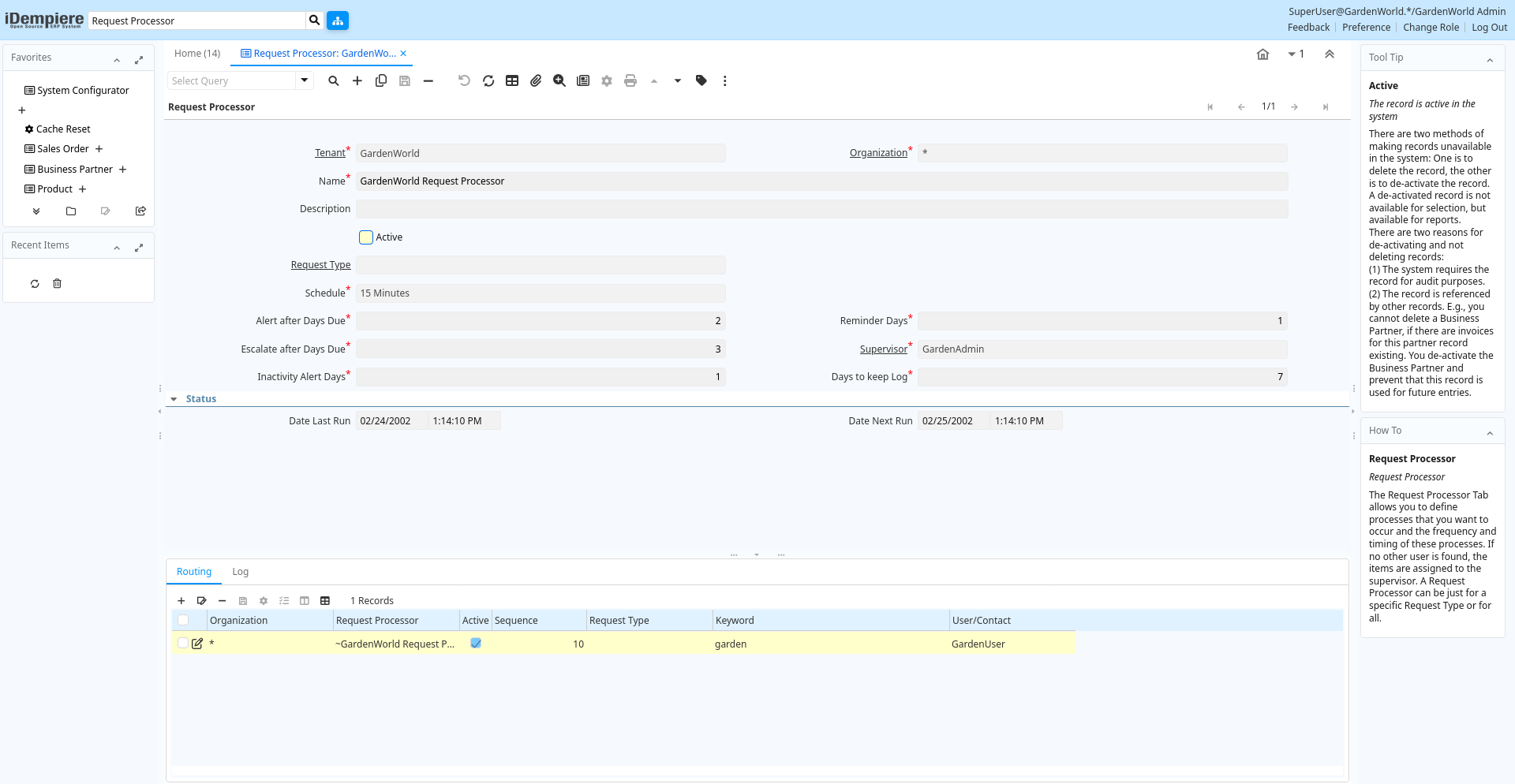
Tab: Request Processor
[Created: 11/01/2001 - Updated: 02/01/2000 ]
Description: Request Processor
Help: The Request Processor Tab allows you to define processes that you want to occur and the frequency and timing of these processes. If no other user is found, the items are assigned to the supervisor. A Request Processor can be just for a specific Request Type or for all.
Tab Level: 0
Table 10: Request Processor - Fields
Table: Report Parameters
| Name | Description | Help | Technical Info |
|---|---|---|---|
| Tenant | Tenant for this installation. | A Tenant is a company or a legal entity. You cannot share data between Tenants. | r_requestprocessor.AD_Client_ID numeric(10) Table Direct |
| Organization | Organizational entity within tenant | An organization is a unit of your tenant or legal entity - examples are store, department. You can share data between organizations. | r_requestprocessor.AD_Org_ID numeric(10) Table Direct |
| Name | Alphanumeric identifier of the entity | The name of an entity (record) is used as an default search option in addition to the search key. The name is up to 60 characters in length. | r_requestprocessor.Name character varying(60) String |
| Description | Optional short description of the record | A description is limited to 255 characters. | r_requestprocessor.Description character varying(255) String |
| Active | The record is active in the system | There are two methods of making records unavailable in the system: One is to delete the record, the other is to de-activate the record. A de-activated record is not available for selection, but available for reports.There are two reasons for de-activating and not deleting records:(1) The system requires the record for audit purposes.(2) The record is referenced by other records. E.g., you cannot delete a Business Partner, if there are invoices for this partner record existing. You de-activate the Business Partner and prevent that this record is used for future entries. | r_requestprocessor.IsActive character(1) Yes-No |
| Request Type | Type of request (e.g. Inquiry, Complaint, ..) | Request Types are used for processing and categorizing requests. Options are Account Inquiry, Warranty Issue, etc. | r_requestprocessor.R_RequestType_ID numeric(10) Table Direct |
| Schedule | r_requestprocessor.AD_Schedule_ID numeric(10) Table Direct | ||
| Alert after Days Due | Send email alert after number of days due (0=no alerts) | Send an email alert after the item is Due (after Date Next Action). If set to zero, no alert is sent. | r_requestprocessor.OverdueAlertDays numeric(10) Integer |
| Reminder Days | Days between sending Reminder Emails for a due or inactive Document | When a document is due for too long without activity, a reminder is sent. 0 means no reminders.The Remind Days are the days when the next email reminder is sent. | r_requestprocessor.RemindDays numeric(10) Integer |
| Escalate after Days Due | Escalation to superior after number of due days (0 = no) | The item will be escalated and assigned to the supervisor after the number of days over due. If 0, there is no escalation. | r_requestprocessor.OverdueAssignDays numeric(10) Integer |
| Supervisor | Supervisor for this user/organization - used for escalation and approval | The Supervisor indicates who will be used for forwarding and escalating issues for this user - or for approvals. | r_requestprocessor.Supervisor_ID numeric(10) Table |
| Inactivity Alert Days | Send Alert when there is no activity after days (0= no alert) | An email alert is sent when the request shows no activity for the number of days defined. | r_requestprocessor.InactivityAlertDays numeric(10) Integer |
| Days to keep Log | Number of days to keep the log entries | Older Log entries may be deleted | r_requestprocessor.KeepLogDays numeric(10) Integer |
| Date Last Run | Date the process was last run. | The Date Last Run indicates the last time that a process was run. | r_requestprocessor.DateLastRun timestamp without time zone Date+Time |
| Date Next Run | Date the process will run next | The Date Next Run indicates the next time this process will run. | r_requestprocessor.DateNextRun timestamp without time zone Date+Time |
Tab: Routing
[Created: 07/12/2001 - Updated: 02/01/2000 ]
Description: Request Routing
Help: Define the sequence of request types and keywords and to whom the web and mail requests should be routed to. The keywords are separated by space, comma, semicolon, tab or new line. The first match wins (first request type then keyword.
Tab Level: 1
Table 20: Routing - Fields
Table: Report Parameters
| Name | Description | Help | Technical Info |
|---|---|---|---|
| Tenant | Tenant for this installation. | A Tenant is a company or a legal entity. You cannot share data between Tenants. | r_requestprocessor_route.AD_Client_ID numeric(10) Table Direct |
| Organization | Organizational entity within tenant | An organization is a unit of your tenant or legal entity - examples are store, department. You can share data between organizations. | r_requestprocessor_route.AD_Org_ID numeric(10) Table Direct |
| Request Processor | Processor for Requests | Processor for Requests | r_requestprocessor_route.R_RequestProcessor_ID numeric(10) Table Direct |
| Active | The record is active in the system | There are two methods of making records unavailable in the system: One is to delete the record, the other is to de-activate the record. A de-activated record is not available for selection, but available for reports.There are two reasons for de-activating and not deleting records:(1) The system requires the record for audit purposes.(2) The record is referenced by other records. E.g., you cannot delete a Business Partner, if there are invoices for this partner record existing. You de-activate the Business Partner and prevent that this record is used for future entries. | r_requestprocessor_route.IsActive character(1) Yes-No |
| Sequence | Method of ordering records; lowest number comes first | The Sequence indicates the order of records | r_requestprocessor_route.SeqNo numeric(10) Integer |
| Request Type | Type of request (e.g. Inquiry, Complaint, ..) | Request Types are used for processing and categorizing requests. Options are Account Inquiry, Warranty Issue, etc. | r_requestprocessor_route.R_RequestType_ID numeric(10) Table Direct |
| Keyword | Case insensitive keyword | Case insensitive keyword for matching. The individual keywords can be separated by space, comma, semicolon, tab or new line. Do not use filler words like "a", "the". At this point, there are NO text search operators like "or" and "and". | r_requestprocessor_route.Keyword character varying(60) String |
| User/Contact | User within the system - Internal or Business Partner Contact | The User identifies a unique user in the system. This could be an internal user or a business partner contact | r_requestprocessor_route.AD_User_ID numeric(10) Table Direct |
Tab: Log
[Created: 06/03/2004 - Updated: 02/01/2000 ]
Description:
Help:
Tab Level: 1
Table 30: Log - Fields
Table: Report Parameters
| Name | Description | Help | Technical Info |
|---|---|---|---|
| Tenant | Tenant for this installation. | A Tenant is a company or a legal entity. You cannot share data between Tenants. | r_requestprocessorlog.AD_Client_ID numeric(10) Table Direct |
| Organization | Organizational entity within tenant | An organization is a unit of your tenant or legal entity - examples are store, department. You can share data between organizations. | r_requestprocessorlog.AD_Org_ID numeric(10) Table Direct |
| Request Processor | Processor for Requests | Processor for Requests | r_requestprocessorlog.R_RequestProcessor_ID numeric(10) Table Direct |
| Created | Date this record was created | The Created field indicates the date that this record was created. | r_requestprocessorlog.Created timestamp without time zone Date+Time |
| Summary | Textual summary of this request | The Summary allows free form text entry of a recap of this request. | r_requestprocessorlog.Summary character varying(2000) Text |
| Error | An Error occurred in the execution | r_requestprocessorlog.IsError character(1) Yes-No | |
| Reference | Reference for this record | The Reference displays the source document number. | r_requestprocessorlog.Reference character varying(60) String |
| Text Message | Text Message | r_requestprocessorlog.TextMsg character varying(2000) Text | |
| Description | Optional short description of the record | A description is limited to 255 characters. | r_requestprocessorlog.Description character varying(255) String |