Window: Request Type
[Created: 01/10/2002 - Updated: 02/01/2000 ]
Description: Maintain Request Types
Help: Request Types are used for processing and categorizing requests. Options are Account Inquiry, Warranty Issue, etc.
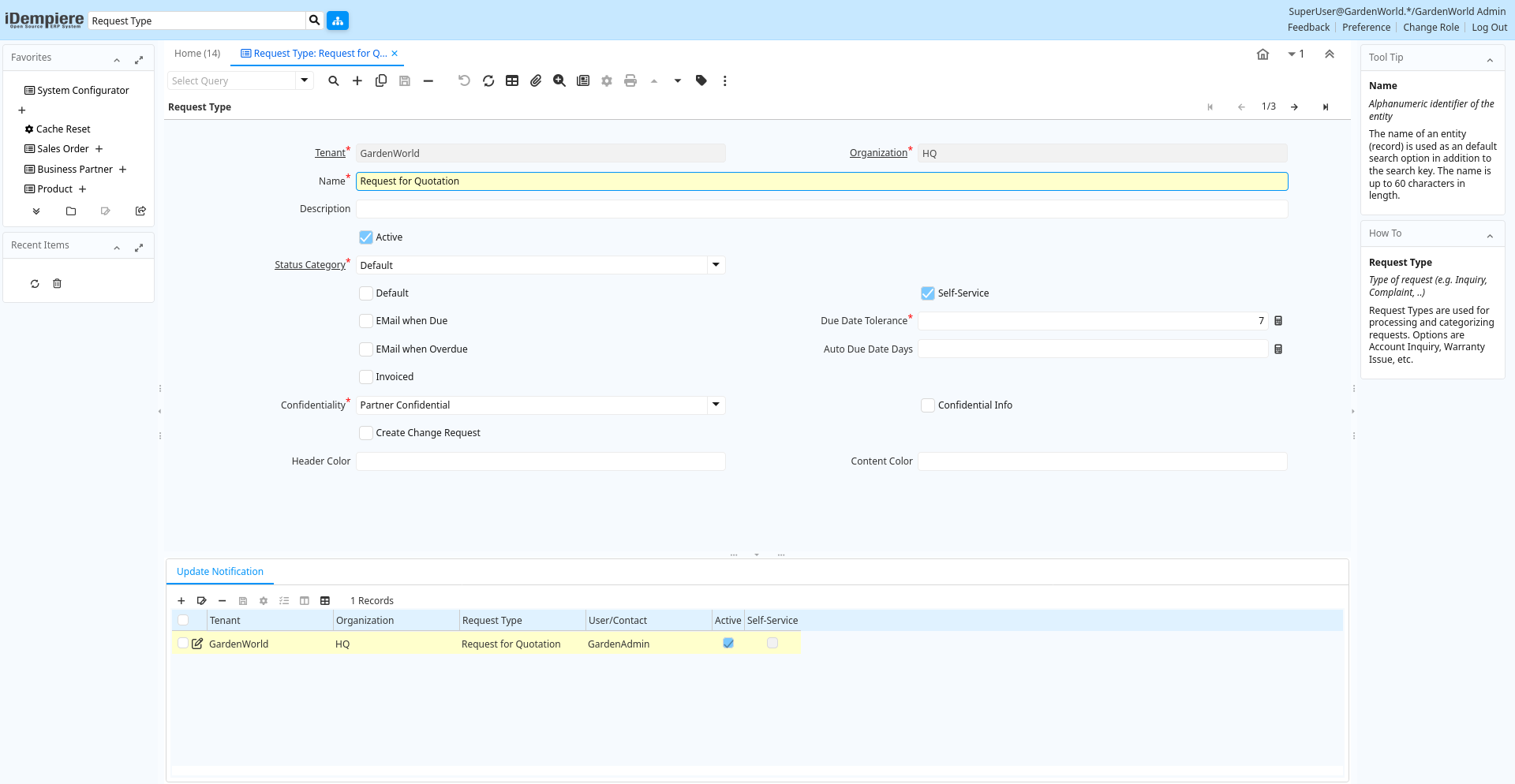
Tab: Request Type
[Created: 01/10/2002 - Updated: 02/01/2000 ]
Description: Type of request (e.g. Inquiry, Complaint, ..)
Help: Request Types are used for processing and categorizing requests. Options are Account Inquiry, Warranty Issue, etc.
Tab Level: 0
Table 10: Request Type - Fields
Table: Report Parameters
| Name | Description | Help | Technical Info |
|---|---|---|---|
| Tenant | Tenant for this installation. | A Tenant is a company or a legal entity. You cannot share data between Tenants. | r_requesttype.AD_Client_ID numeric(10) Table Direct |
| Organization | Organizational entity within tenant | An organization is a unit of your tenant or legal entity - examples are store, department. You can share data between organizations. | r_requesttype.AD_Org_ID numeric(10) Table Direct |
| Name | Alphanumeric identifier of the entity | The name of an entity (record) is used as an default search option in addition to the search key. The name is up to 60 characters in length. | r_requesttype.Name character varying(60) String |
| Description | Optional short description of the record | A description is limited to 255 characters. | r_requesttype.Description character varying(255) String |
| Active | The record is active in the system | There are two methods of making records unavailable in the system: One is to delete the record, the other is to de-activate the record. A de-activated record is not available for selection, but available for reports.There are two reasons for de-activating and not deleting records:(1) The system requires the record for audit purposes.(2) The record is referenced by other records. E.g., you cannot delete a Business Partner, if there are invoices for this partner record existing. You de-activate the Business Partner and prevent that this record is used for future entries. | r_requesttype.IsActive character(1) Yes-No |
| Status Category | Request Status Category | Category of Request Status enables to maintain different set of Status for different Request Categories | r_requesttype.R_StatusCategory_ID numeric(10) Table Direct |
| Default | Default value | The Default Checkbox indicates if this record will be used as a default value. | r_requesttype.IsDefault character(1) Yes-No |
| Self-Service | This is a Self-Service entry or this entry can be changed via Self-Service | Self-Service allows users to enter data or update their data. The flag indicates, that this record was entered or created via Self-Service or that the user can change it via the Self-Service functionality. | r_requesttype.IsSelfService character(1) Yes-No |
| EMail when Due | Send EMail when Request becomes due | Send EMail when Request becomes due | r_requesttype.IsEMailWhenDue character(1) Yes-No |
| Due Date Tolerance | Tolerance in days between the Date Next Action and the date the request is regarded as overdue | When the Date Next Action is passed, the Request becomes Due. After the Due Date Tolerance, the Request becomes Overdue. | r_requesttype.DueDateTolerance numeric(10) Integer |
| EMail when Overdue | Send EMail when Request becomes overdue | Send EMail when Request becomes overdue | r_requesttype.IsEMailWhenOverdue character(1) Yes-No |
| Auto Due Date Days | Automatic Due Date Days | If a due date is not defined and the Auto Due Days ins greater then zero, a due date in the number of days is automatically created. | r_requesttype.AutoDueDateDays numeric(10) Integer |
| Invoiced | Is this invoiced? | If selected, invoices are created | r_requesttype.IsInvoiced character(1) Yes-No |
| Confidentiality | Type of Confidentiality | r_requesttype.ConfidentialType character(1) List | |
| Confidential Info | Can enter confidential information | When entering/updating Requests over the web, the user can mark his info as confidential | r_requesttype.IsConfidentialInfo character(1) Yes-No |
| Create Change Request | Automatically create BOM (Engineering) Change Request | Create automatically a Product Bill of Material (Engineering) Change Request when the Request Group references a Product BOM | r_requesttype.IsAutoChangeRequest character(1) Yes-No |
| Header Color | Header color of calendar dashlet | r_requesttype.HeaderColor character varying(7) String | |
| Content Color | Content color of calendar dashlet | r_requesttype.ContentColor character varying(7) String |
Tab: Update Notification
[Created: 13/05/2005 - Updated: 13/05/2005 ]
Description: List Recipients for to receive Request Updates
Help:
Tab Level: 1
Table 20: Update Notification - Fields
Table: Report Parameters
| Name | Description | Help | Technical Info |
|---|---|---|---|
| Tenant | Tenant for this installation. | A Tenant is a company or a legal entity. You cannot share data between Tenants. | r_requesttypeupdates.AD_Client_ID numeric(10) Table Direct |
| Organization | Organizational entity within tenant | An organization is a unit of your tenant or legal entity - examples are store, department. You can share data between organizations. | r_requesttypeupdates.AD_Org_ID numeric(10) Table Direct |
| Request Type | Type of request (e.g. Inquiry, Complaint, ..) | Request Types are used for processing and categorizing requests. Options are Account Inquiry, Warranty Issue, etc. | r_requesttypeupdates.R_RequestType_ID numeric(10) Table Direct |
| User/Contact | User within the system - Internal or Business Partner Contact | The User identifies a unique user in the system. This could be an internal user or a business partner contact | r_requesttypeupdates.AD_User_ID numeric(10) Search |
| Active | The record is active in the system | There are two methods of making records unavailable in the system: One is to delete the record, the other is to de-activate the record. A de-activated record is not available for selection, but available for reports.There are two reasons for de-activating and not deleting records:(1) The system requires the record for audit purposes.(2) The record is referenced by other records. E.g., you cannot delete a Business Partner, if there are invoices for this partner record existing. You de-activate the Business Partner and prevent that this record is used for future entries. | r_requesttypeupdates.IsActive character(1) Yes-No |
| Self-Service | This is a Self-Service entry or this entry can be changed via Self-Service | Self-Service allows users to enter data or update their data. The flag indicates, that this record was entered or created via Self-Service or that the user can change it via the Self-Service functionality. | r_requesttypeupdates.IsSelfService character(1) Yes-No |