Window: Reference
[Created: 21/05/1999 - Updated: 03/05/2006 ]
Description: Maintain System References
Help: The Reference Window defines field/display types and validations. This window is for System Admin use only.
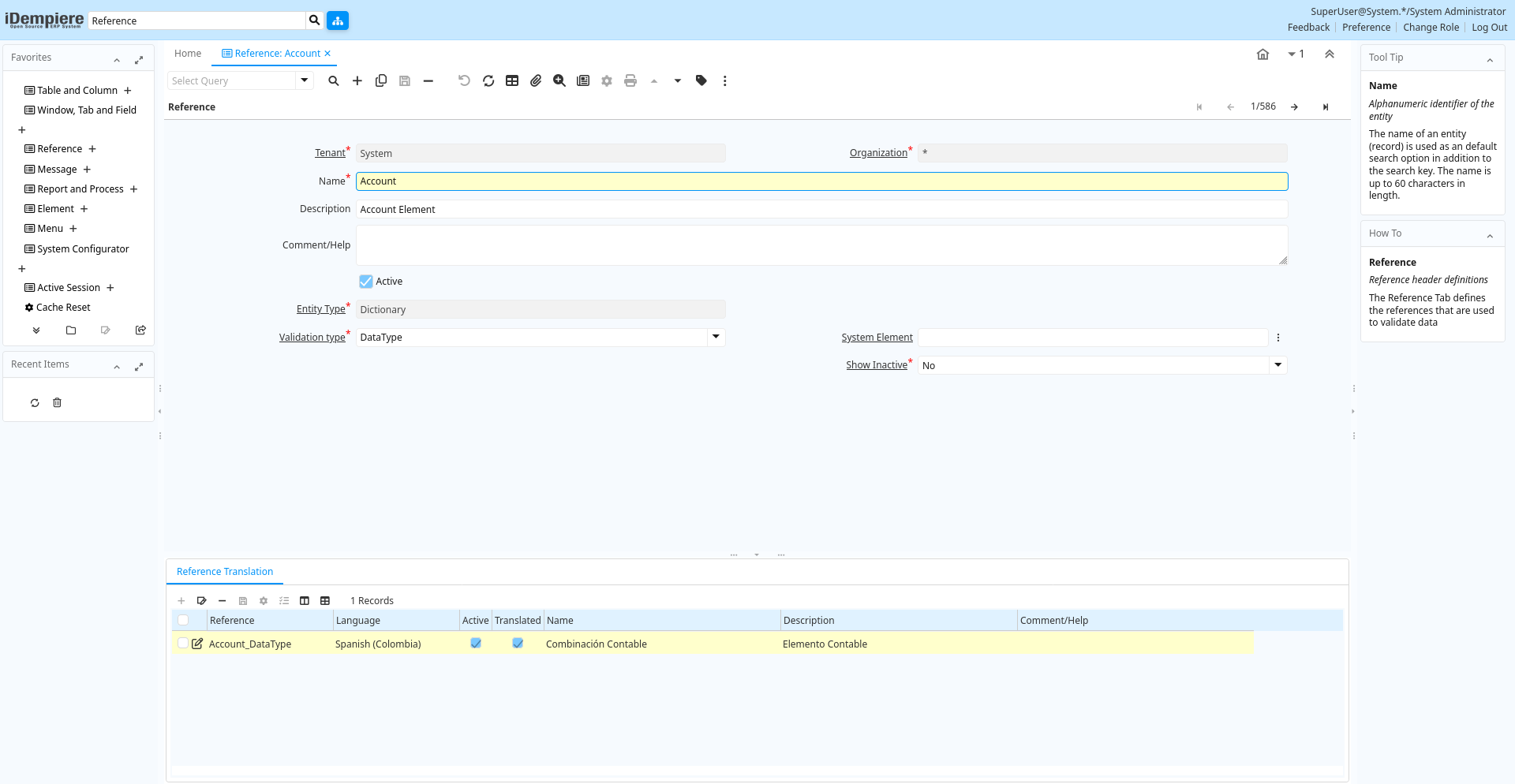
Tab: Reference
[Created: 21/05/1999 - Updated: 02/01/2000 ]
Description: Reference header definitions
Help: The Reference Tab defines the references that are used to validate data
Tab Level: 0
Table 10: Reference - Fields
Table: Report Parameters
| Name | Description | Help | Technical Info |
|---|---|---|---|
| Tenant | Tenant for this installation. | A Tenant is a company or a legal entity. You cannot share data between Tenants. | ad_reference.AD_Client_ID numeric(10) Table Direct |
| Organization | Organizational entity within tenant | An organization is a unit of your tenant or legal entity - examples are store, department. You can share data between organizations. | ad_reference.AD_Org_ID numeric(10) Table Direct |
| Name | Alphanumeric identifier of the entity | The name of an entity (record) is used as an default search option in addition to the search key. The name is up to 60 characters in length. | ad_reference.Name character varying(60) String |
| Description | Optional short description of the record | A description is limited to 255 characters. | ad_reference.Description character varying(255) String |
| Comment/Help | Comment or Hint | The Help field contains a hint, comment or help about the use of this item. | ad_reference.Help character varying(2000) Text |
| Active | The record is active in the system | There are two methods of making records unavailable in the system: One is to delete the record, the other is to de-activate the record. A de-activated record is not available for selection, but available for reports.There are two reasons for de-activating and not deleting records:(1) The system requires the record for audit purposes.(2) The record is referenced by other records. E.g., you cannot delete a Business Partner, if there are invoices for this partner record existing. You de-activate the Business Partner and prevent that this record is used for future entries. | ad_reference.IsActive character(1) Yes-No |
| Entity Type | Dictionary Entity Type; Determines ownership and synchronization | The Entity Types "Dictionary", "iDempiere" and "Application" might be automatically synchronized and customizations deleted or overwritten. For customizations, copy the entity and select "User"! | ad_reference.EntityType character varying(40) Table |
| Validation type | Different method of validating data | The Validation Type indicates the validation method to use. These include list, table or data type validation. | ad_reference.ValidationType character(1) List |
| System Element | System Element enables the central maintenance of column description and help. | The System Element allows for the central maintenance of help, descriptions and terminology for a database column. | ad_reference.AD_Element_ID numeric(10) Search |
| Value Format | Format of the value; Can contain fixed format elements, Variables: "_lLoOaAcCa09", or ~regex | Validation elements:~regex - Validates a regular expression (Space) any character_Space (fixed character)lany Letter a..Z NO spaceLany Letter a..Z NO space converted to upper caseoany Letter a..Z or spaceOany Letter a..Z or space converted to upper caseaany Letters & Digits NO spaceAany Letters & Digits NO space converted to upper casecany Letters & Digits or spaceCany Letters & Digits or space converted to upper case0Digits 0..9 NO space9Digits 0..9 or spaceExample of format "(000)_000-0000" | ad_reference.VFormat character varying(40) String |
| Show Inactive | Show Inactive Records | ad_reference.ShowInactive character varying(4) List | |
| Order By Value | Order list using the value column instead of the name column | Order list using the value column instead of the name column | ad_reference.IsOrderByValue character(1) Yes-No |
Tab: List Validation
[Created: 21/05/1999 - Updated: 16/11/2012 ]
Description: Reference List
Help: The List Validation Tab defines lists to validate data
Tab Level: 1
Table 20: List Validation - Fields
Table: Report Parameters
| Name | Description | Help | Technical Info |
|---|---|---|---|
| Tenant | Tenant for this installation. | A Tenant is a company or a legal entity. You cannot share data between Tenants. | ad_ref_list.AD_Client_ID numeric(10) Table Direct |
| Organization | Organizational entity within tenant | An organization is a unit of your tenant or legal entity - examples are store, department. You can share data between organizations. | ad_ref_list.AD_Org_ID numeric(10) Table Direct |
| Reference | System Reference and Validation | The Reference could be a display type, list or table validation. | ad_ref_list.AD_Reference_ID numeric(10) Table Direct |
| Search Key | Search key for the record in the format required - must be unique | A search key allows you a fast method of finding a particular record.If you leave the search key empty, the system automatically creates a numeric number. The document sequence used for this fallback number is defined in the "Maintain Sequence" window with the name "DocumentNo_", where TableName is the actual name of the table (e.g. C_Order). | ad_ref_list.Value character varying(60) String |
| Name | Alphanumeric identifier of the entity | The name of an entity (record) is used as an default search option in addition to the search key. The name is up to 60 characters in length. | ad_ref_list.Name character varying(60) String |
| Description | Optional short description of the record | A description is limited to 255 characters. | ad_ref_list.Description character varying(255) String |
| Active | The record is active in the system | There are two methods of making records unavailable in the system: One is to delete the record, the other is to de-activate the record. A de-activated record is not available for selection, but available for reports.There are two reasons for de-activating and not deleting records:(1) The system requires the record for audit purposes.(2) The record is referenced by other records. E.g., you cannot delete a Business Partner, if there are invoices for this partner record existing. You de-activate the Business Partner and prevent that this record is used for future entries. | ad_ref_list.IsActive character(1) Yes-No |
| Entity Type | Dictionary Entity Type; Determines ownership and synchronization | The Entity Types "Dictionary", "iDempiere" and "Application" might be automatically synchronized and customizations deleted or overwritten. For customizations, copy the entity and select "User"! | ad_ref_list.EntityType character varying(40) Table |
| Valid from | Valid from including this date (first day) | The Valid From date indicates the first day of a date range | ad_ref_list.ValidFrom timestamp without time zone Date |
| Valid to | Valid to including this date (last day) | The Valid To date indicates the last day of a date range | ad_ref_list.ValidTo timestamp without time zone Date |
Tab: List Translation
[Created: 09/08/1999 - Updated: 27/10/2024 ]
Description:
Help:
Tab Level: 2
Table 30: List Translation - Fields
Table: Report Parameters
| Name | Description | Help | Technical Info |
|---|---|---|---|
| Tenant | Tenant for this installation. | A Tenant is a company or a legal entity. You cannot share data between Tenants. | ad_ref_list_trl.AD_Client_ID numeric(10) Table Direct |
| Organization | Organizational entity within tenant | An organization is a unit of your tenant or legal entity - examples are store, department. You can share data between organizations. | ad_ref_list_trl.AD_Org_ID numeric(10) Table Direct |
| Reference List | Reference List based on Table | The Reference List field indicates a list of reference values from a database tables. Reference lists populate drop down list boxes in data entry screens | ad_ref_list_trl.AD_Ref_List_ID numeric(10) Table Direct |
| Language | Language for this entity | The Language identifies the language to use for display and formatting | ad_ref_list_trl.AD_Language character varying(6) Table |
| Active | The record is active in the system | There are two methods of making records unavailable in the system: One is to delete the record, the other is to de-activate the record. A de-activated record is not available for selection, but available for reports.There are two reasons for de-activating and not deleting records:(1) The system requires the record for audit purposes.(2) The record is referenced by other records. E.g., you cannot delete a Business Partner, if there are invoices for this partner record existing. You de-activate the Business Partner and prevent that this record is used for future entries. | ad_ref_list_trl.IsActive character(1) Yes-No |
| Translated | This column is translated | The Translated checkbox indicates if this column is translated. | ad_ref_list_trl.IsTranslated character(1) Yes-No |
| Name | Alphanumeric identifier of the entity | The name of an entity (record) is used as an default search option in addition to the search key. The name is up to 60 characters in length. | ad_ref_list_trl.Name character varying(60) String |
| Description | Optional short description of the record | A description is limited to 255 characters. | ad_ref_list_trl.Description character varying(255) String |
Tab: Table Validation
[Created: 21/05/1999 - Updated: 16/11/2012 ]
Description: Table validation
Help: The Table Validation Tab defines tables to validate data
Tab Level: 1
Table 40: Table Validation - Fields
Table: Report Parameters
| Name | Description | Help | Technical Info |
|---|---|---|---|
| Tenant | Tenant for this installation. | A Tenant is a company or a legal entity. You cannot share data between Tenants. | ad_ref_table.AD_Client_ID numeric(10) Table Direct |
| Organization | Organizational entity within tenant | An organization is a unit of your tenant or legal entity - examples are store, department. You can share data between organizations. | ad_ref_table.AD_Org_ID numeric(10) Table Direct |
| Reference | System Reference and Validation | The Reference could be a display type, list or table validation. | ad_ref_table.AD_Reference_ID numeric(10) Table Direct |
| Table | Database Table information | The Database Table provides the information of the table definition | ad_ref_table.AD_Table_ID numeric(10) Table Direct |
| Key column | Unique identifier of a record | The Key Column indicates that this the unique identifier of a record on this table. | ad_ref_table.AD_Key numeric(10) Table |
| Display column | Column that will display | The Display Column indicates the column that will display. | ad_ref_table.AD_Display numeric(10) Table |
| Display Value | Displays Value column with the Display column | The Display Value checkbox indicates if the value column will display with the display column. | ad_ref_table.IsValueDisplayed character(1) Yes-No |
| Active | The record is active in the system | There are two methods of making records unavailable in the system: One is to delete the record, the other is to de-activate the record. A de-activated record is not available for selection, but available for reports.There are two reasons for de-activating and not deleting records:(1) The system requires the record for audit purposes.(2) The record is referenced by other records. E.g., you cannot delete a Business Partner, if there are invoices for this partner record existing. You de-activate the Business Partner and prevent that this record is used for future entries. | ad_ref_table.IsActive character(1) Yes-No |
| Entity Type | Dictionary Entity Type; Determines ownership and synchronization | The Entity Types "Dictionary", "iDempiere" and "Application" might be automatically synchronized and customizations deleted or overwritten. For customizations, copy the entity and select "User"! | ad_ref_table.EntityType character varying(40) Table |
| Sql WHERE | Fully qualified SQL WHERE clause | The Where Clause indicates the SQL WHERE clause to use for record selection. The WHERE clause is added to the query. Fully qualified means "tablename.columnname". | ad_ref_table.WhereClause character varying(2000) Text |
| Sql ORDER BY | Fully qualified ORDER BY clause | The ORDER BY Clause indicates the SQL ORDER BY clause to use for record selection | ad_ref_table.OrderByClause character varying(2000) Text |
| Window | Data entry or display window | The Window field identifies a unique Window in the system. | ad_ref_table.AD_Window_ID numeric(10) Table Direct |
| Info Window | Info and search/select Window | The Info window is used to search and select records as well as display information relevant to the selection. | ad_ref_table.AD_InfoWindow_ID numeric(10) Table Direct |
Tab: Used in Column
[Created: 27/10/2005 - Updated: 16/11/2012 ]
Description: Used in Column (Reference)
Help:
Tab Level: 1
Table 50: Used in Column - Fields
Table: Report Parameters
| Name | Description | Help | Technical Info |
|---|---|---|---|
| Tenant | Tenant for this installation. | A Tenant is a company or a legal entity. You cannot share data between Tenants. | ad_column.AD_Client_ID numeric(10) Table Direct |
| Organization | Organizational entity within tenant | An organization is a unit of your tenant or legal entity - examples are store, department. You can share data between organizations. | ad_column.AD_Org_ID numeric(10) Table Direct |
| Table | Database Table information | The Database Table provides the information of the table definition | ad_column.AD_Table_ID numeric(10) Table Direct |
| DB Column Name | Name of the column in the database | The Column Name indicates the name of a column on a table as defined in the database. | ad_column.ColumnName character varying(63) String |
| System Element | System Element enables the central maintenance of column description and help. | The System Element allows for the central maintenance of help, descriptions and terminology for a database column. | ad_column.AD_Element_ID numeric(10) Search |
| Name | Alphanumeric identifier of the entity | The name of an entity (record) is used as an default search option in addition to the search key. The name is up to 60 characters in length. | ad_column.Name character varying(60) String |
| Description | Optional short description of the record | A description is limited to 255 characters. | ad_column.Description character varying(255) String |
| Comment/Help | Comment or Hint | The Help field contains a hint, comment or help about the use of this item. | ad_column.Help character varying(2000) Text |
| Active | The record is active in the system | There are two methods of making records unavailable in the system: One is to delete the record, the other is to de-activate the record. A de-activated record is not available for selection, but available for reports.There are two reasons for de-activating and not deleting records:(1) The system requires the record for audit purposes.(2) The record is referenced by other records. E.g., you cannot delete a Business Partner, if there are invoices for this partner record existing. You de-activate the Business Partner and prevent that this record is used for future entries. | ad_column.IsActive character(1) Yes-No |
| Length | Length of the column in the database | The Length indicates the length of a column as defined in the database. | ad_column.FieldLength numeric(10) Integer |
| Reference | System Reference and Validation | The Reference could be a display type, list or table validation. | ad_column.AD_Reference_ID numeric(10) Table |
| Reference Key | Required to specify, if data type is Table or List | The Reference Value indicates where the reference values are stored. It must be specified if the data type is Table or List. | ad_column.AD_Reference_Value_ID numeric(10) Table |
| Dynamic Validation | Dynamic Validation Rule | These rules define how an entry is determined to valid. You can use variables for dynamic (context sensitive) validation. | ad_column.AD_Val_Rule_ID numeric(10) Table Direct |
| Dynamic Validation (Lookup) | Override Dynamic Validation Rule for Lookup Window | For some situations the dynamic validation rule for a Lookup window should be different from user data entry window. | ad_column.AD_Val_Rule_Lookup_ID numeric(10) Table |
Tab: Reference Translation
[Created: 09/08/1999 - Updated: 27/10/2024 ]
Description:
Help:
Tab Level: 1
Table 60: Reference Translation - Fields
Table: Report Parameters
| Name | Description | Help | Technical Info |
|---|---|---|---|
| Tenant | Tenant for this installation. | A Tenant is a company or a legal entity. You cannot share data between Tenants. | ad_reference_trl.AD_Client_ID numeric(10) Table Direct |
| Organization | Organizational entity within tenant | An organization is a unit of your tenant or legal entity - examples are store, department. You can share data between organizations. | ad_reference_trl.AD_Org_ID numeric(10) Table Direct |
| Reference | System Reference and Validation | The Reference could be a display type, list or table validation. | ad_reference_trl.AD_Reference_ID numeric(10) Table Direct |
| Language | Language for this entity | The Language identifies the language to use for display and formatting | ad_reference_trl.AD_Language character varying(6) Table |
| Active | The record is active in the system | There are two methods of making records unavailable in the system: One is to delete the record, the other is to de-activate the record. A de-activated record is not available for selection, but available for reports.There are two reasons for de-activating and not deleting records:(1) The system requires the record for audit purposes.(2) The record is referenced by other records. E.g., you cannot delete a Business Partner, if there are invoices for this partner record existing. You de-activate the Business Partner and prevent that this record is used for future entries. | ad_reference_trl.IsActive character(1) Yes-No |
| Translated | This column is translated | The Translated checkbox indicates if this column is translated. | ad_reference_trl.IsTranslated character(1) Yes-No |
| Name | Alphanumeric identifier of the entity | The name of an entity (record) is used as an default search option in addition to the search key. The name is up to 60 characters in length. | ad_reference_trl.Name character varying(60) String |
| Description | Optional short description of the record | A description is limited to 255 characters. | ad_reference_trl.Description character varying(255) String |
| Comment/Help | Comment or Hint | The Help field contains a hint, comment or help about the use of this item. | ad_reference_trl.Help character varying(2000) Text |