Window: Import Business Partner
[Created: 29/12/1999 - Updated: 02/01/2000 ]
Description: Import Business Partner
Help: The Import Business Partner Window is an interim table which is used when importing external data into the system. Selecting the 'Process' button will either add or modify the appropriate records.
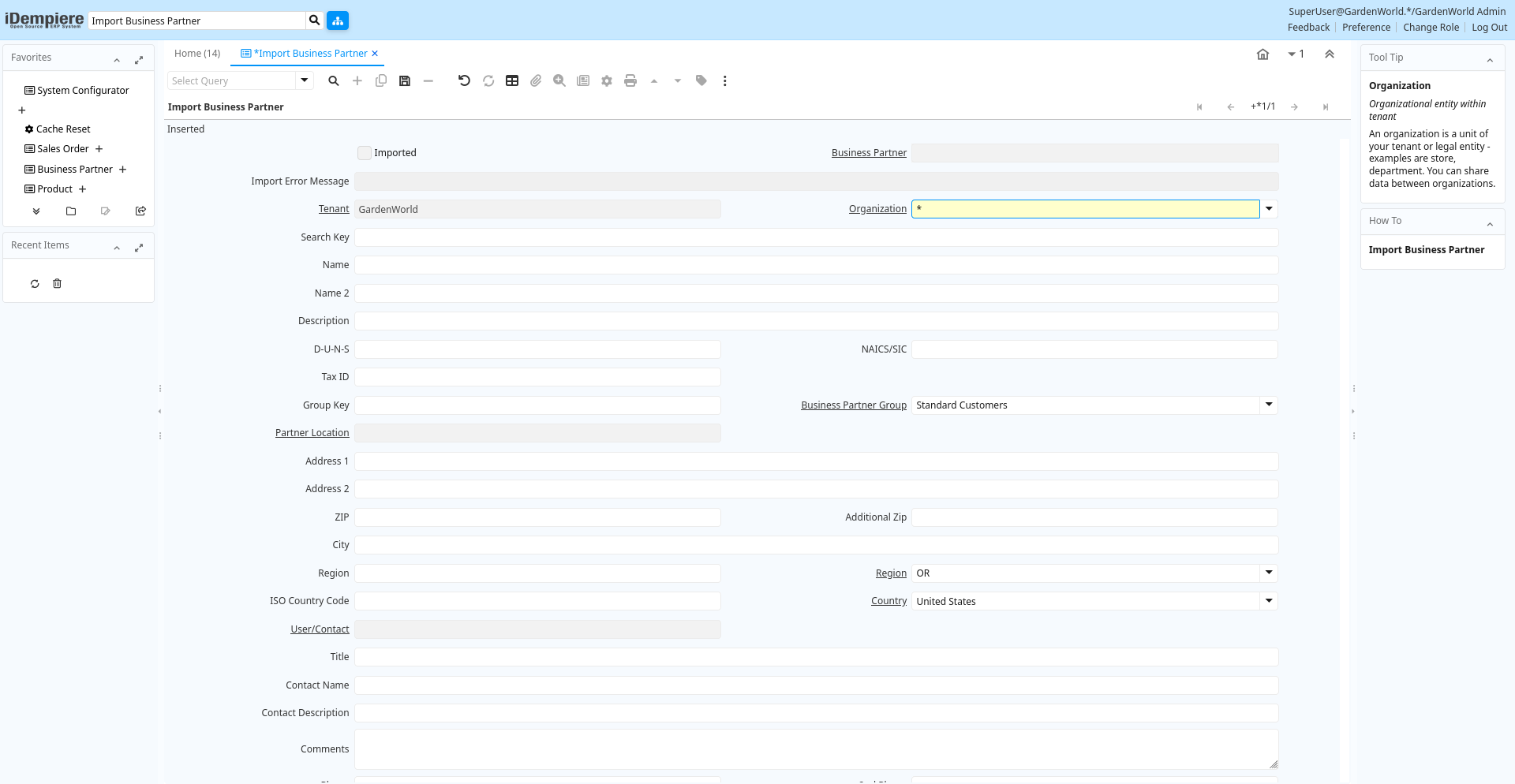
Tab: Import Business Partner
[Created: 11/01/2003 - Updated: 02/01/2000 ]
Description:
Help:
Tab Level: 0
Table 10: Import Business Partner - Fields
Table: Report Parameters
| Name | Description | Help | Technical Info |
|---|---|---|---|
| Import Business Partner | i_bpartner.I_BPartner_ID numeric(10) ID | ||
| Imported | Has this import been processed | The Imported check box indicates if this import has been processed. | i_bpartner.I_IsImported character(1) Yes-No |
| Business Partner | Identifies a Business Partner | A Business Partner is anyone with whom you transact. This can include Vendor, Customer, Employee or Salesperson | i_bpartner.C_BPartner_ID numeric(10) Search |
| Import Error Message | Messages generated from import process | The Import Error Message displays any error messages generated during the import process. | i_bpartner.I_ErrorMsg character varying(2000) String |
| Tenant | Tenant for this installation. | A Tenant is a company or a legal entity. You cannot share data between Tenants. | i_bpartner.AD_Client_ID numeric(10) Table Direct |
| Organization | Organizational entity within tenant | An organization is a unit of your tenant or legal entity - examples are store, department. You can share data between organizations. | i_bpartner.AD_Org_ID numeric(10) Table Direct |
| Search Key | Search key for the record in the format required - must be unique | A search key allows you a fast method of finding a particular record.If you leave the search key empty, the system automatically creates a numeric number. The document sequence used for this fallback number is defined in the "Maintain Sequence" window with the name "DocumentNo_", where TableName is the actual name of the table (e.g. C_Order). | i_bpartner.Value character varying(40) String |
| Name | Alphanumeric identifier of the entity | The name of an entity (record) is used as an default search option in addition to the search key. The name is up to 60 characters in length. | i_bpartner.Name character varying(60) String |
| Name 2 | Additional Name | i_bpartner.Name2 character varying(60) String | |
| Description | Optional short description of the record | A description is limited to 255 characters. | i_bpartner.Description character varying(255) String |
| D-U-N-S | Dun & Bradstreet Number | Used for EDI - For details see www.dnb.com/dunsno/list.htm | i_bpartner.DUNS character varying(11) String |
| NAICS/SIC | Standard Industry Code or its successor NAIC - http://www.osha.gov/oshstats/sicser.html | The NAICS/SIC identifies either of these codes that may be applicable to this Business Partner. | i_bpartner.NAICS character varying(6) String |
| Tax ID | Tax Identification | The Tax ID field identifies the legal Identification number of this Entity. | i_bpartner.TaxID character varying(20) String |
| Group Key | Business Partner Group Key | i_bpartner.GroupValue character varying(40) String | |
| Business Partner Group | Business Partner Group | The Business Partner Group provides a method of defining defaults to be used for individual Business Partners. | i_bpartner.C_BP_Group_ID numeric(10) Table Direct |
| Partner Location | Identifies the (ship to) address for this Business Partner | The Partner address indicates the location of a Business Partner | i_bpartner.C_BPartner_Location_ID numeric(10) Table Direct |
| Address 1 | Address line 1 for this location | The Address 1 identifies the address for an entity's location | i_bpartner.Address1 character varying(60) String |
| Address 2 | Address line 2 for this location | The Address 2 provides additional address information for an entity. It can be used for building location, apartment number or similar information. | i_bpartner.Address2 character varying(60) String |
| ZIP | Postal code | The Postal Code or ZIP identifies the postal code for this entity's address. | i_bpartner.Postal character varying(10) String |
| Additional Zip | Additional ZIP or Postal code | The Additional ZIP or Postal Code identifies, if appropriate, any additional Postal Code information. | i_bpartner.Postal_Add character varying(10) String |
| City | Identifies a City | The City identifies a unique City for this Country or Region. | i_bpartner.City character varying(60) String |
| Region | Name of the Region | The Region Name defines the name that will print when this region is used in a document. | i_bpartner.RegionName character varying(60) String |
| Region | Identifies a geographical Region | The Region identifies a unique Region for this Country. | i_bpartner.C_Region_ID numeric(10) Table Direct |
| ISO Country Code | Upper-case two-letter alphanumeric ISO Country code according to ISO 3166-1 | The official list can be found at https://www.iso.org/obp/ui/#search | i_bpartner.CountryCode character(2) String |
| Country | Country | The Country defines a Country. Each Country must be defined before it can be used in any document. | i_bpartner.C_Country_ID numeric(10) Table Direct |
| User/Contact | User within the system - Internal or Business Partner Contact | The User identifies a unique user in the system. This could be an internal user or a business partner contact | i_bpartner.AD_User_ID numeric(10) Table Direct |
| Title | Name this entity is referred to as | The Title indicates the name that an entity is referred to as. | i_bpartner.Title character varying(40) String |
| Contact Name | Business Partner Contact Name | i_bpartner.ContactName character varying(60) String | |
| Contact Description | Description of Contact | i_bpartner.ContactDescription character varying(255) String | |
| Comments | Comments or additional information | The Comments field allows for free form entry of additional information. | i_bpartner.Comments character varying(2000) Text |
| Phone | Identifies a telephone number | The Phone field identifies a telephone number | i_bpartner.Phone character varying(40) String |
| 2nd Phone | Identifies an alternate telephone number. | The 2nd Phone field identifies an alternate telephone number. | i_bpartner.Phone2 character varying(40) String |
| Fax | Facsimile number | The Fax identifies a facsimile number for this Business Partner or Location | i_bpartner.Fax character varying(40) String |
| Birthday | Birthday or Anniversary day | Birthday or Anniversary day | i_bpartner.Birthday timestamp without time zone Date |
| EMail Address | Electronic Mail Address | The Email Address is the Electronic Mail ID for this User and should be fully qualified (e.g. joe.smith@company.com). The Email Address is used to access the self service application functionality from the web. | i_bpartner.EMail character varying(60) String |
| Password | Password of any length (case sensitive) | The Password for this User. Passwords are required to identify authorized users. For iDempiere Users, you can change the password via the Process "Reset Password". | i_bpartner.Password character varying(20) String |
| Interest Area | Name of the Interest Area | Name of the Interest Area of the user | i_bpartner.InterestAreaName character varying(40) String |
| Interest Area | Interest Area or Topic | Interest Areas reflect interest in a topic by a contact. Interest areas can be used for marketing campaigns. | i_bpartner.R_InterestArea_ID numeric(10) Table Direct |
| BP Contact Greeting | Greeting for Business Partner Contact | i_bpartner.BPContactGreeting character varying(60) String | |
| Greeting | Greeting to print on correspondence | The Greeting identifies the greeting to print on correspondence. | i_bpartner.C_Greeting_ID numeric(10) Table Direct |
| Customer | Indicates if this Business Partner is a Customer | The Customer checkbox indicates if this Business Partner is a customer. If it is select additional fields will display which further define this customer. | i_bpartner.IsCustomer character(1) Yes-No |
| Employee | Indicates if this Business Partner is an employee | The Employee checkbox indicates if this Business Partner is an Employee. If it is selected, additional fields will display which further identify this employee. | i_bpartner.IsEmployee character(1) Yes-No |
| Vendor | Indicates if this Business Partner is a Vendor | The Vendor checkbox indicates if this Business Partner is a Vendor. If it is selected, additional fields will display which further identify this vendor. | i_bpartner.IsVendor character(1) Yes-No |
| Import Business Partners | Import Business Partners | The Parameters are default values for null import record values, they do not overwrite any data. | i_bpartner.Processing character(1) Button |
| Processed | The document has been processed | The Processed checkbox indicates that a document has been processed. | i_bpartner.Processed character(1) Yes-No |