Window: Vendor Details
[Created: 25/01/2000 - Updated: 02/01/2000 ]
Description: Maintain Vendor Details
Help: The Vendor Details Window allows you to display and maintain all products for a selected Vendor.
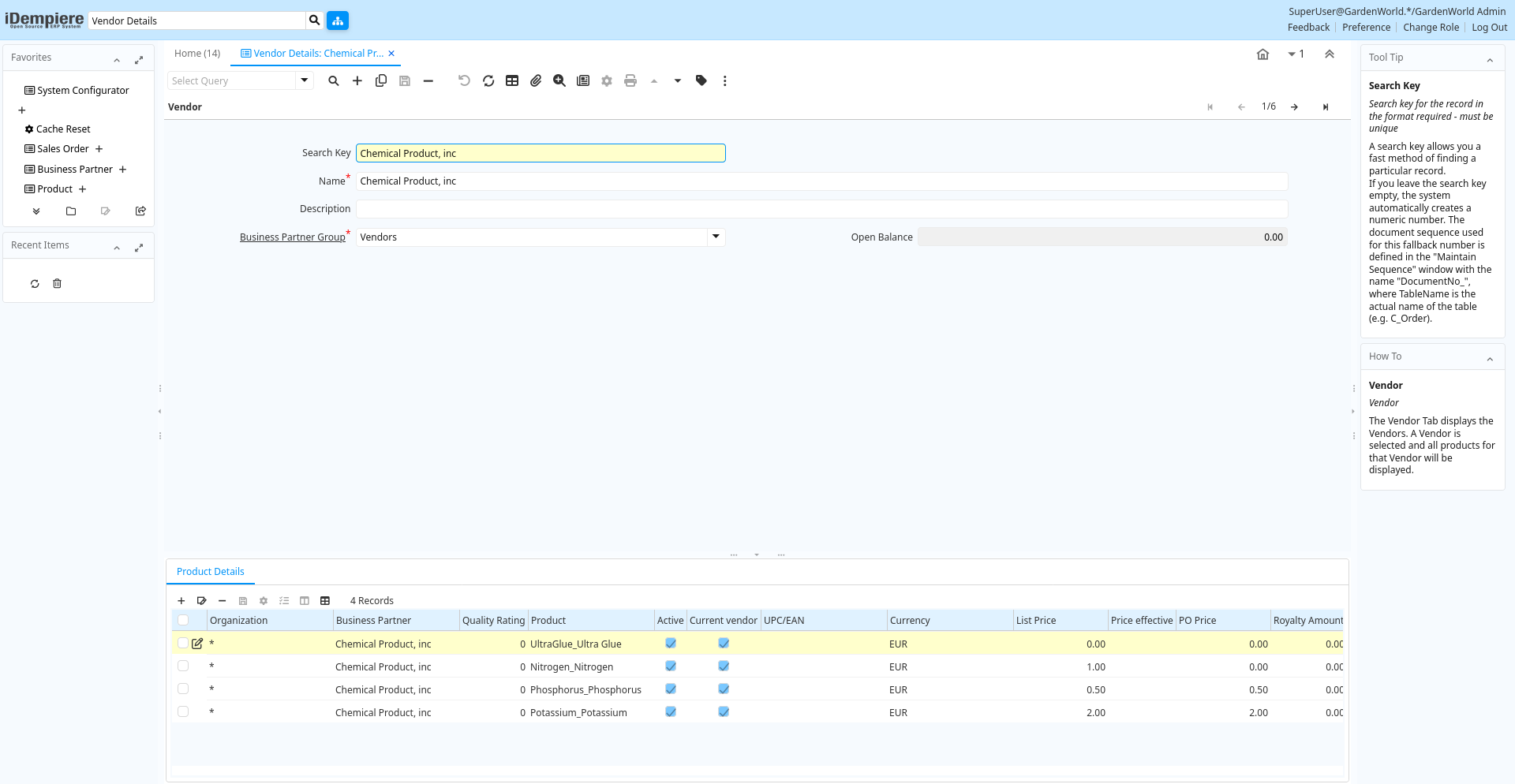
Tab: Vendor
[Created: 25/01/2000 - Updated: 02/01/2000 ]
Description: Vendor
Help: The Vendor Tab displays the Vendors. A Vendor is selected and all products for that Vendor will be displayed.
Tab Level: 0
Table 10: Vendor - Fields
Table: Report Parameters
| Name | Description | Help | Technical Info |
|---|---|---|---|
| Search Key | Search key for the record in the format required - must be unique | A search key allows you a fast method of finding a particular record.If you leave the search key empty, the system automatically creates a numeric number. The document sequence used for this fallback number is defined in the "Maintain Sequence" window with the name "DocumentNo_", where TableName is the actual name of the table (e.g. C_Order). | c_bpartner.Value character varying(40) String |
| Name | Alphanumeric identifier of the entity | The name of an entity (record) is used as an default search option in addition to the search key. The name is up to 60 characters in length. | c_bpartner.Name character varying(120) String |
| Description | Optional short description of the record | A description is limited to 255 characters. | c_bpartner.Description character varying(255) String |
| Business Partner Group | Business Partner Group | The Business Partner Group provides a method of defining defaults to be used for individual Business Partners. | c_bpartner.C_BP_Group_ID numeric(10) Table Direct |
| Open Balance | Total Open Balance Amount in primary Accounting Currency | The Total Open Balance Amount is the calculated open item amount for Customer and Vendor activity. If the Balance is below zero, we owe the Business Partner. The amount is used for Credit Management.Invoices and Payment Allocations determine the Open Balance (i.e. not Orders or Payments). | c_bpartner.TotalOpenBalance numeric Amount |
Tab: Product Details
[Created: 25/01/2000 - Updated: 02/01/2000 ]
Description: Product Details
Help: The Product Details Tab allows you to display and maintain all products for a selected Vendor.
Tab Level: 1
Table 20: Product Details - Fields
Table: Report Parameters
| Name | Description | Help | Technical Info |
|---|---|---|---|
| Tenant | Tenant for this installation. | A Tenant is a company or a legal entity. You cannot share data between Tenants. | m_product_po.AD_Client_ID numeric(10) Table Direct |
| Organization | Organizational entity within tenant | An organization is a unit of your tenant or legal entity - examples are store, department. You can share data between organizations. | m_product_po.AD_Org_ID numeric(10) Table Direct |
| Business Partner | Identifies a Business Partner | A Business Partner is anyone with whom you transact. This can include Vendor, Customer, Employee or Salesperson | m_product_po.C_BPartner_ID numeric(10) Search |
| Quality Rating | Method for rating vendors | The Quality Rating indicates how a vendor is rated (higher number = higher quality) | m_product_po.QualityRating numeric Integer |
| Product | Product, Service, Item | Identifies an item which is either purchased or sold in this organization. | m_product_po.M_Product_ID numeric(10) Search |
| Active | The record is active in the system | There are two methods of making records unavailable in the system: One is to delete the record, the other is to de-activate the record. A de-activated record is not available for selection, but available for reports.There are two reasons for de-activating and not deleting records:(1) The system requires the record for audit purposes.(2) The record is referenced by other records. E.g., you cannot delete a Business Partner, if there are invoices for this partner record existing. You de-activate the Business Partner and prevent that this record is used for future entries. | m_product_po.IsActive character(1) Yes-No |
| Current vendor | Use this Vendor for pricing and stock replenishment | The Current Vendor indicates if prices are used and Product is reordered from this vendor | m_product_po.IsCurrentVendor character(1) Yes-No |
| UPC/EAN | Bar Code (Universal Product Code or its superset European Article Number) | Use this field to enter the bar code for the product in any of the bar code symbologies (Codabar, Code 25, Code 39, Code 93, Code 128, UPC (A), UPC (E), EAN-13, EAN-8, ITF, ITF-14, ISBN, ISSN, JAN-13, JAN-8, POSTNET and FIM, MSI/Plessey, and Pharmacode) | m_product_po.UPC character varying(20) String |
| Currency | The Currency for this record | Indicates the Currency to be used when processing or reporting on this record | m_product_po.C_Currency_ID numeric(10) Table Direct |
| List Price | List Price | The List Price is the official List Price in the document currency. | m_product_po.PriceList numeric Costs+Prices |
| Price effective | Effective Date of Price | The Price Effective indicates the date this price is for. This allows you to enter future prices for products which will become effective when appropriate. | m_product_po.PriceEffective timestamp without time zone Date |
| PO Price | Price based on a purchase order | The PO Price indicates the price for a product per the purchase order. | m_product_po.PricePO numeric Costs+Prices |
| Royalty Amount | (Included) Amount for copyright, etc. | m_product_po.RoyaltyAmt numeric Amount | |
| Last PO Price | Price of the last purchase order for the product | The Last PO Price indicates the last price paid (per the purchase order) for this product. | m_product_po.PriceLastPO numeric Costs+Prices |
| Last Invoice Price | Price of the last invoice for the product | The Last Invoice Price indicates the last price paid (per the invoice) for this product. | m_product_po.PriceLastInv numeric Costs+Prices |
| UOM | Unit of Measure | The UOM defines a unique non monetary Unit of Measure | m_product_po.C_UOM_ID numeric(10) Table Direct |
| Minimum Order Qty | Minimum order quantity in UOM | The Minimum Order Quantity indicates the smallest quantity of this product which can be ordered. | m_product_po.Order_Min numeric Quantity |
| Order Pack Qty | Package order size in UOM (e.g. order set of 5 units) | The Order Pack Quantity indicates the number of units in each pack of this product. | m_product_po.Order_Pack numeric Quantity |
| Promised Delivery Time | Promised days between order and delivery | The Promised Delivery Time indicates the number of days between the order date and the date that delivery was promised. | m_product_po.DeliveryTime_Promised numeric(10) Integer |
| Actual Delivery Time | Actual days between order and delivery | The Actual Delivery Time indicates the number of days elapsed between placing an order and the delivery of the order | m_product_po.DeliveryTime_Actual numeric(10) Integer |
| Cost per Order | Fixed Cost Per Order | The Cost Per Order indicates the fixed charge levied when an order for this product is placed. | m_product_po.CostPerOrder numeric Costs+Prices |
| Partner Product Key | Product Key of the Business Partner | The Business Partner Product Key identifies the number used by the Business Partner for this product. It can be printed on orders and invoices when you include the Product Key in the print format. | m_product_po.VendorProductNo character varying(40) String |
| Partner Category | Product Category of the Business Partner | The Business Partner Category identifies the category used by the Business Partner for this product. | m_product_po.VendorCategory character varying(30) String |
| Manufacturer | Manufacturer of the Product | The manufacturer of the Product (used if different from the Business Partner / Vendor) | m_product_po.Manufacturer character varying(30) String |
| Discontinued | This product is no longer available | The Discontinued check box indicates a product that has been discontinued. | m_product_po.Discontinued character(1) Yes-No |
| Discontinued At | Discontinued At indicates Date when product was discontinued | m_product_po.DiscontinuedAt timestamp without time zone Date |