Window: Broadcast Message
[Created: 24/11/2012 - Updated: 02/12/2012 ]
Description: Broadcast Message
Help: Window allows to enter broadcast messages
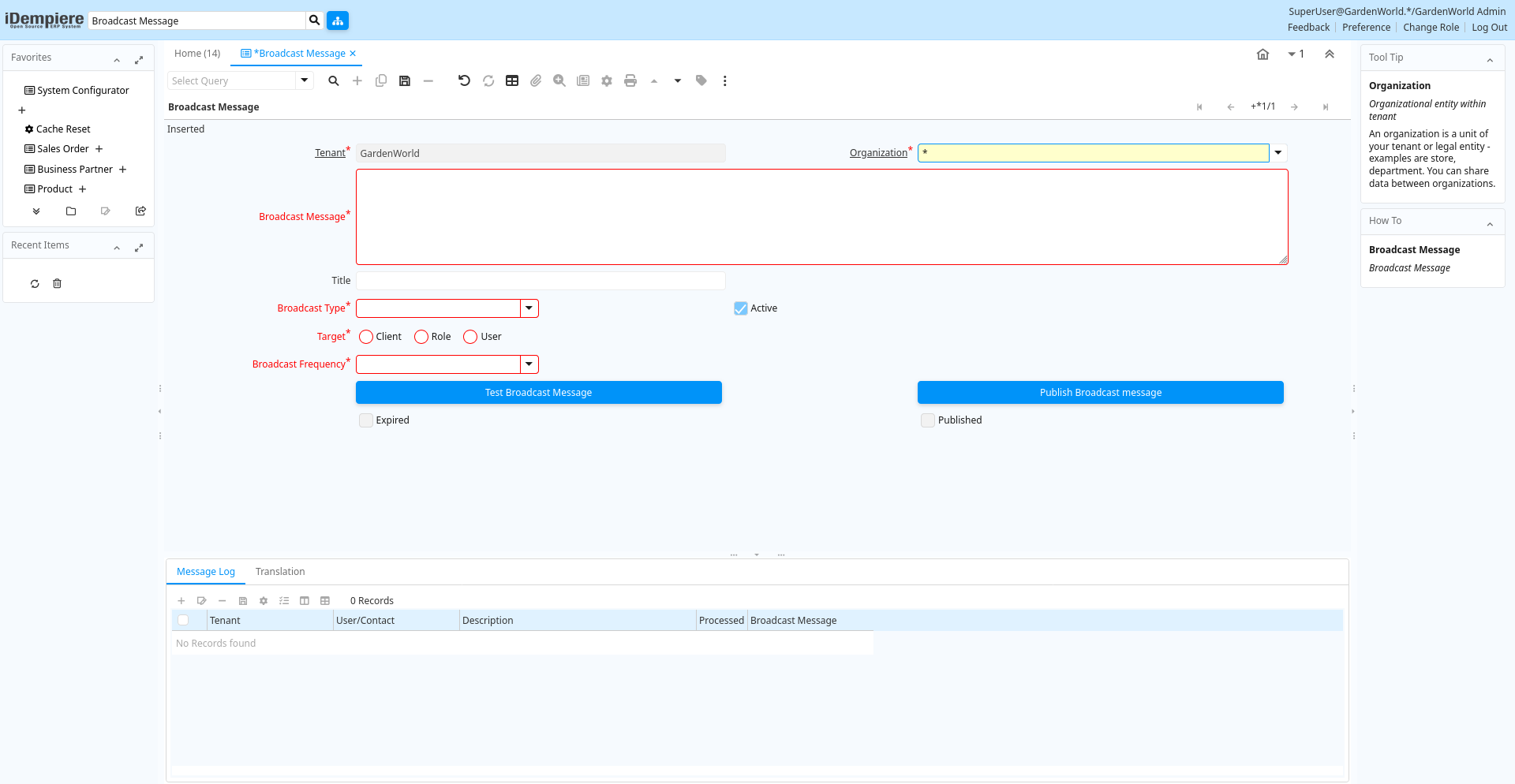
Tab: Broadcast Message
[Created: 24/11/2012 - Updated: 17/04/2013 ]
Description: Broadcast Message
Help:
Tab Level: 0
Table 10: Broadcast Message - Fields
Table: Report Parameters
| Name | Description | Help | Technical Info |
|---|---|---|---|
| Tenant | Tenant for this installation. | A Tenant is a company or a legal entity. You cannot share data between Tenants. | ad_broadcastmessage.AD_Client_ID numeric(10) Table Direct |
| Organization | Organizational entity within tenant | An organization is a unit of your tenant or legal entity - examples are store, department. You can share data between organizations. | ad_broadcastmessage.AD_Org_ID numeric(10) Table Direct |
| Broadcast Message | Broadcast Message | ad_broadcastmessage.BroadcastMessage text Text Long | |
| Title | Name this entity is referred to as | The Title indicates the name that an entity is referred to as. | ad_broadcastmessage.Title character varying(60) String |
| Broadcast Type | Type of Broadcast | ad_broadcastmessage.BroadcastType character varying(32) List | |
| Active | The record is active in the system | There are two methods of making records unavailable in the system: One is to delete the record, the other is to de-activate the record. A de-activated record is not available for selection, but available for reports.There are two reasons for de-activating and not deleting records:(1) The system requires the record for audit purposes.(2) The record is referenced by other records. E.g., you cannot delete a Business Partner, if there are invoices for this partner record existing. You de-activate the Business Partner and prevent that this record is used for future entries. | ad_broadcastmessage.IsActive character(1) Yes-No |
| Target | Target tenant | ad_broadcastmessage.Target character varying(60) Radio Group List | |
| Role | Responsibility Role | The Role determines security and access a user who has this Role will have in the System. | ad_broadcastmessage.AD_Role_ID numeric(10) Table Direct |
| User/Contact | User within the system - Internal or Business Partner Contact | The User identifies a unique user in the system. This could be an internal user or a business partner contact | ad_broadcastmessage.AD_User_ID numeric(10) Table Direct |
| Broadcast Frequency | How Many Times Message Should be Broadcasted | ad_broadcastmessage.BroadcastFrequency character varying(60) List | |
| Expire On | Expire On | ad_broadcastmessage.Expiration timestamp without time zone Date+Time | |
| Test Broadcast Message | Test and verify message before broadcasting | ad_broadcastmessage.TestMessage character(1) Button | |
| Publish Broadcast message | Publish Broadcast message | Selecting ok will publish message. Do you want to publish message? | ad_broadcastmessage.Publish character(1) Button |
| Expire Broadcast Message | Expire Broadcast Message | Selecting OK will expire current message. Do you want to expire message? | ad_broadcastmessage.ExpireNow character(1) Button |
| Expired | ad_broadcastmessage.Expired character(1) Yes-No | ||
| Published | The Topic is published and can be viewed | If not selected, the Topic is not visible to the general public. | ad_broadcastmessage.IsPublished character(1) Yes-No |
Tab: Message Log
[Created: 24/11/2012 - Updated: 25/11/2012 ]
Description:
Help:
Tab Level: 1
Table 20: Message Log - Fields
Table: Report Parameters
| Name | Description | Help | Technical Info |
|---|---|---|---|
| Tenant | Tenant for this installation. | A Tenant is a company or a legal entity. You cannot share data between Tenants. | ad_note.AD_Client_ID numeric(10) Table Direct |
| Organization | Organizational entity within tenant | An organization is a unit of your tenant or legal entity - examples are store, department. You can share data between organizations. | ad_note.AD_Org_ID numeric(10) Table Direct |
| Message | System Message | Information and Error messages | ad_note.AD_Message_ID numeric(10) Search |
| User/Contact | User within the system - Internal or Business Partner Contact | The User identifies a unique user in the system. This could be an internal user or a business partner contact | ad_note.AD_User_ID numeric(10) Table Direct |
| Workflow Activity | Workflow Activity | The Workflow Activity is the actual Workflow Node in a Workflow Process instance | ad_note.AD_WF_Activity_ID numeric(10) Search |
| Table | Database Table information | The Database Table provides the information of the table definition | ad_note.AD_Table_ID numeric(10) Table Direct |
| Record ID | Direct internal record ID | The Record ID is the internal unique identifier of a record. Please note that zooming to the record may not be successful for Orders, Invoices and Shipment/Receipts as sometimes the Sales Order type is not known. | ad_note.Record_ID numeric(10) Record ID |
| Reference | Reference for this record | The Reference displays the source document number. | ad_note.Reference character varying(255) String |
| Text Message | Text Message | ad_note.TextMsg character varying(2000) Text | |
| Description | Optional short description of the record | A description is limited to 255 characters. | ad_note.Description character varying(255) String |
| Broadcast Message | Broadcast Message | ad_note.AD_BroadcastMessage_ID numeric(10) Table Direct | |
| Delete Notices | Delete all Notices | ad_note.Processing character(1) Button | |
| Processed | The document has been processed | The Processed checkbox indicates that a document has been processed. | ad_note.Processed character(1) Yes-No |
Tab: Translation
[Created: 21/03/2014 - Updated: 27/10/2024 ]
Description:
Help:
Tab Level: 1
Table 30: Translation - Fields
Table: Report Parameters
| Name | Description | Help | Technical Info |
|---|---|---|---|
| Tenant | Tenant for this installation. | A Tenant is a company or a legal entity. You cannot share data between Tenants. | ad_broadcastmessage_trl.AD_Client_ID numeric(10) Table Direct |
| Organization | Organizational entity within tenant | An organization is a unit of your tenant or legal entity - examples are store, department. You can share data between organizations. | ad_broadcastmessage_trl.AD_Org_ID numeric(10) Table Direct |
| Broadcast Message | Broadcast Message | ad_broadcastmessage_trl.AD_BroadcastMessage_ID numeric(10) Search | |
| Language | Language for this entity | The Language identifies the language to use for display and formatting | ad_broadcastmessage_trl.AD_Language character varying(6) Table |
| Active | The record is active in the system | There are two methods of making records unavailable in the system: One is to delete the record, the other is to de-activate the record. A de-activated record is not available for selection, but available for reports.There are two reasons for de-activating and not deleting records:(1) The system requires the record for audit purposes.(2) The record is referenced by other records. E.g., you cannot delete a Business Partner, if there are invoices for this partner record existing. You de-activate the Business Partner and prevent that this record is used for future entries. | ad_broadcastmessage_trl.IsActive character(1) Yes-No |
| Translated | This column is translated | The Translated checkbox indicates if this column is translated. | ad_broadcastmessage_trl.IsTranslated character(1) Yes-No |
| Title | Name this entity is referred to as | The Title indicates the name that an entity is referred to as. | ad_broadcastmessage_trl.Title character varying(60) String |
| Broadcast Message | Broadcast Message | ad_broadcastmessage_trl.BroadcastMessage text Text Long |