Window: Import Loader Format
[Created: 15/09/2000 - Updated: 02/01/2000 ]
Description: Maintain Import Loader Formats
Help: The Import Loader Format Window is used for defining the file layout for product information which will be imported.
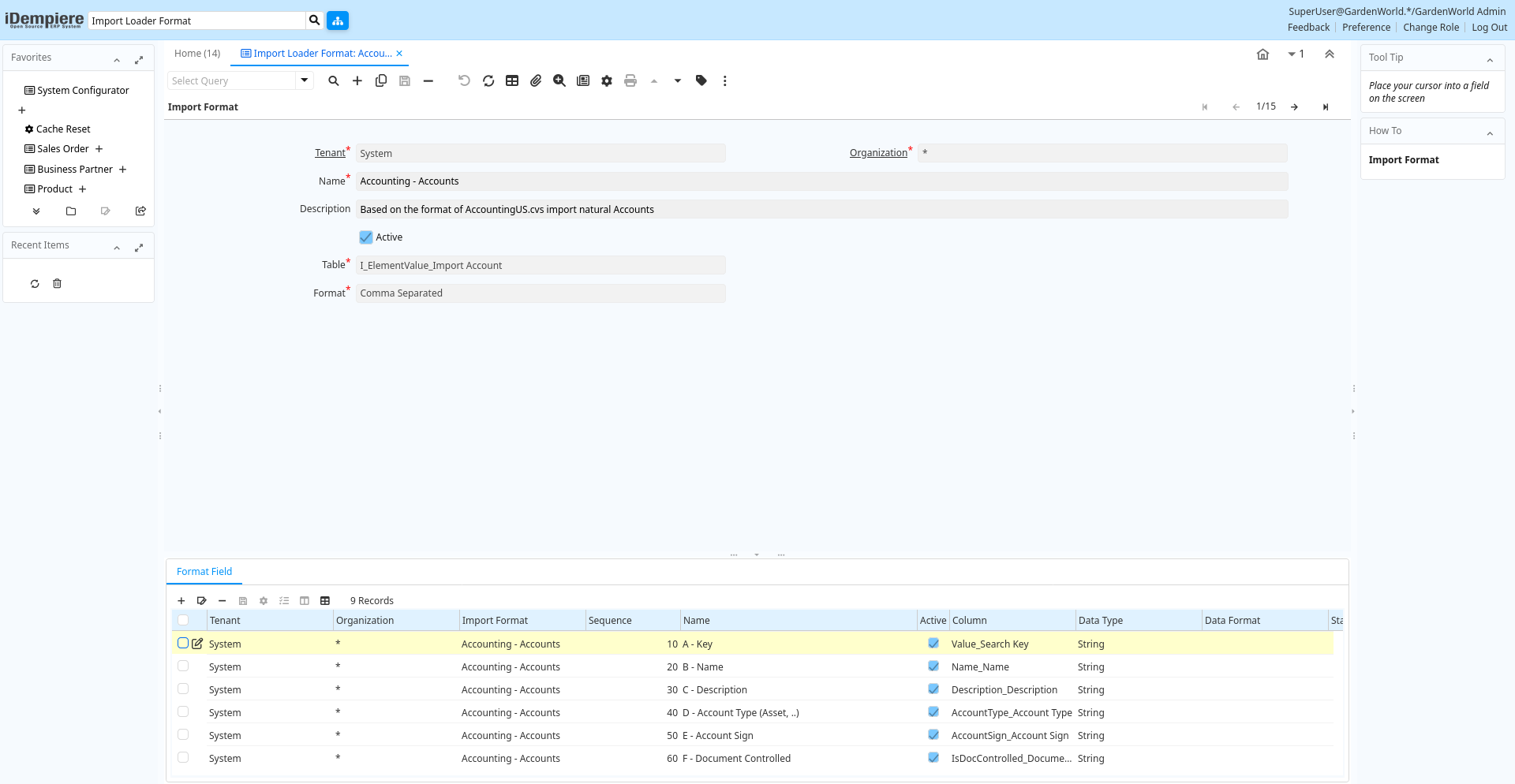
Tab: Import Format
[Created: 15/09/2000 - Updated: 02/01/2000 ]
Description:
Help:
Tab Level: 0
Table 10: Import Format - Fields
Table: Report Parameters
| Name | Description | Help | Technical Info |
|---|---|---|---|
| Tenant | Tenant for this installation. | A Tenant is a company or a legal entity. You cannot share data between Tenants. | ad_impformat.AD_Client_ID numeric(10) Table Direct |
| Organization | Organizational entity within tenant | An organization is a unit of your tenant or legal entity - examples are store, department. You can share data between organizations. | ad_impformat.AD_Org_ID numeric(10) Table Direct |
| Name | Alphanumeric identifier of the entity | The name of an entity (record) is used as an default search option in addition to the search key. The name is up to 60 characters in length. | ad_impformat.Name character varying(60) String |
| Description | Optional short description of the record | A description is limited to 255 characters. | ad_impformat.Description character varying(255) String |
| Active | The record is active in the system | There are two methods of making records unavailable in the system: One is to delete the record, the other is to de-activate the record. A de-activated record is not available for selection, but available for reports.There are two reasons for de-activating and not deleting records:(1) The system requires the record for audit purposes.(2) The record is referenced by other records. E.g., you cannot delete a Business Partner, if there are invoices for this partner record existing. You de-activate the Business Partner and prevent that this record is used for future entries. | ad_impformat.IsActive character(1) Yes-No |
| Table | Database Table information | The Database Table provides the information of the table definition | ad_impformat.AD_Table_ID numeric(10) Table Direct |
| Format | Format of the data | The Format is a drop down list box for selecting the format type (text, tab delimited, XML, etc) of the file to be imported | ad_impformat.FormatType character(1) List |
| Separator Character | ad_impformat.SeparatorChar character varying(1) String | ||
| Copy Lines | Copy Lines from other Import Format | ad_impformat.Processing character(1) Button |
Tab: Format Field
[Created: 15/09/2000 - Updated: 02/01/2000 ]
Description: Maintain Format Fields
Help: Define the individual field based on the table definition. Please note that you have to make sure that a Constant has the correct SQL data type (i.e. if it is a 'string', you need to enclose it like 'this').Product mapping (for details see documentation):H_Item => ValueH_ItemDesc => Name / DescriptionH_ItemDefn => HelpH_ItemType => ProductCategoryH_PartnrID => Value of Business PartnerH_Commodity1 => Vendor Product NoH_Commodity2 => SKUH_ItemClass => Classification (A,B,C..)V_OperAmt_T_Cur => CurrencyV_OperAmt_T => Price
Tab Level: 1
Table 20: Format Field - Fields
Table: Report Parameters
| Name | Description | Help | Technical Info |
|---|---|---|---|
| Tenant | Tenant for this installation. | A Tenant is a company or a legal entity. You cannot share data between Tenants. | ad_impformat_row.AD_Client_ID numeric(10) Table Direct |
| Organization | Organizational entity within tenant | An organization is a unit of your tenant or legal entity - examples are store, department. You can share data between organizations. | ad_impformat_row.AD_Org_ID numeric(10) Table Direct |
| Import Format | ad_impformat_row.AD_ImpFormat_ID numeric(10) Table Direct | ||
| Sequence | Method of ordering records; lowest number comes first | The Sequence indicates the order of records | ad_impformat_row.SeqNo numeric(10) Integer |
| Name | Alphanumeric identifier of the entity | The name of an entity (record) is used as an default search option in addition to the search key. The name is up to 60 characters in length. | ad_impformat_row.Name character varying(60) String |
| Active | The record is active in the system | There are two methods of making records unavailable in the system: One is to delete the record, the other is to de-activate the record. A de-activated record is not available for selection, but available for reports.There are two reasons for de-activating and not deleting records:(1) The system requires the record for audit purposes.(2) The record is referenced by other records. E.g., you cannot delete a Business Partner, if there are invoices for this partner record existing. You de-activate the Business Partner and prevent that this record is used for future entries. | ad_impformat_row.IsActive character(1) Yes-No |
| Column | Column in the table | Link to the database column of the table | ad_impformat_row.AD_Column_ID numeric(10) Table Direct |
| Data Type | Type of data | ad_impformat_row.DataType character(1) List | |
| Data Format | Format String in Java Notation, e.g. ddMMyy | The Date Format indicates how dates are defined on the record to be imported. It must be in Java Notation | ad_impformat_row.DataFormat character varying(20) String |
| Start No | Starting number/position | The Start Number indicates the starting position in the line or field number in the line | ad_impformat_row.StartNo numeric(10) Integer |
| Import prefix | This prefix will be added in front of import string if they are not empty | Use it e.g. when concatening input fields into one import field to add a blank | ad_impformat_row.ImportPrefix character varying(20) String |
| End No | ad_impformat_row.EndNo numeric(10) Integer | ||
| Decimal Point | Decimal Point in the data file - if any | ad_impformat_row.DecimalPoint character(1) String | |
| Divide by 100 | Divide number by 100 to get correct amount | ad_impformat_row.DivideBy100 character(1) Yes-No | |
| Constant Value | Constant value | ad_impformat_row.ConstantValue character varying(60) String | |
| Callout | Fully qualified class names and method - separated by semicolons | A Callout allow you to create Java extensions to perform certain tasks always after a value changed. Callouts should not be used for validation but consequences of a user selecting a certain value.The callout is a Java class implementing org.compiere.model.Callout and a method name to call. Example: "org.compiere.model.CalloutRequest.copyText" instantiates the class "CalloutRequest" and calls the method "copyText". You can have multiple callouts by separating them via a semicolon | ad_impformat_row.Callout character varying(4000) String |
| Script | Dynamic Java Language Script to calculate result | Use Java language constructs to define the result of the calculation | ad_impformat_row.Script character varying(2000) Text |