Window: Attribute Set
[Created: 05/05/2003 - Updated: 02/01/2000 ]
Description: Maintain Product Attribute Set
Help: Define Product Attribute Sets to add additional attributes and values to the product. You need to define a Attribute Set if you want to enable Serial and Lot Number tracking.
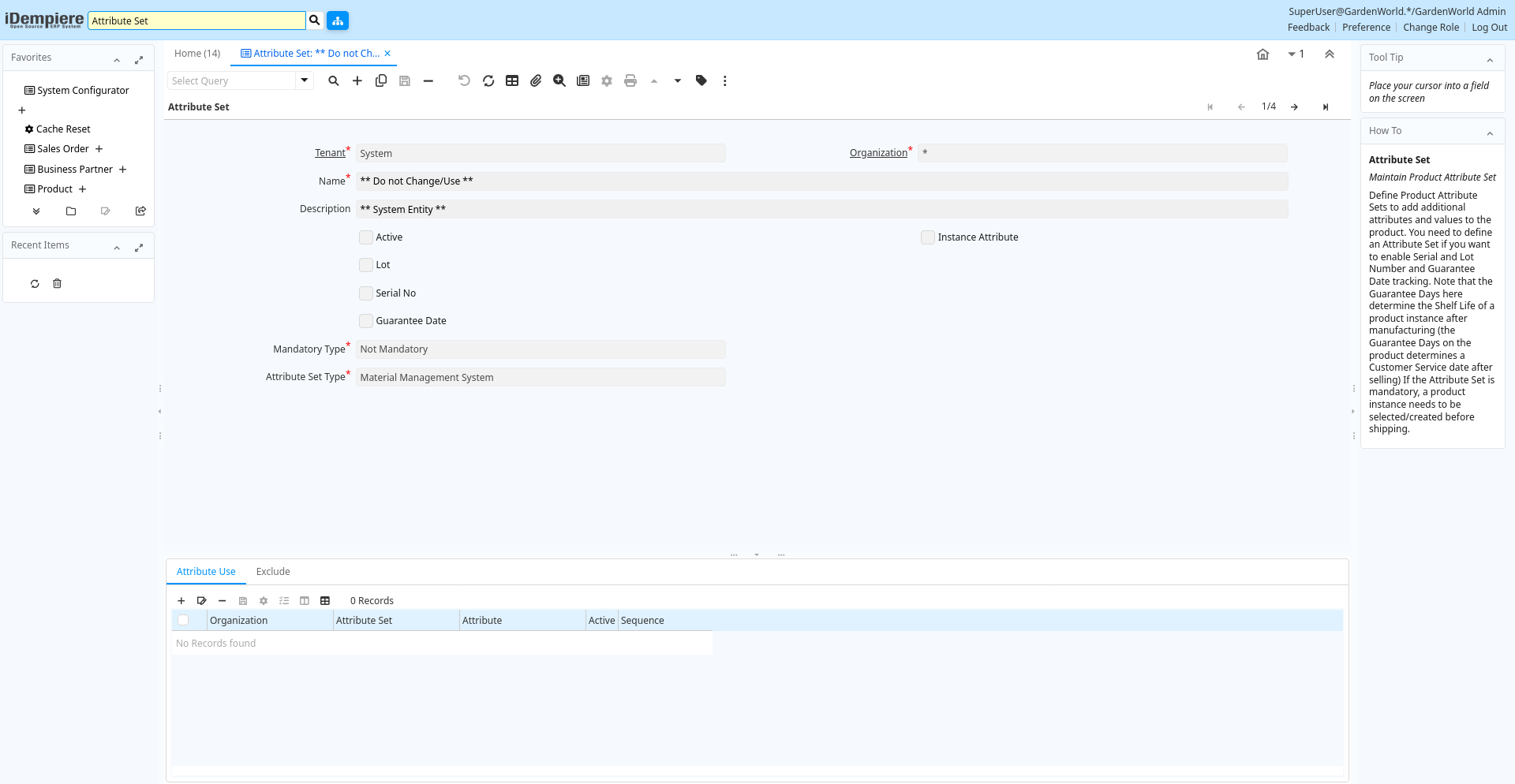
Tab: Attribute Set
[Created: 05/05/2003 - Updated: 16/03/2009 ]
Description: Maintain Product Attribute Set
Help: Define Product Attribute Sets to add additional attributes and values to the product. You need to define an Attribute Set if you want to enable Serial and Lot Number and Guarantee Date tracking. Note that the Guarantee Days here determine the Shelf Life of a product instance after manufacturing (the Guarantee Days on the product determines a Customer Service date after selling)If the Attribute Set is mandatory, a product instance needs to be selected/created before shipping.
Tab Level: 0
Table 10: Attribute Set - Fields
Table: Report Parameters
| Name | Description | Help | Technical Info |
|---|---|---|---|
| Tenant | Tenant for this installation. | A Tenant is a company or a legal entity. You cannot share data between Tenants. | m_attributeset.AD_Client_ID numeric(10) Table Direct |
| Organization | Organizational entity within tenant | An organization is a unit of your tenant or legal entity - examples are store, department. You can share data between organizations. | m_attributeset.AD_Org_ID numeric(10) Table Direct |
| Name | Alphanumeric identifier of the entity | The name of an entity (record) is used as an default search option in addition to the search key. The name is up to 60 characters in length. | m_attributeset.Name character varying(60) String |
| Description | Optional short description of the record | A description is limited to 255 characters. | m_attributeset.Description character varying(255) String |
| Active | The record is active in the system | There are two methods of making records unavailable in the system: One is to delete the record, the other is to de-activate the record. A de-activated record is not available for selection, but available for reports.There are two reasons for de-activating and not deleting records:(1) The system requires the record for audit purposes.(2) The record is referenced by other records. E.g., you cannot delete a Business Partner, if there are invoices for this partner record existing. You de-activate the Business Partner and prevent that this record is used for future entries. | m_attributeset.IsActive character(1) Yes-No |
| Instance Attribute | The product attribute is specific to the instance (like Serial No, Lot or Guarantee Date) | If selected, the individual instance of the product has this attribute - like the individual Serial or Lot Numbers or Guarantee Date of a product instance. If not selected, all instances of the product share the attribute (e.g. color=green). | m_attributeset.IsInstanceAttribute character(1) Yes-No |
| Lot | The product instances have a Lot Number | For individual products, you can define Lot Numbers | m_attributeset.IsLot character(1) Yes-No |
| Mandatory Lot | The entry of Lot info is mandatory when creating a Product Instance | m_attributeset.IsLotMandatory character(1) Yes-No | |
| Lot Control | Product Lot Control | Definition to create Lot numbers for Products | m_attributeset.M_LotCtl_ID numeric(10) Table Direct |
| Lot Char Start Overwrite | Lot/Batch Start Indicator overwrite - default « | If not defined, the default character « is used | m_attributeset.LotCharSOverwrite character(1) String |
| Lot Char End Overwrite | Lot/Batch End Indicator overwrite - default » | If not defined, the default character » is used | m_attributeset.LotCharEOverwrite character(1) String |
| Serial No | The product instances have Serial Numbers | For individual products, you can define Serial Numbers | m_attributeset.IsSerNo character(1) Yes-No |
| Mandatory Serial No | The entry of a Serial No is mandatory when creating a Product Instance | m_attributeset.IsSerNoMandatory character(1) Yes-No | |
| Serial No Control | Product Serial Number Control | Definition to create Serial numbers for Products | m_attributeset.M_SerNoCtl_ID numeric(10) Table Direct |
| Ser No Char Start Overwrite | Serial Number Start Indicator overwrite - default # | If not defined, the default character # is used | m_attributeset.SerNoCharSOverwrite character(1) String |
| Ser No Char End Overwrite | Serial Number End Indicator overwrite - default empty | If not defined, no character is used | m_attributeset.SerNoCharEOverwrite character(1) String |
| Guarantee Date | Product has Guarantee or Expiry Date | For individual products, you can define a guarantee or expiry date | m_attributeset.IsGuaranteeDate character(1) Yes-No |
| Mandatory Guarantee Date | The entry of a Guarantee Date is mandatory when creating a Product Instance | m_attributeset.IsGuaranteeDateMandatory character(1) Yes-No | |
| Guarantee Days | Number of days the product is guaranteed or available | If the value is 0, there is no limit to the availability or guarantee, otherwise the guarantee date is calculated by adding the days to the delivery date. | m_attributeset.GuaranteeDays numeric(10) Integer |
| Use Guarantee Date for Material Policy | m_attributeset.UseGuaranteeDateForMPolicy character(1) Yes-No | ||
| Mandatory Type | The specification of a Product Attribute Instance is mandatory | m_attributeset.MandatoryType character(1) List | |
| Is Auto Generate Lot | m_attributeset.IsAutoGenerateLot character(1) Yes-No | ||
| Attribute Set Type | m_attributeset.M_AttributeSet_Type character varying(3) List |
Tab: Attribute Use
[Created: 06/05/2003 - Updated: 02/01/2000 ]
Description: Attributes Used for the Product Attribute Set
Help: Attributes and Attribute Values used for the product
Tab Level: 1
Table 20: Attribute Use - Fields
Table: Report Parameters
| Name | Description | Help | Technical Info |
|---|---|---|---|
| Tenant | Tenant for this installation. | A Tenant is a company or a legal entity. You cannot share data between Tenants. | m_attributeuse.AD_Client_ID numeric(10) Table Direct |
| Organization | Organizational entity within tenant | An organization is a unit of your tenant or legal entity - examples are store, department. You can share data between organizations. | m_attributeuse.AD_Org_ID numeric(10) Table Direct |
| Attribute Set | Product Attribute Set | Define Product Attribute Sets to add additional attributes and values to the product. You need to define a Attribute Set if you want to enable Serial and Lot Number tracking. | m_attributeuse.M_AttributeSet_ID numeric(10) Table Direct |
| Attribute | Product Attribute | Product Attribute like Color, Size | m_attributeuse.M_Attribute_ID numeric(10) Table Direct |
| Active | The record is active in the system | There are two methods of making records unavailable in the system: One is to delete the record, the other is to de-activate the record. A de-activated record is not available for selection, but available for reports.There are two reasons for de-activating and not deleting records:(1) The system requires the record for audit purposes.(2) The record is referenced by other records. E.g., you cannot delete a Business Partner, if there are invoices for this partner record existing. You de-activate the Business Partner and prevent that this record is used for future entries. | m_attributeuse.IsActive character(1) Yes-No |
| Sequence | Method of ordering records; lowest number comes first | The Sequence indicates the order of records | m_attributeuse.SeqNo numeric(10) Integer |
Tab: Exclude
[Created: 01/09/2005 - Updated: 02/09/2005 ]
Description: Exclude the ability to enter Attribute Sets
Help: Create a record, if you want to exclude the ability to enter Product Attribute Set information. Note that the information is cached. To have effect you may have to re-login or reset cache.
Tab Level: 1
Table 30: Exclude - Fields
Table: Report Parameters
| Name | Description | Help | Technical Info |
|---|---|---|---|
| Tenant | Tenant for this installation. | A Tenant is a company or a legal entity. You cannot share data between Tenants. | m_attributesetexclude.AD_Client_ID numeric(10) Table Direct |
| Organization | Organizational entity within tenant | An organization is a unit of your tenant or legal entity - examples are store, department. You can share data between organizations. | m_attributesetexclude.AD_Org_ID numeric(10) Table Direct |
| Attribute Set | Product Attribute Set | Define Product Attribute Sets to add additional attributes and values to the product. You need to define a Attribute Set if you want to enable Serial and Lot Number tracking. | m_attributesetexclude.M_AttributeSet_ID numeric(10) Table Direct |
| Active | The record is active in the system | There are two methods of making records unavailable in the system: One is to delete the record, the other is to de-activate the record. A de-activated record is not available for selection, but available for reports.There are two reasons for de-activating and not deleting records:(1) The system requires the record for audit purposes.(2) The record is referenced by other records. E.g., you cannot delete a Business Partner, if there are invoices for this partner record existing. You de-activate the Business Partner and prevent that this record is used for future entries. | m_attributesetexclude.IsActive character(1) Yes-No |
| Table | Database Table information | The Database Table provides the information of the table definition | m_attributesetexclude.AD_Table_ID numeric(10) Table Direct |
| Sales Transaction | This is a Sales Transaction | The Sales Transaction checkbox indicates if this item is a Sales Transaction. | m_attributesetexclude.IsSOTrx character(1) Yes-No |