Window: Business Partner Group
[Created: 17/12/2000 - Updated: 02/01/2000 ]
Description: Maintain Business Partner Groups
Help: The Business Partner Group window allows you to define the accounting parameters at a group level. If you define the accounting parameters for a group any Business Partner entered using this group will have these accounting parameters automatically populated. You can then make any modifications necessary at the Business Partner level.
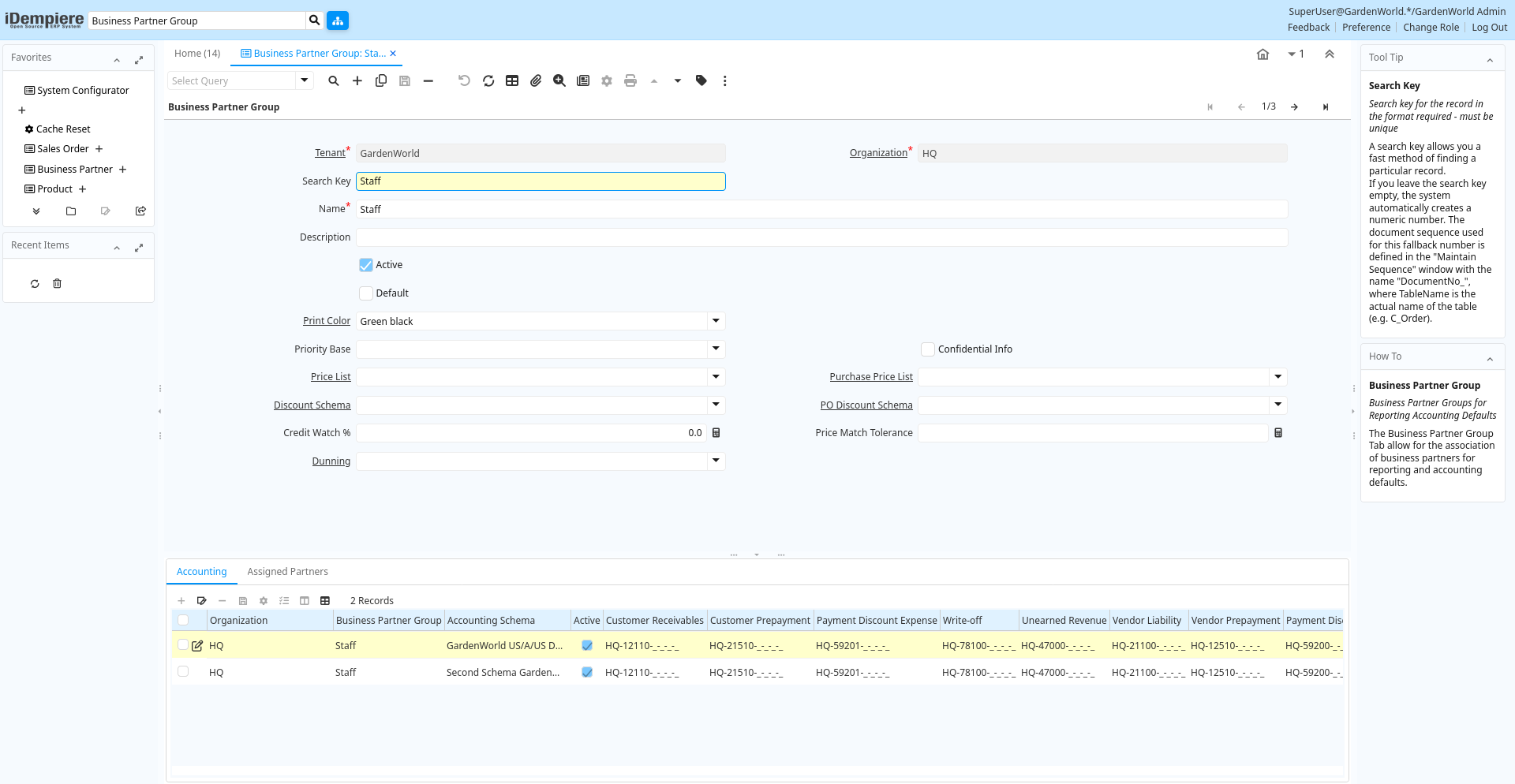
Tab: Business Partner Group
[Created: 17/12/2000 - Updated: 02/01/2000 ]
Description: Business Partner Groups for Reporting Accounting Defaults
Help: The Business Partner Group Tab allow for the association of business partners for reporting and accounting defaults.
Tab Level: 0
Table 10: Business Partner Group - Fields
Table: Report Parameters
| Name | Description | Help | Technical Info |
|---|---|---|---|
| Tenant | Tenant for this installation. | A Tenant is a company or a legal entity. You cannot share data between Tenants. | c_bp_group.AD_Client_ID numeric(10) Table Direct |
| Organization | Organizational entity within tenant | An organization is a unit of your tenant or legal entity - examples are store, department. You can share data between organizations. | c_bp_group.AD_Org_ID numeric(10) Table Direct |
| Search Key | Search key for the record in the format required - must be unique | A search key allows you a fast method of finding a particular record.If you leave the search key empty, the system automatically creates a numeric number. The document sequence used for this fallback number is defined in the "Maintain Sequence" window with the name "DocumentNo_", where TableName is the actual name of the table (e.g. C_Order). | c_bp_group.Value character varying(40) String |
| Name | Alphanumeric identifier of the entity | The name of an entity (record) is used as an default search option in addition to the search key. The name is up to 60 characters in length. | c_bp_group.Name character varying(60) String |
| Description | Optional short description of the record | A description is limited to 255 characters. | c_bp_group.Description character varying(255) String |
| Active | The record is active in the system | There are two methods of making records unavailable in the system: One is to delete the record, the other is to de-activate the record. A de-activated record is not available for selection, but available for reports.There are two reasons for de-activating and not deleting records:(1) The system requires the record for audit purposes.(2) The record is referenced by other records. E.g., you cannot delete a Business Partner, if there are invoices for this partner record existing. You de-activate the Business Partner and prevent that this record is used for future entries. | c_bp_group.IsActive character(1) Yes-No |
| Default | Default value | The Default Checkbox indicates if this record will be used as a default value. | c_bp_group.IsDefault character(1) Yes-No |
| Print Color | Color used for printing and display | Colors used for printing and display | c_bp_group.AD_PrintColor_ID numeric(10) Table Direct |
| Priority Base | Base of Priority | When deriving the Priority from Importance, the Base is "added" to the User Importance. | c_bp_group.PriorityBase character(1) List |
| Confidential Info | Can enter confidential information | When entering/updating Requests over the web, the user can mark his info as confidential | c_bp_group.IsConfidentialInfo character(1) Yes-No |
| Price List | Unique identifier of a Price List | Price Lists are used to determine the pricing, margin and cost of items purchased or sold. | c_bp_group.M_PriceList_ID numeric(10) Table Direct |
| Purchase Price List | Price List used by this Business Partner | Identifies the price list used by a Vendor for products purchased by this organization. | c_bp_group.PO_PriceList_ID numeric(10) Table |
| Discount Schema | Schema to calculate the trade discount percentage | After calculation of the (standard) price, the trade discount percentage is calculated and applied resulting in the final price. | c_bp_group.M_DiscountSchema_ID numeric(10) Table |
| PO Discount Schema | Schema to calculate the purchase trade discount percentage | c_bp_group.PO_DiscountSchema_ID numeric(10) Table | |
| Credit Watch % | Credit Watch - Percent of Credit Limit when OK switches to Watch | If iDempiere maintains credit status, the status "Credit OK" is moved to "Credit Watch" if the credit available reaches the percent entered. If not defined, 90% is used. | c_bp_group.CreditWatchPercent numeric Number |
| Price Match Tolerance | PO-Invoice Match Price Tolerance in percent of the purchase price | Tolerance in Percent of matching the purchase order price to the invoice price. The difference is posted as Invoice Price Tolerance for Standard Costing. If defined, the PO-Invoice match must be explicitly approved, if the matching difference is greater then the tolerance.Example: if the purchase price is 00 and the tolerance is 1 (percent), the invoice price must be between 9 and 101 to be automatically approved. | c_bp_group.PriceMatchTolerance numeric Number |
| Dunning | Dunning Rules for overdue invoices | The Dunning indicates the rules and method of dunning for past due payments. | c_bp_group.C_Dunning_ID numeric(10) Table Direct |
Tab: Accounting
[Created: 17/12/2000 - Updated: 05/03/2013 ]
Description: Define Accounting
Help: The Accounting Tab defines the default accounts for any business partner that references this group. These default values can be modified for each business partner if required.
Tab Level: 1
Table 20: Accounting - Fields
Table: Report Parameters
| Name | Description | Help | Technical Info |
|---|---|---|---|
| Tenant | Tenant for this installation. | A Tenant is a company or a legal entity. You cannot share data between Tenants. | c_bp_group_acct.AD_Client_ID numeric(10) Table Direct |
| Organization | Organizational entity within tenant | An organization is a unit of your tenant or legal entity - examples are store, department. You can share data between organizations. | c_bp_group_acct.AD_Org_ID numeric(10) Table Direct |
| Business Partner Group | Business Partner Group | The Business Partner Group provides a method of defining defaults to be used for individual Business Partners. | c_bp_group_acct.C_BP_Group_ID numeric(10) Table Direct |
| Accounting Schema | Rules for accounting | An Accounting Schema defines the rules used in accounting such as costing method, currency and calendar | c_bp_group_acct.C_AcctSchema_ID numeric(10) Table Direct |
| Active | The record is active in the system | There are two methods of making records unavailable in the system: One is to delete the record, the other is to de-activate the record. A de-activated record is not available for selection, but available for reports.There are two reasons for de-activating and not deleting records:(1) The system requires the record for audit purposes.(2) The record is referenced by other records. E.g., you cannot delete a Business Partner, if there are invoices for this partner record existing. You de-activate the Business Partner and prevent that this record is used for future entries. | c_bp_group_acct.IsActive character(1) Yes-No |
| Not-invoiced Receipts | Account for not-invoiced Material Receipts | The Not Invoiced Receipts account indicates the account used for recording receipts for materials that have not yet been invoiced. | c_bp_group_acct.NotInvoicedReceipts_Acct numeric(10) Account |
| Unearned Revenue | Account for unearned revenue | The Unearned Revenue indicates the account used for recording invoices sent for products or services not yet delivered. It is used in revenue recognition | c_bp_group_acct.UnEarnedRevenue_Acct numeric(10) Account |
| Payment Discount Expense | Payment Discount Expense Account | Indicates the account to be charged for payment discount expenses. | c_bp_group_acct.PayDiscount_Exp_Acct numeric(10) Account |
| Payment Discount Revenue | Payment Discount Revenue Account | Indicates the account to be charged for payment discount revenues. | c_bp_group_acct.PayDiscount_Rev_Acct numeric(10) Account |
| Write-off | Account for Receivables write-off | The Write Off Account identifies the account to book write off transactions to. | c_bp_group_acct.WriteOff_Acct numeric(10) Account |
| Customer Prepayment | Account for customer prepayments | The Customer Prepayment account indicates the account to be used for recording prepayments from a customer. | c_bp_group_acct.C_Prepayment_Acct numeric(10) Account |
| Vendor Liability | Account for Vendor Liability | The Vendor Liability account indicates the account used for recording transactions for vendor liabilities | c_bp_group_acct.V_Liability_Acct numeric(10) Account |
| Customer Receivables | Account for Customer Receivables | The Customer Receivables Accounts indicates the account to be used for recording transaction for customers receivables. | c_bp_group_acct.C_Receivable_Acct numeric(10) Account |
| Vendor Prepayment | Account for Vendor Prepayments | The Vendor Prepayment Account indicates the account used to record prepayments from a vendor. | c_bp_group_acct.V_Prepayment_Acct numeric(10) Account |
| Copy Accounts | Copy and overwrite Accounts to Business Partners of this group | If you copy and overwrite the current default values, you may have to repeat previous updates (e.g. set the receivebles account, ...) | c_bp_group_acct.Processing character(1) Button |
Tab: Assigned Partners
[Created: 19/12/2005 - Updated: 19/12/2005 ]
Description: Business Partners in Group
Help:
Tab Level: 1
Table 30: Assigned Partners - Fields
Table: Report Parameters
| Name | Description | Help | Technical Info |
|---|---|---|---|
| Tenant | Tenant for this installation. | A Tenant is a company or a legal entity. You cannot share data between Tenants. | c_bpartner.AD_Client_ID numeric(10) Table Direct |
| Organization | Organizational entity within tenant | An organization is a unit of your tenant or legal entity - examples are store, department. You can share data between organizations. | c_bpartner.AD_Org_ID numeric(10) Table Direct |
| Business Partner Group | Business Partner Group | The Business Partner Group provides a method of defining defaults to be used for individual Business Partners. | c_bpartner.C_BP_Group_ID numeric(10) Table Direct |
| Search Key | Search key for the record in the format required - must be unique | A search key allows you a fast method of finding a particular record.If you leave the search key empty, the system automatically creates a numeric number. The document sequence used for this fallback number is defined in the "Maintain Sequence" window with the name "DocumentNo_", where TableName is the actual name of the table (e.g. C_Order). | c_bpartner.Value character varying(40) String |
| Greeting | Greeting to print on correspondence | The Greeting identifies the greeting to print on correspondence. | c_bpartner.C_Greeting_ID numeric(10) Table Direct |
| Name | Alphanumeric identifier of the entity | The name of an entity (record) is used as an default search option in addition to the search key. The name is up to 60 characters in length. | c_bpartner.Name character varying(120) String |
| Name 2 | Additional Name | c_bpartner.Name2 character varying(60) String | |
| Description | Optional short description of the record | A description is limited to 255 characters. | c_bpartner.Description character varying(255) String |
| Active | The record is active in the system | There are two methods of making records unavailable in the system: One is to delete the record, the other is to de-activate the record. A de-activated record is not available for selection, but available for reports.There are two reasons for de-activating and not deleting records:(1) The system requires the record for audit purposes.(2) The record is referenced by other records. E.g., you cannot delete a Business Partner, if there are invoices for this partner record existing. You de-activate the Business Partner and prevent that this record is used for future entries. | c_bpartner.IsActive character(1) Yes-No |
| Summary Level | This is a summary entity | A summary entity represents a branch in a tree rather than an end-node. Summary entities are used for reporting and do not have own values. | c_bpartner.IsSummary character(1) Yes-No |
| Credit Status | Business Partner Credit Status | Credit Management is inactive if Credit Status is No Credit Check, Credit Stop or if the Credit Limit is 0.If active, the status is set automatically set to Credit Hold, if the Total Open Balance (including Vendor activities) is higher then the Credit Limit. It is set to Credit Watch, if above 90% of the Credit Limit and Credit OK otherwise. | c_bpartner.SOCreditStatus character(1) List |
| Open Balance | Total Open Balance Amount in primary Accounting Currency | The Total Open Balance Amount is the calculated open item amount for Customer and Vendor activity. If the Balance is below zero, we owe the Business Partner. The amount is used for Credit Management.Invoices and Payment Allocations determine the Open Balance (i.e. not Orders or Payments). | c_bpartner.TotalOpenBalance numeric Amount |
| Tax ID | Tax Identification | The Tax ID field identifies the legal Identification number of this Entity. | c_bpartner.TaxID character varying(20) String |
| SO Tax exempt | Business partner is exempt from tax on sales | If a business partner is exempt from tax on sales, the exempt tax rate is used. For this, you need to set up a tax rate with a 0% rate and indicate that this is your tax exempt rate. This is required for tax reporting, so that you can track tax exempt transactions. | c_bpartner.IsTaxExempt character(1) Yes-No |
| D-U-N-S | Dun & Bradstreet Number | Used for EDI - For details see www.dnb.com/dunsno/list.htm | c_bpartner.DUNS character varying(11) String |
| Reference No | Your customer or vendor number at the Business Partner's site | The reference number can be printed on orders and invoices to allow your business partner to faster identify your records. | c_bpartner.ReferenceNo character varying(40) String |
| NAICS/SIC | Standard Industry Code or its successor NAIC - http://www.osha.gov/oshstats/sicser.html | The NAICS/SIC identifies either of these codes that may be applicable to this Business Partner. | c_bpartner.NAICS character varying(6) String |
| Rating | Classification or Importance | The Rating is used to differentiate the importance | c_bpartner.Rating character(1) String |
| URL | Full URL address - e.g. http://www.idempiere.org | The URL defines an fully qualified web address like http://www.idempiere.org | c_bpartner.URL character varying(120) URL |
| Language | Language for this Business Partner if Multi-Language enabled | The Language identifies the language to use for display and formatting documents. It requires, that on Tenant level, Multi-Lingual documents are selected and that you have created/loaded the language. | c_bpartner.AD_Language character varying(6) Table |
| Prospect | Indicates this is a Prospect | The Prospect checkbox indicates an entity that is an active prospect. | c_bpartner.IsProspect character(1) Yes-No |
| Potential Life Time Value | Total Revenue expected | The Potential Life Time Value is the anticipated revenue in primary accounting currency to be generated by the Business Partner. | c_bpartner.PotentialLifeTimeValue numeric Amount |
| Actual Life Time Value | Actual Life Time Revenue | The Actual Life Time Value is the recorded revenue in primary accounting currency generated by the Business Partner. | c_bpartner.ActualLifeTimeValue numeric Amount |
| Acquisition Cost | The cost of gaining the prospect as a customer | The Acquisition Cost identifies the cost associated with making this prospect a customer. | c_bpartner.AcqusitionCost numeric Costs+Prices |
| Employees | Number of employees | Indicates the number of employees for this Business Partner. This field displays only for Prospects. | c_bpartner.NumberEmployees numeric(10) Integer |
| Share | Share of Customer's business as a percentage | The Share indicates the percentage of this Business Partner's volume of the products supplied. | c_bpartner.ShareOfCustomer numeric(10) Integer |
| Sales Volume in 1.000 | Total Volume of Sales in Thousands of Currency | The Sales Volume indicates the total volume of sales for a Business Partner. | c_bpartner.SalesVolume numeric(10) Integer |
| First Sale | Date of First Sale | The First Sale Date identifies the date of the first sale to this Business Partner | c_bpartner.FirstSale timestamp without time zone Date |