Window: Resource
[Created: 15/06/2002 - Updated: 02/01/2000 ]
Description: Maintain Resources
Help: Maintain your Resources. The product for the resource is automatically created and synchronized. Update Name, Unit of Measure, etc. in the Resource and don't change it in the product.
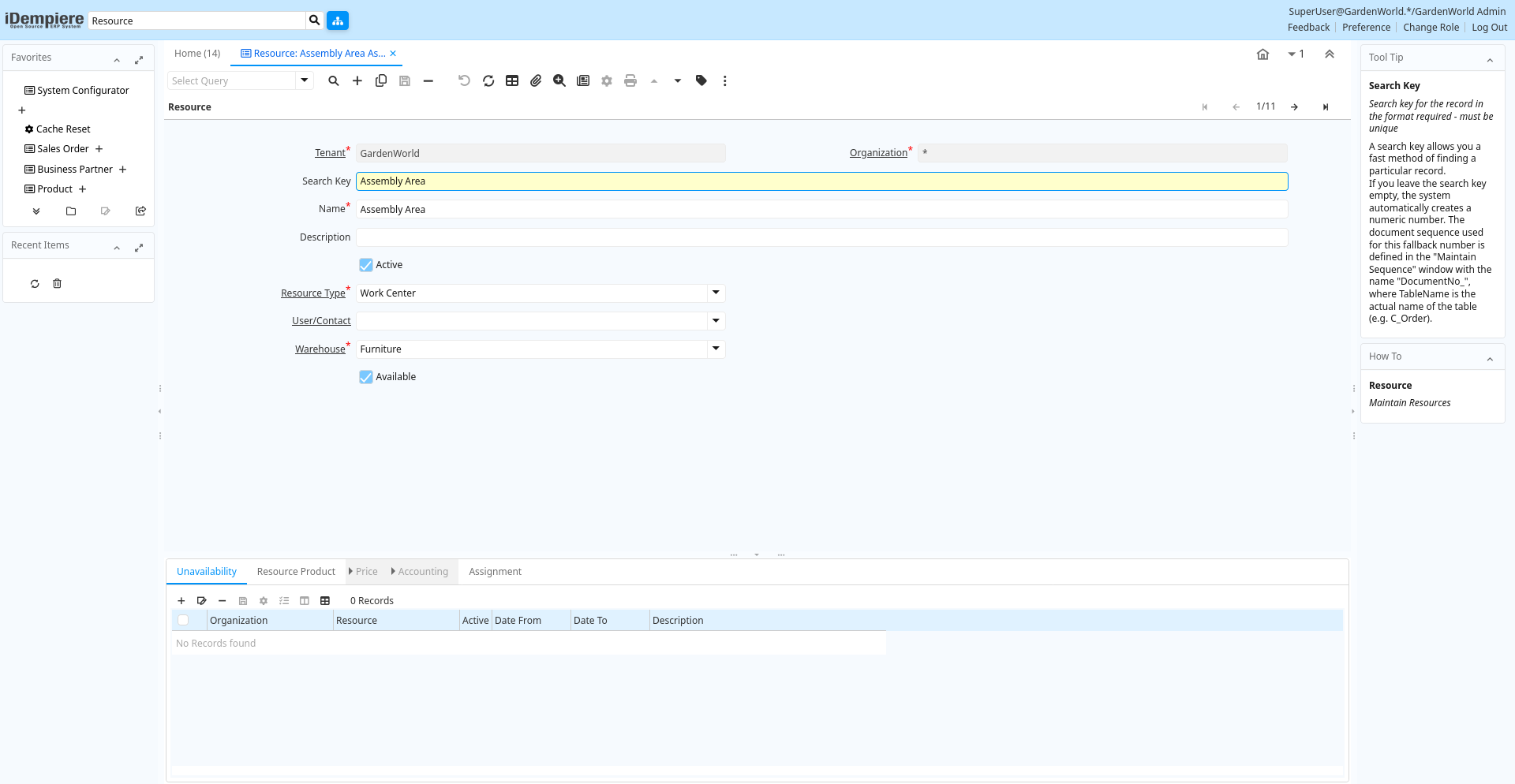
Tab: Resource
[Created: 15/06/2002 - Updated: 02/01/2000 ]
Description: Maintain Resources
Help:
Tab Level: 0
Table 10: Resource - Fields
Table: Report Parameters
| Name | Description | Help | Technical Info |
|---|---|---|---|
| Tenant | Tenant for this installation. | A Tenant is a company or a legal entity. You cannot share data between Tenants. | s_resource.AD_Client_ID numeric(10) Table Direct |
| Organization | Organizational entity within tenant | An organization is a unit of your tenant or legal entity - examples are store, department. You can share data between organizations. | s_resource.AD_Org_ID numeric(10) Table Direct |
| Search Key | Search key for the record in the format required - must be unique | A search key allows you a fast method of finding a particular record.If you leave the search key empty, the system automatically creates a numeric number. The document sequence used for this fallback number is defined in the "Maintain Sequence" window with the name "DocumentNo_", where TableName is the actual name of the table (e.g. C_Order). | s_resource.Value character varying(40) String |
| Name | Alphanumeric identifier of the entity | The name of an entity (record) is used as an default search option in addition to the search key. The name is up to 60 characters in length. | s_resource.Name character varying(60) String |
| Description | Optional short description of the record | A description is limited to 255 characters. | s_resource.Description character varying(255) String |
| Active | The record is active in the system | There are two methods of making records unavailable in the system: One is to delete the record, the other is to de-activate the record. A de-activated record is not available for selection, but available for reports.There are two reasons for de-activating and not deleting records:(1) The system requires the record for audit purposes.(2) The record is referenced by other records. E.g., you cannot delete a Business Partner, if there are invoices for this partner record existing. You de-activate the Business Partner and prevent that this record is used for future entries. | s_resource.IsActive character(1) Yes-No |
| Resource Type | s_resource.S_ResourceType_ID numeric(10) Table Direct | ||
| User/Contact | User within the system - Internal or Business Partner Contact | The User identifies a unique user in the system. This could be an internal user or a business partner contact | s_resource.AD_User_ID numeric(10) Table Direct |
| Warehouse | Storage Warehouse and Service Point | The Warehouse identifies a unique Warehouse where products are stored or Services are provided. | s_resource.M_Warehouse_ID numeric(10) Table Direct |
| Available | Resource is available | Resource is available for assignments | s_resource.IsAvailable character(1) Yes-No |
Tab: Unavailability
[Created: 15/06/2002 - Updated: 02/01/2000 ]
Description: Resource unavailability
Help: Dates, when the resource is not available (e.g. vacation)
Tab Level: 1
Table 20: Unavailability - Fields
Table: Report Parameters
| Name | Description | Help | Technical Info |
|---|---|---|---|
| Tenant | Tenant for this installation. | A Tenant is a company or a legal entity. You cannot share data between Tenants. | s_resourceunavailable.AD_Client_ID numeric(10) Table Direct |
| Organization | Organizational entity within tenant | An organization is a unit of your tenant or legal entity - examples are store, department. You can share data between organizations. | s_resourceunavailable.AD_Org_ID numeric(10) Table Direct |
| Resource | Resource | s_resourceunavailable.S_Resource_ID numeric(10) Table Direct | |
| Active | The record is active in the system | There are two methods of making records unavailable in the system: One is to delete the record, the other is to de-activate the record. A de-activated record is not available for selection, but available for reports.There are two reasons for de-activating and not deleting records:(1) The system requires the record for audit purposes.(2) The record is referenced by other records. E.g., you cannot delete a Business Partner, if there are invoices for this partner record existing. You de-activate the Business Partner and prevent that this record is used for future entries. | s_resourceunavailable.IsActive character(1) Yes-No |
| Date From | Starting date for a range | The Date From indicates the starting date of a range. | s_resourceunavailable.DateFrom timestamp without time zone Date |
| Date To | End date of a date range | The Date To indicates the end date of a range (inclusive) | s_resourceunavailable.DateTo timestamp without time zone Date |
| Description | Optional short description of the record | A description is limited to 255 characters. | s_resourceunavailable.Description character varying(255) String |
Tab: Resource Product
[Created: 15/06/2002 - Updated: 02/01/2000 ]
Description: Maintain Product information of Resource
Help: The product for the resource is automatically created and synchronized. Update Name, Unit of Measure, etc. in the Resource and don't change it in the product.
Tab Level: 1
Table 30: Resource Product - Fields
Table: Report Parameters
| Name | Description | Help | Technical Info |
|---|---|---|---|
| Tenant | Tenant for this installation. | A Tenant is a company or a legal entity. You cannot share data between Tenants. | m_product.AD_Client_ID numeric(10) Table Direct |
| Organization | Organizational entity within tenant | An organization is a unit of your tenant or legal entity - examples are store, department. You can share data between organizations. | m_product.AD_Org_ID numeric(10) Table Direct |
| Search Key | Search key for the record in the format required - must be unique | A search key allows you a fast method of finding a particular record.If you leave the search key empty, the system automatically creates a numeric number. The document sequence used for this fallback number is defined in the "Maintain Sequence" window with the name "DocumentNo_", where TableName is the actual name of the table (e.g. C_Order). | m_product.Value character varying(510) String |
| Name | Alphanumeric identifier of the entity | The name of an entity (record) is used as an default search option in addition to the search key. The name is up to 60 characters in length. | m_product.Name character varying(255) String |
| Description | Optional short description of the record | A description is limited to 255 characters. | m_product.Description character varying(255) String |
| Comment/Help | Comment or Hint | The Help field contains a hint, comment or help about the use of this item. | m_product.Help character varying(2000) Text |
| Document Note | Additional information for a Document | The Document Note is used for recording any additional information regarding this product. | m_product.DocumentNote character varying(2000) Text |
| UPC/EAN | Bar Code (Universal Product Code or its superset European Article Number) | Use this field to enter the bar code for the product in any of the bar code symbologies (Codabar, Code 25, Code 39, Code 93, Code 128, UPC (A), UPC (E), EAN-13, EAN-8, ITF, ITF-14, ISBN, ISSN, JAN-13, JAN-8, POSTNET and FIM, MSI/Plessey, and Pharmacode) | m_product.UPC character varying(30) String |
| SKU | Stock Keeping Unit | The SKU indicates a user defined stock keeping unit. It may be used for an additional bar code symbols or your own schema. | m_product.SKU character varying(30) String |
| Active | The record is active in the system | There are two methods of making records unavailable in the system: One is to delete the record, the other is to de-activate the record. A de-activated record is not available for selection, but available for reports.There are two reasons for de-activating and not deleting records:(1) The system requires the record for audit purposes.(2) The record is referenced by other records. E.g., you cannot delete a Business Partner, if there are invoices for this partner record existing. You de-activate the Business Partner and prevent that this record is used for future entries. | m_product.IsActive character(1) Yes-No |
| Summary Level | This is a summary entity | A summary entity represents a branch in a tree rather than an end-node. Summary entities are used for reporting and do not have own values. | m_product.IsSummary character(1) Yes-No |
| Product Category | Category of a Product | Identifies the category which this product belongs to. Product categories are used for pricing and selection. | m_product.M_Product_Category_ID numeric(10) Table Direct |
| Classification | Classification for grouping | The Classification can be used to optionally group products. | m_product.Classification character varying(12) String |
| Tax Category | Tax Category | The Tax Category provides a method of grouping similar taxes. For example, Sales Tax or Value Added Tax. | m_product.C_TaxCategory_ID numeric(10) Table Direct |
| Revenue Recognition | Method for recording revenue | The Revenue Recognition indicates how revenue will be recognized for this product | m_product.C_RevenueRecognition_ID numeric(10) Table Direct |
| UOM | Unit of Measure | The UOM defines a unique non monetary Unit of Measure | m_product.C_UOM_ID numeric(10) Table Direct |
| Sales Representative | Sales Representative or Company Agent | The Sales Representative indicates the Sales Rep for this Region. Any Sales Rep must be a valid internal user. | m_product.SalesRep_ID numeric(10) Table |
| Product Type | Type of product | The type of product also determines accounting consequences. | m_product.ProductType character(1) List |
| Purchased | Organization purchases this product | The Purchased check box indicates if this product is purchased by this organization. | m_product.IsPurchased character(1) Yes-No |
| Sold | Organization sells this product | The Sold check box indicates if this product is sold by this organization. | m_product.IsSold character(1) Yes-No |
| Discontinued | This product is no longer available | The Discontinued check box indicates a product that has been discontinued. | m_product.Discontinued character(1) Yes-No |
| Discontinued At | Discontinued At indicates Date when product was discontinued | m_product.DiscontinuedAt timestamp without time zone Date | |
| Image URL | URL of image | URL of image; The image is not stored in the database, but retrieved at runtime. The image can be a gif, jpeg or png. | m_product.ImageURL character varying(120) URL |
| Description URL | URL for the description | m_product.DescriptionURL character varying(120) URL |
Tab: Price
[Created: 22/06/2002 - Updated: 02/01/2000 ]
Description: Resource Pricing
Help: The Pricing Tab displays the List, Standard and Limit prices for each price list a resource is contained in.
Tab Level: 2
Table 40: Price - Fields
Table: Report Parameters
| Name | Description | Help | Technical Info |
|---|---|---|---|
| Tenant | Tenant for this installation. | A Tenant is a company or a legal entity. You cannot share data between Tenants. | m_productprice.AD_Client_ID numeric(10) Table Direct |
| Organization | Organizational entity within tenant | An organization is a unit of your tenant or legal entity - examples are store, department. You can share data between organizations. | m_productprice.AD_Org_ID numeric(10) Table Direct |
| Product | Product, Service, Item | Identifies an item which is either purchased or sold in this organization. | m_productprice.M_Product_ID numeric(10) Search |
| Price List Version | Identifies a unique instance of a Price List | Each Price List can have multiple versions. The most common use is to indicate the dates that a Price List is valid for. | m_productprice.M_PriceList_Version_ID numeric(10) Table Direct |
| Active | The record is active in the system | There are two methods of making records unavailable in the system: One is to delete the record, the other is to de-activate the record. A de-activated record is not available for selection, but available for reports.There are two reasons for de-activating and not deleting records:(1) The system requires the record for audit purposes.(2) The record is referenced by other records. E.g., you cannot delete a Business Partner, if there are invoices for this partner record existing. You de-activate the Business Partner and prevent that this record is used for future entries. | m_productprice.IsActive character(1) Yes-No |
| List Price | List Price | The List Price is the official List Price in the document currency. | m_productprice.PriceList numeric Costs+Prices |
| Standard Price | Standard Price | The Standard Price indicates the standard or normal price for a product on this price list | m_productprice.PriceStd numeric Costs+Prices |
| Limit Price | Lowest price for a product | The Price Limit indicates the lowest price for a product stated in the Price List Currency. | m_productprice.PriceLimit numeric Costs+Prices |
Tab: Accounting
[Created: 22/06/2002 - Updated: 05/03/2013 ]
Description: Define Accounting Parameters
Help: The Accounting Tab defines the defaults to use when generating accounting transactions for orders and invoices which contain this resource. Not all accounts apply to resources.
Tab Level: 2
Table 50: Accounting - Fields
Table: Report Parameters
| Name | Description | Help | Technical Info |
|---|---|---|---|
| Tenant | Tenant for this installation. | A Tenant is a company or a legal entity. You cannot share data between Tenants. | m_product_acct.AD_Client_ID numeric(10) Table Direct |
| Organization | Organizational entity within tenant | An organization is a unit of your tenant or legal entity - examples are store, department. You can share data between organizations. | m_product_acct.AD_Org_ID numeric(10) Table Direct |
| Product | Product, Service, Item | Identifies an item which is either purchased or sold in this organization. | m_product_acct.M_Product_ID numeric(10) Search |
| Accounting Schema | Rules for accounting | An Accounting Schema defines the rules used in accounting such as costing method, currency and calendar | m_product_acct.C_AcctSchema_ID numeric(10) Table Direct |
| Active | The record is active in the system | There are two methods of making records unavailable in the system: One is to delete the record, the other is to de-activate the record. A de-activated record is not available for selection, but available for reports.There are two reasons for de-activating and not deleting records:(1) The system requires the record for audit purposes.(2) The record is referenced by other records. E.g., you cannot delete a Business Partner, if there are invoices for this partner record existing. You de-activate the Business Partner and prevent that this record is used for future entries. | m_product_acct.IsActive character(1) Yes-No |
| Product Asset | Account for Product Asset (Inventory) | The Product Asset Account indicates the account used for valuing this a product in inventory. | m_product_acct.P_Asset_Acct numeric(10) Account |
| Product Expense | Account for Product Expense | The Product Expense Account indicates the account used to record expenses associated with this product. | m_product_acct.P_Expense_Acct numeric(10) Account |
| Product COGS | Account for Cost of Goods Sold | The Product COGS Account indicates the account used when recording costs associated with this product. | m_product_acct.P_COGS_Acct numeric(10) Account |
| Purchase Price Variance | Difference between Standard Cost and Purchase Price (PPV) | The Purchase Price Variance is used in Standard Costing. It reflects the difference between the Standard Cost and the Purchase Order Price. | m_product_acct.P_PurchasePriceVariance_Acct numeric(10) Account |
| Invoice Price Variance | Difference between Costs and Invoice Price (IPV) | The Invoice Price Variance is used reflects the difference between the current Costs and the Invoice Price. | m_product_acct.P_InvoicePriceVariance_Acct numeric(10) Account |
| Trade Discount Received | Trade Discount Receivable Account | The Trade Discount Receivables Account indicates the account for received trade discounts in vendor invoices | m_product_acct.P_TradeDiscountRec_Acct numeric(10) Account |
| Trade Discount Granted | Trade Discount Granted Account | The Trade Discount Granted Account indicates the account for granted trade discount in sales invoices | m_product_acct.P_TradeDiscountGrant_Acct numeric(10) Account |
| Product Revenue | Account for Product Revenue (Sales Account) | The Product Revenue Account indicates the account used for recording sales revenue for this product. | m_product_acct.P_Revenue_Acct numeric(10) Account |
Tab: Assignment
[Created: 15/06/2002 - Updated: 02/01/2000 ]
Description: Resource Assignments
Help: History of Assignments
Tab Level: 1
Table 70: Assignment - Fields
Table: Report Parameters
| Name | Description | Help | Technical Info |
|---|---|---|---|
| Tenant | Tenant for this installation. | A Tenant is a company or a legal entity. You cannot share data between Tenants. | s_resourceassignment.AD_Client_ID numeric(10) Table Direct |
| Organization | Organizational entity within tenant | An organization is a unit of your tenant or legal entity - examples are store, department. You can share data between organizations. | s_resourceassignment.AD_Org_ID numeric(10) Table Direct |
| Resource | Resource | s_resourceassignment.S_Resource_ID numeric(10) Table Direct | |
| Assign From | Assign resource from | Assignment start | s_resourceassignment.AssignDateFrom timestamp without time zone Date+Time |
| Assign To | Assign resource until | Assignment end | s_resourceassignment.AssignDateTo timestamp without time zone Date+Time |
| Quantity | Quantity | The Quantity indicates the number of a specific product or item for this document. | s_resourceassignment.Qty numeric Quantity |
| Confirmed | Assignment is confirmed | Resource assignment is confirmed | s_resourceassignment.IsConfirmed character(1) Yes-No |
| Name | Alphanumeric identifier of the entity | The name of an entity (record) is used as an default search option in addition to the search key. The name is up to 60 characters in length. | s_resourceassignment.Name character varying(60) String |
| Description | Optional short description of the record | A description is limited to 255 characters. | s_resourceassignment.Description character varying(255) String |