Window: Performance Measure
[Created: 24/04/2001 - Updated: 26/12/2005 ]
Description: Define your Performance Measures
Help: The Performance Measure Window allows you to define the rules and restrictions for performance measurement. You can, for example, restrict performance measurement to sales for a certain product category for a defined time frame.
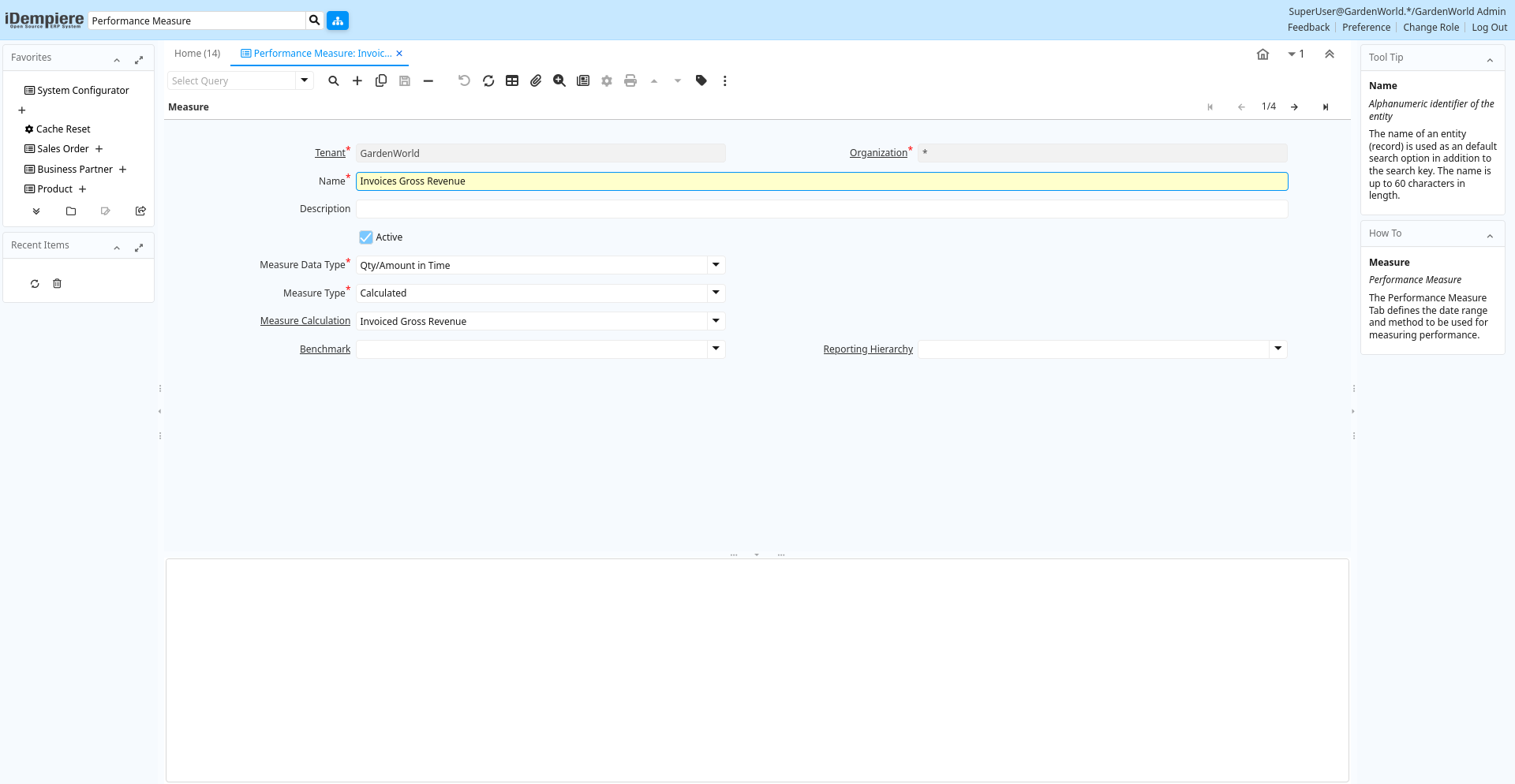
Tab: Measure
[Created: 24/04/2001 - Updated: 02/01/2000 ]
Description: Performance Measure
Help: The Performance Measure Tab defines the date range and method to be used for measuring performance.
Tab Level: 0
Table 10: Measure - Fields
Table: Report Parameters
| Name | Description | Help | Technical Info |
|---|---|---|---|
| Tenant | Tenant for this installation. | A Tenant is a company or a legal entity. You cannot share data between Tenants. | pa_measure.AD_Client_ID numeric(10) Table Direct |
| Organization | Organizational entity within tenant | An organization is a unit of your tenant or legal entity - examples are store, department. You can share data between organizations. | pa_measure.AD_Org_ID numeric(10) Table Direct |
| Name | Alphanumeric identifier of the entity | The name of an entity (record) is used as an default search option in addition to the search key. The name is up to 60 characters in length. | pa_measure.Name character varying(60) String |
| Description | Optional short description of the record | A description is limited to 255 characters. | pa_measure.Description character varying(255) String |
| Active | The record is active in the system | There are two methods of making records unavailable in the system: One is to delete the record, the other is to de-activate the record. A de-activated record is not available for selection, but available for reports.There are two reasons for de-activating and not deleting records:(1) The system requires the record for audit purposes.(2) The record is referenced by other records. E.g., you cannot delete a Business Partner, if there are invoices for this partner record existing. You de-activate the Business Partner and prevent that this record is used for future entries. | pa_measure.IsActive character(1) Yes-No |
| Measure Data Type | Type of data - Status or in Time | Status represents values valid at a certain time (e.g. Open Invoices) - No history is maintained.Time represents a values at a given time (e.g. Invoice Amount on 1/1) - History is maintained | pa_measure.MeasureDataType character(1) List |
| Measure Type | Determines how the actual performance is derived | The Measure Type indicates how the actual measure is determined. For example, one measure may be manual while another is calculated. | pa_measure.MeasureType character(1) List |
| Manual Actual | Manually entered actual value | The Manual Active identifies a manually entered actual measurement value. | pa_measure.ManualActual numeric Number |
| Note | Note for manual entry | The Note allows for entry for additional information regarding a manual entry. | pa_measure.ManualNote character varying(2000) Text |
| Measure Calculation | Calculation method for measuring performance | The Measure Calculation indicates the method of measuring performance. | pa_measure.PA_MeasureCalc_ID numeric(10) Table Direct |
| Calculation Class | Java Class for calculation, implementing Interface Measure | The Calculation Class indicates the Java Class used for calculating measures. | pa_measure.CalculationClass character varying(60) String |
| Ratio | Performance Ratio | Calculation instruction set for a performance ratio | pa_measure.PA_Ratio_ID numeric(10) Table Direct |
| Request Type | Type of request (e.g. Inquiry, Complaint, ..) | Request Types are used for processing and categorizing requests. Options are Account Inquiry, Warranty Issue, etc. | pa_measure.R_RequestType_ID numeric(10) Table Direct |
| Project Type | Type of the project | Type of the project with optional phases of the project with standard performance information | pa_measure.C_ProjectType_ID numeric(10) Table Direct |
| Benchmark | Performance Benchmark | Data Series to compare internal performance with (e.g. stock price, ...) | pa_measure.PA_Benchmark_ID numeric(10) Table Direct |
| Reporting Hierarchy | Optional Reporting Hierarchy - If not selected the default hierarchy trees are used. | Reporting Hierarchy allows you to select different Hierarchies/Trees for the report.Accounting Segments like Organization, Account, Product may have several hierarchies to accommodate different views on the business. | pa_measure.PA_Hierarchy_ID numeric(10) Table Direct |
Tab: Achievement
[Created: 24/04/2001 - Updated: 25/12/2005 ]
Description: Performance Achievement
Help: The Performance Achievement Tab defines the Tasks to be achieved. The performance is measured by the percentage of reached achievements.
Tab Level: 1
Table 20: Achievement - Fields
Table: Report Parameters
| Name | Description | Help | Technical Info |
|---|---|---|---|
| Tenant | Tenant for this installation. | A Tenant is a company or a legal entity. You cannot share data between Tenants. | pa_achievement.AD_Client_ID numeric(10) Table Direct |
| Organization | Organizational entity within tenant | An organization is a unit of your tenant or legal entity - examples are store, department. You can share data between organizations. | pa_achievement.AD_Org_ID numeric(10) Table Direct |
| Measure | Concrete Performance Measurement | The Measure identifies a concrete, measurable indicator of performance. For example, sales dollars, prospects contacted. | pa_achievement.PA_Measure_ID numeric(10) Table Direct |
| Name | Alphanumeric identifier of the entity | The name of an entity (record) is used as an default search option in addition to the search key. The name is up to 60 characters in length. | pa_achievement.Name character varying(60) String |
| Description | Optional short description of the record | A description is limited to 255 characters. | pa_achievement.Description character varying(255) String |
| Active | The record is active in the system | There are two methods of making records unavailable in the system: One is to delete the record, the other is to de-activate the record. A de-activated record is not available for selection, but available for reports.There are two reasons for de-activating and not deleting records:(1) The system requires the record for audit purposes.(2) The record is referenced by other records. E.g., you cannot delete a Business Partner, if there are invoices for this partner record existing. You de-activate the Business Partner and prevent that this record is used for future entries. | pa_achievement.IsActive character(1) Yes-No |
| Sequence | Method of ordering records; lowest number comes first | The Sequence indicates the order of records | pa_achievement.SeqNo numeric(10) Integer |
| Document Date | Date of the Document | The Document Date indicates the date the document was generated. It may or may not be the same as the accounting date. | pa_achievement.DateDoc timestamp without time zone Date |
| Note | Optional additional user defined information | The Note field allows for optional entry of user defined information regarding this record | pa_achievement.Note character varying(2000) Text |
| Achieved | The goal is achieved | The Achieved checkbox indicates if this goal has been achieved. | pa_achievement.IsAchieved character(1) Yes-No |
| Manual Actual | Manually entered actual value | The Manual Active identifies a manually entered actual measurement value. | pa_achievement.ManualActual numeric Number |