Window: Unit of Measure
[Created: 11/06/1999 - Updated: 02/01/2000 ]
Description: Maintain Unit of Measure
Help: The Unit of Measure Window is used to define non monetary units of measure. It also defines if conversion between units of measure are allowed and how they are to be performed. The system provides some automatic conversions between units of measures (e.g. minute, hour, day, working day, etc.) if they are not explicitly defined here.Conversions need to be direct (i.e. if you have only a conversion between A-B and B-C, the system cannot convert A-C, you need to define it explicitly).
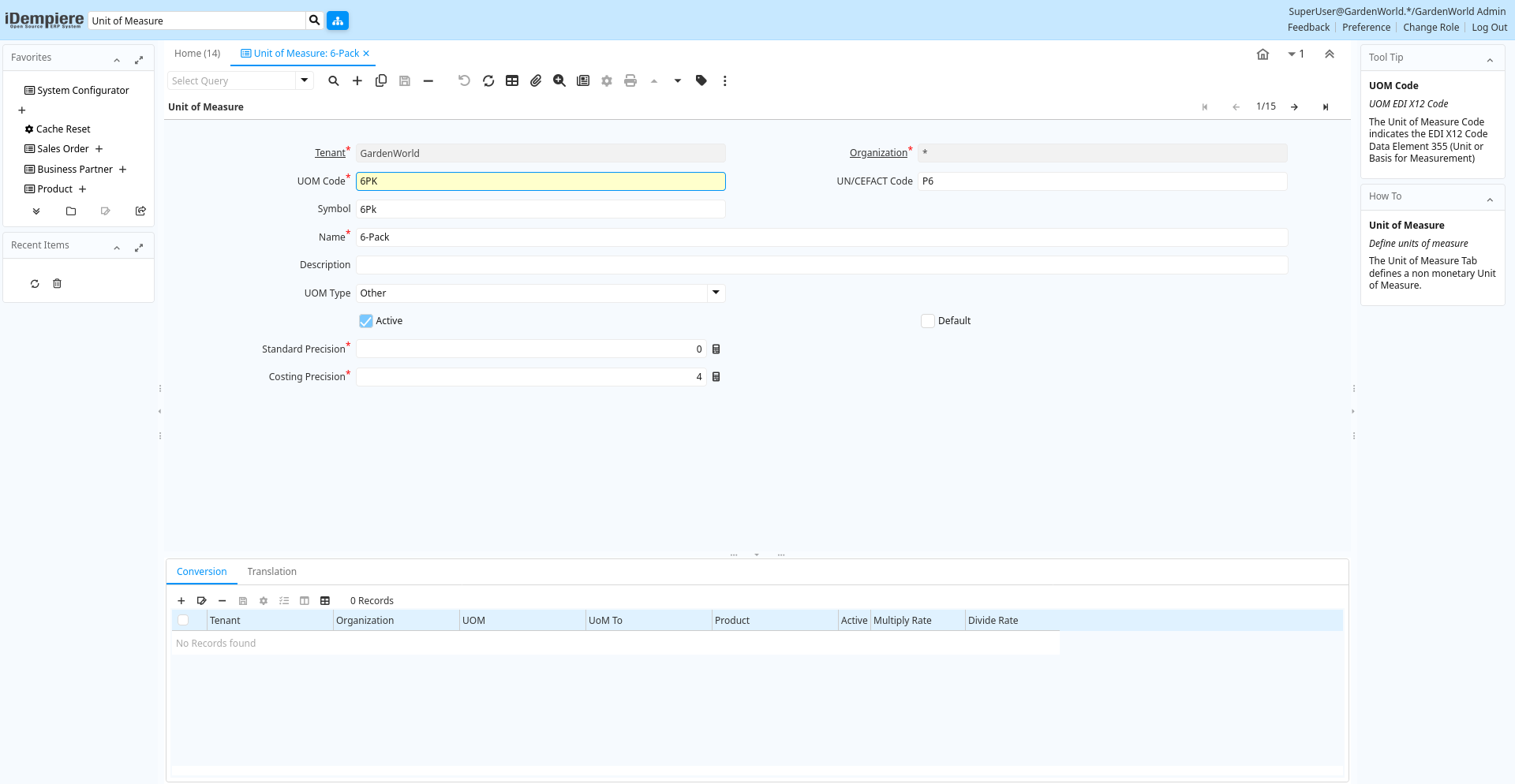
Tab: Unit of Measure
[Created: 11/06/1999 - Updated: 02/01/2000 ]
Description: Define units of measure
Help: The Unit of Measure Tab defines a non monetary Unit of Measure.
Tab Level: 0
Table 10: Unit of Measure - Fields
Table: Report Parameters
| Name | Description | Help | Technical Info |
|---|---|---|---|
| Tenant | Tenant for this installation. | A Tenant is a company or a legal entity. You cannot share data between Tenants. | c_uom.AD_Client_ID numeric(10) Table Direct |
| Organization | Organizational entity within tenant | An organization is a unit of your tenant or legal entity - examples are store, department. You can share data between organizations. | c_uom.AD_Org_ID numeric(10) Table Direct |
| UOM Code | UOM EDI X12 Code | The Unit of Measure Code indicates the EDI X12 Code Data Element 355 (Unit or Basis for Measurement) | c_uom.X12DE355 character varying(4) String |
| UN/CEFACT Code | Code for Units of Measure used in International Trade | As defined at United Nations Centre for Trade Facilitation and Electronic Business. https://service.unece.org/trade/uncefact/vocabulary/rec20/ | c_uom.UNCEFACT character varying(10) String |
| Symbol | Symbol for a Unit of Measure | The Symbol identifies the Symbol to be displayed and printed for a Unit of Measure | c_uom.UOMSymbol character varying(10) String |
| Name | Alphanumeric identifier of the entity | The name of an entity (record) is used as an default search option in addition to the search key. The name is up to 60 characters in length. | c_uom.Name character varying(60) String |
| Description | Optional short description of the record | A description is limited to 255 characters. | c_uom.Description character varying(255) String |
| UOM Type | c_uom.UOMType character varying(2) List | ||
| Active | The record is active in the system | There are two methods of making records unavailable in the system: One is to delete the record, the other is to de-activate the record. A de-activated record is not available for selection, but available for reports.There are two reasons for de-activating and not deleting records:(1) The system requires the record for audit purposes.(2) The record is referenced by other records. E.g., you cannot delete a Business Partner, if there are invoices for this partner record existing. You de-activate the Business Partner and prevent that this record is used for future entries. | c_uom.IsActive character(1) Yes-No |
| Default | Default value | The Default Checkbox indicates if this record will be used as a default value. | c_uom.IsDefault character(1) Yes-No |
| Standard Precision | Rule for rounding calculated amounts | The Standard Precision defines the number of decimal places that amounts will be rounded to for accounting transactions and documents. | c_uom.StdPrecision numeric(10) Integer |
| Costing Precision | Rounding used costing calculations | The Costing Precision defines the number of decimal places that amounts will be rounded to when performing costing calculations. | c_uom.CostingPrecision numeric(10) Integer |
Tab: Conversion
[Created: 11/06/1999 - Updated: 16/11/2012 ]
Description: Define standard Unit of Measure Conversion
Help: The Conversion Tab defines the rates for converting a Unit of Measure. The system provides some automatic conversions between units of measures (e.g. minute, hour, day, working day, etc.) if they are not explicitly defined here.Conversions need to be direct (i.e. if you have only a conversion between A-B and B-C, the system cannot convert A-C, you need to define it explicitly).
Tab Level: 1
Table 20: Conversion - Fields
Table: Report Parameters
| Name | Description | Help | Technical Info |
|---|---|---|---|
| Tenant | Tenant for this installation. | A Tenant is a company or a legal entity. You cannot share data between Tenants. | c_uom_conversion.AD_Client_ID numeric(10) Table Direct |
| Organization | Organizational entity within tenant | An organization is a unit of your tenant or legal entity - examples are store, department. You can share data between organizations. | c_uom_conversion.AD_Org_ID numeric(10) Table Direct |
| UOM | Unit of Measure | The UOM defines a unique non monetary Unit of Measure | c_uom_conversion.C_UOM_ID numeric(10) Table Direct |
| UoM To | Target or destination Unit of Measure | The UOM To indicates the destination UOM for a UOM Conversion pair. | c_uom_conversion.C_UOM_To_ID numeric(10) Table |
| Product | Product, Service, Item | Identifies an item which is either purchased or sold in this organization. | c_uom_conversion.M_Product_ID numeric(10) Search |
| Active | The record is active in the system | There are two methods of making records unavailable in the system: One is to delete the record, the other is to de-activate the record. A de-activated record is not available for selection, but available for reports.There are two reasons for de-activating and not deleting records:(1) The system requires the record for audit purposes.(2) The record is referenced by other records. E.g., you cannot delete a Business Partner, if there are invoices for this partner record existing. You de-activate the Business Partner and prevent that this record is used for future entries. | c_uom_conversion.IsActive character(1) Yes-No |
| Multiply Rate | Rate to multiple the source by to calculate the target. | To convert Source number to Target number, the Source is multiplied by the multiply rate. If the Multiply Rate is entered, then the Divide Rate will be automatically calculated. | c_uom_conversion.MultiplyRate numeric Number |
| Divide Rate | To convert Source number to Target number, the Source is divided | To convert Source number to Target number, the Source is divided by the divide rate. If you enter a Divide Rate, the Multiply Rate will be automatically calculated. | c_uom_conversion.DivideRate numeric Number |
Tab: Translation
[Created: 25/01/2000 - Updated: 27/10/2024 ]
Description: Unit of Measure Translation
Help:
Tab Level: 1
Table 30: Translation - Fields
Table: Report Parameters
| Name | Description | Help | Technical Info |
|---|---|---|---|
| Tenant | Tenant for this installation. | A Tenant is a company or a legal entity. You cannot share data between Tenants. | c_uom_trl.AD_Client_ID numeric(10) Table Direct |
| Organization | Organizational entity within tenant | An organization is a unit of your tenant or legal entity - examples are store, department. You can share data between organizations. | c_uom_trl.AD_Org_ID numeric(10) Table Direct |
| UOM | Unit of Measure | The UOM defines a unique non monetary Unit of Measure | c_uom_trl.C_UOM_ID numeric(10) Table Direct |
| Language | Language for this entity | The Language identifies the language to use for display and formatting | c_uom_trl.AD_Language character varying(6) Table |
| Active | The record is active in the system | There are two methods of making records unavailable in the system: One is to delete the record, the other is to de-activate the record. A de-activated record is not available for selection, but available for reports.There are two reasons for de-activating and not deleting records:(1) The system requires the record for audit purposes.(2) The record is referenced by other records. E.g., you cannot delete a Business Partner, if there are invoices for this partner record existing. You de-activate the Business Partner and prevent that this record is used for future entries. | c_uom_trl.IsActive character(1) Yes-No |
| Translated | This column is translated | The Translated checkbox indicates if this column is translated. | c_uom_trl.IsTranslated character(1) Yes-No |
| Symbol | Symbol for a Unit of Measure | The Symbol identifies the Symbol to be displayed and printed for a Unit of Measure | c_uom_trl.UOMSymbol character varying(10) String |
| Name | Alphanumeric identifier of the entity | The name of an entity (record) is used as an default search option in addition to the search key. The name is up to 60 characters in length. | c_uom_trl.Name character varying(60) String |
| Description | Optional short description of the record | A description is limited to 255 characters. | c_uom_trl.Description character varying(255) String |