Window: Import Invoice
[Created: 07/06/2003 - Updated: 30/06/2021 ]
Description: Import Invoices
Help: Import invoiced loaded
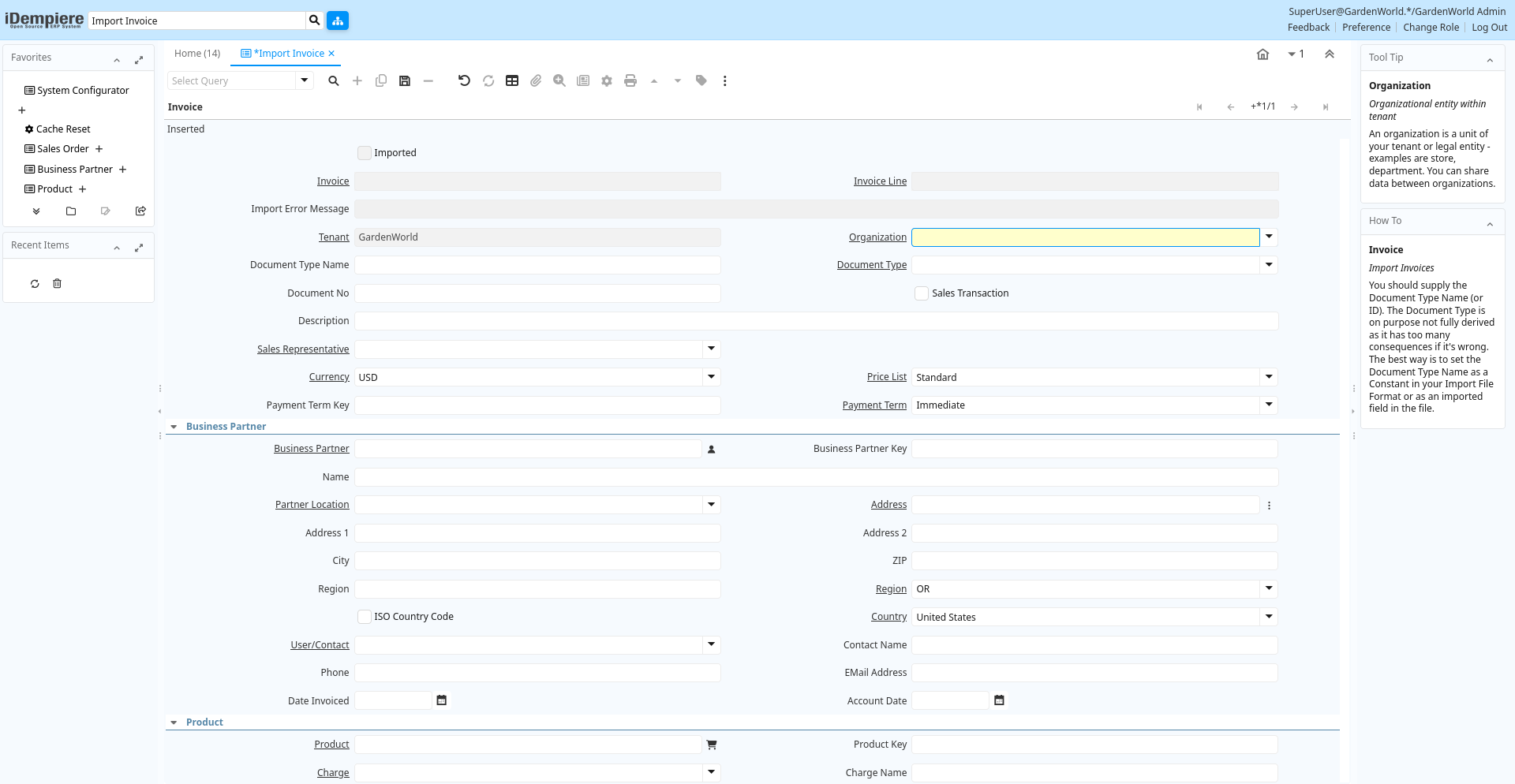
Tab: Invoice
[Created: 07/06/2003 - Updated: 02/01/2000 ]
Description: Import Invoices
Help: You should supply the Document Type Name (or ID). The Document Type is on purpose not fully derived as it has too many consequences if it's wrong. The best way is to set the Document Type Name as a Constant in your Import File Format or as an imported field in the file.
Tab Level: 0
Table 10: Invoice - Fields
Table: Report Parameters
| Name | Description | Help | Technical Info |
|---|---|---|---|
| Import Invoice | Import Invoice | i_invoice.I_Invoice_ID numeric(10) ID | |
| Imported | Has this import been processed | The Imported check box indicates if this import has been processed. | i_invoice.I_IsImported character(1) Yes-No |
| Invoice | Invoice Identifier | The Invoice Document. | i_invoice.C_Invoice_ID numeric(10) Search |
| Invoice Line | Invoice Detail Line | The Invoice Line uniquely identifies a single line of an Invoice. | i_invoice.C_InvoiceLine_ID numeric(10) Search |
| Import Error Message | Messages generated from import process | The Import Error Message displays any error messages generated during the import process. | i_invoice.I_ErrorMsg character varying(2000) String |
| Tenant | Tenant for this installation. | A Tenant is a company or a legal entity. You cannot share data between Tenants. | i_invoice.AD_Client_ID numeric(10) Table Direct |
| Organization | Organizational entity within tenant | An organization is a unit of your tenant or legal entity - examples are store, department. You can share data between organizations. | i_invoice.AD_Org_ID numeric(10) Table Direct |
| Document Type Name | Name of the Document Type | i_invoice.DocTypeName character varying(60) String | |
| Document Type | Document type or rules | The Document Type determines document sequence and processing rules | i_invoice.C_DocType_ID numeric(10) Table Direct |
| Document No | Document sequence number of the document | The document number is usually automatically generated by the system and determined by the document type of the document. If the document is not saved, the preliminary number is displayed in "".If the document type of your document has no automatic document sequence defined, the field is empty if you create a new document. This is for documents which usually have an external number (like vendor invoice). If you leave the field empty, the system will generate a document number for you. The document sequence used for this fallback number is defined in the "Maintain Sequence" window with the name "DocumentNo_", where TableName is the actual name of the table (e.g. C_Order). | i_invoice.DocumentNo character varying(30) String |
| Sales Transaction | This is a Sales Transaction | The Sales Transaction checkbox indicates if this item is a Sales Transaction. | i_invoice.IsSOTrx character(1) Yes-No |
| Description | Optional short description of the record | A description is limited to 255 characters. | i_invoice.Description character varying(255) String |
| Sales Representative | Sales Representative or Company Agent | The Sales Representative indicates the Sales Rep for this Region. Any Sales Rep must be a valid internal user. | i_invoice.SalesRep_ID numeric(10) Table |
| Currency | The Currency for this record | Indicates the Currency to be used when processing or reporting on this record | i_invoice.C_Currency_ID numeric(10) Table Direct |
| Price List | Unique identifier of a Price List | Price Lists are used to determine the pricing, margin and cost of items purchased or sold. | i_invoice.M_PriceList_ID numeric(10) Table Direct |
| Payment Term Key | Key of the Payment Term | i_invoice.PaymentTermValue character varying(40) String | |
| Payment Term | The terms of Payment (timing, discount) | Payment Terms identify the method and timing of payment. | i_invoice.C_PaymentTerm_ID numeric(10) Table Direct |
| Business Partner | Identifies a Business Partner | A Business Partner is anyone with whom you transact. This can include Vendor, Customer, Employee or Salesperson | i_invoice.C_BPartner_ID numeric(10) Search |
| Business Partner Key | Key of the Business Partner | i_invoice.BPartnerValue character varying(40) String | |
| Name | Alphanumeric identifier of the entity | The name of an entity (record) is used as an default search option in addition to the search key. The name is up to 60 characters in length. | i_invoice.Name character varying(60) String |
| Partner Location | Identifies the (ship to) address for this Business Partner | The Partner address indicates the location of a Business Partner | i_invoice.C_BPartner_Location_ID numeric(10) Table Direct |
| Address | Location or Address | The Location / Address field defines the location of an entity. | i_invoice.C_Location_ID numeric(10) Search |
| Address 1 | Address line 1 for this location | The Address 1 identifies the address for an entity's location | i_invoice.Address1 character varying(60) String |
| Address 2 | Address line 2 for this location | The Address 2 provides additional address information for an entity. It can be used for building location, apartment number or similar information. | i_invoice.Address2 character varying(60) String |
| City | Identifies a City | The City identifies a unique City for this Country or Region. | i_invoice.City character varying(60) String |
| ZIP | Postal code | The Postal Code or ZIP identifies the postal code for this entity's address. | i_invoice.Postal character varying(10) String |
| Region | Name of the Region | The Region Name defines the name that will print when this region is used in a document. | i_invoice.RegionName character varying(60) String |
| Region | Identifies a geographical Region | The Region identifies a unique Region for this Country. | i_invoice.C_Region_ID numeric(10) Table Direct |
| ISO Country Code | Upper-case two-letter alphanumeric ISO Country code according to ISO 3166-1 | The official list can be found at https://www.iso.org/obp/ui/#search | i_invoice.CountryCode character(2) Yes-No |
| Country | Country | The Country defines a Country. Each Country must be defined before it can be used in any document. | i_invoice.C_Country_ID numeric(10) Table Direct |
| User/Contact | User within the system - Internal or Business Partner Contact | The User identifies a unique user in the system. This could be an internal user or a business partner contact | i_invoice.AD_User_ID numeric(10) Table Direct |
| Contact Name | Business Partner Contact Name | i_invoice.ContactName character varying(60) String | |
| Phone | Identifies a telephone number | The Phone field identifies a telephone number | i_invoice.Phone character varying(40) String |
| EMail Address | Electronic Mail Address | The Email Address is the Electronic Mail ID for this User and should be fully qualified (e.g. joe.smith@company.com). The Email Address is used to access the self service application functionality from the web. | i_invoice.EMail character varying(60) String |
| Date Invoiced | Date printed on Invoice | The Date Invoice indicates the date printed on the invoice. | i_invoice.DateInvoiced timestamp without time zone Date |
| Account Date | Accounting Date | The Accounting Date indicates the date to be used on the General Ledger account entries generated from this document. It is also used for any currency conversion. | i_invoice.DateAcct timestamp without time zone Date |
| Product | Product, Service, Item | Identifies an item which is either purchased or sold in this organization. | i_invoice.M_Product_ID numeric(10) Search |
| Product Key | Key of the Product | i_invoice.ProductValue character varying(40) String | |
| Charge | Additional document charges | The Charge indicates a type of Charge (Handling, Shipping, Restocking) | i_invoice.C_Charge_ID numeric(10) Table Direct |
| Charge Name | Name of the Charge | i_invoice.ChargeName character varying(60) String | |
| SKU | Stock Keeping Unit | The SKU indicates a user defined stock keeping unit. It may be used for an additional bar code symbols or your own schema. | i_invoice.SKU character varying(30) String |
| UPC/EAN | Bar Code (Universal Product Code or its superset European Article Number) | Use this field to enter the bar code for the product in any of the bar code symbologies (Codabar, Code 25, Code 39, Code 93, Code 128, UPC (A), UPC (E), EAN-13, EAN-8, ITF, ITF-14, ISBN, ISSN, JAN-13, JAN-8, POSTNET and FIM, MSI/Plessey, and Pharmacode) | i_invoice.UPC character varying(30) String |
| Ordered Quantity | Ordered Quantity | The Ordered Quantity indicates the quantity of a product that was ordered. | i_invoice.QtyOrdered numeric Quantity |
| Unit Price | Actual Price | The Actual or Unit Price indicates the Price for a product in source currency. | i_invoice.PriceActual numeric Costs+Prices |
| Line Description | Description of the Line | i_invoice.LineDescription character varying(255) String | |
| Tax Indicator | Short form for Tax to be printed on documents | The Tax Indicator identifies the short name that will print on documents referencing this tax. | i_invoice.TaxIndicator character varying(10) String |
| Tax | Tax identifier | The Tax indicates the type of tax used in document line. | i_invoice.C_Tax_ID numeric(10) Table Direct |
| Tax Amount | Tax Amount for a document | The Tax Amount displays the total tax amount for a document. | i_invoice.TaxAmt numeric Amount |
| Project | Financial Project | A Project allows you to track and control internal or external activities. | i_invoice.C_Project_ID numeric(10) Search |
| Project Key | Key of the Project | i_invoice.ProjectValue character varying(40) String | |
| Campaign | Marketing Campaign | The Campaign defines a unique marketing program. Projects can be associated with a pre defined Marketing Campaign. You can then report based on a specific Campaign. | i_invoice.C_Campaign_ID numeric(10) Table Direct |
| Activity | Business Activity | Activities indicate tasks that are performed and used to utilize Activity based Costing | i_invoice.C_Activity_ID numeric(10) Table Direct |
| Activity Key | Text key for Activity | i_invoice.ActivityValue character varying(40) String | |
| Trx Organization | Performing or initiating organization | The organization which performs or initiates this transaction (for another organization). The owning Organization may not be the transaction organization in a service bureau environment, with centralized services, and inter-organization transactions. | i_invoice.AD_OrgTrx_ID numeric(10) Table |
| 1099 Box | i_invoice.C_1099Box_ID numeric(10) Table | ||
| 1099 Box Value | i_invoice.C_1099Box_Value character varying(40) String | ||
| Import Invoice | Import Invoice | The Parameters are default values for null import record values, they do not overwrite any data.Note that only Prepare and Complete are valid document actions. | i_invoice.Processing character(1) Button |
| Processed | The document has been processed | The Processed checkbox indicates that a document has been processed. | i_invoice.Processed character(1) Yes-No |