Window: RfQ Response
[Created: 23/03/2004 - Updated: 25/03/2022 ]
Description: Manage RfQ Responses
Help:
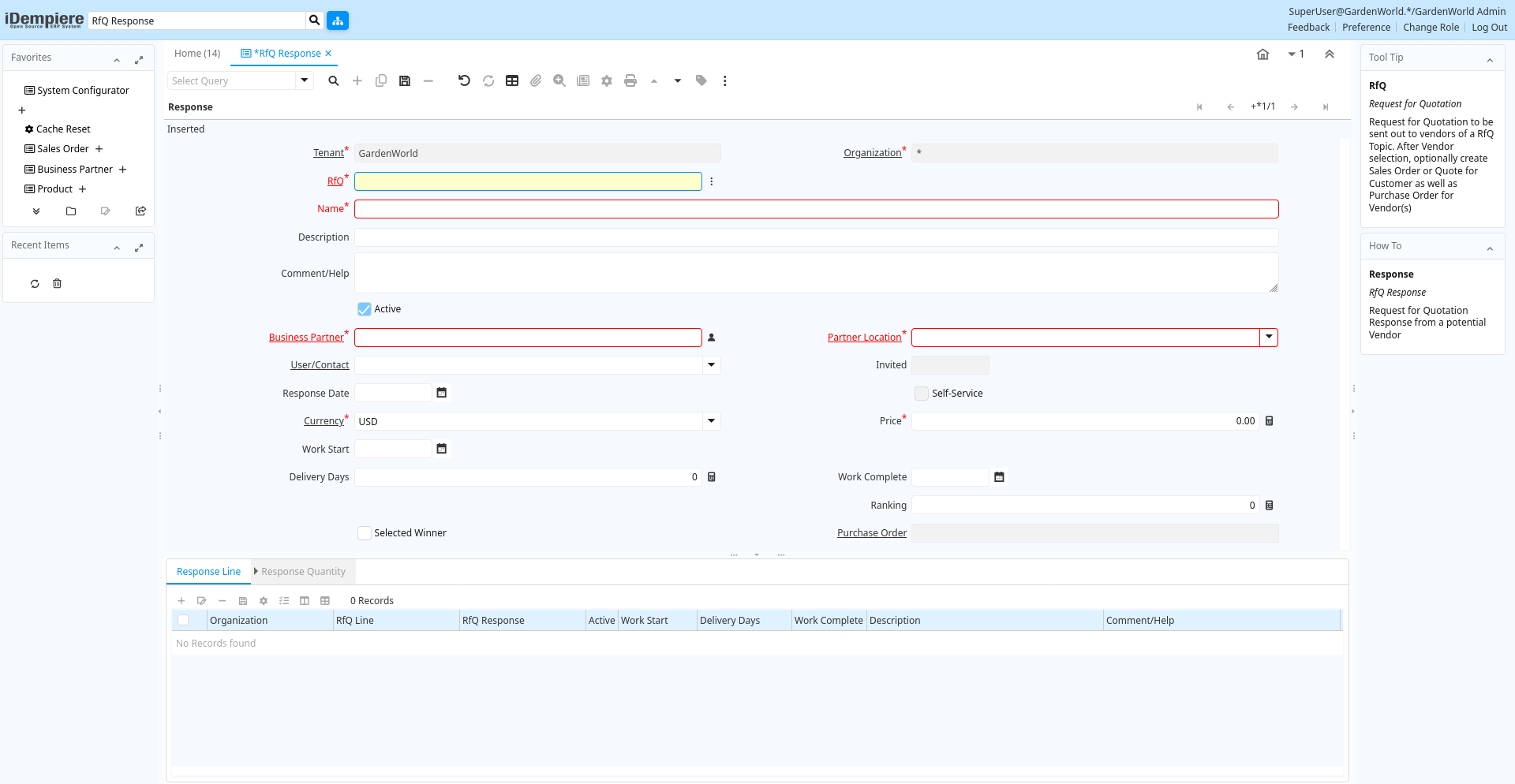
Tab: Response
[Created: 19/02/2004 - Updated: 20/05/2013 ]
Description: RfQ Response
Help: Request for Quotation Response from a potential Vendor
Tab Level: 0
Table 10: Response - Fields
Table: Report Parameters
| Name | Description | Help | Technical Info |
|---|---|---|---|
| Tenant | Tenant for this installation. | A Tenant is a company or a legal entity. You cannot share data between Tenants. | c_rfqresponse.AD_Client_ID numeric(10) Table Direct |
| Organization | Organizational entity within tenant | An organization is a unit of your tenant or legal entity - examples are store, department. You can share data between organizations. | c_rfqresponse.AD_Org_ID numeric(10) Table Direct |
| RfQ | Request for Quotation | Request for Quotation to be sent out to vendors of a RfQ Topic. After Vendor selection, optionally create Sales Order or Quote for Customer as well as Purchase Order for Vendor(s) | c_rfqresponse.C_RfQ_ID numeric(10) Search |
| Name | Alphanumeric identifier of the entity | The name of an entity (record) is used as an default search option in addition to the search key. The name is up to 60 characters in length. | c_rfqresponse.Name character varying(60) String |
| Description | Optional short description of the record | A description is limited to 255 characters. | c_rfqresponse.Description character varying(255) String |
| Comment/Help | Comment or Hint | The Help field contains a hint, comment or help about the use of this item. | c_rfqresponse.Help character varying(2000) Text |
| Active | The record is active in the system | There are two methods of making records unavailable in the system: One is to delete the record, the other is to de-activate the record. A de-activated record is not available for selection, but available for reports.There are two reasons for de-activating and not deleting records:(1) The system requires the record for audit purposes.(2) The record is referenced by other records. E.g., you cannot delete a Business Partner, if there are invoices for this partner record existing. You de-activate the Business Partner and prevent that this record is used for future entries. | c_rfqresponse.IsActive character(1) Yes-No |
| Business Partner | Identifies a Business Partner | A Business Partner is anyone with whom you transact. This can include Vendor, Customer, Employee or Salesperson | c_rfqresponse.C_BPartner_ID numeric(10) Search |
| Partner Location | Identifies the (ship from) address for this Business Partner | The Partner address indicates the location of a Business Partner | c_rfqresponse.C_BPartner_Location_ID numeric(10) Table Direct |
| User/Contact | User within the system - Internal or Business Partner Contact | The User identifies a unique user in the system. This could be an internal user or a business partner contact | c_rfqresponse.AD_User_ID numeric(10) Table Direct |
| Invited | Date when (last) invitation was sent | c_rfqresponse.DateInvited timestamp without time zone Date | |
| Response Date | Date of the Response | Date of the Response | c_rfqresponse.DateResponse timestamp without time zone Date |
| Self-Service | This is a Self-Service entry or this entry can be changed via Self-Service | Self-Service allows users to enter data or update their data. The flag indicates, that this record was entered or created via Self-Service or that the user can change it via the Self-Service functionality. | c_rfqresponse.IsSelfService character(1) Yes-No |
| Currency | The Currency for this record | Indicates the Currency to be used when processing or reporting on this record | c_rfqresponse.C_Currency_ID numeric(10) Table Direct |
| Price | Price | The Price indicates the Price for a product or service. | c_rfqresponse.Price numeric Costs+Prices |
| Work Start | Date when work is (planned to be) started | c_rfqresponse.DateWorkStart timestamp without time zone Date | |
| Delivery Days | Number of Days (planned) until Delivery | c_rfqresponse.DeliveryDays numeric(10) Integer | |
| Work Complete | Date when work is (planned to be) complete | c_rfqresponse.DateWorkComplete timestamp without time zone Date | |
| Invite and Remind | EMail Invite or Remind Vendor to answer RfQ | Send Invitation/Reminder to Vendors to respond to RfQ per email | c_rfqresponse.Processing character(1) Button |
| Ranking | Relative Rank Number | One is the highest Rank | c_rfqresponse.Ranking numeric(10) Integer |
| Selected Winner | The response is the selected winner | The response is the selected winner. If selected on Response level, the line selections are ignored. | c_rfqresponse.IsSelectedWinner character(1) Yes-No |
| Purchase Order | Purchase Order | The Purchase Order is a control document. The Purchase Order is complete when the quantity ordered is the same as the quantity shipped and invoiced. When you close an order, unshipped (backordered) quantities are cancelled. | c_rfqresponse.C_Order_ID numeric(10) Search |
| Check Complete | Check if Response is Complete based on RfQ settings | c_rfqresponse.CheckComplete character(1) Button | |
| Complete | It is complete | Indication that this is complete | c_rfqresponse.IsComplete character(1) Yes-No |
| Processed | The document has been processed | The Processed checkbox indicates that a document has been processed. | c_rfqresponse.Processed character(1) Yes-No |
Tab: Response Line
[Created: 19/02/2004 - Updated: 20/05/2013 ]
Description: RfQ Response Line
Help: Request for Quotation Response Line from a potential Vendor
Tab Level: 1
Table 20: Response Line - Fields
Table: Report Parameters
| Name | Description | Help | Technical Info |
|---|---|---|---|
| Tenant | Tenant for this installation. | A Tenant is a company or a legal entity. You cannot share data between Tenants. | c_rfqresponseline.AD_Client_ID numeric(10) Table Direct |
| Organization | Organizational entity within tenant | An organization is a unit of your tenant or legal entity - examples are store, department. You can share data between organizations. | c_rfqresponseline.AD_Org_ID numeric(10) Table Direct |
| RfQ Line | Request for Quotation Line | Request for Quotation Line | c_rfqresponseline.C_RfQLine_ID numeric(10) Table Direct |
| RfQ Response | Request for Quotation Response from a potential Vendor | Request for Quotation Response from a potential Vendor | c_rfqresponseline.C_RfQResponse_ID numeric(10) Search |
| Active | The record is active in the system | There are two methods of making records unavailable in the system: One is to delete the record, the other is to de-activate the record. A de-activated record is not available for selection, but available for reports.There are two reasons for de-activating and not deleting records:(1) The system requires the record for audit purposes.(2) The record is referenced by other records. E.g., you cannot delete a Business Partner, if there are invoices for this partner record existing. You de-activate the Business Partner and prevent that this record is used for future entries. | c_rfqresponseline.IsActive character(1) Yes-No |
| Work Start | Date when work is (planned to be) started | c_rfqresponseline.DateWorkStart timestamp without time zone Date | |
| Delivery Days | Number of Days (planned) until Delivery | c_rfqresponseline.DeliveryDays numeric(10) Integer | |
| Work Complete | Date when work is (planned to be) complete | c_rfqresponseline.DateWorkComplete timestamp without time zone Date | |
| Description | Optional short description of the record | A description is limited to 255 characters. | c_rfqresponseline.Description character varying(255) String |
| Comment/Help | Comment or Hint | The Help field contains a hint, comment or help about the use of this item. | c_rfqresponseline.Help character varying(2000) Text |
| Selected Winner | The response is the selected winner | The response is the selected winner. If selected on Response level, the line selections are ignored. | c_rfqresponseline.IsSelectedWinner character(1) Yes-No |
| Self-Service | This is a Self-Service entry or this entry can be changed via Self-Service | Self-Service allows users to enter data or update their data. The flag indicates, that this record was entered or created via Self-Service or that the user can change it via the Self-Service functionality. | c_rfqresponseline.IsSelfService character(1) Yes-No |
Tab: Response Quantity
[Created: 19/02/2004 - Updated: 20/05/2013 ]
Description: RfQ Line Quantity Response
Help: Request for Quotation Response Line Quantity from a potential Vendor
Tab Level: 2
Table 30: Response Quantity - Fields
Table: Report Parameters
| Name | Description | Help | Technical Info |
|---|---|---|---|
| Tenant | Tenant for this installation. | A Tenant is a company or a legal entity. You cannot share data between Tenants. | c_rfqresponselineqty.AD_Client_ID numeric(10) Table Direct |
| Organization | Organizational entity within tenant | An organization is a unit of your tenant or legal entity - examples are store, department. You can share data between organizations. | c_rfqresponselineqty.AD_Org_ID numeric(10) Table Direct |
| RfQ Response Line | Request for Quotation Response Line | Request for Quotation Response Line from a potential Vendor | c_rfqresponselineqty.C_RfQResponseLine_ID numeric(10) Table Direct |
| RfQ Line Quantity | Request for Quotation Line Quantity | You may request a quotation for different quantities | c_rfqresponselineqty.C_RfQLineQty_ID numeric(10) Search |
| Active | The record is active in the system | There are two methods of making records unavailable in the system: One is to delete the record, the other is to de-activate the record. A de-activated record is not available for selection, but available for reports.There are two reasons for de-activating and not deleting records:(1) The system requires the record for audit purposes.(2) The record is referenced by other records. E.g., you cannot delete a Business Partner, if there are invoices for this partner record existing. You de-activate the Business Partner and prevent that this record is used for future entries. | c_rfqresponselineqty.IsActive character(1) Yes-No |
| Price | Price | The Price indicates the Price for a product or service. | c_rfqresponselineqty.Price numeric Costs+Prices |
| Discount % | Discount in percent | The Discount indicates the discount applied or taken as a percentage. | c_rfqresponselineqty.Discount numeric Number |
| Ranking | Relative Rank Number | One is the highest Rank | c_rfqresponselineqty.Ranking numeric(10) Integer |