Window: Price List Schema
[Created: 28/12/2001 - Updated: 03/06/2021 ]
Description: Maintain Price List Schema
Help: Price List schema defines calculation rules for price lists
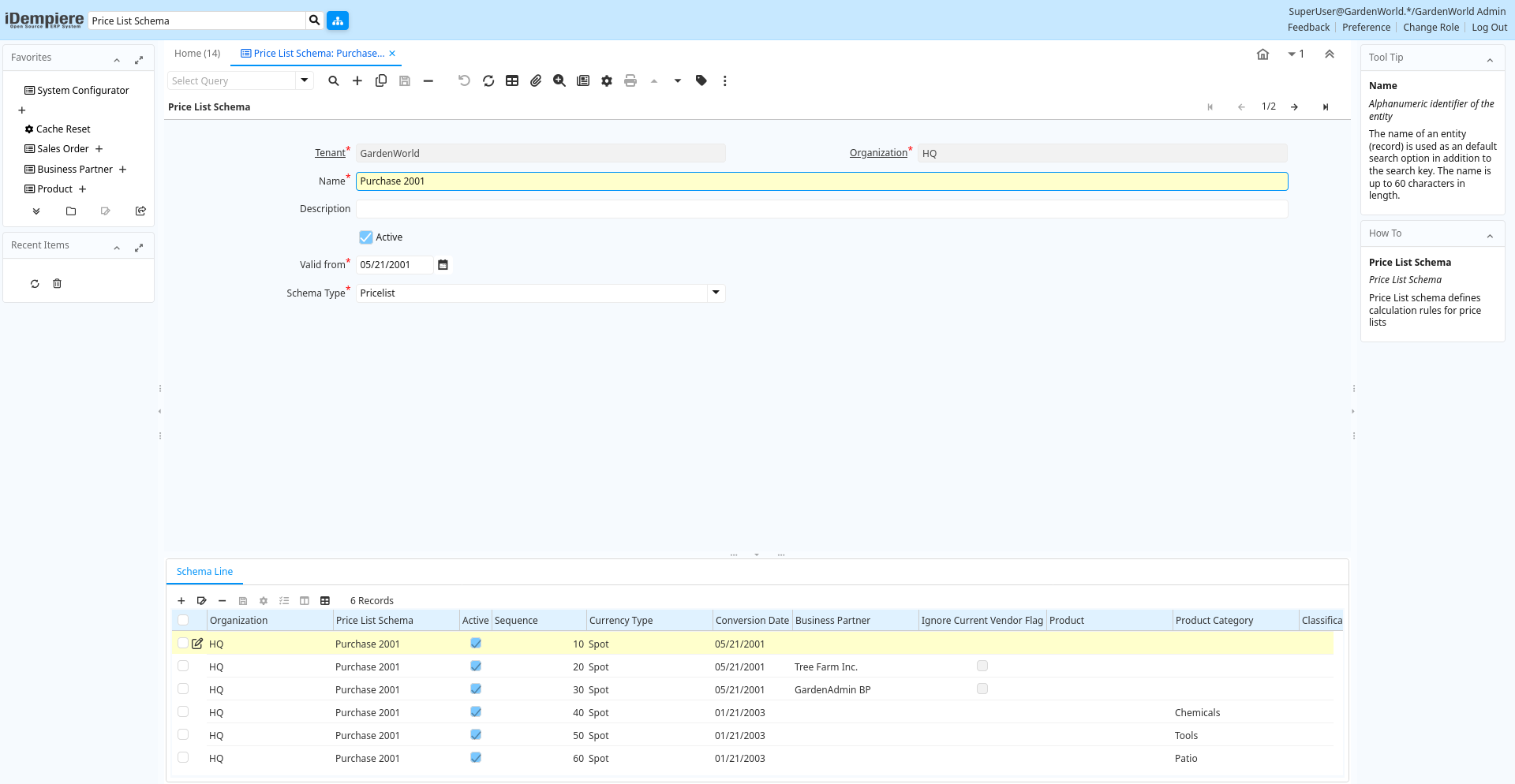
Tab: Price List Schema
[Created: 07/07/2004 - Updated: 30/09/2009 ]
Description: Price List Schema
Help: Price List schema defines calculation rules for price lists
Tab Level: 0
Table 10: Price List Schema - Fields
Table: Report Parameters
| Name | Description | Help | Technical Info |
|---|---|---|---|
| Tenant | Tenant for this installation. | A Tenant is a company or a legal entity. You cannot share data between Tenants. | m_discountschema.AD_Client_ID numeric(10) Table Direct |
| Organization | Organizational entity within tenant | An organization is a unit of your tenant or legal entity - examples are store, department. You can share data between organizations. | m_discountschema.AD_Org_ID numeric(10) Table Direct |
| Name | Alphanumeric identifier of the entity | The name of an entity (record) is used as an default search option in addition to the search key. The name is up to 60 characters in length. | m_discountschema.Name character varying(60) String |
| Description | Optional short description of the record | A description is limited to 255 characters. | m_discountschema.Description character varying(255) String |
| Active | The record is active in the system | There are two methods of making records unavailable in the system: One is to delete the record, the other is to de-activate the record. A de-activated record is not available for selection, but available for reports.There are two reasons for de-activating and not deleting records:(1) The system requires the record for audit purposes.(2) The record is referenced by other records. E.g., you cannot delete a Business Partner, if there are invoices for this partner record existing. You de-activate the Business Partner and prevent that this record is used for future entries. | m_discountschema.IsActive character(1) Yes-No |
| Valid from | Valid from including this date (first day) | The Valid From date indicates the first day of a date range | m_discountschema.ValidFrom timestamp without time zone Date |
| Schema Type | Type of trade schema calculation | Type of procedure used to calculate the trade schema percentage | m_discountschema.DiscountType character(1) List |
| Renumber | Renumber Discount entries | m_discountschema.Processing character(1) Button |
Tab: Schema Line
[Created: 28/12/2001 - Updated: 02/01/2000 ]
Description: Trade Discount Price List Lines
Help: Pricelists are created based on Product Purchase and Category Discounts.The parameters listed here allow to copy and calculate pricelists.The calculation:Copy and convert price from referenced price listresult plus Surcharge Amountresult minus Discountif resulting price is less than the original limit price plus min Margin, use this price (only if Margin is not zero)if resulting price is more than the original limit price plus max Margin, use this price (only if Margin us not zero)Round resulting priceThe Formula isNewPrice = (Convert(BasePrice) + Surcharge) * (100-Discount) / 100;if MinMargin 0 then NewPrice = Max (NewPrice, Convert(OrigLimitPrice) + MinMargin);if MaxMargin 0 then NewPrice = Min (NewPrice, Convert(OrigLimitPrice) + MaxMargin); Example: (assuming same currency)Original Prices: List=300, Standard=250, Limit=200;New List Price: Base=List, Surcharge=0, Discount=0, Round
Tab Level: 1
Table 20: Schema Line - Fields
Table: Report Parameters
| Name | Description | Help | Technical Info |
|---|---|---|---|
| Tenant | Tenant for this installation. | A Tenant is a company or a legal entity. You cannot share data between Tenants. | m_discountschemaline.AD_Client_ID numeric(10) Table Direct |
| Organization | Organizational entity within tenant | An organization is a unit of your tenant or legal entity - examples are store, department. You can share data between organizations. | m_discountschemaline.AD_Org_ID numeric(10) Table Direct |
| Price List Schema | Schema to calculate price lists | m_discountschemaline.M_DiscountSchema_ID numeric(10) Table | |
| Active | The record is active in the system | There are two methods of making records unavailable in the system: One is to delete the record, the other is to de-activate the record. A de-activated record is not available for selection, but available for reports.There are two reasons for de-activating and not deleting records:(1) The system requires the record for audit purposes.(2) The record is referenced by other records. E.g., you cannot delete a Business Partner, if there are invoices for this partner record existing. You de-activate the Business Partner and prevent that this record is used for future entries. | m_discountschemaline.IsActive character(1) Yes-No |
| Sequence | Method of ordering records; lowest number comes first | The Sequence indicates the order of records | m_discountschemaline.SeqNo numeric(10) Integer |
| Description | Optional short description of the record | A description is limited to 255 characters. | m_discountschemaline.Description character varying(255) String |
| Currency Type | Currency Conversion Rate Type | The Currency Conversion Rate Type lets you define different type of rates, e.g. Spot, Corporate and/or Sell/Buy rates. | m_discountschemaline.C_ConversionType_ID numeric(10) Table Direct |
| Conversion Date | Date for selecting conversion rate | The Conversion Date identifies the date used for currency conversion. The conversion rate chosen must include this date in it's date range | m_discountschemaline.ConversionDate timestamp without time zone Date |
| Business Partner | Identifies a Business Partner | A Business Partner is anyone with whom you transact. This can include Vendor, Customer, Employee or Salesperson | m_discountschemaline.C_BPartner_ID numeric(10) Search |
| Ignore Current Vendor Flag | take all PO prices into account | will use PO price even if it is not marked as current vendor | m_discountschemaline.IsIgnoreIsCurrentVendor character(1) Yes-No |
| Product | Product, Service, Item | Identifies an item which is either purchased or sold in this organization. | m_discountschemaline.M_Product_ID numeric(10) Search |
| Product Category | Category of a Product | Identifies the category which this product belongs to. Product categories are used for pricing and selection. | m_discountschemaline.M_Product_Category_ID numeric(10) Table Direct |
| Classification | Classification for grouping | The Classification can be used to optionally group products. | m_discountschemaline.Classification character varying(12) String |
| Group1 | m_discountschemaline.Group1 character varying(255) String | ||
| Group2 | m_discountschemaline.Group2 character varying(255) String | ||
| Partner Category | Product Category of the Business Partner | The Business Partner Category identifies the category used by the Business Partner for this product. | m_discountschemaline.VendorCategory character varying(30) String |
| List price Base | Price used as the basis for price list calculations | The List Price Base indicates the price to use as the basis for the calculation of a new price list. | m_discountschemaline.List_Base character(1) List |
| List price min Margin | Minimum margin for a product | The List Price Min Margin indicates the minimum margin for a product. The margin is calculated by subtracting the original list price from the newly calculated price. If this field contains 0.00 then it is ignored. | m_discountschemaline.List_MinAmt numeric Amount |
| List price Surcharge Amount | List Price Surcharge Amount | The List Price Surcharge Amount indicates the amount to be added to the price prior to multiplication. | m_discountschemaline.List_AddAmt numeric Amount |
| List price max Margin | Maximum margin for a product | The List Price Max Margin indicates the maximum margin for a product. The margin is calculated by subtracting the original list price from the newly calculated price. If this field contains 0.00 then it is ignored. | m_discountschemaline.List_MaxAmt numeric Amount |
| List price Discount % | Discount from list price as a percentage | The List Price Discount Percentage indicates the percentage discount which will be subtracted from the base price. A negative amount indicates the percentage which will be added to the base price. | m_discountschemaline.List_Discount numeric Number |
| List price Rounding | Rounding rule for final list price | The List Price Rounding indicates how the final list price will be rounded. | m_discountschemaline.List_Rounding character(1) List |
| Fixed List Price | Fixes List Price (not calculated) | m_discountschemaline.List_Fixed numeric Amount | |
| Standard price Base | Base price for calculating new standard price | The Standard Price Base indicates the price to use as the basis for the calculation of a new price standard. | m_discountschemaline.Std_Base character(1) List |
| Standard price min Margin | Minimum margin allowed for a product | The Standard Price Min Margin indicates the minimum margin for a product. The margin is calculated by subtracting the original Standard price from the newly calculated price. If this field contains 0.00 then it is ignored. | m_discountschemaline.Std_MinAmt numeric Amount |
| Standard price Surcharge Amount | Amount added to a price as a surcharge | The Standard Price Surcharge Amount indicates the amount to be added to the price prior to multiplication. | m_discountschemaline.Std_AddAmt numeric Amount |
| Standard max Margin | Maximum margin allowed for a product | The Standard Price Max Margin indicates the maximum margin for a product. The margin is calculated by subtracting the original Standard price from the newly calculated price. If this field contains 0.00 then it is ignored. | m_discountschemaline.Std_MaxAmt numeric Amount |
| Standard price Discount % | Discount percentage to subtract from base price | The Standard Price Discount Percentage indicates the percentage discount which will be subtracted from the base price. A negative amount indicates the percentage which will be added to the base price. | m_discountschemaline.Std_Discount numeric Number |
| Standard price Rounding | Rounding rule for calculated price | The Standard Price Rounding indicates how the final Standard price will be rounded. | m_discountschemaline.Std_Rounding character(1) List |
| Fixed Standard Price | Fixed Standard Price (not calculated) | m_discountschemaline.Std_Fixed numeric Amount | |
| Limit price Base | Base price for calculation of the new price | Identifies the price to be used as the base for calculating a new price list. | m_discountschemaline.Limit_Base character(1) List |
| Limit price min Margin | Minimum difference to original limit price; ignored if zero | Indicates the minimum margin for a product. The margin is calculated by subtracting the original limit price from the newly calculated price. If this field contains 0.00 then it is ignored. | m_discountschemaline.Limit_MinAmt numeric Amount |
| Limit price Surcharge Amount | Amount added to the converted/copied price before multiplying | Indicates the amount to be added to the Limit price prior to multiplication. | m_discountschemaline.Limit_AddAmt numeric Amount |
| Limit price max Margin | Maximum difference to original limit price; ignored if zero | Indicates the maximum margin for a product. The margin is calculated by subtracting the original limit price from the newly calculated price. If this field contains 0.00 then it is ignored. | m_discountschemaline.Limit_MaxAmt numeric Amount |
| Limit price Discount % | Discount in percent to be subtracted from base, if negative it will be added to base price | Indicates the discount in percent to be subtracted from base, if negative it will be added to base price | m_discountschemaline.Limit_Discount numeric Number |
| Limit price Rounding | Rounding of the final result | A drop down list box which indicates the rounding (if any) will apply to the final prices in this price list. | m_discountschemaline.Limit_Rounding character(1) List |
| Fixed Limit Price | Fixed Limit Price (not calculated) | m_discountschemaline.Limit_Fixed numeric Amount |