Window: Role Data Access
[Created: 28/05/2003 - Updated: 02/01/2000 ]
Description: Maintain Data Access Rules
Help: Maintain Data Access Roles of Roles/Responsibilties.Note that access information is cached and requires re-login or reset of cache.
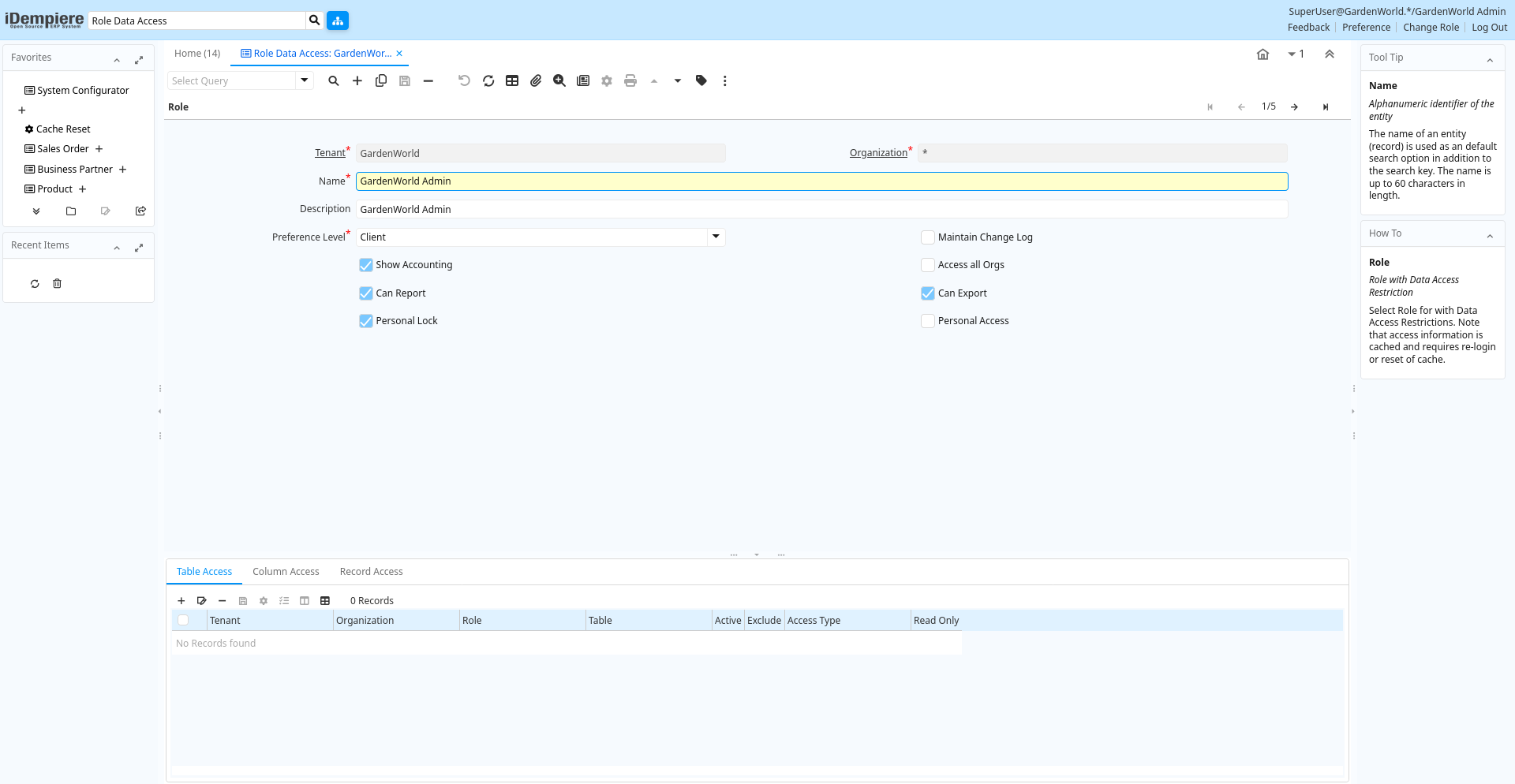
Tab: Role
[Created: 28/05/2003 - Updated: 02/01/2000 ]
Description: Role with Data Access Restriction
Help: Select Role for with Data Access Restrictions.Note that access information is cached and requires re-login or reset of cache.
Tab Level: 0
Table 10: Role - Fields
Table: Report Parameters
| Name | Description | Help | Technical Info |
|---|---|---|---|
| Tenant | Tenant for this installation. | A Tenant is a company or a legal entity. You cannot share data between Tenants. | ad_role.AD_Client_ID numeric(10) Table Direct |
| Organization | Organizational entity within tenant | An organization is a unit of your tenant or legal entity - examples are store, department. You can share data between organizations. | ad_role.AD_Org_ID numeric(10) Table Direct |
| Name | Alphanumeric identifier of the entity | The name of an entity (record) is used as an default search option in addition to the search key. The name is up to 60 characters in length. | ad_role.Name character varying(60) String |
| Description | Optional short description of the record | A description is limited to 255 characters. | ad_role.Description character varying(255) String |
| Preference Level | Determines what preferences the user can set | Preferences allow you to define default values. If set to None, you cannot set any preference nor value preference. Only if set to Tenant, you can see the Record Info Change Log. | ad_role.PreferenceType character(1) List |
| Maintain Change Log | Maintain a log of changes | If selected, a log of all changes is maintained. | ad_role.IsChangeLog character(1) Yes-No |
| Show Accounting | Users with this role can see accounting information | This allows to prevent access to any accounting information. | ad_role.IsShowAcct character(1) Yes-No |
| Access all Orgs | Access all Organizations (no org access control) of the tenant | When selected, the role has access to all organizations of the tenant automatically. This also increases performance where you have many organizations. | ad_role.IsAccessAllOrgs character(1) Yes-No |
| Can Report | Users with this role can create reports | You can restrict the ability to report on data. | ad_role.IsCanReport character(1) Yes-No |
| Can Export | Users with this role can export data | You can restrict the ability to export data from iDempiere. | ad_role.IsCanExport character(1) Yes-No |
| Personal Lock | Allow users with role to lock access to personal records | If enabled, the user with the role can prevent access of others to personal records. If a record is locked, only the user or people who can read personal locked records can see the record. | ad_role.IsPersonalLock character(1) Yes-No |
| Personal Access | Allow access to all personal records | Users of this role have access to all records locked as personal. | ad_role.IsPersonalAccess character(1) Yes-No |
Tab: Table Access
[Created: 28/05/2003 - Updated: 15/01/2024 ]
Description: Maintain Table Access
Help: If listed here, the Role can(not) access all data of this table, even if the role has access to the functionality.If you Include Access to a table and select Read Only, you can only read data (otherwise full access).If you Exclude Access to a table and select Read Only, you can only read data (otherwise no access).Please note that table access rules here are in addition to the Data Access Levels defined for a Table and the User Level defined for a Role. These rules are evaluated first and you only need to define the exceptions to these rules here.Note that access information is cached and requires re-login or reset of cache. Be aware that if you use Include rules, then you need to include also several supporting entities. As an alternative, grant access only to functionality required.
Tab Level: 1
Table 20: Table Access - Fields
Table: Report Parameters
| Name | Description | Help | Technical Info |
|---|---|---|---|
| Tenant | Tenant for this installation. | A Tenant is a company or a legal entity. You cannot share data between Tenants. | ad_table_access.AD_Client_ID numeric(10) Table Direct |
| Organization | Organizational entity within tenant | An organization is a unit of your tenant or legal entity - examples are store, department. You can share data between organizations. | ad_table_access.AD_Org_ID numeric(10) Table Direct |
| Role | Responsibility Role | The Role determines security and access a user who has this Role will have in the System. | ad_table_access.AD_Role_ID numeric(10) Table Direct |
| Table | Database Table information | The Database Table provides the information of the table definition | ad_table_access.AD_Table_ID numeric(10) Table Direct |
| Active | The record is active in the system | There are two methods of making records unavailable in the system: One is to delete the record, the other is to de-activate the record. A de-activated record is not available for selection, but available for reports.There are two reasons for de-activating and not deleting records:(1) The system requires the record for audit purposes.(2) The record is referenced by other records. E.g., you cannot delete a Business Partner, if there are invoices for this partner record existing. You de-activate the Business Partner and prevent that this record is used for future entries. | ad_table_access.IsActive character(1) Yes-No |
| Exclude | Exclude access to the data - if not selected Include access to the data | If selected (excluded), the role cannot access the data specified. If not selected (included), the role can ONLY access the data specified. Exclude items represent a negative list (i.e. you don't have access to the listed items). Include items represent a positive list (i.e. you only have access to the listed items).You would usually not mix Exclude and Include. If you have one include rule in your list, you would only have access to that item anyway. | ad_table_access.IsExclude character(1) Yes-No |
| Access Type | The type of access for this rule | If you restrict Access to the entity, you also cannot Report or Export it (i.e. to have access is a requirement that you can report or export the data). The Report and Export rules are further restrictions if you have access. | ad_table_access.AccessTypeRule character(1) List |
| Read Only | Field is read only | The Read Only indicates that this field may only be Read. It may not be updated. | ad_table_access.IsReadOnly character(1) Yes-No |
Tab: Column Access
[Created: 28/05/2003 - Updated: 02/01/2000 ]
Description: Maintain Column Access
Help: If listed here, the Role can(not) access the column of this table, even if the role has access to the functionality.If you Include Access to a column and select Read Only, you can only read data (otherwise full access).If you Exclude Access to a column and select Read Only, you can only read data (otherwise no access).Note that access information is cached and requires re-login or reset of cache.
Tab Level: 1
Table 30: Column Access - Fields
Table: Report Parameters
| Name | Description | Help | Technical Info |
|---|---|---|---|
| Tenant | Tenant for this installation. | A Tenant is a company or a legal entity. You cannot share data between Tenants. | ad_column_access.AD_Client_ID numeric(10) Table Direct |
| Organization | Organizational entity within tenant | An organization is a unit of your tenant or legal entity - examples are store, department. You can share data between organizations. | ad_column_access.AD_Org_ID numeric(10) Table Direct |
| Role | Responsibility Role | The Role determines security and access a user who has this Role will have in the System. | ad_column_access.AD_Role_ID numeric(10) Table Direct |
| Table | Database Table information | The Database Table provides the information of the table definition | ad_column_access.AD_Table_ID numeric(10) Table Direct |
| Column | Column in the table | Link to the database column of the table | ad_column_access.AD_Column_ID numeric(10) Table Direct |
| Active | The record is active in the system | There are two methods of making records unavailable in the system: One is to delete the record, the other is to de-activate the record. A de-activated record is not available for selection, but available for reports.There are two reasons for de-activating and not deleting records:(1) The system requires the record for audit purposes.(2) The record is referenced by other records. E.g., you cannot delete a Business Partner, if there are invoices for this partner record existing. You de-activate the Business Partner and prevent that this record is used for future entries. | ad_column_access.IsActive character(1) Yes-No |
| Exclude | Exclude access to the data - if not selected Include access to the data | If selected (excluded), the role cannot access the data specified. If not selected (included), the role can ONLY access the data specified. Exclude items represent a negative list (i.e. you don't have access to the listed items). Include items represent a positive list (i.e. you only have access to the listed items).You would usually not mix Exclude and Include. If you have one include rule in your list, you would only have access to that item anyway. | ad_column_access.IsExclude character(1) Yes-No |
| Read Only | Field is read only | The Read Only indicates that this field may only be Read. It may not be updated. | ad_column_access.IsReadOnly character(1) Yes-No |
Tab: Record Access
[Created: 28/05/2003 - Updated: 25/09/2005 ]
Description: Maintain Record Access
Help: You create Record Access records by enabling "Personal Lock" for the administrative role and Ctl-Lock (holding the Ctrl key while clicking on the Lock button).If listed here, the Role can(not) access the data records of this table, even if the role has access to the functionality.If you Include Access to a record and select Read Only, you can only read data (otherwise full access).If you Exclude Access to a recorf and select Read Only, you can only read data (otherwise no access).Note that access information is cached and requires re-login or reset of cache.
Tab Level: 1
Table 40: Record Access - Fields
Table: Report Parameters
| Name | Description | Help | Technical Info |
|---|---|---|---|
| Tenant | Tenant for this installation. | A Tenant is a company or a legal entity. You cannot share data between Tenants. | ad_record_access.AD_Client_ID numeric(10) Table Direct |
| Organization | Organizational entity within tenant | An organization is a unit of your tenant or legal entity - examples are store, department. You can share data between organizations. | ad_record_access.AD_Org_ID numeric(10) Table Direct |
| Role | Responsibility Role | The Role determines security and access a user who has this Role will have in the System. | ad_record_access.AD_Role_ID numeric(10) Table Direct |
| Table | Database Table information | The Database Table provides the information of the table definition | ad_record_access.AD_Table_ID numeric(10) Table Direct |
| Record ID | Direct internal record ID | The Record ID is the internal unique identifier of a record. Please note that zooming to the record may not be successful for Orders, Invoices and Shipment/Receipts as sometimes the Sales Order type is not known. | ad_record_access.Record_ID numeric(10) Record ID |
| Active | The record is active in the system | There are two methods of making records unavailable in the system: One is to delete the record, the other is to de-activate the record. A de-activated record is not available for selection, but available for reports.There are two reasons for de-activating and not deleting records:(1) The system requires the record for audit purposes.(2) The record is referenced by other records. E.g., you cannot delete a Business Partner, if there are invoices for this partner record existing. You de-activate the Business Partner and prevent that this record is used for future entries. | ad_record_access.IsActive character(1) Yes-No |
| Exclude | Exclude access to the data - if not selected Include access to the data | If selected (excluded), the role cannot access the data specified. If not selected (included), the role can ONLY access the data specified. Exclude items represent a negative list (i.e. you don't have access to the listed items). Include items represent a positive list (i.e. you only have access to the listed items).You would usually not mix Exclude and Include. If you have one include rule in your list, you would only have access to that item anyway. | ad_record_access.IsExclude character(1) Yes-No |
| Read Only | Field is read only | The Read Only indicates that this field may only be Read. It may not be updated. | ad_record_access.IsReadOnly character(1) Yes-No |
| Dependent Entities | Also check access in dependent entities | Also dependent entities are included. Please be aware, that enabling this rule has severe consequences and that this is only wanted in some circumstances.Example Rule: "Include Payment Term Immediate with Dependent Entities"Primary effect: users with this role can only select the payment term ImmediateSecondary effect (dependent entities): users with this role can see only invoices/orders with the payment term immediate. | ad_record_access.IsDependentEntities character(1) Yes-No |