Window: Payment and Receipt
[Created: 18/12/2000 - Updated: 08/12/2023 ]
Description: Process Payments and Receipts
Help: The Process Payments Window allows you to enter payments and reaipts for invoices. If the payment is for a single invoice then it can be processed here. If it is for multiple invoices or is a partial payment then it should be processed in the Payment Allocation Window.
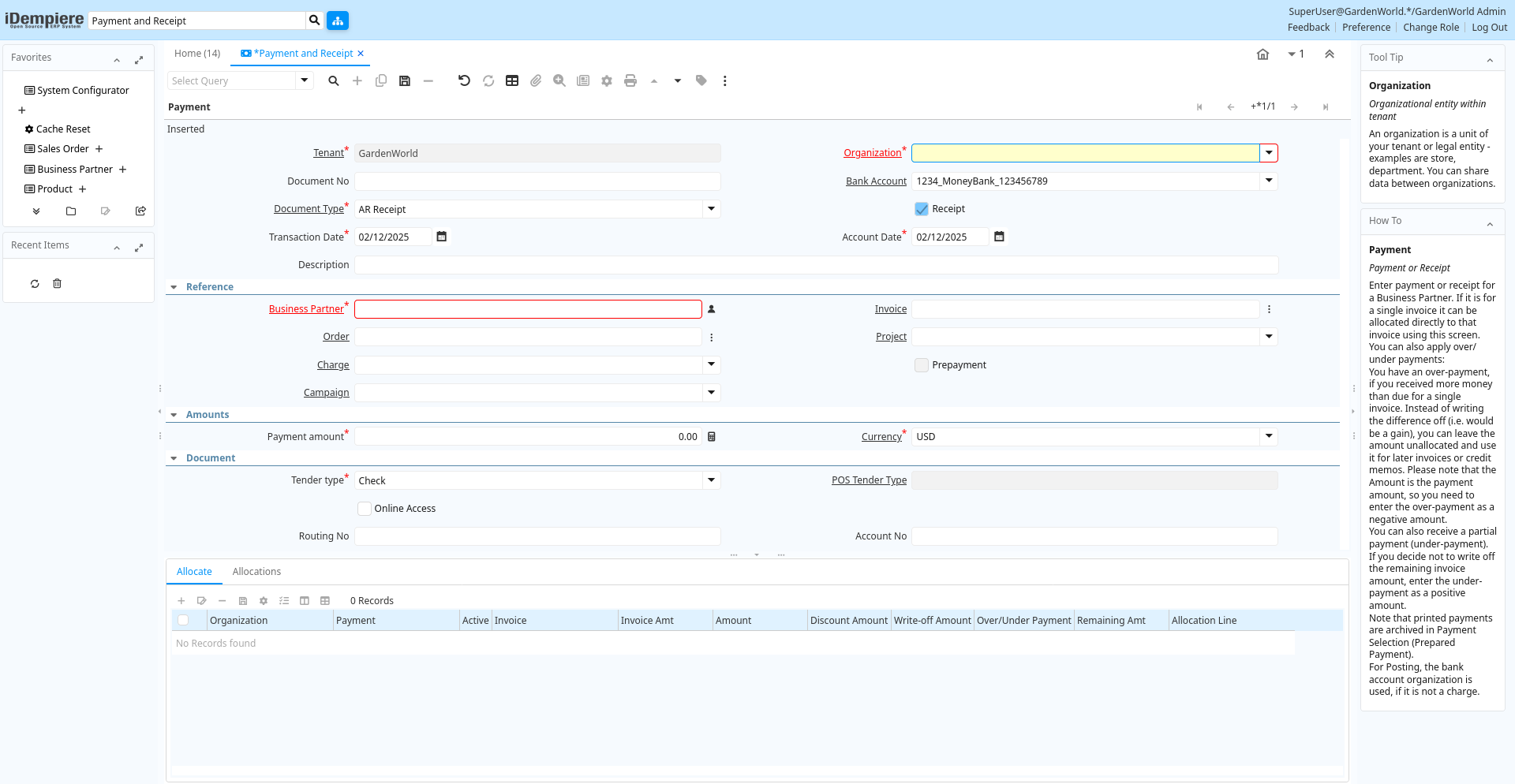
Tab: Payment
[Created: 18/12/2000 - Updated: 30/09/2009 ]
Description: Payment or Receipt
Help: Enter payment or receipt for a Business Partner. If it is for a single invoice it can be allocated directly to that invoice using this screen. You can also apply over/under payments:You have an over-payment, if you received more money than due for a single invoice. Instead of writing the difference off (i.e. would be a gain), you can leave the amount unallocated and use it for later invoices or credit memos. Please note that the Amount is the payment amount, so you need to enter the over-payment as a negative amount.You can also receive a partial payment (under-payment). If you decide not to write off the remaining invoice amount, enter the under-payment as a positive amount.Note that printed payments are archived in Payment Selection (Prepared Payment).For Posting, the bank account organization is used, if it is not a charge.
Tab Level: 0
Table 10: Payment - Fields
Table: Report Parameters
| Name | Description | Help | Technical Info |
|---|---|---|---|
| Tenant | Tenant for this installation. | A Tenant is a company or a legal entity. You cannot share data between Tenants. | c_payment.AD_Client_ID numeric(10) Table Direct |
| Organization | Organizational entity within tenant | An organization is a unit of your tenant or legal entity - examples are store, department. You can share data between organizations. | c_payment.AD_Org_ID numeric(10) Table Direct |
| Document No | Document sequence number of the document | The document number is usually automatically generated by the system and determined by the document type of the document. If the document is not saved, the preliminary number is displayed in "".If the document type of your document has no automatic document sequence defined, the field is empty if you create a new document. This is for documents which usually have an external number (like vendor invoice). If you leave the field empty, the system will generate a document number for you. The document sequence used for this fallback number is defined in the "Maintain Sequence" window with the name "DocumentNo_", where TableName is the actual name of the table (e.g. C_Order). | c_payment.DocumentNo character varying(30) String |
| Bank Account | Account at the Bank | The Bank Account identifies an account at this Bank. | c_payment.C_BankAccount_ID numeric(10) Table Direct |
| Document Type | Document type or rules | The Document Type determines document sequence and processing rules | c_payment.C_DocType_ID numeric(10) Table Direct |
| Receipt | This is a sales transaction (receipt) | c_payment.IsReceipt character(1) Yes-No | |
| Transaction Date | Transaction Date | The Transaction Date indicates the date of the transaction. | c_payment.DateTrx timestamp without time zone Date |
| Account Date | Accounting Date | The Accounting Date indicates the date to be used on the General Ledger account entries generated from this document. It is also used for any currency conversion. | c_payment.DateAcct timestamp without time zone Date |
| Description | Optional short description of the record | A description is limited to 255 characters. | c_payment.Description character varying(255) String |
| Business Partner | Identifies a Business Partner | A Business Partner is anyone with whom you transact. This can include Vendor, Customer, Employee or Salesperson | c_payment.C_BPartner_ID numeric(10) Search |
| Invoice | Invoice Identifier | The Invoice Document. | c_payment.C_Invoice_ID numeric(10) Search |
| Order | Order | The Order is a control document. The Order is complete when the quantity ordered is the same as the quantity shipped and invoiced. When you close an order, unshipped (backordered) quantities are cancelled. | c_payment.C_Order_ID numeric(10) Search |
| Project | Financial Project | A Project allows you to track and control internal or external activities. | c_payment.C_Project_ID numeric(10) Table Direct |
| Charge | Additional document charges | The Charge indicates a type of Charge (Handling, Shipping, Restocking) | c_payment.C_Charge_ID numeric(10) Table Direct |
| Prepayment | The Payment/Receipt is a Prepayment | Payments not allocated to an invoice with a charge are posted to Unallocated Payments. When setting this flag, the payment is posted to the Customer or Vendor Prepayment account. | c_payment.IsPrepayment character(1) Yes-No |
| Activity | Business Activity | Activities indicate tasks that are performed and used to utilize Activity based Costing | c_payment.C_Activity_ID numeric(10) Table Direct |
| Campaign | Marketing Campaign | The Campaign defines a unique marketing program. Projects can be associated with a pre defined Marketing Campaign. You can then report based on a specific Campaign. | c_payment.C_Campaign_ID numeric(10) Table Direct |
| Trx Organization | Performing or initiating organization | The organization which performs or initiates this transaction (for another organization). The owning Organization may not be the transaction organization in a service bureau environment, with centralized services, and inter-organization transactions. | c_payment.AD_OrgTrx_ID numeric(10) Table |
| User Element List 1 | User defined list element #1 | The user defined element displays the optional elements that have been defined for this account combination. | c_payment.User1_ID numeric(10) Search |
| User Element List 2 | User defined list element #2 | The user defined element displays the optional elements that have been defined for this account combination. | c_payment.User2_ID numeric(10) Search |
| Payment amount | Amount being paid | Indicates the amount this payment is for. The payment amount can be for single or multiple invoices or a partial payment for an invoice. | c_payment.PayAmt numeric Amount |
| Currency | The Currency for this record | Indicates the Currency to be used when processing or reporting on this record | c_payment.C_Currency_ID numeric(10) Table Direct |
| Currency Type | Currency Conversion Rate Type | The Currency Conversion Rate Type lets you define different type of rates, e.g. Spot, Corporate and/or Sell/Buy rates. | c_payment.C_ConversionType_ID numeric(10) Table Direct |
| Override Currency Conversion Rate | Override Currency Conversion Rate | c_payment.IsOverrideCurrencyRate character(1) Yes-No | |
| Rate | Currency Conversion Rate | The Currency Conversion Rate indicates the rate to use when converting the source currency to the accounting currency | c_payment.CurrencyRate numeric Number |
| Converted Amount | Converted Amount | The Converted Amount is the result of multiplying the Source Amount by the Conversion Rate for this target currency. | c_payment.ConvertedAmt numeric Amount |
| Discount Amount | Calculated amount of discount | The Discount Amount indicates the discount amount for a document or line. | c_payment.DiscountAmt numeric Amount |
| Write-off Amount | Amount to write-off | The Write Off Amount indicates the amount to be written off as uncollectible. | c_payment.WriteOffAmt numeric Amount |
| Over/Under Payment | Over-Payment (unallocated) or Under-Payment (partial payment) | Overpayments (negative) are unallocated amounts and allow you to receive money for more than the particular invoice. Underpayments (positive) is a partial payment for the invoice. You do not write off the unpaid amount. | c_payment.IsOverUnderPayment character(1) Yes-No |
| Over/Under Payment | Over-Payment (unallocated) or Under-Payment (partial payment) Amount | Overpayments (negative) are unallocated amounts and allow you to receive money for more than the particular invoice. Underpayments (positive) is a partial payment for the invoice. You do not write off the unpaid amount. | c_payment.OverUnderAmt numeric Amount |
| Tender type | Method of Payment | The Tender Type indicates the method of payment (ACH or Direct Deposit, Credit Card, Check, Direct Debit) | c_payment.TenderType character(1) List |
| POS Tender Type | c_payment.C_POSTenderType_ID numeric(10) Table Direct | ||
| Online Access | Can be accessed online | The Online Access check box indicates if the application can be accessed via the web. | c_payment.IsOnline character(1) Yes-No |
| Routing No | Bank Routing Number | The Bank Routing Number (ABA Number) identifies a legal Bank. It is used in routing checks and electronic transactions. | c_payment.RoutingNo character varying(20) String |
| Account No | Account Number | The Account Number indicates the Number assigned to this bank account. | c_payment.AccountNo character varying(20) String |
| IBAN | International Bank Account Number | If your bank provides an International Bank Account Number, enter it hereDetails ISO 13616 and http://www.ecbs.org. The account number has the maximum length of 22 characters (without spaces). The IBAN is often printed with a apace after 4 characters. Do not enter the spaces in iDempiere. | c_payment.IBAN character varying(40) String |
| Swift code | Swift Code or BIC | The Swift Code (Society of Worldwide Interbank Financial Telecommunications) or BIC (Bank Identifier Code) is an identifier of a Bank. The first 4 characters are the bank code, followed by the 2 character country code, the two character location code and optional 3 character branch code. For details see http://www.swift.com/biconline/index.cfm | c_payment.SwiftCode character varying(20) String |
| Check No | Check Number | The Check Number indicates the number on the check. | c_payment.CheckNo character varying(20) String |
| Micr | Combination of routing no, account and check no | The Micr number is the combination of the bank routing number, account number and check number | c_payment.Micr character varying(20) String |
| Credit Card | Credit Card (Visa, MC, AmEx) | The Credit Card drop down list box is used for selecting the type of Credit Card presented for payment. | c_payment.CreditCardType character(1) List |
| Transaction Type | Type of credit card transaction | The Transaction Type indicates the type of transaction to be submitted to the Credit Card Company. | c_payment.TrxType character(1) List |
| Number | Credit Card Number | The Credit Card number indicates the number on the credit card, without blanks or spaces. | c_payment.CreditCardNumber character varying(20) String |
| Verification Code | Credit Card Verification code on credit card | The Credit Card Verification indicates the verification code on the credit card (AMEX 4 digits on front; MC,Visa 3 digits back) | c_payment.CreditCardVV character varying(4) String |
| Exp. Month | Expiry Month | The Expiry Month indicates the expiry month for this credit card. | c_payment.CreditCardExpMM numeric(10) Integer |
| Exp. Year | Expiry Year | The Expiry Year indicates the expiry year for this credit card. | c_payment.CreditCardExpYY numeric(10) Integer |
| Account Name | Name on Credit Card or Account holder | The Name of the Credit Card or Account holder. | c_payment.A_Name character varying(60) String |
| Account Street | Street address of the Credit Card or Account holder | The Street Address of the Credit Card or Account holder. | c_payment.A_Street character varying(60) String |
| Account City | City or the Credit Card or Account Holder | The Account City indicates the City of the Credit Card or Account holder | c_payment.A_City character varying(60) String |
| Account Zip/Postal | Zip Code of the Credit Card or Account Holder | The Zip Code of the Credit Card or Account Holder. | c_payment.A_Zip character varying(20) String |
| Account State | State of the Credit Card or Account holder | The State of the Credit Card or Account holder | c_payment.A_State character varying(40) String |
| Account Country | Country | Account Country Name | c_payment.A_Country character varying(40) String |
| Driver License | Payment Identification - Driver License | The Driver's License being used as identification. | c_payment.A_Ident_DL character varying(20) String |
| Social Security No | Payment Identification - Social Security No | The Social Security number being used as identification. | c_payment.A_Ident_SSN character varying(20) String |
| Account EMail | Email Address | The EMail Address indicates the EMail address off the Credit Card or Account holder. | c_payment.A_EMail character varying(60) String |
| Tax Amount | Tax Amount for Credit Card transaction | The Tax Amount displays the total tax amount. The tax amount is only used for credit card processing. | c_payment.TaxAmt numeric Amount |
| PO Number | Purchase Order Number | The PO Number indicates the number assigned to a purchase order | c_payment.PONum character varying(60) String |
| Voice authorization code | Voice Authorization Code from credit card company | The Voice Authorization Code indicates the code received from the Credit Card Company. | c_payment.VoiceAuthCode character varying(20) String |
| Original Transaction ID | Original Transaction ID | The Original Transaction ID is used for reversing transactions and indicates the transaction that has been reversed. | c_payment.Orig_TrxID character varying(20) String |
| Online Process | c_payment.OProcessing character(1) Button | ||
| Approved | Indicates if this document requires approval | The Approved checkbox indicates if this document requires approval before it can be processed. | c_payment.IsApproved character(1) Yes-No |
| Result | Result of transmission | The Response Result indicates the result of the transmission to the Credit Card Company. | c_payment.R_Result character varying(20) String |
| Response Message | Response message | The Response Message indicates the message returned from the Credit Card Company as the result of a transmission | c_payment.R_RespMsg character varying(60) String |
| Voided | c_payment.IsVoided character(1) Yes-No | ||
| Void Message | c_payment.R_VoidMsg character varying(255) Text | ||
| Reference | Payment reference | The Payment Reference indicates the reference returned from the Credit Card Company for a payment | c_payment.R_PnRef character varying(20) String |
| Authorization Code | Authorization Code returned | The Authorization Code indicates the code returned from the electronic transmission. | c_payment.R_AuthCode character varying(20) String |
| Zip verified | The Zip Code has been verified | The Zip Verified indicates if the zip code has been verified by the Credit Card Company. | c_payment.R_AvsZip character(1) List |
| Address verified | This address has been verified | The Address Verified indicates if the address has been verified by the Credit Card Company. | c_payment.R_AvsAddr character(1) List |
| Payment Processor | Payment processor for electronic payments | The Payment Processor indicates the processor to be used for electronic payments | c_payment.C_PaymentProcessor_ID numeric(10) Table Direct |
| Customer Payment Profile ID | c_payment.CustomerPaymentProfileID character varying(60) String | ||
| Customer Profile ID | c_payment.CustomerProfileID character varying(60) String | ||
| Customer Address ID | c_payment.CustomerAddressID character varying(60) String | ||
| Document Status | The current status of the document | The Document Status indicates the status of a document at this time. If you want to change the document status, use the Document Action field | c_payment.DocStatus character(2) List |
| Process Payment | c_payment.DocAction character(2) Button | ||
| Self-Service | This is a Self-Service entry or this entry can be changed via Self-Service | Self-Service allows users to enter data or update their data. The flag indicates, that this record was entered or created via Self-Service or that the user can change it via the Self-Service functionality. | c_payment.IsSelfService character(1) Yes-No |
| Posted | Posting status | The Posted field indicates the status of the Generation of General Ledger Accounting Lines | c_payment.Posted character(1) Button |
| Allocated | Indicates if the payment has been allocated | The Allocated checkbox indicates if a payment has been allocated or associated with an invoice or invoices. | c_payment.IsAllocated character(1) Yes-No |
| Reconciled | Payment is reconciled with bank statement | c_payment.IsReconciled character(1) Yes-No |
Tab: Allocate
[Created: 03/09/2005 - Updated: 07/01/2006 ]
Description: Allocate Payments to Invoices
Help: You can directly allocate payments to invoices with the same currency when creating the Payment. Note that you can over- or under-allocate the payment.When processing the payment, the allocation is created.The Organization is set to the invoice organization
Tab Level: 1
Table 15: Allocate - Fields
Table: Report Parameters
| Name | Description | Help | Technical Info |
|---|---|---|---|
| Tenant | Tenant for this installation. | A Tenant is a company or a legal entity. You cannot share data between Tenants. | c_paymentallocate.AD_Client_ID numeric(10) Table Direct |
| Organization | Organizational entity within tenant | An organization is a unit of your tenant or legal entity - examples are store, department. You can share data between organizations. | c_paymentallocate.AD_Org_ID numeric(10) Table Direct |
| Payment | Payment identifier | The Payment is a unique identifier of this payment. | c_paymentallocate.C_Payment_ID numeric(10) Search |
| Active | The record is active in the system | There are two methods of making records unavailable in the system: One is to delete the record, the other is to de-activate the record. A de-activated record is not available for selection, but available for reports.There are two reasons for de-activating and not deleting records:(1) The system requires the record for audit purposes.(2) The record is referenced by other records. E.g., you cannot delete a Business Partner, if there are invoices for this partner record existing. You de-activate the Business Partner and prevent that this record is used for future entries. | c_paymentallocate.IsActive character(1) Yes-No |
| Invoice | Invoice Identifier | The Invoice Document. | c_paymentallocate.C_Invoice_ID numeric(10) Search |
| Invoice Amt | c_paymentallocate.InvoiceAmt numeric Amount | ||
| Amount | Amount in a defined currency | The Amount indicates the amount for this document line. | c_paymentallocate.Amount numeric Amount |
| Discount Amount | Calculated amount of discount | The Discount Amount indicates the discount amount for a document or line. | c_paymentallocate.DiscountAmt numeric Amount |
| Write-off Amount | Amount to write-off | The Write Off Amount indicates the amount to be written off as uncollectible. | c_paymentallocate.WriteOffAmt numeric Amount |
| Over/Under Payment | Over-Payment (unallocated) or Under-Payment (partial payment) Amount | Overpayments (negative) are unallocated amounts and allow you to receive money for more than the particular invoice. Underpayments (positive) is a partial payment for the invoice. You do not write off the unpaid amount. | c_paymentallocate.OverUnderAmt numeric Amount |
| Allocation Line | Allocation Line | Allocation of Cash/Payment to Invoice | c_paymentallocate.C_AllocationLine_ID numeric(10) Table Direct |
Tab: Allocations
[Created: 27/01/2005 - Updated: 03/09/2005 ]
Description: Display Allocation of the Payment/Receipt to Invoices
Help:
Tab Level: 1
Table 20: Allocations - Fields
Table: Report Parameters
| Name | Description | Help | Technical Info |
|---|---|---|---|
| Tenant | Tenant for this installation. | A Tenant is a company or a legal entity. You cannot share data between Tenants. | c_allocationline.AD_Client_ID numeric(10) Table Direct |
| Organization | Organizational entity within tenant | An organization is a unit of your tenant or legal entity - examples are store, department. You can share data between organizations. | c_allocationline.AD_Org_ID numeric(10) Table Direct |
| Payment | Payment identifier | The Payment is a unique identifier of this payment. | c_allocationline.C_Payment_ID numeric(10) Search |
| Allocation | Payment allocation | c_allocationline.C_AllocationHdr_ID numeric(10) Search | |
| Transaction Date | Transaction Date | The Transaction Date indicates the date of the transaction. | c_allocationline.DateTrx timestamp without time zone Date |
| Invoice | Invoice Identifier | The Invoice Document. | c_allocationline.C_Invoice_ID numeric(10) Search |
| Order | Order | The Order is a control document. The Order is complete when the quantity ordered is the same as the quantity shipped and invoiced. When you close an order, unshipped (backordered) quantities are cancelled. | c_allocationline.C_Order_ID numeric(10) Search |
| Amount | Amount in a defined currency | The Amount indicates the amount for this document line. | c_allocationline.Amount numeric Amount |
| Discount Amount | Calculated amount of discount | The Discount Amount indicates the discount amount for a document or line. | c_allocationline.DiscountAmt numeric Amount |
| Write-off Amount | Amount to write-off | The Write Off Amount indicates the amount to be written off as uncollectible. | c_allocationline.WriteOffAmt numeric Amount |
| Over/Under Payment | Over-Payment (unallocated) or Under-Payment (partial payment) Amount | Overpayments (negative) are unallocated amounts and allow you to receive money for more than the particular invoice. Underpayments (positive) is a partial payment for the invoice. You do not write off the unpaid amount. | c_allocationline.OverUnderAmt numeric Amount |