Window: Payment Term
[Created: 09/08/1999 - Updated: 02/01/2000 ]
Description: Maintain Payment Terms
Help: The Payment Terms Window defines the different payment terms that you offer your customers and that are offered to you by your vendors. Each invoice must contain a Payment Term. On the standard invoice, the Name and the Document Note of the Payment Term is printed.
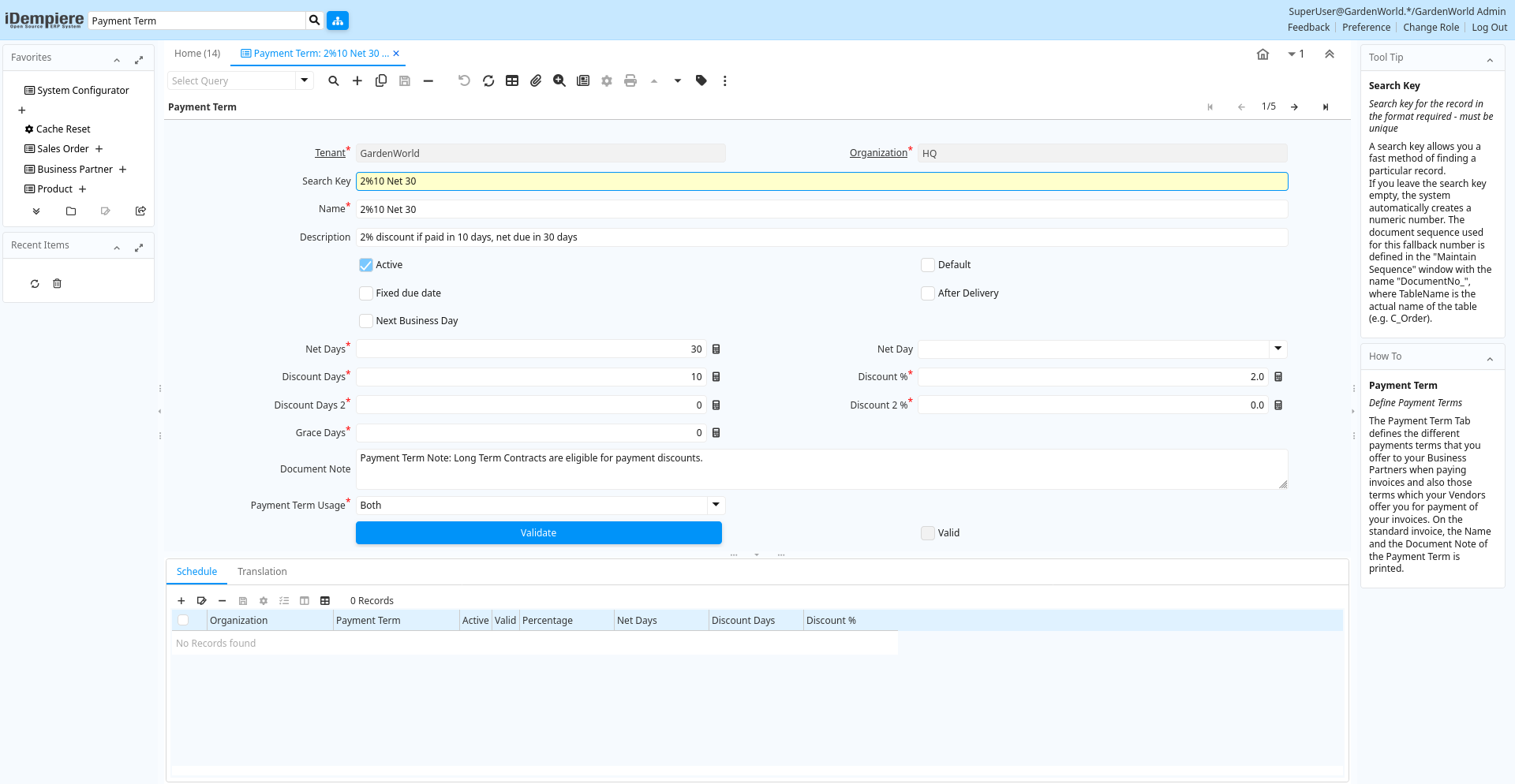
Tab: Payment Term
[Created: 09/08/1999 - Updated: 02/01/2000 ]
Description: Define Payment Terms
Help: The Payment Term Tab defines the different payments terms that you offer to your Business Partners when paying invoices and also those terms which your Vendors offer you for payment of your invoices. On the standard invoice, the Name and the Document Note of the Payment Term is printed.
Tab Level: 0
Table 10: Payment Term - Fields
Table: Report Parameters
| Name | Description | Help | Technical Info |
|---|---|---|---|
| Tenant | Tenant for this installation. | A Tenant is a company or a legal entity. You cannot share data between Tenants. | c_paymentterm.AD_Client_ID numeric(10) Table Direct |
| Organization | Organizational entity within tenant | An organization is a unit of your tenant or legal entity - examples are store, department. You can share data between organizations. | c_paymentterm.AD_Org_ID numeric(10) Table Direct |
| Search Key | Search key for the record in the format required - must be unique | A search key allows you a fast method of finding a particular record.If you leave the search key empty, the system automatically creates a numeric number. The document sequence used for this fallback number is defined in the "Maintain Sequence" window with the name "DocumentNo_", where TableName is the actual name of the table (e.g. C_Order). | c_paymentterm.Value character varying(40) String |
| Name | Alphanumeric identifier of the entity | The name of an entity (record) is used as an default search option in addition to the search key. The name is up to 60 characters in length. | c_paymentterm.Name character varying(60) String |
| Description | Optional short description of the record | A description is limited to 255 characters. | c_paymentterm.Description character varying(255) String |
| Active | The record is active in the system | There are two methods of making records unavailable in the system: One is to delete the record, the other is to de-activate the record. A de-activated record is not available for selection, but available for reports.There are two reasons for de-activating and not deleting records:(1) The system requires the record for audit purposes.(2) The record is referenced by other records. E.g., you cannot delete a Business Partner, if there are invoices for this partner record existing. You de-activate the Business Partner and prevent that this record is used for future entries. | c_paymentterm.IsActive character(1) Yes-No |
| Default | Default value | The Default Checkbox indicates if this record will be used as a default value. | c_paymentterm.IsDefault character(1) Yes-No |
| Fixed due date | Payment is due on a fixed date | The Fixed Due Date checkbox indicates if invoices using this payment tern will be due on a fixed day of the month. | c_paymentterm.IsDueFixed character(1) Yes-No |
| After Delivery | Due after delivery rather than after invoicing | The After Delivery checkbox indicates that payment is due after delivery as opposed to after invoicing. | c_paymentterm.AfterDelivery character(1) Yes-No |
| Next Business Day | Payment due on the next business day | The Next Business Day checkbox indicates that payment is due on the next business day after invoice or delivery. | c_paymentterm.IsNextBusinessDay character(1) Yes-No |
| Fix month day | Day of the month of the due date | The Fix Month Day indicates the day of the month that invoices are due. This field only displays if the fixed due date checkbox is selected. | c_paymentterm.FixMonthDay numeric(10) Integer |
| Fix month cutoff | Last day to include for next due date | The Fix Month Cutoff indicates the last day invoices can have to be included in the current due date. This field only displays when the fixed due date checkbox has been selected. | c_paymentterm.FixMonthCutoff numeric(10) Integer |
| Fix month offset | Number of months (0=same, 1=following) | The Fixed Month Offset indicates the number of months from the current month to indicate an invoice is due. A 0 indicates the same month, a 1 the following month. This field will only display if the fixed due date checkbox is selected. | c_paymentterm.FixMonthOffset numeric(10) Integer |
| Net Days | Net Days in which payment is due | Indicates the number of days after invoice date that payment is due. | c_paymentterm.NetDays numeric(10) Integer |
| Net Day | Day when payment is due net | When defined, overwrites the number of net days with the relative number of days to the the day defined. | c_paymentterm.NetDay character(1) List |
| Discount Days | Number of days from invoice date to be eligible for discount | The Discount Days indicates the number of days that payment must be received in to be eligible for the stated discount. | c_paymentterm.DiscountDays numeric(10) Integer |
| Discount % | Discount in percent | The Discount indicates the discount applied or taken as a percentage. | c_paymentterm.Discount numeric Number |
| Discount Days 2 | Number of days from invoice date to be eligible for discount | The Discount Days indicates the number of days that payment must be received in to be eligible for the stated discount. | c_paymentterm.DiscountDays2 numeric(10) Integer |
| Discount 2 % | Discount in percent | The Discount indicates the discount applied or taken as a percentage. | c_paymentterm.Discount2 numeric Number |
| Grace Days | Days after due date to send first dunning letter | The Grace Days indicates the number of days after the due date to send the first dunning letter. This field displays only if the send dunning letters checkbox has been selected. | c_paymentterm.GraceDays numeric(10) Integer |
| Document Note | Additional information for a Document | The Document Note is used for recording any additional information regarding this product. | c_paymentterm.DocumentNote character varying(2000) Text |
| Payment Term Usage | Payment term usage indicates if this payment term is used for sales, purchases or both. | c_paymentterm.PaymentTermUsage character(1) List | |
| Validate | Validate Payment Terms and Schedule | c_paymentterm.Processing character(1) Button | |
| Valid | Element is valid | The element passed the validation check | c_paymentterm.IsValid character(1) Yes-No |
Tab: Schedule
[Created: 04/06/2003 - Updated: 16/11/2012 ]
Description: Payment Schedule
Help:
Tab Level: 1
Table 20: Schedule - Fields
Table: Report Parameters
| Name | Description | Help | Technical Info |
|---|---|---|---|
| Tenant | Tenant for this installation. | A Tenant is a company or a legal entity. You cannot share data between Tenants. | c_payschedule.AD_Client_ID numeric(10) Table Direct |
| Organization | Organizational entity within tenant | An organization is a unit of your tenant or legal entity - examples are store, department. You can share data between organizations. | c_payschedule.AD_Org_ID numeric(10) Table Direct |
| Payment Term | The terms of Payment (timing, discount) | Payment Terms identify the method and timing of payment. | c_payschedule.C_PaymentTerm_ID numeric(10) Table Direct |
| Active | The record is active in the system | There are two methods of making records unavailable in the system: One is to delete the record, the other is to de-activate the record. A de-activated record is not available for selection, but available for reports.There are two reasons for de-activating and not deleting records:(1) The system requires the record for audit purposes.(2) The record is referenced by other records. E.g., you cannot delete a Business Partner, if there are invoices for this partner record existing. You de-activate the Business Partner and prevent that this record is used for future entries. | c_payschedule.IsActive character(1) Yes-No |
| Valid | Element is valid | The element passed the validation check | c_payschedule.IsValid character(1) Yes-No |
| Percentage | Percent of the entire amount | Percentage of an amount (up to 100) | c_payschedule.Percentage numeric Number |
| Net Days | Net Days in which payment is due | Indicates the number of days after invoice date that payment is due. | c_payschedule.NetDays numeric(10) Integer |
| Discount Days | Number of days from invoice date to be eligible for discount | The Discount Days indicates the number of days that payment must be received in to be eligible for the stated discount. | c_payschedule.DiscountDays numeric(10) Integer |
| Discount % | Discount in percent | The Discount indicates the discount applied or taken as a percentage. | c_payschedule.Discount numeric Number |
Tab: Translation
[Created: 04/12/1999 - Updated: 27/10/2024 ]
Description:
Help:
Tab Level: 1
Table 30: Translation - Fields
Table: Report Parameters
| Name | Description | Help | Technical Info |
|---|---|---|---|
| Tenant | Tenant for this installation. | A Tenant is a company or a legal entity. You cannot share data between Tenants. | c_paymentterm_trl.AD_Client_ID numeric(10) Table Direct |
| Organization | Organizational entity within tenant | An organization is a unit of your tenant or legal entity - examples are store, department. You can share data between organizations. | c_paymentterm_trl.AD_Org_ID numeric(10) Table Direct |
| Payment Term | The terms of Payment (timing, discount) | Payment Terms identify the method and timing of payment. | c_paymentterm_trl.C_PaymentTerm_ID numeric(10) Table Direct |
| Language | Language for this entity | The Language identifies the language to use for display and formatting | c_paymentterm_trl.AD_Language character varying(6) Table |
| Name | Alphanumeric identifier of the entity | The name of an entity (record) is used as an default search option in addition to the search key. The name is up to 60 characters in length. | c_paymentterm_trl.Name character varying(60) String |
| Description | Optional short description of the record | A description is limited to 255 characters. | c_paymentterm_trl.Description character varying(255) String |
| Document Note | Additional information for a Document | The Document Note is used for recording any additional information regarding this product. | c_paymentterm_trl.DocumentNote character varying(2000) Text |
| Active | The record is active in the system | There are two methods of making records unavailable in the system: One is to delete the record, the other is to de-activate the record. A de-activated record is not available for selection, but available for reports.There are two reasons for de-activating and not deleting records:(1) The system requires the record for audit purposes.(2) The record is referenced by other records. E.g., you cannot delete a Business Partner, if there are invoices for this partner record existing. You de-activate the Business Partner and prevent that this record is used for future entries. | c_paymentterm_trl.IsActive character(1) Yes-No |
| Translated | This column is translated | The Translated checkbox indicates if this column is translated. | c_paymentterm_trl.IsTranslated character(1) Yes-No |