Window: Recurring
[Created: 28/05/2003 - Updated: 02/01/2000 ]
Description: Recurring Document
Help: Create new documents based on existing one
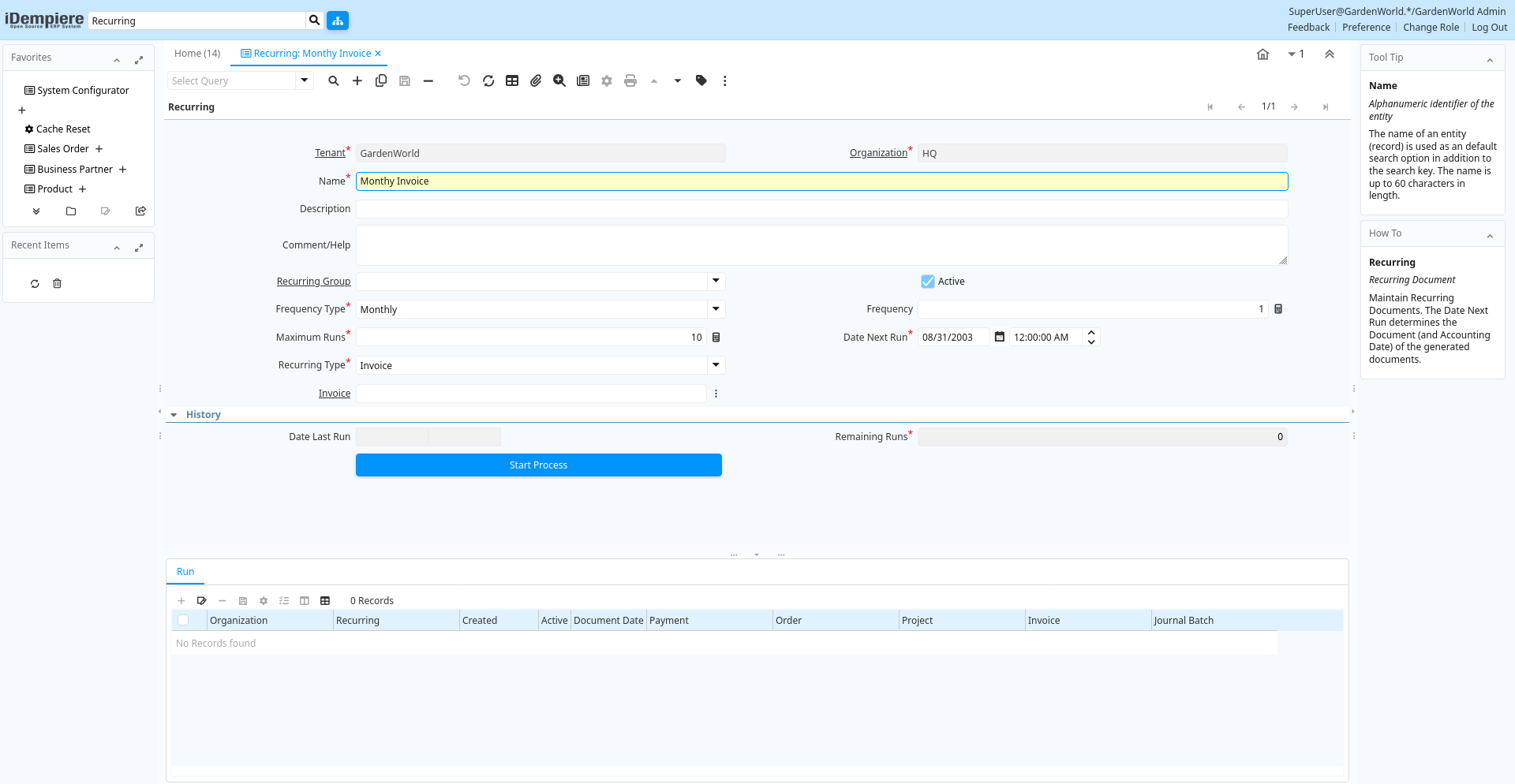
Tab: Recurring
[Created: 28/05/2003 - Updated: 02/01/2000 ]
Description: Recurring Document
Help: Maintain Recurring Documents. The Date Next Run determines the Document (and Accounting Date) of the generated documents.
Tab Level: 0
Table 10: Recurring - Fields
Table: Report Parameters
| Name | Description | Help | Technical Info |
|---|---|---|---|
| Tenant | Tenant for this installation. | A Tenant is a company or a legal entity. You cannot share data between Tenants. | c_recurring.AD_Client_ID numeric(10) Table Direct |
| Organization | Organizational entity within tenant | An organization is a unit of your tenant or legal entity - examples are store, department. You can share data between organizations. | c_recurring.AD_Org_ID numeric(10) Table Direct |
| Name | Alphanumeric identifier of the entity | The name of an entity (record) is used as an default search option in addition to the search key. The name is up to 60 characters in length. | c_recurring.Name character varying(60) String |
| Description | Optional short description of the record | A description is limited to 255 characters. | c_recurring.Description character varying(255) String |
| Comment/Help | Comment or Hint | The Help field contains a hint, comment or help about the use of this item. | c_recurring.Help character varying(2000) Text |
| Recurring Group | c_recurring.C_RecurringGroup_ID numeric(10) Table Direct | ||
| Active | The record is active in the system | There are two methods of making records unavailable in the system: One is to delete the record, the other is to de-activate the record. A de-activated record is not available for selection, but available for reports.There are two reasons for de-activating and not deleting records:(1) The system requires the record for audit purposes.(2) The record is referenced by other records. E.g., you cannot delete a Business Partner, if there are invoices for this partner record existing. You de-activate the Business Partner and prevent that this record is used for future entries. | c_recurring.IsActive character(1) Yes-No |
| Frequency Type | Frequency of event | The frequency type is used for calculating the date of the next event. | c_recurring.FrequencyType character(1) List |
| Frequency | Frequency of events | The frequency is used in conjunction with the frequency type in determining an event. Example: If the Frequency Type is Week and the Frequency is 2 - it is every two weeks. | c_recurring.Frequency numeric(10) Integer |
| Maximum Runs | Number of recurring runs | Number of recurring documents to be generated in total | c_recurring.RunsMax numeric(10) Integer |
| Date Next Run | Date the process will run next | The Date Next Run indicates the next time this process will run. | c_recurring.DateNextRun timestamp without time zone Date+Time |
| Recurring Type | Type of Recurring Document | The type of document to be generated | c_recurring.RecurringType character(1) List |
| Order | Order | The Order is a control document. The Order is complete when the quantity ordered is the same as the quantity shipped and invoiced. When you close an order, unshipped (backordered) quantities are cancelled. | c_recurring.C_Order_ID numeric(10) Search |
| Journal Batch | General Ledger Journal Batch | The General Ledger Journal Batch identifies a group of journals to be processed as a group. | c_recurring.GL_JournalBatch_ID numeric(10) Search |
| Invoice | Invoice Identifier | The Invoice Document. | c_recurring.C_Invoice_ID numeric(10) Search |
| Project | Financial Project | A Project allows you to track and control internal or external activities. | c_recurring.C_Project_ID numeric(10) Search |
| Payment | Payment identifier | The Payment is a unique identifier of this payment. | c_recurring.C_Payment_ID numeric(10) Search |
| Date Last Run | Date the process was last run. | The Date Last Run indicates the last time that a process was run. | c_recurring.DateLastRun timestamp without time zone Date+Time |
| Remaining Runs | Number of recurring runs remaining | Number of recurring documents to be still generated | c_recurring.RunsRemaining numeric(10) Integer |
| Start Process | Start Recurring Run | c_recurring.Processing character(1) Button |
Tab: Run
[Created: 28/05/2003 - Updated: 02/01/2000 ]
Description: Recurring Document Run
Help: History of Recurring Document Generation
Tab Level: 1
Table 20: Run - Fields
Table: Report Parameters
| Name | Description | Help | Technical Info |
|---|---|---|---|
| Tenant | Tenant for this installation. | A Tenant is a company or a legal entity. You cannot share data between Tenants. | c_recurring_run.AD_Client_ID numeric(10) Table Direct |
| Organization | Organizational entity within tenant | An organization is a unit of your tenant or legal entity - examples are store, department. You can share data between organizations. | c_recurring_run.AD_Org_ID numeric(10) Table Direct |
| Recurring | Recurring Document | Recurring Documents | c_recurring_run.C_Recurring_ID numeric(10) Table Direct |
| Created | Date this record was created | The Created field indicates the date that this record was created. | c_recurring_run.Created timestamp without time zone Date+Time |
| Active | The record is active in the system | There are two methods of making records unavailable in the system: One is to delete the record, the other is to de-activate the record. A de-activated record is not available for selection, but available for reports.There are two reasons for de-activating and not deleting records:(1) The system requires the record for audit purposes.(2) The record is referenced by other records. E.g., you cannot delete a Business Partner, if there are invoices for this partner record existing. You de-activate the Business Partner and prevent that this record is used for future entries. | c_recurring_run.IsActive character(1) Yes-No |
| Document Date | Date of the Document | The Document Date indicates the date the document was generated. It may or may not be the same as the accounting date. | c_recurring_run.DateDoc timestamp without time zone Date |
| Payment | Payment identifier | The Payment is a unique identifier of this payment. | c_recurring_run.C_Payment_ID numeric(10) Search |
| Order | Order | The Order is a control document. The Order is complete when the quantity ordered is the same as the quantity shipped and invoiced. When you close an order, unshipped (backordered) quantities are cancelled. | c_recurring_run.C_Order_ID numeric(10) Search |
| Project | Financial Project | A Project allows you to track and control internal or external activities. | c_recurring_run.C_Project_ID numeric(10) Search |
| Invoice | Invoice Identifier | The Invoice Document. | c_recurring_run.C_Invoice_ID numeric(10) Search |
| Journal Batch | General Ledger Journal Batch | The General Ledger Journal Batch identifies a group of journals to be processed as a group. | c_recurring_run.GL_JournalBatch_ID numeric(10) Search |